
其他
完整应用

deepseek-harness
deepseek-ai
DeepSeek Harness: Everything is a Plugin.
PROJECT TOPICS
INSTALL REFERENCE
dsh plugin --profile web add github:fhidalgodev/dsh-odoo-sdd
该命令指向仓库当前默认分支;尚无绑定当前 commit 的完整验证结果。
PROJECT README


🇬🇧 English • 🇪🇸 Español • 🇨🇳 简体中文
Author: Franyer Hidalgo — fhidalgo.dev@gmail.com
|
⭐ If this plugin saves you time, a star helps a lot — it is the signal that keeps the pipeline maintained.
🐛 Found a bug or want a feature? Open an issue in any language. Reproducible reports and honest "this did not work" notes are the most useful thing you can send. |
dsh-odoo-sdd turns DeepSeek Harness into a specification-driven (SDD)
Odoo development pipeline. Two ideas hold it together:
odoo-bin: you point it at an instance you
already have (dev/staging) through a gitignored .env, and the tools speak
plain JSON-RPC.APPROVED marker, three consecutive failures force a
root-cause diagnosis, verify/fix iterations are capped, stop.md halts
everything, and verdicts are honest: a failed verification is persisted as
FAILED and can never be reported as success.[!NOTE] What it is not: an infrastructure orchestrator, a credential manager over chat, or an auto-committer. It writes no commit and never asks you for a password.
| Need | Why |
|---|---|
| DSH ≥ 0.1.2-rc.1 on Node ≥ 20 | the plugin mounts as a Cordis bundle and uses the tools service |
| An existing Odoo instance reachable over HTTP(S) | the loop needs a real server to install into and read tracebacks from |
| A disposable dev/staging database | verification installs modules and writes test data |
| (optional) a Playwright browser tool | only for the UI layer of verification; without it those scenarios are marked for manual checking |
graph TD
    A(["Idea or request"]) --> C1

    subgraph P [SDD protocol - fail-closed gates]
        C1["1 CLARIFY<br/>interview and security questions"] --> R2["2 READ_SPEC<br/>immutable spec.md"]
        R2 -->|APPROVED| A3["3 ARCHITECTURE<br/>models, views, security, test plan"]
        A3 -->|APPROVED| W4["4 WRITE_CODE<br/>module source and OCA docs"]
        W4 --> V5["5 VERIFY<br/>static, install, RPC, UI"]
        V5 -->|PASSED| D9(["handoff.md - DONE"])
        V5 -->|FAILED| F6["FIX_LOOP<br/>root cause, max 5 iterations"]
        F6 --> V5
    end

    subgraph L [Closed loop against a real instance]
        W4 -.-> M7["odoo_module install or upgrade"]
        M7 -.->|traceback| E8["odoo_errors"]
        E8 -.-> F6
    end

    style P fill:#1e1e2e,stroke:#89b4fa,stroke-width:2px,color:#cdd6f4
    style L fill:#181825,stroke:#a6e3a1,stroke-width:2px,color:#cdd6f4
The specification is the single source of truth and it is immutable: the code adapts to the spec, never the other way around. Gates are human-answered by default, and can be delegated to a human-proxy agent when you choose the autonomous mode.
spec.md carries numbered acceptance criteria;
DONE is unreachable without a persisted PASSED verdict on disk.odoo_module install returns the server's own
output or traceback; odoo_errors reads ir.logging; failures become a
persisted FAILED verdict instead of a hopeful summary.mode=functional): configure a live instance and load data in
human-approved batches, with Odoo's own importer for CSV/Excel, and close with
a runbook a person can repeat. → The functional pathurl + db + user (.sdd/grants.json).odoo_execute pre-image, and a restore always reports the files created
after the checkpoint. What it cannot undo, it says so.odoo_docs produces the OCA readme/
fragments, the Apps index.html and a mandatory changelog entry — and it
works on an existing module with no spec, no phase and no instance.odoo_validate (structure + ACL coherence)
and odoo_security_scan (raw SQL, sudo(), auth="none", QWeb t-raw…)
give findings with file:line before anything is installed.DONE
or BLOCKED..env permissions
are handled per platform and tested on Windows in CI.dsh plugin --profile web add dsh-odoo-sddThat installs the published package from the npm registry — no clone, no
build, nothing to compile on your side. dsh plugin is a thin pnpm forwarder:
it runs pnpm add inside the profile directory and then registers the bundle
(dsh.profile.bundles). Two consequences worth knowing:
PATH (dsh plugin reports it when it is not).dsh plugin --profile web add dsh-odoo-sdd@0.12.1.Prefer plain npm — a project that depends on the plugin, or a CI job?
npm install dsh-odoo-sdd # 0.12.1, published with a provenance attestation[!IMPORTANT] Restart DSH and refresh the browser tab after installing. Client-side changes (the Odoo SDD settings panel) load from the installed package.
Working on the plugin itself? Install the checkout instead. lib/ is build
output and is not committed; npm install builds it through the prepare
hook, and you can always ask for it explicitly:
git clone https://github.com/fhidalgodev/dsh-odoo-sdd && cd dsh-odoo-sdd
npm install          # devDependencies: typescript, then prepare builds lib/
npm run host:deps    # optional peers, needed to compile (no-save)
npm run build        # emits lib/ — required, package main is lib/index.js
dsh plugin --profile odoo add .
[!NOTE] A git install runs that
preparebuild on the consumer's machine, and pnpm blocks dependency build scripts until they are allowed: the command tells you the exact key to add underallowBuildsin the profile'spnpm-workspace.yaml. A registry install needs none of that — the tarball already shipslib/.
dsh plugin add records the bundle in the profile's package.json
(dsh.profile.bundles), and the package ships a Cordis patch
(cordis.patch.yml) that inserts its own row — so there is no manual
composition step. dsh --profile <name> --dump-config prints the composed tree
without booting anything.
Ask the agent to run odoo_setup mode=check. It writes a secret-free
scaffold and you fill the password yourself:
odoo_setup mode=interactive url=http://localhost:8069 db=odoo_dev username=admin
# then fill ODOO_PASSWORD (an Odoo API key is recommended) in the printed file
odoo_setup mode=authorize   # asks YOU, once, to authorize that exact target
Or do it by hand — the plugin looks for the first of these that exists:
| # | Location | Scope |
|---|---|---|
| 1 | ODOO_SDD_ENV_FILE |
explicit environment override |
| 2 | <project>/.sdd/instances/<name>.env |
one target per file, the active instance |
| 3 | <project>/.sdd/.env |
single-target layout (also listed as the instance default) |
| 4 | ~/.config/dsh-odoo-sdd/.env (honors $XDG_CONFIG_HOME) |
user scope — one set of dev credentials for every project |
| 5 | <project>/.env |
legacy location, still supported (reported as legacy) |
Several targets in one project. A workspace that needs a local CE server, a
staging EE server and a client's instance no longer overwrites its only .env:
each target gets its own file under .sdd/instances/, and one is active.
odoo_setup mode=instance instance=list                      # what exists, non-secret identity
odoo_setup mode=instance instance=add name=staging url=https://stg.example.com db=stg username=ci
# fill the secret in .sdd/instances/staging.env by hand, then:
odoo_setup mode=authorize name=staging                     # grants THAT target
odoo_setup mode=instance instance=use name=staging          # activate it FOR THIS SESSION
odoo_setup mode=instance instance=remove name=staging       # needs confirm_destructive=true
odoo_setup mode=revoke name=staging                         # drops only that target's grant
The active target belongs to the SESSION, not the project. Each chat keeps its
own pointer (.sdd/instances/active-<sessionId>.json), so two sessions on one
project can work in two environments at once — one on staging, another on a
client's server — without either moving the other.
A session that has not chosen is ASKED, never given a default. The first Odoo operation in a new chat refuses and returns the question, with the available targets and their non-secret identity:
This session has no environment chosen yet, and this project defines 2 instance(s):
  - argelia: https://… db=argelia user=admin
  - farmago: https://… db=farmago user=admin   (the project's last used)
ASK THE DEVELOPER which one THIS session should use, then record the answer:
  - an existing one: `odoo_setup mode=instance instance=use name=<name>`
  - a new one: `odoo_setup mode=instance instance=add name=<name> url=… db=… username=…`, …
Inheriting the project's last-used target is convenient exactly once and dangerous
afterwards: another session switching environments would silently redirect a
working one, and its tool answers would still just say OK. One question per
session buys that away. .sdd/instances/active.json is kept only as the
suggestion shown in the question. A project with no named instances (just
.sdd/.env, the single-target layout) is never asked, and
requireInstanceChoice: false restores the old inheritance for anyone who
prefers it.
Authorization is per target (url+db+user), so two instances on the same
server are two grants. authorize takes the target's NAME, which is what makes
switching recoverable: grants expire (12 h), and requiring activation before
authorization used to be a closed circle — use demands a live grant for the
target, while authorize only ever saw the active one. Naming it breaks the
circle: authorize staging without leaving main.
Activating a target that has no live grant is still refused — the pointer decides
where mutations go, so it cannot be switched to something nobody approved. With
several instances and none active, every connection tool refuses instead
of picking one by order, and an old .sdd/.env keeps working untouched as
default until you choose to move it yourself.
mkdir -p ~/.config/dsh-odoo-sdd && cd ~/.config/dsh-odoo-sdd
cp <plugin>/.env.example .env && chmod 600 .env
# fill: ODOO_URL, ODOO_DB, ODOO_USERNAME, and ONE secret:
#   ODOO_PASSWORD=<account password>   or   ODOO_API_KEY=<api key>
The secret has two accepted names. ODOO_PASSWORD and ODOO_API_KEY are both
read, and the API key is the recommended one: Odoo accepts it wherever it accepts
a password over RPC (Settings → Users → API Keys, and use a key with the global
scope). If both are set, ODOO_PASSWORD wins and the plugin reports that the
other was ignored, so a rotated credential cannot go unnoticed.
There is one place an API key does not work, and it is Odoo's rule, not this
plugin's: odoo_session and odoo_import authenticate a web session, and
Odoo authenticates interactive logins with interactive: True while only
consulting the API-key table otherwise. Configure an account password if you need
those two; everything else works with the key.
| Server | Transport | Credential |
|---|---|---|
| Odoo 19+ | POST /json/2/<model>/<method> — named parameters, Authorization: Bearer |
API key |
| Any version | POST /jsonrpc — execute_kw |
password or API key |
On 19+ the plugin uses the modern JSON-2 API: no uid round-trip, named
parameters validated by Odoo itself, read-replica routing for @api.readonly
methods, and errors that arrive as an HTTP status with a structured body. It falls
back to classic JSON-RPC automatically in three cases: the route is missing, the server
predates it, or the credential cannot be used there at all. That last one matters:
JSON-2 authenticates with Authorization: Bearer only, so a target configured with an
account PASSWORD answers 401 on every call — and a 401 means the request never ran, so
serving it over the other transport cannot double-apply anything. A call the server actually
PROCESSED and refused (403, 422, a domain error) is never re-sent. Pin
the choice with odooApi: auto | json2 | jsonrpc in the panel or with
odoo_config; json2 reports a missing route instead of degrading quietly.
Business actions (action_*, button_*, do_*) always use execute_kw: JSON-2
has no positional-argument form, and inventing a position→name mapping for a
method whose signature the plugin does not know is exactly the kind of silent
mis-send it refuses to make.
[!WARNING] Never paste a password into the chat, a spec, a commit or an issue. The plugin refuses a group/world-readable
.env, redacts the secret from every tool output, and stores session cookies in.sdd/session.json(mode 600) without ever returning them to the model.
Implement a sale order approval module for Odoo 19, using the SDD workflow.The agent picks up odoo-sdd-workflow from the session skill catalog and follows
the protocol. If you want to be explicit — or you want to be sure the full
instructions are loaded — start your message with /odoo-sdd-workflow.
For configuration and data work on a running instance, ask for that instead:
Set up company, taxes and chart of accounts in my dev instance, then import
this customers.csv — functional SDD, dev environment, no production.
That selects odoo-functional-sdd (or /odoo-functional-sdd explicitly) and
the functional spec mode described below.
| Phase | What happens | Gate to leave it |
|---|---|---|
| CLARIFY | Intent recorded (mode create/bug, licensed, and optionally translations — see below) and the security interview answered: groups, ACLs, record rules, sudo() justification, public routes |
sdd_phase clarify |
| READ_SPEC | spec.md is assimilated: business context, numbered acceptance criteria, constraints, target Odoo version. Writing code here is forbidden. |
APPROVED + mark_spec_loaded |
| ARCHITECTURE | Models, views (including extra view types and a search view where they matter), reports, security matrix and test-plan.md |
APPROVED |
| WRITE_CODE | The module is implemented with version-pinned Odoo patterns and its OCA documentation | static gates green |
| VERIFY | Ascending pyramid: static → install/upgrade → RPC/data → UI (Playwright) only for critical flows | persisted PASSED verdict |
| FIX_LOOP | Root-cause fixes. 3 consecutive failures force a consultant diagnosis; 5 iterations force BLOCKED |
honest verdict |
translations)CLARIFY asks it, next to the licensing question, and the answer is recorded on the spec — not as a global setting, exactly like the edition. One workspace can hold a client project in Venezuela and an internal fix that ships no languages at all.
sdd_phase operation=clarify spec_id=<id> mode=… licensed=… translations=["es_VE","es_PA"]translations means the work is not translated. That is a normal
answer, so unlike mode and licensed it is NOT a fail-closed gate.ll or ll_CC: es_VE, es_PA, pt_BR, fr). A
malformed one is refused while it can still be corrected, instead of becoming a
file the server would never load.odoo_i18n part of the plan and puts the matching
acceptance criterion in test-plan.md: "i18n/<lang>.po exists and no exported
term is left with an empty msgstr" — which odoo_i18n operation=check verifies.sdd_phase status reports them, so "did we translate this?" is answerable without
opening state.json.In ARCHITECTURE the agent also asks about the things that are cheap to decide
early and expensive to discover late: extra view types beyond form/tree
(including a search view for how a model is searched — custom filters,
favorites), reports (PDF via ir.actions.report/QWeb, SQL, CSV/XLSX, an
external tool), web tours (onboarding, test, or none — with the asset bundle
that loads them, because a tour no bundle loads never runs) and demo data
(which files, and what for). Each one is answered explicitly — "form + tree
only", "no reports needed", "no tours needed", "no demo data". Those are
guide decisions: recorded in ## Views / ## Reports / ## Tours /
## Demo data and surfaced as warnings in sdd_phase status, non-blocking by
design — the security model is the only fail-closed content gate. The
version-by-version tour API, the HttpCase that executes a tour and the demo
traps live in resources/references/tours-and-demo.md.
Per-spec artifacts (all on disk, resumable):
specs/<NNN>-<slug>/
├── spec.md · architecture.md · test-plan.md
├── verify-verdict.txt   # honest persisted verdict
├── state.json           # phase, failures, iterations
├── kb.json              # decisions, discarded options, blockers, diagnoses
├── docs-report.md · security-report.md
└── handoff.md # written by sdd_handoff when the run closesNot every Odoo job is code. Setting up a company, its taxes, its users and its master data is configuration and data, and it happens on a live instance — where a wrong click is not a failed test but a real record. The same SDD machine covers it with a different middle phase and stricter closing rules.
graph TD
    C1["1 CLARIFY<br/>objective, instance, ENVIRONMENT"] --> R2["2 READ_SPEC<br/>spec.md, criteria, sources"]
    R2 -->|APPROVED| A3["3 ARCHITECTURE<br/>to-be process, batches, risks"]
    A3 -->|APPROVED| X4["4 APPLY_CONFIG<br/>discovery + approved batches"]
    X4 --> V5["5 VERIFY<br/>re-read the records, evidence per AC"]
    V5 -->|PASSED| D9(["runbook.md + handoff.md - DONE"])
    V5 -->|FAILED| F6["FIX_LOOP"]
    F6 --> X4

style X4 fill:#1e1e2e,stroke:#f9e2af,stroke-width:2px,color:#cdd6f4| Development run | Functional run | |
|---|---|---|
Chosen at CLARIFY |
mode=create or mode=bug |
mode=functional |
| Middle phase | WRITE_CODE (module source) |
APPLY_CONFIG (batches against the instance) |
| Deliverable | module + OCA docs | configured instance + functional-runbook.md |
| Skill | odoo-sdd-workflow |
odoo-functional-sdd |
How a change reaches the instance. Nothing is written "to see what happens":
indeterminate, the batch
stops and the run parks until a human reconciles it.sdd_phase succeed demands an explicit pass per
acceptance criterion, the security review is mandatory, and so is the
runbook (who does it, in which company, prerequisites, the verified menu
path, the steps with their field labels, the expected result, how to check it
and how to undo it) — whatever the documentation policy says.The environment is declared, never assumed. ODOO_SDD_ENVIRONMENT on the
target says dev, staging or production. A plan that declares a different
environment than the target is refused (environment-mismatch), an undeclared
target asks for it (NEEDS_ENVIRONMENT), and production additionally needs a
declared backup reference plus its own approval. High-risk changes are proven in
staging first.
Imports go through Odoo's importer, never through a hand-written parser:
odoo_import use=prepare file=... model=res.partner   # uploads, with its own approval
odoo_import use=preview   ...                        # what ODOO read: sheets, headers, sample
odoo_import use=map       ...                        # one decision per column, no blanks
odoo_import use=plan      ...                        # becomes an `apply` batch
odoo_functional operation=approve / apply            # the batch path, unchanged
The version contract is explicit (majors 10–19: file/import_id + JSONP on the
old endpoint, ufile/id + JSON on the new one, do/execute_import for the
apply), and a version outside the verified families is refused with what to
investigate instead of guessed. A file that changed after the upload invalidates
the mapping; a nextrow in the answer means the importer stopped mid-file and is
reported as partial, never as success — and the rows it counted are never
re-sent. The session cookie stays in .sdd/session.json (mode 600) and out of
every tool result.
[!NOTE] The functional path needs an instance, and the importer needs a web session: run
odoo_sessiononce beforeodoo_import use=prepare.
| Tool | Purpose |
|---|---|
odoo_connect |
Probe the instance: server version + authentication. Masked report; distinguishes NEEDS_SETUP / NEEDS_SECRET / DEFERRED / SKIPPED states (never asks for secrets in chat). |
odoo_setup |
Onboarding: check (cascade + gitignore + delegation mode), interactive (secret-free chmod-600 scaffold), authorize (ask the DEVELOPER, through native approval, for a connection grant bound to the current url/db/user), revoke (drop the grants), purge (plan first, then — with confirm_destructive=true plus human approval — remove only the plugin's own state under .sdd/), later, skip, reset, autonomy (supervised | autonomous, human-approved). Secrets are never accepted as parameters. |
odoo_module |
info / install / upgrade on ir.module.module (button_immediate_*). Returns the server's own output or traceback, redacted — the closed feedback loop. |
odoo_execute |
Generic RPC (execute_kw) against the instance: any public method of any model is callable, and what it needs is decided by what it is. READS (search, search_read, search_count, read, read_group, fields_get, name_get, name_search, default_get, exists, check_access_rights, check_access_rule) run freely, with fields/limit/order/offset for projection and paging (a fractional or negative offset is refused, never clamped); CRUD mutations (create/write/unlink) require confirm_destructive=true AND the model in executeAllowlist, and are journaled so the data undo can replay them; every business action (action_*, button_*, do_*…, e.g. confirming an order) runs with confirm_destructive=true and no allowlist, because the plugin cannot replay its effect — it is never journaled, no undo exists for it, and a timeout is reported as an INDETERMINATE outcome instead of a plain failure — the same rule now applies to CRUD, because a create whose answer never arrived may already have committed and reporting it as a retryable failure is how one effect becomes two. Declare precondition/postcondition (the same shape a batch uses: {domain, expect, count}) to carry a state guard before the call and a state proof after it: if the precondition fails, nothing is sent; if the postcondition fails, the answer says the call WAS sent and the instance may be half-changed, and the CRUD mutation keeps its journal receipt (created id + pre-image) so it can still be compensated; without one, OK only means the server accepted the call. A private method (_name) is refused, and that wall is Odoo's own: execute_kw dispatches through get_public_method, which answers AccessError for _…, init, @api.private and the internal attribute names — so read the model in the source (the native/custom repositories are reported by odoo_config mode=read) and call the public button or action that wraps it (sale.order._create_invoices is private; the sale.advance.payment.inv wizard exposes the public create_invoices()). For several operations, or when a human approval per run is wanted, use a functional batch with kind: "method". context is forwarded verbatim — use allowed_company_ids/company_id on multi-company instances — and the server still applies its own ACL. A large answer is BOUNDED and the cut is MARKED: the text says how many characters were dropped, that what you see is the beginning (not a complete JSON document) and how to page with fields/limit/offset — and for a mutation it explicitly forbids repeating the call to get more text. |
odoo_validate |
LOCAL, instance-free module structure check: __manifest__.py present + depends, declared data XML files exist, security/ir.model.access.csv when models are declared. Returns file:line findings plus the module_dir and project root it resolved (a relative path resolves against the session's folder, never the process cwd). |
odoo_errors |
Reads recent ir.logging server errors — the remote equivalent of fetching environment logs. |
odoo_session |
Mints a passwordless web session (the connect_as_user pattern) stored in .sdd/session.json (chmod 600) for Playwright UI tests. The cookie itself is never returned. |
sdd_phase |
The phase state machine: init, status (logbook summary, spec directory and specs location), mark_spec_loaded, advance (fail-closed gates: the host is asked for approval natively and the approval_marker/approval_source stay as the documented backstop for hosts with no approval seam), fail (failure ladder + FAILED verdict), succeed (PASSED verdict; refused outside VERIFY/FIX_LOOP, and unless every AC the SPEC declares has a row in test-plan.md reading an explicit pass — an omitted criterion is not a passing one, and the verdict records the fingerprint of the evidence it used so DONE refuses a verdict made stale by an edit), rollback (restore a checkpoint OF THIS SPEC and return to the phase that mode works in — WRITE_CODE, or APPLY_CONFIG for a functional spec), diagnose, waive (record — with native approval — that THIS session may work without a spec: the developer's "leave it to your judgement", kept verbatim in .sdd/waiver.json, reported by status and by the handoff; revoke: true drops it and needs no approval). |
sdd_checkpoint |
The rollback surface: create (snapshots the workspace, becomes the active checkpoint), list, restore (files, plus — with restore_data=true and confirm_destructive=true — the journaled data mutations: the undo runs under the company context the mutation used, turns read shapes into write values, marks each op so a retry never compensates it twice, refuses a journal from another destination, and reports every field it could not restore; it always REPORTS files created after the checkpoint and deletes them only with remove_created=true), drop, journal. |
odoo_docs |
Documentation for a module, usable on its own (no spec, phase, checkpoint or instance), so an existing module can simply be documented: check (OCA fragments mapped to Diátaxis, version scheme, changelog, index.html, docstrings, xpath comments, OWL directives → ERROR/WARN with file:line), plan, scaffold (create-only skeletons, never overwrites) and report (persists docs-report.md; APPROVED only when nothing is still a scaffold). The changelog entry is mandatory for any change to a released module. |
odoo_security_scan |
Local static security review (no instance needed): raw SQL by concatenation, eval/exec/pickle, hardcoded secrets, unjustified sudo(), auth="none", disabled CSRF, QWeb t-raw. Findings carry file:line + a fix hint; any ERROR blocks DONE. |
sdd_handoff |
Writes specs/<id>/handoff.md (final phase, verdict, decisions, blockers, checkpoints, the COMPLETE per-spec data journal, effective config, next steps) when the run closes. |
odoo_config |
Reads or updates the persistent configuration and answers "which project am I in?": the resolved root, its provenance (session cwd / configured / process cwd), the specs base, the effective spec directory and the config file in use. |
odoo_i18n |
Translations through Odoo's own models: base.language.export supplies the translatable terms and base.language.install activates the language. export writes <module>/i18n/<lang>.po (creating the i18n/ folder when missing) and MERGES with the file already there — a written translation is never replaced by what the export says, new terms are added, and terms the module dropped are kept as #~ instead of deleted. status reports what each language covers, check fails while an entry still awaits its text. It does not translate: the export gives the message IDs and a person writes the text. Version-aware (Odoo 16 is the boundary, the same one that removed ir.translation). |
odoo_import |
Preparation of a CSV/XLS/XLSX import through Odoo's OWN importer (base_import), never through a parser of this plugin: prepare uploads the authorised file with the web session and its own approval, preview reports what Odoo reads (sheets, headers, a bounded sample, the importable fields), map records a decision per column, plan turns it into an apply batch — and odoo_functional approves and executes it like any other, so this tool never applies an import on its own. A JSONP answer is parsed as data (never executed), the session cookie never leaves the plugin, and a version outside the verified families is refused with what to investigate. |
odoo_functional |
The batch executor of the functional path: plan (validate and store a batch fail-closed), approve (native human approval bound to the spec, design, plan and batch hashes), apply (execute it one operation at a time, persisting each state before and after the call, and record it as applied only after reading back the state the operation declared — a call that answers but leaves the records untouched is a failure, not a success), inspect (read-only discovery under its own scope), status, reconcile (decide an outcome that came back as unknown), verify (evidence per acceptance criterion) and compensate (build the undo batch from the journal). The declared environment gates the run and production additionally needs a declared backup; while a batch runs, every other mutation path is denied. |
The pipeline starts by asking how much of it to delegate — recorded once per
project with odoo_setup mode=autonomy decision=...:
| Mode | Who answers the gates | How it ends |
|---|---|---|
| Supervised (default) | you, for each gated phase | you approve, or the run parks |
| Autonomous | a human-proxy agent (resources/roles/human-proxy.md) that emits only a fail-closed line-start APPROVED or NEEDS_REVISION |
create_goal runs unattended rounds until DONE or BLOCKED |
[!TIP] In autonomous mode the brakes stay armed:
stop.md, the iteration ceiling and the diagnosis ladder all remain, andBLOCKEDis the only way the run pages a human. Connection grants are not covered by the switch — a human still authorizes the instance once.
| Layer | Component |
|---|---|
| identity | resources/roles/*.md — architect, developer, qa, consultant, human-proxy, security-reviewer, documentation roles, each with its limits. Both bundled skills declare resources/ as their resourceBase, so every roles/… and references/… path resolves from the base the host hands the model |
| odoo_connection | odoo-client.ts — JSON-RPC auth, execute_kw, session minting |
| executors | odoo_module, odoo_execute, odoo_validate, odoo_errors |
| schemas | staged templates with required sections; transition() rejects a phase whose deliverable lacks them |
| knowledge | version-pinned Odoo pattern skills (delegated, verified by the skill) |
| skills | skills/*/SKILL.md — the 5-phase development flow and the functional flow, auto-registered with the host on apply(). The body is the ROUTE (phases, owners, gates, exits); the per-phase WORK lives in resources/roles/ and resources/references/, loaded on demand. Measured budgets keep the selected load from creeping back |
| logbook | kb.json — decisions, discarded options, blockers; read before proposing |
| audit | .sdd/audit.jsonl — sanitized append-only tool-activity log, written by a global tools/result listener (not just the Odoo tools) |
| rollback | .sdd/checkpoints/<id>/ — manifest + file snapshot + data journal, restorable per spec |
| security | odoo_security_scan rules + the security-reviewer role + the mandatory security interview in CLARIFY |
| test | tests/smoke.mjs — instance-free invariant suite (state machine, security, policy guard, RPC shapes, root/specs layout, real-Cordis host contract) + tests/client.mjs — browser bundle contract and settings-panel render |
The pipeline assumes the agent will eventually be wrong, so every mutation path has a way back and a way to prove what happened.
Credentials are not consent. Before any tool opens a socket towards the
instance, a HUMAN must have approved that exact target. odoo_setup mode=authorize asks through the host's native approval seam and only the
allowed-once outcome stores a receipt in .sdd/grants.json (0600,
gitignored). The receipt is bound to a fingerprint of url + db + username,
so changing any of them invalidates it; mode=revoke drops it. Without a live
receipt, no client is handed out at all, so a configured .env cannot be used
silently. In AUTONOMOUS mode there are no answerers, so the run reports
NOT AUTHORIZED and parks — which is the point.
The model cannot relax its own policy. Changing the allowlist or the policy
guards (odoo_config mode=set) and switching delegation mode
(odoo_setup mode=autonomy) each require a native approval.
No change without a spec — or your explicit waiver. Whatever the request
("now also change X" in the same chat), a change needs a spec in a writing
phase (WRITE_CODE, VERIFY, FIX_LOOP, APPLY_CONFIG) or a waiver you
approved for THAT session. The gate covers both surfaces: instance mutations
(odoo_execute, odoo_module, odoo_import prepare) and source edits through
the host's write/edit tools. Writing the spec documents themselves
(specs/, .sdd/) is never blocked — otherwise the way out would be blocked
too. A small change is a small spec: mode=bug, one acceptance criterion, no
design interview. If you would rather not specify it, sdd_phase operation=waive detail="..." records your words, needs your approval, and
covers this session only: the next chat starts under the policy again, and
every change made under it still lands in the KB as a decision.
requireSpecForChanges: false is the human off-switch. Honest hole: the
guard sees host tool calls, so a change made through bash (a heredoc, sed -i) is not gated — the pipeline is the path, not a jail.
Where the question is asked (specPolicyScope, default "odoo"). A spec
requirement is only meaningful where there is Odoo work, and the gate used to
check one thing only: whether the path fell inside the session's root. So a
plugin installed at profile level blocked writes in folders that have nothing to
do with Odoo — notes, a pipeline of your own, anything. With "odoo", a file
edit is gated only where the directory shows a sign of Odoo work:
.sdd/ holding real plugin state (config, specs, checkpoints, a waiver) —
not a .sdd/ containing only audit.jsonl, which the audit listener
writes for every tool call and which therefore means "something ran here",
not "this is an Odoo project";__manifest__.py in the root — the directory IS a module;__manifest__.py one level down — the directory holds modules;odoo_* tool already used against that root in this session.An instance mutation is always gated: it is an odoo_* call, which is
itself the evidence. stop.md still halts everything, adopted or not, because
it is an emergency stop and not a scope question. "everywhere" restores the
old blanket behaviour, and the refusal now names the signal that armed it rather
than leaving you to guess.
Three ways out, and all three work. (1) a small spec for this change,
(2) continue the spec that already covers it, (3) ask the developer to waive —
sdd_phase operation=waive detail="...". The third used to require a spec_id,
which made it unreachable in the one situation it exists for: a directory with
no specs, where you would have to create one to say you did not want one. A
waiver is per project and per session, and spec_id is now optional for it (and
for waive revoke=true) while every other operation still demands it.
Checkpoint before mutating. With requireCheckpointBeforeMutation on
(default), instance mutations are denied until sdd_checkpoint create has
snapshotted the active spec — and denied outright before WRITE_CODE. The
rule covers odoo_execute (CRUD and business actions), odoo_module install|upgrade, odoo_import use=prepare and odoo_functional operation=apply, which used to be missing from that classification.
Snapshots skip symlinks (lstat) and never copy .env or key material.
Fail-closed guard. An internal guard failure denies with a visible reason
instead of allowing the call through. The guard is also a MOUNT requirement
while either policy is armed: a host that exposes no tools.guard (or whose
guard cannot be installed) makes the plugin refuse to mount with the reason and
the way out, instead of staying up and looking protected.
The canonical phase decides. Authorization reads the phase from
specs/<id>/state.json; the pointer only says WHICH spec and checkpoint the
session works on. A stale pointer can no longer authorize a change for a spec
that has already gone BLOCKED.
The pointer belongs to the session. It lives in
.sdd/active/<sessionId>.json, so two chats open on one project no longer
overwrite each other and neither can authorize its changes against the other's
spec — the failure this scoping exists for. .sdd/active.json remains only as
the project's last spec: a new session adopts it as a hint when it is
fresh (< 12 h) and names a spec that still exists, and otherwise starts with no
spec at all. Checkpoint snapshots stay shared (they are the project's), while
which checkpoint is your rollback target is per session; dropping one clears
the reference in every pointer that held it.
Set adoptProjectPointerHint: false to remove the hint entirely: every
session then starts with no spec until it declares one (sdd_phase status spec_id=…), which is the strictest reading of "one session, one spec".
File rollback. sdd_checkpoint restore puts the snapshotted files back
byte-for-byte; sdd_phase rollback returns the spec to the phase its MODE
works in — WRITE_CODE, or APPLY_CONFIG for a functional spec — with the
failure recorded, so the loop restarts from a known state. It refuses a
checkpoint that belongs to another spec. A checkpoint
snapshots the project tree, so with the central specs layout the spec
documents (which live outside the project) are deliberately not part of it:
the spec is the immutable source of truth, not code to roll back.
Data rollback (best effort, and honest about it). Every
create/write/unlink through odoo_execute records its pre-image in the
checkpoint journal, stamped with the database and the destination
(url+db+user) it was applied to; restore restore_data=true confirm_destructive=true replays it in reverse and refuses a journal from
another destination. The replay runs under the company context the mutation
used, converts read shapes into write values (many2one, x2many), marks each
operation as it is compensated so a retry never repeats one, and reports the
fields it could not restore (binary content, read-only or non-stored fields).
Re-created records get NEW ids — the report says so. This covers data written
through the plugin — not side effects of a module install/upgrade, which
are not reverted at database level.
Restore reports drift. restore always lists the files created after the
checkpoint, so nothing is silently left behind; remove_created=true deletes
them (inside the snapshotted roots only) to match the snapshot exactly.
Documentation is a gate, not a footnote. ARCHITECTURE records the decision
in ## Documentation, WRITE_CODE produces the OCA fragments + the Apps
index.html + the mandatory changelog entry, and DONE is gated by
documentationPolicy (required by default; optional and off available).
What the plugin cannot do, it says so: gen-odoo-readme, towncrier, Ruff and
pylint need a shell, so the fragments are the source of truth and compiling
README.rst stays your step.
Lifecycle: the plugin owns its state and can give it back. odoo_setup mode=purge prints a plan (what it owns and what it deliberately keeps) and
deletes only after confirm_destructive=true plus native human approval. It
never touches .env (your credentials), stop.md (your brake) or specs/
(your documents).
Durable state. Pipeline state, KB, verdicts, grants and the journal are
written with an atomic replace, and a corrupt file is quarantined next to the
original instead of being overwritten: sdd_phase status reports the recovery.
Traceability. .sdd/audit.jsonl records every tool call with outcome
(ok / error / denied), duration and phase; sdd_phase status prints the
logbook; sdd_handoff freezes the whole run into handoff.md.
Emergency brakes. stop.md (at .sdd/stop.md or specs/<active>/stop.md)
halts every tool; iteration ceilings and the diagnosis ladder route to
BLOCKED instead of looping forever.
.env. No telemetry, no update checks, no third-party
endpoints.http:// is accepted only for loopback
hosts (localhost, 127.x, ::1, *.localhost); anything else must be
https://, otherwise credential loading is refused — plain http to a remote
host would ship the API key in clear text.credentials.ts and only
injected into RPC parameters. Every tool output passes through two-layer
redaction (known secret + generic password= / Bearer / api_key= /
session_id shapes) and home-path masking (/home/user/… → ~/…) before
being shown to the model or persisted to the KB.odoo_session writes the cookie to
.sdd/session.json (chmod 600) and returns only the path.prepare/prepack, which compile src/ into the shipped lib/ and do
nothing else — no network, no postinstall, no shell. The two have opposite
failure policies on purpose: prepare (which runs on an install) never
fails one — without the devDependencies or the optional host peers it says
what it could not check and emits without type checking so the plugin still
loads — while prepack (which runs on a publish) refuses to package a build
it could not typecheck. prepack is also what guarantees a published tarball
is never missing the entry point its main promises (that failure was real: a
clean clone packed 39 files and zero of them under lib/; so was its sequel,
a prepare that typechecked during npm install and failed every CI job
before the step that installs those peers could run).engines.dsh and lockstep optional peer ranges on
@deepseek-ai/{cordis,dsh-tools,schemastery}. On a host without the tools
service the plugin refuses to mount with an explicit error instead of booting
broken.The plugin runs wherever DSH does and claims Linux, macOS and Windows — a
claim the CI matrix tests rather than asserts (ubuntu-latest and
windows-latest, on Node 20 and 22).
| Concern | Behaviour |
|---|---|
| Paths | module_dir and an explicit root accept POSIX (/opt/odoo) and Windows (C:\odoo, UNC) spellings; an absolute path is never concatenated under the project root. |
.env permissions |
Owner-only (0600) is requested and re-checked after chmod: on a filesystem that cannot express mode bits (Windows, FAT/exFAT, some mounts) the plugin says "owner-only mode requested" and adds a note instead of pretending the file is private. On a real POSIX filesystem, a loose mode that cannot be tightened is still refused. |
| Atomic writes | State files are written to a sibling temp file and renamed into place, retrying EPERM/EACCES/EBUSY with a bounded backoff — the case where Windows refuses the rename because an editor, indexer or antivirus holds an open handle. |
| Project root | Resolved per call from the session's folder; the process cwd is only a last resort and is reported as LAST RESORT. |
| Symlinks | A checkpoint never follows a symlink out of the tree; the test suite skips its symlink assertions where the OS or the user privileges forbid creating one — and says so instead of passing silently. |
The project root is the folder open in the current session, so it is not a plugin-wide setting. Spec documents follow it:
| Layout | Path | Pick it when |
|---|---|---|
| project (default) | <projectRoot>/<specsDir>/<specId> |
specs should travel with the code |
| central | <specsRoot>/<projectSlug>/<specId> |
you keep many module repos and want one searchable place |
In the central layout each project gets its own subfolder with a
.dsh-project-root marker, plus a hash suffix if two projects share a directory
name — a foreign folder is never adopted. .sdd/ always stays with the project.
<projectRoot>/
├── .sdd/                       # plugin-owned, gitignored
│   ├── .env                    # credentials, single-target layout (chmod 600)
│   ├── instances/<name>.env    # one file per Odoo target (chmod 600)
│   ├── instances/active.json   # which target is in use
│   ├── config.json             # project configuration
│   ├── grants.json             # human authorization receipts
│   ├── session.json            # Playwright cookie
│   ├── audit.jsonl             # every tool call, sanitized
│   ├── setup-state.json        # onboarding + delegation decision
│   ├── active/<sessionId>.json  # THIS session's pointer (spec, phase, checkpoint)
│   ├── active.json             # the project's last spec (a hint for new sessions)
│   └── checkpoints/<id>/       # manifest + file snapshot + data journal
└── specs/<NNN>-<slug>/         # or the central folder
[!TIP] With several projects open, read the
Project root: … [provenance]line that every tool result carries, or askodoo_config mode=read— it returns the resolved root, its provenance and the effective spec directory.
Open Settings → Odoo SDD in the Web UI. Everything is editable there, plus a few copy-paste presets where you need them.
Host requirement: the Settings panel needs dsh >= 0.2.0-rc.1. That host removed the
settingsScopeservice this panel used to bind to, and it now renders the form from the plugin's ownConfigschema (entryodoo-sdd). On an older host the section is absent and the plugin says so in the console; the tools and the pipeline keep working, andodoo_config mode=read|setedits the same values from the conversation.
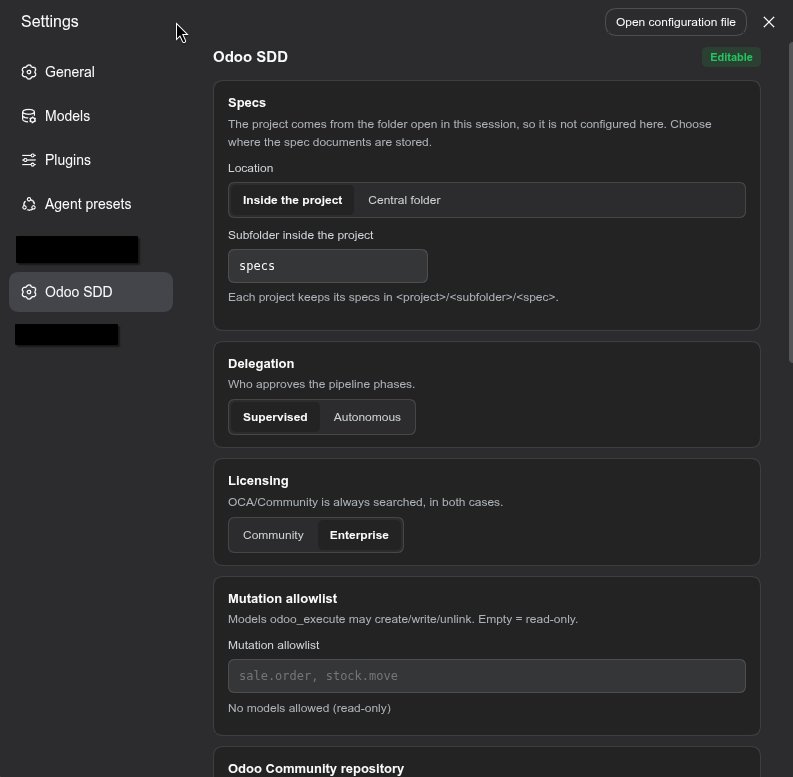
# ~/.dsh/profiles/<profile>/cordis.patch.yml (optional: same fields, as a patch)
- insert:
    - id: odoo-sdd
      config:
        specsMode: project      # project | central
        specsRoot: ''           # absolute folder when specsMode=central
        specsDir: specs         # folder inside the project when specsMode=project
        executeAllowlist: []    # models odoo_execute may create/write/unlink
        methodAllowlist: []     # "model.method" pairs a functional batch may call (any model)
                                # the ad-hoc RPC needs no list: any public method + confirm_destructive
        communityRepoUrl: https://github.com/odoo/odoo
        enterpriseRepoUrl: https://github.com/odoo/enterprise
        communityRepoPath: ''   # local OS path; when set it OVERRIDES communityRepoUrl
        enterpriseRepoPath: ''  # same for enterprise
        odooApi: auto           # auto | json2 | jsonrpc (auto falls back on a 401)
        autonomy: supervised    # supervised | autonomous
        licensed: community     # community | enterprise (OCA is always searched)
        requireCheckpointBeforeMutation: true
        requireSpecForChanges: true     # every change needs a spec in a writing phase (or a waiver)
        specPolicyScope: odoo           # odoo (only where Odoo work is detected) | everywhere
        securityReviewRequired: true
        securityInterviewRequired: true
        auditAllTools: true
        maxCheckpoints: 5
        documentationPolicy: required   # required | optional | off
        documentationLanguage: ''       # empty = English unless the project says otherwise
[!IMPORTANT] There are two configuration stores, and the more specific one wins: Settings (user-wide,
~/.dsh/settings.yaml) and the project's.sdd/config.json(written byodoo_config mode=set, per project). If a key looks ignored after you change it in the panel, the project file is pinning it —odoo_config mode=readreports the effective values.
The agent sees 16 tools with self-contained descriptions. Typical flow:
sdd_phase init → security interview + odoo_connect → gated phases with
APPROVED → sdd_checkpoint create → code → odoo_security_scan →
odoo_module install → on traceback, odoo_errors + sdd_phase fail (which may
force a diagnosis) → fix (or sdd_phase rollback) → re-verify →
sdd_phase succeed → sdd_handoff → DONE. Tool responses are actionable text:
server tracebacks, gate rejection reasons and remediation instructions.
The workflow skill is registered at mount time, so its name and description
appear in every session's skill catalog automatically. The full instructions load
when the model selects it (the catalog is summaries only) or when you type
/odoo-sdd-workflow.
--test-enable; the second verification layer is RPC/UI testing. Pending: an
optional odoo_run_tests tool if you expose a test runner.sdd_checkpoint reverses data written through odoo_execute, but a module
install/upgrade is not reverted at database level. Use a disposable
database.odoo_security_scan is rule-based over source
text (no AST, no taint tracking), so it catches the common Odoo mistakes, not
everything; it complements a human review, never replaces it.write/edit and the
Odoo tools are gated; a file written through bash (heredoc, sed -i) is not,
because the host exposes no after-the-fact inspection of what a shell command
wrote. The policy makes the pipeline the path of least resistance and the
exception visible; it is not a sandbox..env). Pending: named instance
profiles (dev, staging).autonomy and
securityInterviewRequired are stored and reported, but the pipeline reads the
delegation decision from .sdd/setup-state.json (set with odoo_setup mode=autonomy) and enforces the security interview through the ARCHITECTURE
content gate. Tracked as pending work.| Symptom | What it means | What to do |
|---|---|---|
NOT CONFIGURED |
no usable .env in the cascade |
odoo_setup mode=interactive |
NEEDS_SECRET |
the scaffold exists but ODOO_PASSWORD is empty |
fill it in the file, never in chat |
NOT AUTHORIZED |
credentials exist, no live human grant for this target | odoo_setup mode=authorize |
Instance unreachable |
version probe failed | check the URL/port and that the instance is running |
| Mutations always denied | no checkpoint, or the spec is not in WRITE_CODE yet |
approve the gates, then sdd_checkpoint create |
| Everything is halted | stop.md exists |
read it, then remove it |
| A panel change seems ignored | the project's .sdd/config.json outranks the global Settings layer |
odoo_config mode=read shows the effective values |
| A spec directory "cannot be found" | you are in a different project folder | open that project's folder in a session |
Follows the DSH tool-plugin convention (dsh-tool-todo, dsh-tool-goal): named
exports name, inject, Config (schemastery schema) and apply(ctx, config),
registering each tool with defineTool from @deepseek-ai/dsh-tools. The
browser half is a plain JS ModuleLoader bundle that contributes the Odoo SDD
settings section.
| File | Role |
|---|---|
src/index.ts |
Plugin entry: registration of the 16 tools, config resolution and the policy guard |
src/types.ts |
Public payload types (never contain secret material) |
src/credentials.ts |
Credential cascade, .env load/validation, permission verification, redact(), fail-closed |
src/odoo-client.ts |
JSON-RPC client: common.version, authenticate, execute_kw, button_immediate_*, ir.logging, /web/session/authenticate |
src/tools-runtime.ts |
Odoo-facing tool bodies: odoo_execute (allowlist + pre-image capture), odoo_validate, odoo_module, odoo_errors |
src/sdd-state.ts |
Phase machine, gates, append-only KB, verdicts, security content gate, stop.md |
src/checkpoints.ts |
Checkpoint store: manifest, file snapshot/restore, data journal, purge budget |
src/security-scan.ts |
Instance-free static security rules (scanModule) with file:line findings |
src/audit.ts |
Sanitized append-only audit log (.sdd/audit.jsonl) and the withAudit wrapper |
src/setup-state.ts |
Onboarding decision + delegation mode persistence (.sdd/setup-state.json) |
src/grants.ts |
Human authorization receipts (.sdd/grants.json), fingerprint-bound and fail-closed |
src/atomic.ts |
Atomic writes (bounded retry on EPERM/EACCES/EBUSY) and corruption quarantine + recovery reporting |
src/paths.ts |
Cross-platform module_dir resolution |
src/specs-location.ts |
Where specs live: project vs central layout, session-root resolution with provenance, slug/marker/collision handling |
src/lifecycle.ts |
Ownership inventory and the purge primitive (own state only; never .env/stop.md/specs/) |
src/docs-scan.ts |
Documentation rules: OCA fragments + Diátaxis, version scheme, changelog, index.html, docstrings, xpath, OWL |
src/docs-tool.ts |
The odoo_docs tool (check/plan/scaffold/report), usable without the pipeline |
src/project-conventions.ts |
Resolves the documentation language from the project's own rules, defaulting to English |
credentials.ts and the RPC call parameters;
every output passes through redact() (including user:pass@ URL shapes).create/write/unlink unless a checkpoint
exists and the spec is in WRITE_CODE or later.DONE unreachable; security gap ⇒
ARCHITECTURE gate rejected.npm run typecheck # tsc --noEmit
npm run build # emits lib/ (required: package main is lib/index.js)
npm test # server invariants + Cordis host contract + client bundle + README + functional/import
npm run test:package # tarball contents (a file the runtime loads but `files` omits)These are exactly the steps CI runs on Linux and
Windows, so a local npm run typecheck && npm test reproduces the pipeline.
test:package also simulates the publish: it copies the package without
lib/ (what a fresh clone has), runs npm pack on it and asserts the tarball
still contains the compiled entry point. That is the check that keeps a released
version from being installable-but-unloadable. It then simulates the install
side — a tree with the compiler but without the optional host peers, which is
exactly CI's npm install — and asserts that prepare exits 0 there while
prepack refuses.
npm does not follow GitHub. They are two independent registries: a push, a tag
or a GitHub Release updates GitHub and nothing else, and npm publish updates npm
and nothing else. A published version is immutable — it cannot be overwritten,
only superseded — so package.json is bumped for every release.
lib/ is build output and is gitignored, so the tarball is built by the prepack
hook — never by hand, never from a stale tree. The first publication is manual
(npm only lets you register a trusted publisher for a package that already
exists):
npm login                 # once; then `npm whoami` should answer
npm publish               # prepack runs `tsc` and packs the result
npm view dsh-odoo-sdd version   # verify what the registry actually has
After that, .github/workflows/publish.yml does
it: publishing a GitHub Release (or a manual workflow_dispatch) runs the
same gates as CI — typecheck, build, tests, the publish simulation — checks that
the release tag matches package.json, refuses a version that is already on the
registry, and publishes with provenance through npm's OIDC trusted
publishing, so no NPM_TOKEN lives in this repository.
One-time setup for that automation: on npmjs.com → the package → Settings →
Trusted publishers → Add → provider GitHub Actions, owner fhidalgodev,
repository dsh-odoo-sdd, workflow filename publish.yml, environment blank
(a mismatch is a 403 npm-trusted-publisher-not-configured). Prefer a token?
Create a granular access token with bypass 2FA and store it as the NPM_TOKEN
secret — the workflow says where.
So a release is: bump the version → merge → publish the Release, and the tag, the Release and the npm version end up agreeing.
The same hooks make a repository install work: prepare compiles the sources
when TypeScript is present (npm i github:fhidalgodev/dsh-odoo-sdd), and skips
with a notice when it is not (a file: install has no devDependencies).
Chart generated live by the star-history.com API.
Built for the Odoo developer community, this plugin rests on two ecosystems:
Thank you to everyone who contributes patterns, reviews and ideas that shape the SDD workflow. Contributors:
MIT © Franyer Hidalgo
CLASSIFICATION EVIDENCE
系统优先读取 GitHub Topics,再与站内分类词典和词根规则比对。当前命中: dsh-skill。
deepseek-ai
DeepSeek Harness: Everything is a Plugin.

anywhere-labs
为 DeepSeek Harness (DSH) 插件生态打造的现代化桌面端解决方案。万物皆「插件」,桌面本身也是「插件」。

walkinglabs
Harness engineering beginner tutorial, from 0 to 1