
模型与 MCP
待识别

rea
morluto
Reverse engineer anything with agents, from app behavior down to native binaries.
PROJECT TOPICS
INSTALL REFERENCE
dsh plugin --profile web add github:ferrisching/dsh-prompt-predict
该命令指向仓库当前默认分支;尚无绑定当前 commit 的完整验证结果。
PROJECT README








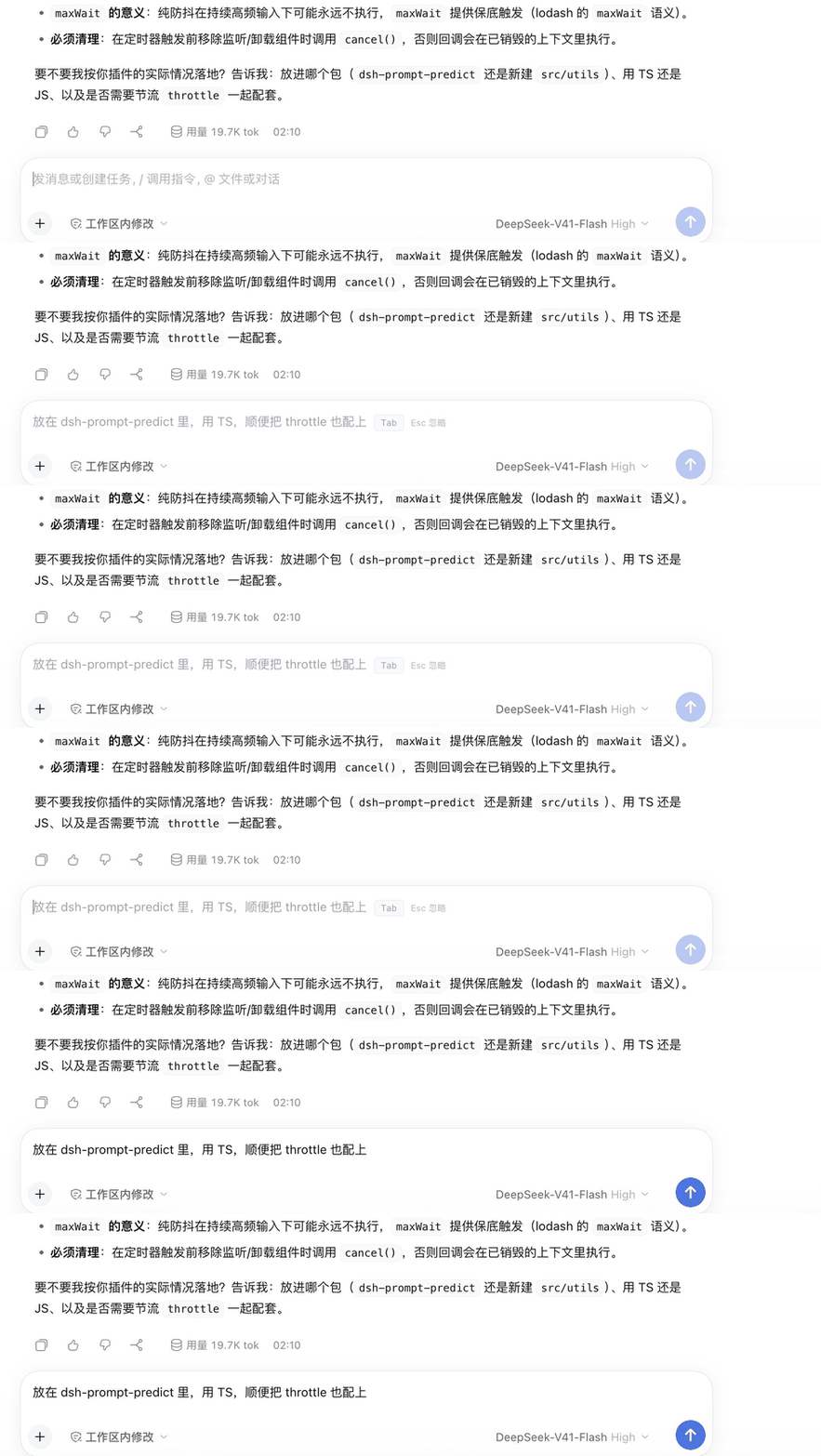
dsh-prompt-predict is a DeepSeek Harness plugin: after every assistant turn it predicts the message you are most likely to type next and floats it into the composer as gray ghost text. The suggestion never enters the editor — only pressing Tab inserts it, and even then it stays undoable — so a wrong prediction costs you nothing.
Tab to accept, ↻ (or ↓) for a different suggestion, Esc to dismiss; typing hides it, and clearing the draft brings it backprefers-color-scheme), with contrast kept at WCAG AA in bothThe plugin is published on npm. Options are ordered by convenience.
GUI: open the plugins page → Add plugin → enter the package name dsh-prompt-predict → install.
Or the dsh CLI — pin any published version with pnpm's @version syntax:
dsh plugin --profile desktop add dsh-prompt-predict@0.2.21Replace --profile with your own profile (usually desktop on the desktop app, web for the web build), then restart DSH.
Upgrade to the latest release
dsh plugin --profile desktop add dsh-prompt-predict@latestFrom a source checkout, bash scripts/update.sh [profile] does the same and also converges the lockfile; it refuses to run while the app is still up — quit it first. The settings page has a Check for updates button next to the version and also checks npm automatically when opened (at most once every 10 minutes). When a newer version exists it links straight to DSH sidebar → Plugins → Installed plugins → dsh-prompt-predict → Versions → Update, where DSH handles the download, rollback and restart; a copyable CLI command remains as a fallback. Update notices live only in Settings — there is no banner under the composer.
⚠️ The CLI only installs the package. DSH loads a plugin only when it is also listed in
dsh.profile.bundlesinside~/.dsh/profiles/<profile>/package.json. Verified: with the package installed but not in that list, the plugin's routes answer404and nothing loads. The GUI route above handles it for you; with the CLI add"dsh-prompt-predict"to that array yourself, or just runscripts/install.shbelow, which does both steps.
You'll find the switch and all parameters under Settings → Prompt Suggestions.
Every release carries the exact
tarball that is on npm (shasum matches the registry), which is handy for offline machines or for
pinning an artifact you can verify:
gh release download v0.2.21 --repo ferrisching/dsh-prompt-predict --pattern '*.tgz'
dsh plugin --profile desktop add ./dsh-prompt-predict-0.2.21.tgz
Same caveat as the CLI route above: add "dsh-prompt-predict" to dsh.profile.bundles yourself,
or run scripts/install.sh instead.
git clone https://github.com/ferrisching/dsh-prompt-predict.git
cd dsh-prompt-predict
bash scripts/install.sh
# make sure the app is fully quit first (Cmd+Q) — the script refuses to run while it is up
The script packs this repo on the fly, installs it into the profile's node_modules, and adds dsh-prompt-predict to dsh.profile.bundles. The default target is ~/.dsh/profiles/desktop; for another profile:
bash scripts/install.sh ~/.dsh/profiles/webRestart DSH afterwards, then look under Settings → Prompt Suggestions.
cd ~/.dsh/profiles/desktop
pnpm add dsh-prompt-predict              # from npm
# or link local source (symlink — handy while developing):
pnpm add /path/to/dsh-prompt-predict
Then open that profile's package.json and add "dsh-prompt-predict" to the dsh.profile.bundles array, and restart DSH.
0.2.2-rc.2 (web build; the desktop app runs the same host and client code)node / pnpm: the install script prefers DSH's own runtime under ~/.dsh/dsh-runtimes/*/dependencies and only falls back to PATHTab / ↻ / Esc on its right| Action | Effect |
|---|---|
Tab |
Accept the whole thing while the composer is focused (only now is it inserted, and it stays undoable) |
↻ (button on the right) |
Reroll — ask the model for a different suggestion |
↓ |
Generate the next suggestion (counts toward Max switches); if this round already has later suggestions, move forward through them for free. With no suggestion showing and an empty composer it fetches one immediately. Ctrl/⌘+↓ works as a fallback |
↑ |
Return to the previous suggestion in this round (free) |
Ctrl/⌘+Shift+Space |
Trigger a prediction by hand; rerolls when one is already showing |
Esc |
Dismiss this one |
| Just start typing | It disappears; clearing the draft brings it back (only Esc is a permanent dismissal) |
Suggestions only appear when the composer is empty and the session isn't running. Switching sessions or interrupting a reply clears any pending suggestion.
Settings → Prompt Suggestions:
| Setting | Description | Default |
|---|---|---|
| Enable predictions | Master switch | On |
| Provider / model | Model used for the prediction call; pick "Follow current session model" to reuse the session's own model | Follow current session model |
| Response timeout (advanced) | 1–60 seconds | 12 seconds |
| Context size (advanced) | Small 3 / Standard 8 / Large 12 messages | Standard 8 |
| Context budget (advanced) | Character cap sent to the helper call, 1000–20000 | 6000 |
| Output length | How long a suggestion should be, in characters (20–400) — no token maths. Pinning a Latin-script language also shows the equivalent in words; CJK stays in characters because word segmentation is undefined there. The host derives a generous token safety cap from it (per language) and writes the character budget into the prompt; a reply that still gets cut is retried with more room and marked cut off · raise the output length | 120 |
| Keep multi-line formatting | Allow code snippets/lists to keep line breaks and indentation (off = always one line) | On |
| Switchable suggestions | When on, ↓ generates the next suggestion and ↑ returns to the previous one (kept in this round's history); off disables arrow switching and the ↻ button | On |
| Max switches | Max new suggestions generated per round (0–10; 0 = unlimited). Moving back with ↑ does not count |
3 |
| Reasoning effort (advanced) | Options are generated from the model actually in use (the session's model when following it); unsupported levels never appear | Off (fastest, cheapest) |
| Suggestion language | Auto follows the conversation; pin a language and every suggestion is written in it. 14 mainstream languages are listed up front, the rest fold behind More languages…, and languages with regional variants get a second Region dropdown: Simplified Chinese (Mainland China / Singapore / Malaysia), Traditional Chinese (Taiwan / Hong Kong), English (US / UK / Australia / Canada), Portuguese (Brazil / Portugal), Spanish (Spain / Latin America (neutral) / Mexico / Argentina / Colombia), French (France / Canada), German (Germany / Austria / Switzerland), Dutch (Netherlands / Belgium). The chosen variant is named explicitly in the prompt (e.g. Traditional Chinese (Taiwan), British English) |
Auto |
| Pause | Stops predictions for ten minutes with a countdown, then resumes automatically; the deadline survives a reload | Off |
| History size (advanced) | How many recent predictions the settings page keeps (0–50; 0 turns history off). Records live in the app's own local storage — the Electron renderer's storage in the desktop app, the page's localStorage on web — and are never uploaded |
10 |
The bottom of the settings page shows a recent predictions list (default 10, adjustable): time, session, model, latency, and whether the reasoning level was auto-downgraded, a reroll happened, the suggestion was truncated by the output cap, or the call failed (with the reason). The list stays folded to the newest run (▸ Show all opens the rest), the newest run's suggestion text is expanded by default, and clicking a row's ▸ expands that run's text while collapsing the previous one. Records live in the app's own local storage (the Electron renderer's storage on desktop, the page's localStorage on web) and are never uploaded. No more guessing why nothing appeared.
~/.dsh/dsh-prompt-predict/config.json (mode 600)The plugin registers a same-origin prefix route /dsh-prompt-predict on DSH's web server; both the settings page and the composer suggestion go through it. Every endpoint is authenticated with DSH's browser cookie (connection.requestRejection) — off-machine callers get 401/403.
| Method | Path | Description |
|---|---|---|
| GET | /dsh-prompt-predict/status |
Current session model, effective settings, saved overrides, deploy defaults |
| GET | /dsh-prompt-predict/catalog |
All providers and models (for the dropdowns) |
| GET | /dsh-prompt-predict/efforts?provider=&model= |
The reasoning levels that model actually supports |
| POST | /dsh-prompt-predict/settings |
Save settings; { "reset": true } restores defaults |
| POST | /dsh-prompt-predict/suggest |
{ sessionId } → one suggestion |
Every endpoint accepts an optional x-dsh-locale header (zh / en, default Chinese) deciding which language validation errors and prediction failures come back in. The client sends the active UI language automatically.
Host side (lib/)
lib/index.js is the plugin entry point and registers the same-origin HTTP routesuggest, lib/predict.mjs trims the session down to the most recent user/assistant plain text — walking backwards under both a message-count limit and a character budgetstream / replayState, so a trimmed fragment cannot masquerade as one (same approach session-title uses)Suggestion: prefixes and wrapping quotes stripped, newlines collapsed) and returned to the clientFor model selection, provider / model set to auto means "follow the session": no route is hard-coded onto the helper call, and predictNextPrompt inherits whatever the session itself selected.
Client side (client/)
conversation.composer.dock (lifecycle mount point next to the composer) and settings.section slotsinputActions.insertTextThe client is built from ordered fragments in client/src/ (npm run build:client writes client/client.js). DSH loads exactly one client script, so the split is a source-organisation aid, not native ES modules; pretest and prepack rebuild automatically.
npm run test:smoke boots a disposable DSH profile, installs this repo as a local tarball, starts a local mock LLM and drives a headless Edge via CDP. It covers ghost display, focus-scoped Tab acceptance, reroll, ↓/↑ switching, pause, multi-line code, and a geometry matrix for narrow/scaled composers (260/220/180/600 px, scale(0.8/1.25/1.5), and a decoy composer). Requires the DeepSeek Harness app and Microsoft Edge; override paths with DSH_SMOKE_DSH and DSH_SMOKE_EDGE. It is deliberately not part of npm test.
npm run test:sidebar is a separate opt-in probe for the real right sidebar. It additionally installs dsh-better-sidebar@0.30.1, opens Plugins → side chat, creates a thread, sends a message, and prints the real DOM. Current finding: that version's side chat uses TEXTAREA._4BEzFa_sidechatComposerInput and does not mount the plugin composer dock, so it produces zero plugin ghosts; the probe is diagnostic and makes no right-sidebar ghost assertion. See test/README.md for the full test matrix and the issue #6 investigation notes.
git clone https://github.com/ferrisching/dsh-prompt-predict.git
cd dsh-prompt-predict
npm test        # 141 host-side + 225 client render cases
.
├── lib/ Host side (plain ESM, no build step)
│ ├── index.js Plugin entry point, registers the HTTP route
│ ├── host-route.mjs Same-origin API: status / catalog / efforts / settings / suggest
│ ├── predict.mjs Session trimming, helper-model call, suggestion normalization
│ ├── messages.mjs User-facing host copy (Chinese + English)
│ └── config.mjs User settings persistence
├── client/
│ └── client.js Client: composer ghost-text overlay + settings page
├── test/
│ ├── predict.mjs 141 cases: trimming, cleanup, route inheritance, settings validation, degrade-retry, dedup, bilingual errors, HTTP end-to-end
│ ├── client-render.mjs 225 cases: ghost/settings rendering through a tiny React stand-in, Tab focus matrix, geometry, IME/paste/attachments, both locales
│ ├── dsh-smoke.mjs 18 real-DSH checks (optional; also hosts the opt-in sidebar probe)
│ └── README.md test matrix, real-DSH smoke and right-sidebar probe notes
├── scripts/
│ ├── install.sh One-shot install from a local pack
│ └── update.sh Upgrade a profile to the npm latest
├── cordis.patch.yml Plugin mount patch
└── package.json
test/client-render.mjsis the only automated safety net for the client side: no browser needed — a tiny React stand-in expands the components into a plain object tree so the test can assert that the ghost shows up and thatTab/↻/Escare all there. It exists because of a real incident: the overlay referenced a variable it never read from props, the render threw, React's error boundary swallowed it, and the symptom was "the API returns a suggestion but nothing ever appears" — while every host-side test was green.
The tests need no DSH runtime: a fake ctx plus a local HTTP server cover route registration, settings validation, route inheritance and end-to-end calls.
Tab and send does the text become a real messageNo suggestion appears at all
"Prediction failed: …" shows under the composer (it appears after two failures in a row)
| Reason text | What to do |
|---|---|
Request timed out |
Raise Response timeout in Advanced |
Provider "…" is unavailable / has no model "…" |
Pin a provider and model instead of following the session model |
Prompt prediction is turned off |
Turn the switch back on |
| anything else | Open Settings → Prompt suggestions → Recent predictions; the row carries the host's exact reason |
Suggestions come in the wrong language
Auto (the default) detects the language from your recent messages by majority vote over the last five, so a message that is mostly a pasted log can skew it.A suggestion ends with "cut off · raise the output length"
Tab does nothing
Tab is intercepted only while a suggestion is visible; with no ghost it behaves normally.Tab acts on the focused editor.Ghost text sits on top of what I typed
0.2.7: it hides on paste, IME composition and drag-and-drop, and it no longer appears while the composer has a draft. Upgrade if you still see this."Recent predictions" is empty
0.2.5 carry no suggestion text.I upgraded but nothing changed
package.json is not rewritten by a window reload.0.2.2-rc.2; other versions untestedconversation.composer.dock and settings.section slot names — a major DSH update may require adaptingMIT © ferrisching
Free to use, modify and distribute, including in closed-source commercial projects — just keep the copyright notice and license text.
See CHANGELOG.md for the change history (中文).
CLASSIFICATION EVIDENCE
系统优先读取 GitHub Topics,再与站内分类词典和词根规则比对。当前命中: deepseek、deepseek-harness、deepseek-harness-plugin。
morluto
Reverse engineer anything with agents, from app behavior down to native binaries.

deepseek-ai
DeepSeek Harness: Everything is a Plugin.

nexu-io
The 1st Collaborative AI Design Agent Workspace. Local-first and open source. Create motion, prototypes, websites, apps, dashboards, presentations, images, and videos with your team and AI agents. Share work, exchange feedback, and iterate together in one workspace.