
Agent 与会话
插件

nuwa-skill
alchaincyf
你想蒸馏的下一个员工,何必是同事。蒸馏任何人的思维方式——心智模型、决策启发式、表达DNA。Distill how anyone thinks.
PROJECT TOPICS
INSTALL REFERENCE
dsh plugin --profile web add github:fengshenx/dsh-leader-agent
该命令指向仓库当前默认分支;尚无绑定当前 commit 的完整验证结果。
PROJECT README

English | 简体中文






One Leader drives the work and the review, so you can run ten features in parallel instead of babysitting each one.
A leader / worker orchestration bundle for DeepSeek Harness (dsh). The Leader splits work, dispatches it, tracks every worker to completion, checks what comes back and runs review; workers do the work in the background, report back automatically, and every task fact lands on a board organized by project. Running one worktree per task is this repository's convention, not a requirement of the bundle.
LEADER.md holds the Leader's prompt and this project's orchestration rules: boundaries, dispatch requirements, acceptance criteria. SLOTS.md gives each worker role its own rules (dev / review / …). Both are evaluated before every model request and appended only when their text changes, so editing a file changes behavior without recreating sessions.leader-mode skill: an orchestration protocol for the Leader — Not "you are a tech lead". Staged playbooks across discussion → design → implementation and delivery → review → merge, plus guidance on parallel collaboration and handoff.read_worker_session reads a worker's session log directly and returns each turn's task, body, the tools it called and why anything failed. Read-only: it does not wake the worker and triggers no model call. The completion notice tells you what came out; this tells you how it got there, so debugging does not need another round.Desktop uses its own profile ($DSH_HOME/profiles/desktop), separate from web.
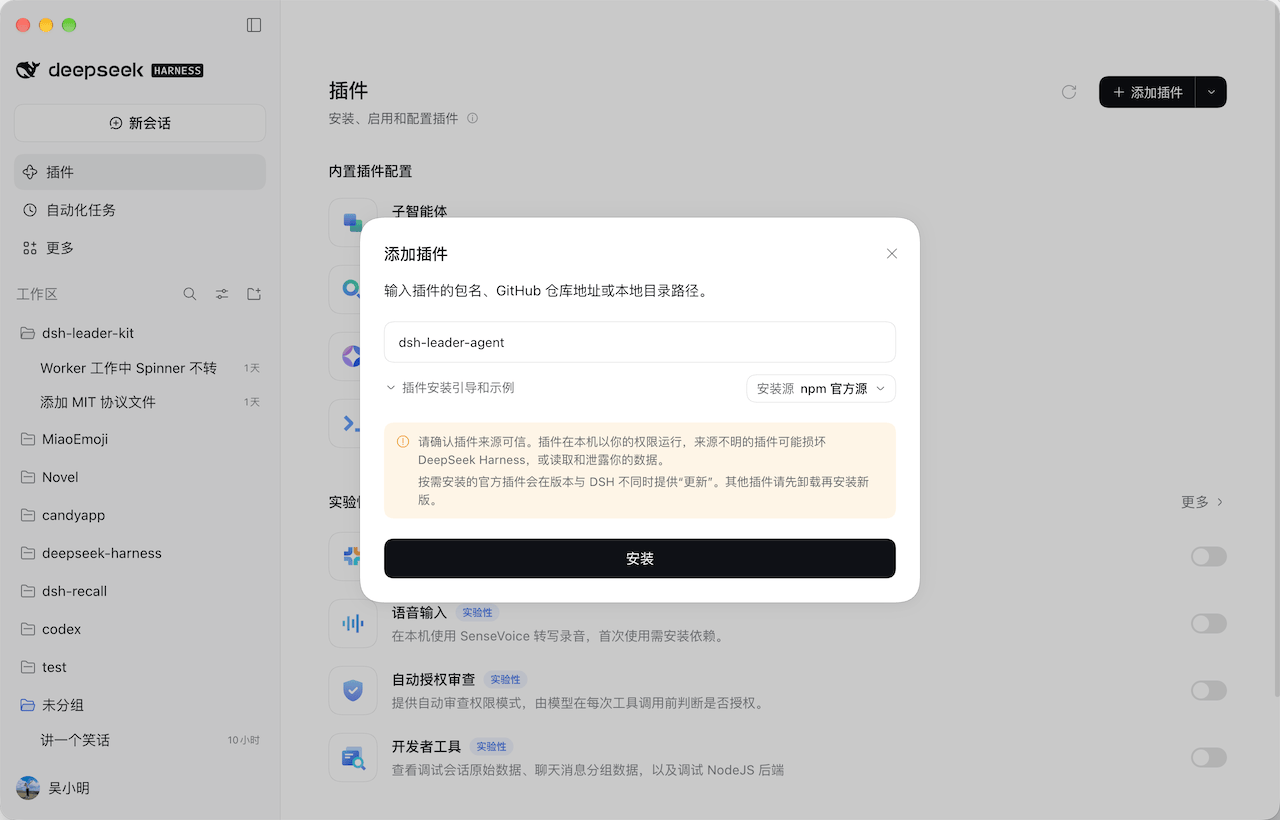
GUI install: open Plugins in the left sidebar, click Add plugin in the top right, type dsh-leader-agent and click Install:
CLI install: the system dsh refuses to manage the desktop profile; use the CLI bundled with the desktop install:
# quit the app completely first (closing the window only hides it)
"/Applications/DeepSeek Harness.app/Contents/Resources/runtime/cli/bin/dsh" \
  plugin --profile desktop add dsh-leader-agent
On Windows / Linux, use runtime/cli/bin/dsh inside the installation directory. The app reads the profile only at startup, and only one version can be mounted at a time. DSH_HOME must be absolute or start with ~/. Sessions, projects, and cards are shared with web; plugin packages and activation are separate.
For development inside this repository, npm run desktop mounts the current worktree, rebuilds the bundle and launches the app; -- --remove unmounts it.
Install from npm (package name dsh-leader-agent):
dsh plugin --profile web add dsh-leader-agent
dsh web
The profile must be named web; custom names are absent from PROFILE_TEMPLATES, so the install lacks the web-app bundle and the client half never loads. Requires dsh >=0.2.1-rc.2 <0.3.0.
For pinning a version, removing it, development installs, or trying it without a profile, see Development.
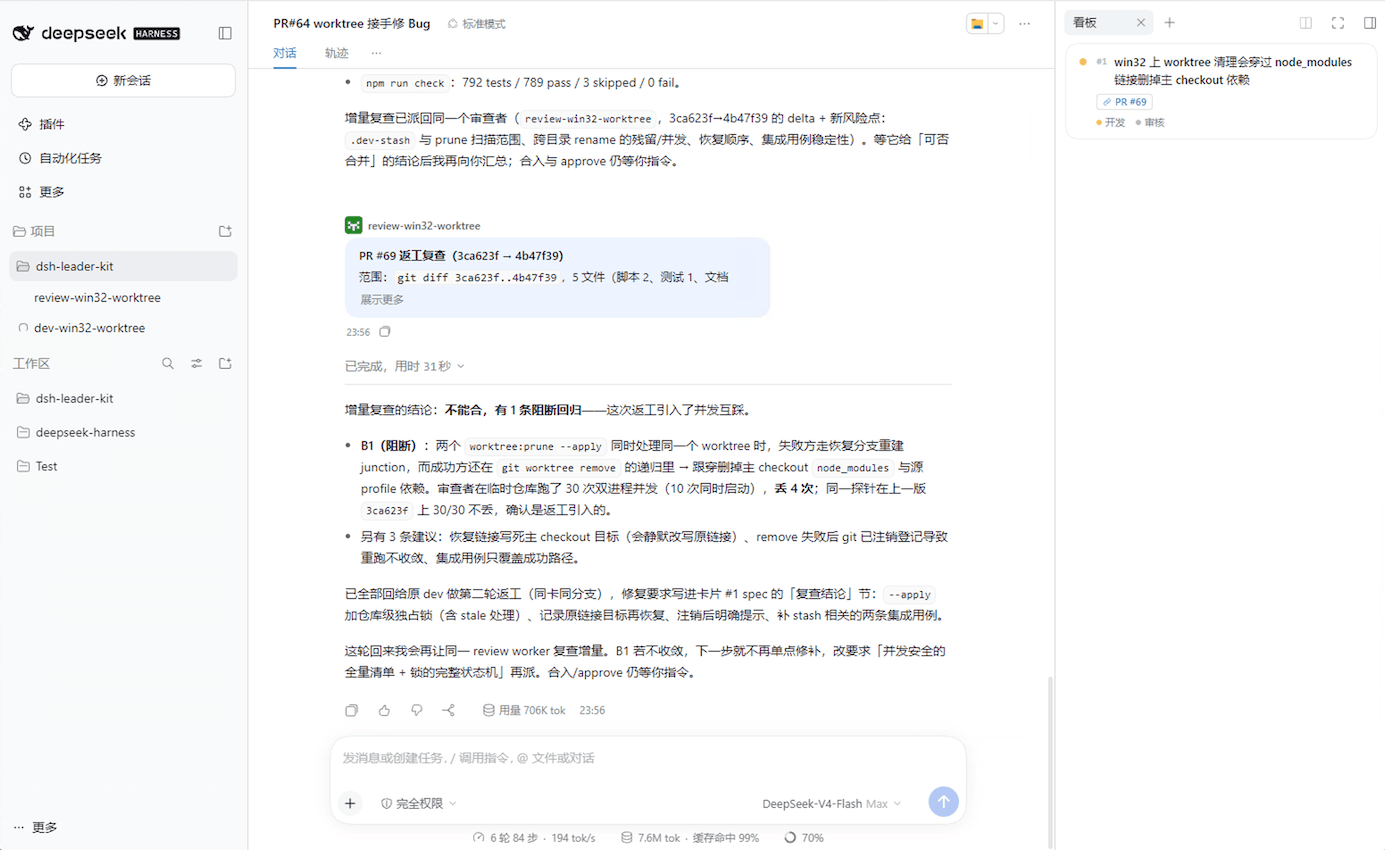
Left: projects and the workers each Leader spawned. Center: the Leader's session — the task, the dispatch, the worker reporting back, the verdict. Right: the delivery board for the project, with one card per task and a slot chip per executor. You can see the agents that are working, click one to drill into its session and talk to it directly, without going through the Leader.
The screenshot shows a real working session.
you ──────▶ Leader (the leader session, sole commander of the project)
             │  create_card      record what to build and how it is accepted
             │  spawn_worker     create the worker session, return immediately
             │  message_worker   deliver the first message — that is what starts work
             ▼
      worker ─ worker ─ worker        each runs in its own project directory
             │                        (one worktree each is the project convention, see Prerequisites)
             │  the turn end is settled by the runtime, workers submit nothing
             ▼
      Leader wakes up ──▶ board status lights update ──▶ open any worker and keep talking
Three mechanisms make this more than "a smarter prompt":
spawn_worker / message_worker; workers don't. The host trims the tool surface when a session is created — the model is not trusted to hold back.LEADER.md (the Leader's persona prompt and orchestration flow) and SLOTS.md (the role split and each role's persona prompt).apps-add-outline glyph by default (three cells plus a plus sign; it replaces the host's folder icon so projects and workspaces are not the same shape in the sidebar): while the Leader is running it becomes a spinner (the Leader has no row of its own, so this holds whether the project is expanded or collapsed), and when the project is collapsed with a worker running under it, it becomes a spinner too — once expanded, each worker carries its own spinner.leader-mode. It reads playbooks/program.md first, then the playbook for the current stage.spawn_worker requires name (a short role-task handle); cardId + slot optionally bind the card's executor slot in the same call. It returns a session id immediately and the worker has not started yet. Deliver the task body with message_worker (sessionId + message, optionally rename): the first message is what starts the turn, and a card-bound worker gets the card facts added to its request automatically, so you do not need to paste the spec. The worker's sandbox mode and approval policy are inherited from the Leader at dispatch time (an Auto Leader also passes on its review gate); the receipt states the permissions the worker actually runs with, and calls out full access by name. To see how it went about this turn — which tools it called, where it failed — use read_worker_session on it; that does not wake the worker.create_card opens a card (title required), update_card edits one (content changes carry expectedRevision for optimistic concurrency; links can be replaced wholesale with links or merged by id with addLinks), list_cards reads them. Cards belong to a project and are numbered globally; edits across projects are refused. list_cards and create_card are the Leader's alone, and plain sessions get neither; update_card is shared with workers. A worker may only edit a card it is bound to, and only derived fields such as links — title / spec / status / kind / sortOrder / slots belong to the Leader (the first two are the acceptance anchor and injected content, the rest organize the board and decide who executes). read_card is the worker's alone: it reads any card in the project, and with no cardId / number it reads the worker's single bound card — the way back to its task after compaction or a stale injection. Long specs come in 2000-character pages via specOffset.Three things, each covering one layer. All of them contribute prompt text only and grant no tool permissions:
| File / skill | For whom | What it holds |
|---|---|---|
LEADER.md |
The Leader of this project | How to command this project: boundaries, card and dispatch granularity, hard constraints every brief must carry, acceptance criteria. Injected into the leader session, with no binding step |
SLOTS.md |
Workers, by role | Per-role method and persona under ## <slot-name> (dev / review / …). The card's slots field binds a slot to a session, and that session gets the section injected |
leader-mode skill |
The Leader's protocol | Staged playbooks for discussion → design → implementation and delivery → review → merge, plus parallel-collaboration and handoff guidance |
LEADER.md and SLOTS.md are evaluated before every model request and appended only when their text changes, so a change takes effect on the next request and nothing gets injected twice. The leader-mode skill takes a different path — the model loads it through the skill tool on demand, which is why the step above says load rather than configure. The target project's own AGENTS.md is read by the host's agent-instructions as a system-prompt section. Closing a card (done / archived) releases its executor: the slot binding and the card facts stop being injected together.
The plugin only reads LEADER.md. A COORDINATOR.md that merely points at it is a compatibility shim for external tools that still look for the old file name; it is never injected, and you do not need it otherwise.
Slot names are ASCII identifiers (lowercase letters, digits, underscore, hyphen, up to 32 characters); display names come from the slots: frontmatter at the top of SLOTS.md. A project without SLOTS.md falls back to the default two roles dev / review.
The init-leader-agent skill handles project setup: it merges the repository's engineering conventions into a managed block of the target project's AGENTS.md, then writes LEADER.md (how the Leader drives this project) and SLOTS.md (executor roles) from the bundled skeletons. Re-running only replaces the managed block, and both manuals are read before editing. An empty directory gets the TODO skeleton plus the three questions still unanswered — project facts are never invented.
For the full interaction — slot frontmatter details, archiving, swapping the Leader, how board status lights are derived — see the usage manual (Chinese).
Running ten features in parallel requires real isolation between tasks: one worktree per task, one dsh instance per task, one data root per task, so tasks never overwrite each other's plugin version or compete for sessions and data. This repository's scripts/worktree-*.mjs and scripts/dev.mjs exist for exactly this (Development); mechanisms and where each one lands are in collaboration and documentation (Chinese).
list_agents / send_message / interrupt_agent do not apply to them (interrupt_agent even returns a false success). A worker that goes off track is steered with message_worker: the message is injected into the next step of its current turn. There is no cancel — the host's Agent.cancel() is not exposed as a tool here — so a wedged worker needs a human in its own session. You can read what it is doing (read_worker_session, read-only, no wake-up).The full list and trade-offs (status-light sources, watermark collapsing, avatars, the archive entry point, DOM injection positioning and more) live in known limitations and trade-offs (Chinese).
npm run worktree:spawn <task>     # create the worktree and feature branch
cd .worktrees/<task>
npm run dev                       # dsh instance mounting this worktree's plugin
npm run check                     # full gate
npm run e2e                       # browser e2e
Data roots, instance overrides, build constraints and the test policy are in development (Chinese); the command index is in AGENTS.md (Chinese). npm start runs the daily instance.
Read AGENTS.md first: worktree discipline, verification requirements, and documentation rules live there. The short path is npm install → npm run check → open a PR. Commit messages are in Chinese, and non-trivial changes ship an .agents/notes/ decision note in the same PR.
| Document | Contents |
|---|---|
| AGENTS.md | Repository rules and the task-routed reading index |
| docs/getting-started.md | Walkthrough (Chinese): prerequisites, adding a project and its Leader, the two project files, one card from creation to drill-down |
| docs/usage.md | Full interaction for dispatch, follow-ups, cards, board, project management, slots and manuals |
| docs/architecture.md | Layers, runtime model, data flow, persistence layout, host-contract landing spots |
| docs/limitations.md | Full known limitations and trade-offs |
| docs/development.md | Dev environment, instances, build contract, test policy |
| docs/capability-gaps.md | Measured evidence for host capability boundaries (read before touching host-side code) |
| docs/e2e-testing.md | Browser e2e lane (commands, fixtures, mock conventions, screenshots) and manual evidence rules; assertion discipline and failure diagnosis live in .agents/skills/e2e-scenarios/ |
| growing/ | Growth archive: case studies, copy, source files; media lives in OSS |
| .agents/notes/ | Decision memory for non-trivial changes |
| .agents/skills/leader-mode/ | Protocol layer: dispatch, handoff, event scheduling, card upkeep, acceptance |
| .agents/skills/promo-video/ | Promo pipeline for the repo dev env (needs Playwright + ffmpeg): storyboard, TTS timeline, capture/record, cover production; narration in doubao-tts/, covers in promo-stills/ |
The design drew on Cursor's Project implementation and PStack's orchestration mechanism: treating a project as a first-class entity, aggregating sessions and deliverables per project, and the leader-dispatches / executor-reports / delivery-board line.
The session tab bar drew on dsh-session-tabs (MIT) for main-panel anchoring and per-project tab persistence; see THIRD_PARTY_LICENSE for the full third-party inventory.
Thanks also to the DeepSeek Harness team: the host plugin contract, and the worktree, Agent Note, progressive-disclosure and documentation practices this repository mirrors directly.
Third-party notices: THIRD_PARTY_LICENSE.
CLASSIFICATION EVIDENCE
系统优先读取 GitHub Topics,再与站内分类词典和词根规则比对。当前命中: session、sessions。
alchaincyf
你想蒸馏的下一个员工,何必是同事。蒸馏任何人的思维方式——心智模型、决策启发式、表达DNA。Distill how anyone thinks.

freestylefly
Prompt as Code | GPT Image 2 / 2.5 提示词与案例库,530+ 个案例、20+ 套工业级模板与可复用 Skills,新增 2.5 同提示词对比专区,附完整提示词与生成记录,持续更新。

titanwings
Distilly — Distill how they think into reusable Skills for any Agent or Bot. Formerly Colleague Skill(原同事 Skill).