

模型与 MCP
待识别

rea
morluto
Reverse engineer anything with agents, from app behavior down to native binaries.
PROJECT TOPICS
INSTALL REFERENCE
dsh plugin --profile web add github:feifandiv/dsh-md-live-edit
该命令指向仓库当前默认分支;尚无绑定当前 commit 的完整验证结果。
PROJECT README


English | 中文
Edit Markdown files directly in the sidebar preview: click any rendered block, edit that block's Markdown source in place, and save the whole document back to disk. No code mode, no separate editor.
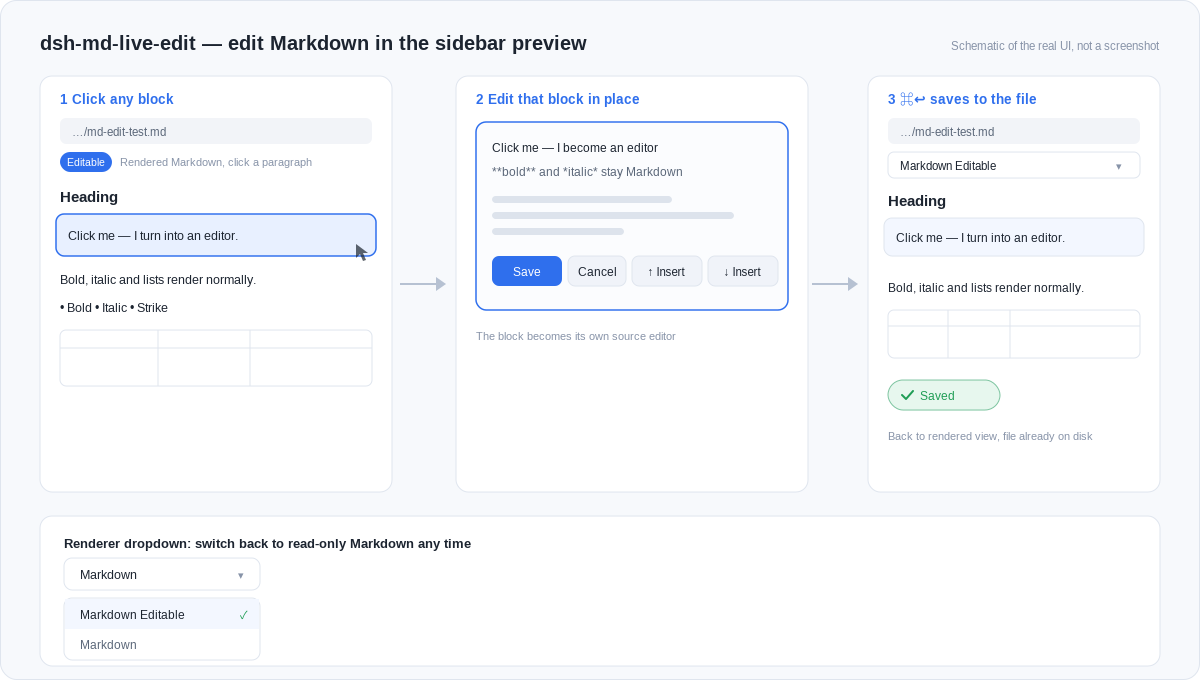
Scope: a small, restrained patch. It adds one preview implementation and one write route. It does not replace built-in slots or layout, does not change kernel behaviour, and does not touch other plugins' data. Turning it off returns the sidebar to the official read-only preview.
The built-in sidebar preview is view-only (dsh-client-ui-sidebar-documentpreview
documents "Preview, not editing"). To change a word you had to leave the rendered
view, find a text editor, and lose the context of the surrounding document.
This plugin registers an extension-band Markdown preview with the same
extensions (md, markdown). It ranks above the built-in renderer and is
selected by default; the renderer dropdown still offers the built-in read-only
Markdown, Code, and Plain text views at any time.
.md file in the right Sidebar (file tree, or Mod+P → files page).⌘/Ctrl + Enter (or click Save) to write the document back.
Esc / Cancel discards the edit for that block.Frontmatter (--- blocks) is editable like any other block.
A table block opens as its own Markdown table. Add a row by adding one line:
| Capability | Status | Note |
| --- | --- | --- |
| In-place edit | ✅ | click any block |
| Save | ✅ | ⌘↩ |
Save, and the rendered table updates.
fs with the session's
own policy (sandboxPolicy.resolve({ session })); a read-only session is
refused rather than widened.connection.requestRejection (Host/Origin fence + browser session) before it
reads a body; a rejected request touches neither the body nor the filesystem.ctx.locale and switches live.>=0.2.2-rc.1 (the release line whose
connection service exposes requestRejection). On an older Host the route
fails closed with 401 rather than serving an unguarded write.read-only sessions the preview is
editable locally but the save is refused with the sandbox reason.| Area | Supported |
|---|---|
| File types | .md, .markdown |
| Block editing | headings, paragraphs, lists, blockquotes, fenced code, tables, rules, frontmatter |
| Inline rendering | bold, italic, strikethrough, inline code, links, images |
| Block actions | edit, delete, insert above, insert below, append at end |
| Save | ⌘/Ctrl+Enter, Save button; whole document |
| Conflict handling | external-change banner, reload or keep |
| Renderer | default; dropdown switches to built-in Markdown / Code / Plain text |
| Locales | English, 中文 |
git clone https://github.com/feifandiv/dsh-md-live-edit.gitThen add it as a bundle in DSH (Settings → Plugins → add/clone the directory, or
plugin_manager with install_bundle and the absolute package path). The
bundle row is md-live-edit.
npm pack @fanfan4589/dsh-md-live-edit
tar -xzf fanfan4589-dsh-md-live-edit-*.tgz
# add the extracted package directory as a bundle in DSHnpm test # node --test test/*.test.mjs — 34 cases| Path | Responsibility |
|---|---|
index.js |
Host half: the admission-gated POST /dsh-md-live-edit/api/write route |
client.js |
Client half: preview metadata, keyed document body, block parser and in-place editor |
test/gate.test.mjs |
Route admission, body/fs isolation on rejection, sandbox policy |
test/client.test.mjs |
Module identity, registration metadata, parser round-trip, text transforms |
test/render.test.mjs |
End-to-end body rendering under a VM timeout |
test/inline.test.mjs |
Inline renderer termination, watched in a child process |
test/labels.test.mjs |
Localized labels, no raw locale keys in the UI |
See CONTRIBUTING.md and RELEASING.md.
MIT © feifandiv
CLASSIFICATION EVIDENCE
系统优先读取 GitHub Topics,再与站内分类词典和词根规则比对。当前命中: deepseek-harness。
morluto
Reverse engineer anything with agents, from app behavior down to native binaries.

deepseek-ai
DeepSeek Harness: Everything is a Plugin.

nexu-io
The 1st Collaborative AI Design Agent Workspace. Local-first and open source. Create motion, prototypes, websites, apps, dashboards, presentations, images, and videos with your team and AI agents. Share work, exchange feedback, and iterate together in one workspace.