

模型与 MCP
待识别

rea
morluto
Reverse engineer anything with agents, from app behavior down to native binaries.
PROJECT TOPICS
PROJECT README

Your SSH hosts, as local tabs.
Persistent remote workspaces, native file editing, search, exec, terminals and port forwards for coding agents — with nothing installed on the remote host.
English · 简体中文 · Releases · MCP server



⚠️ A local session is not bound to a remote workspace. Opening a remote workspace in Presence does not turn a local agent session into a remote one. When your session's working directory is outside the presence mounts root,
presence_execand every otherpresence_*tool require an explicithost(orPRESENCE_HOST); without one they refuse with the session's cwd instead of silently running on the last-activated machine. Sessions started inside a remote workspace resolve to that machine automatically. See Known limits.
Running an agent on every remote machine means installing it N times, upgrading it N
times and configuring proxies per host. Running ssh host '<command>' from the local
agent means a new handshake per command, no native file tools and no continuity.
Presence keeps the agent local and extends its reach through one persistent SSH
connection per host. The remote side is still plain sshd: SFTP, exec and a PTY.
| Approach | Cost |
|---|---|
| Install the agent on every host | N installs, N upgrades, per-host proxying |
ssh host '<command>' per call |
Handshake per command, no file tools, no sessions |
| Presence | One connection per host, native tools, nothing installed remotely |
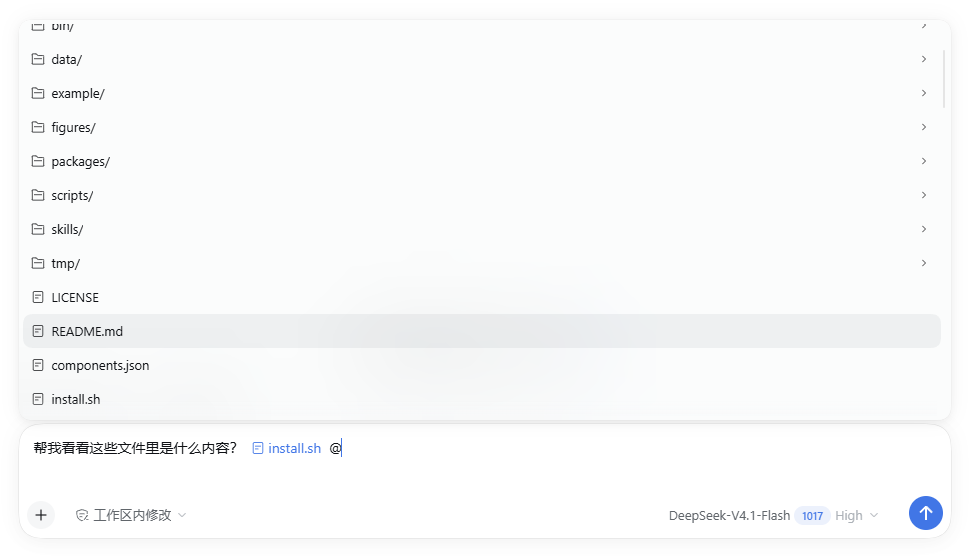
sshd built-ins: the SFTP subsystem, exec channels and a PTY.rg/grep runs on the target, commands run in the target shell; path, permission and encoding semantics are the remote ones.presence_edit with dry-run diffs.presence_* needs an explicit host or PRESENCE_HOST, and the system prompt tells each session whether it is local or remote.presence_wait blocks on a file (exists/minBytes/mtimeAfter), a grep match count, a process (pid/pattern), a port state or a job id; a timeout is met:false, not an error.~/.dsh/presence/jobs.json with pid/pgid. logPath is the job log to tail; commandLogPath is the command's own log and equals logPath on current kernels (a separate wrapper log only exists when a kernel records one) — use commandLogPath ?? logPath. After a restart their state is unknown until probed — never a false running, and an exit code may be missing.presence_import/presence_export take paths[] (1–50) or a glob and return per-file results; presence_write { mode:"append" } appends without rewriting the file.presence_trash moves paths to a remote trash with restore.@ completes remote files — inside a remote workspace, file-reference completion indexes the machine itself (rg --files, find fallback), not a local mirror.presence_mkdir / move / copy / chmod plus a right-click menu in the file tree; deletes go to the recoverable trash.tail -f job around.notifyCommand for daemons and phones.presence-mcp, 20 core tools) share the same kernel.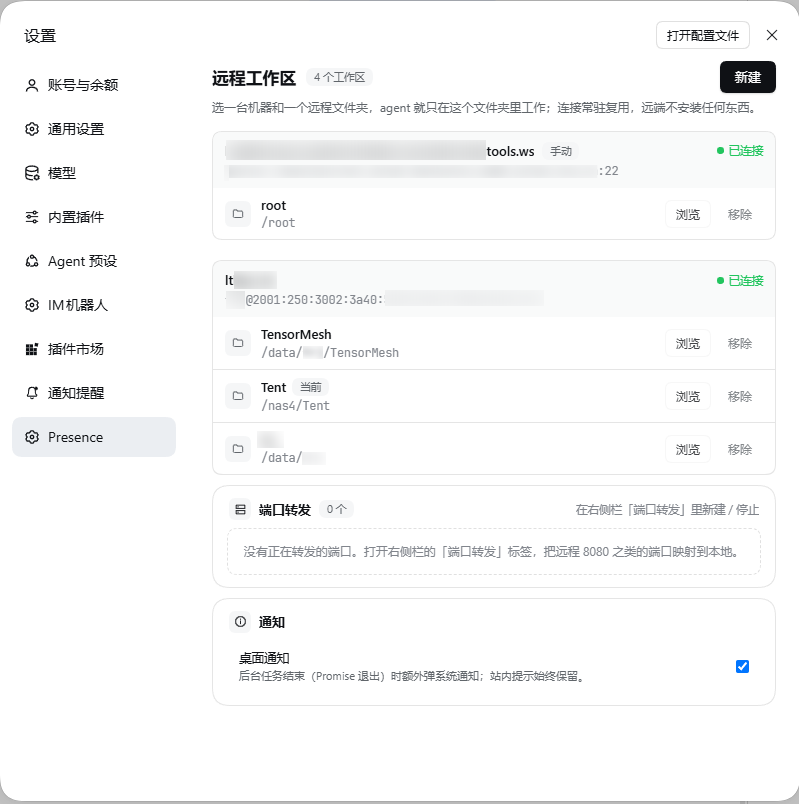 |
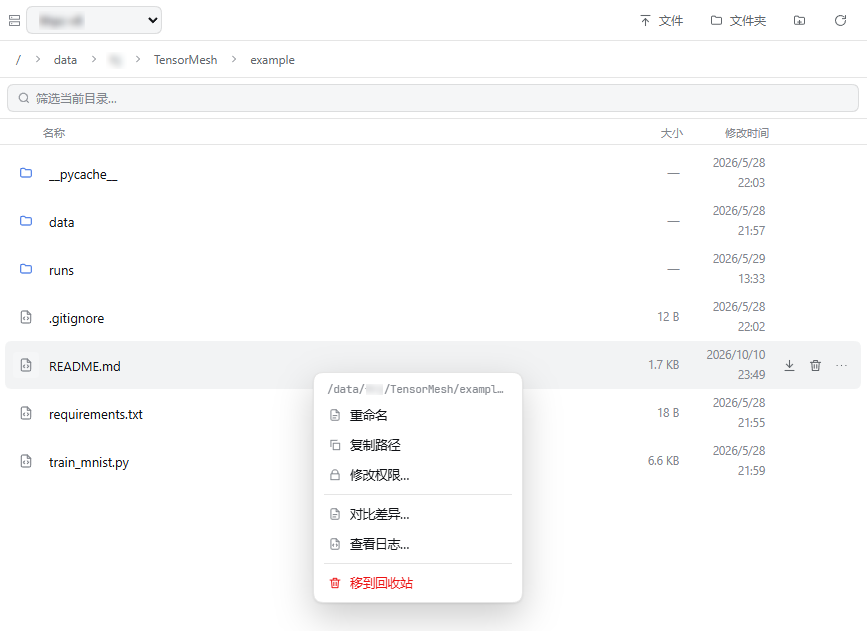 |
| Settings — every host and folder is a local tab | Remote workspace — the file tree and editor are on the host |
 |
 |
| @ files — completion indexes the remote machine itself | Terminal — the shell runs on the host, not locally |
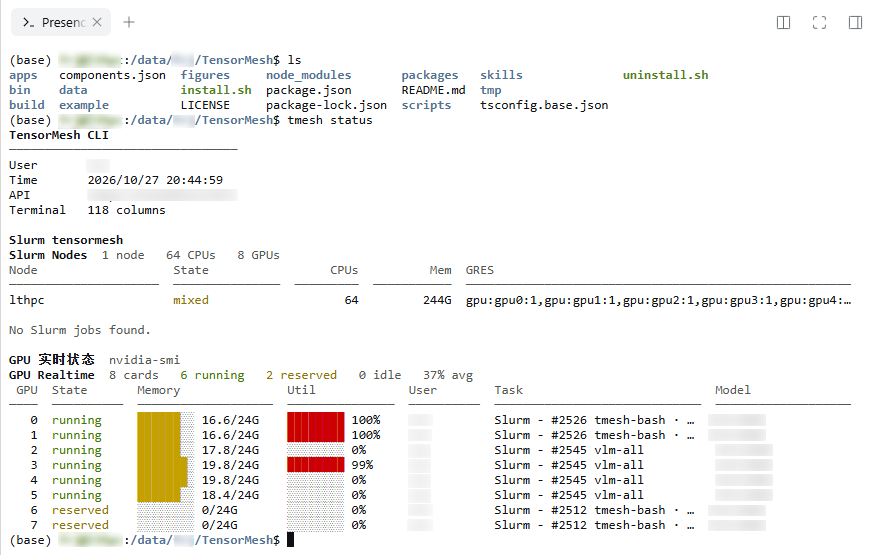
These three figures are rendered from a recorded 22-call session: train an MNIST classifier twice on a remote 64-core host, compare two learning rates, and export the result. Every row is one tool call with its measured duration; red rows are real failures kept verbatim.
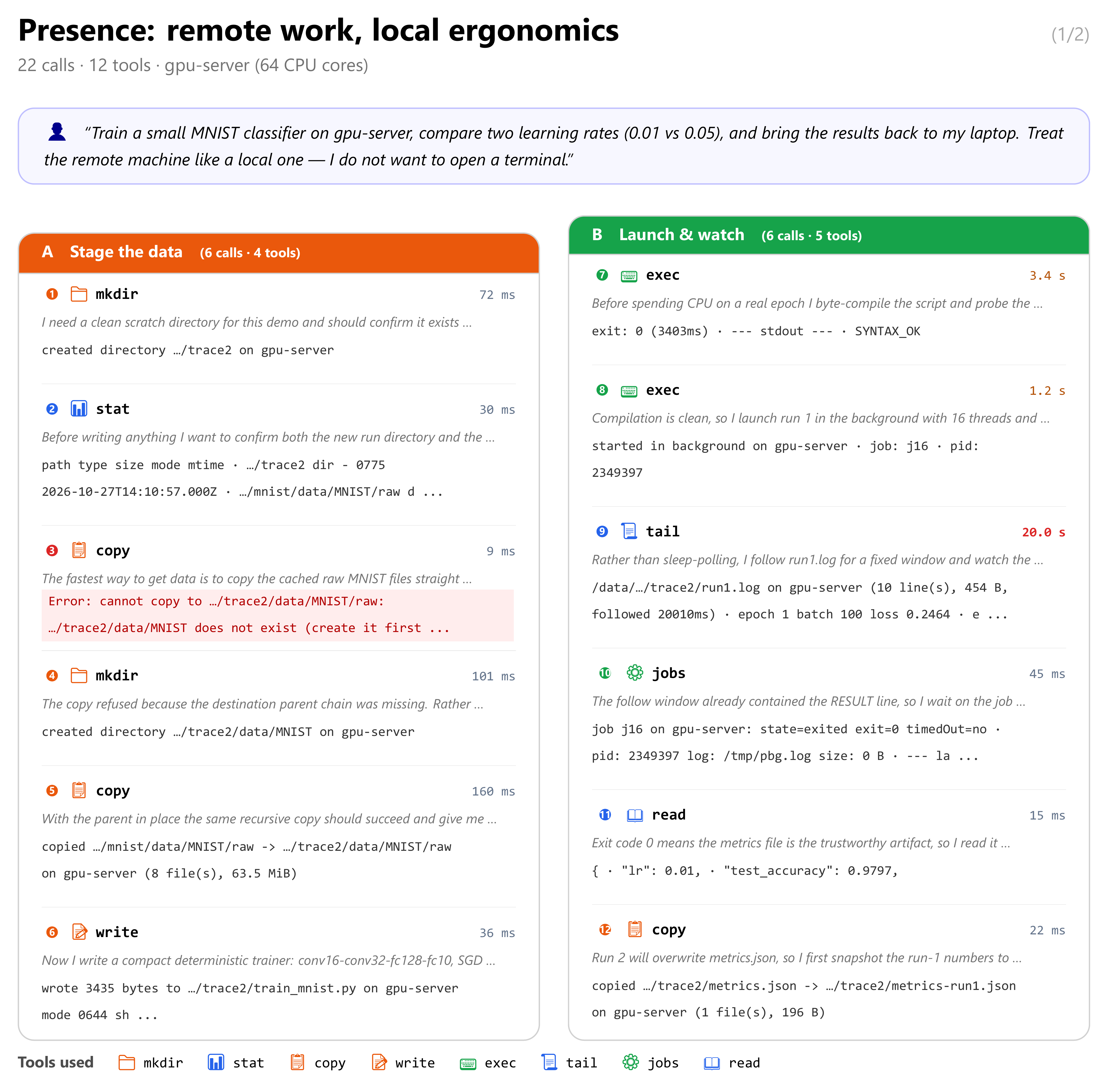
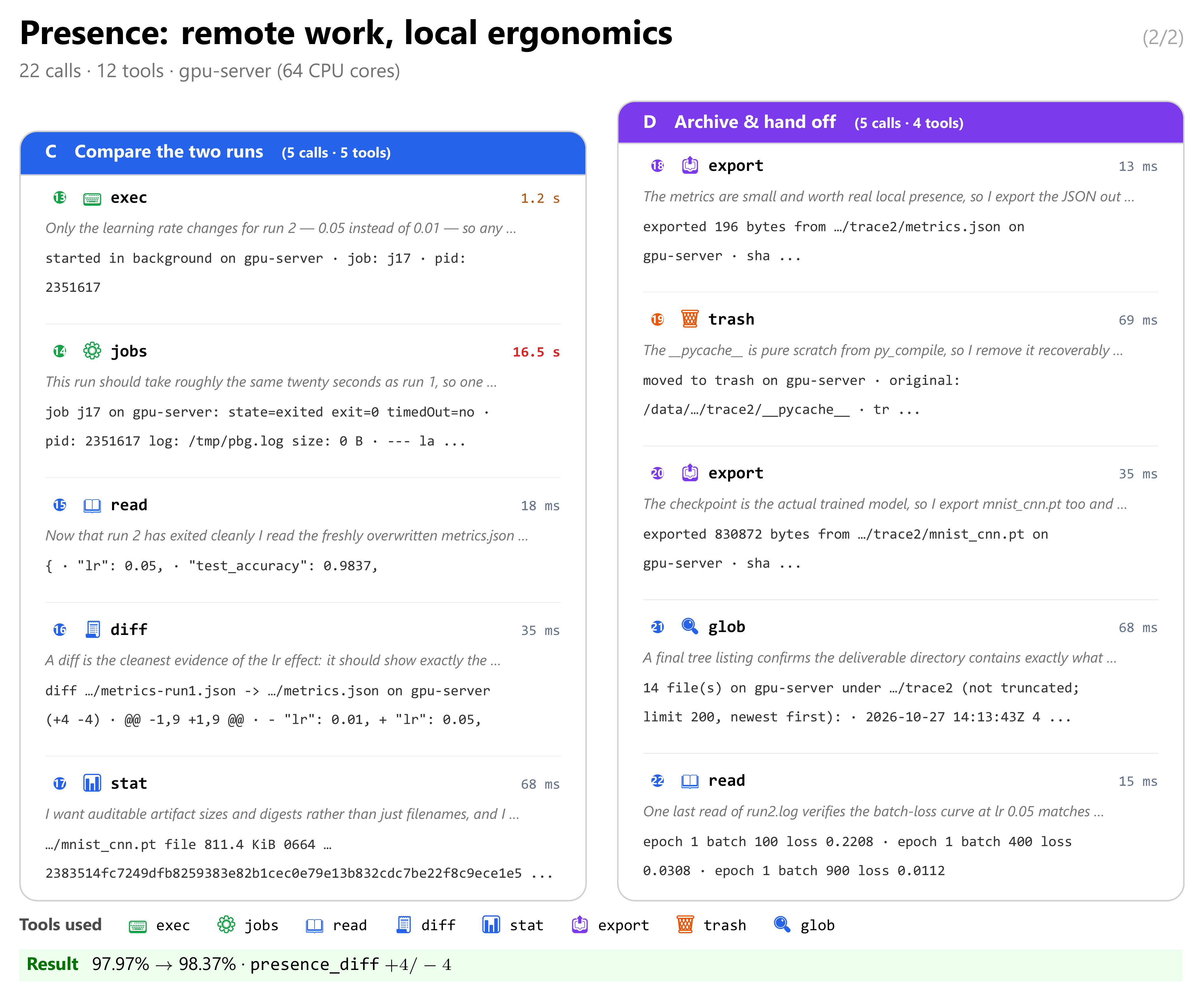
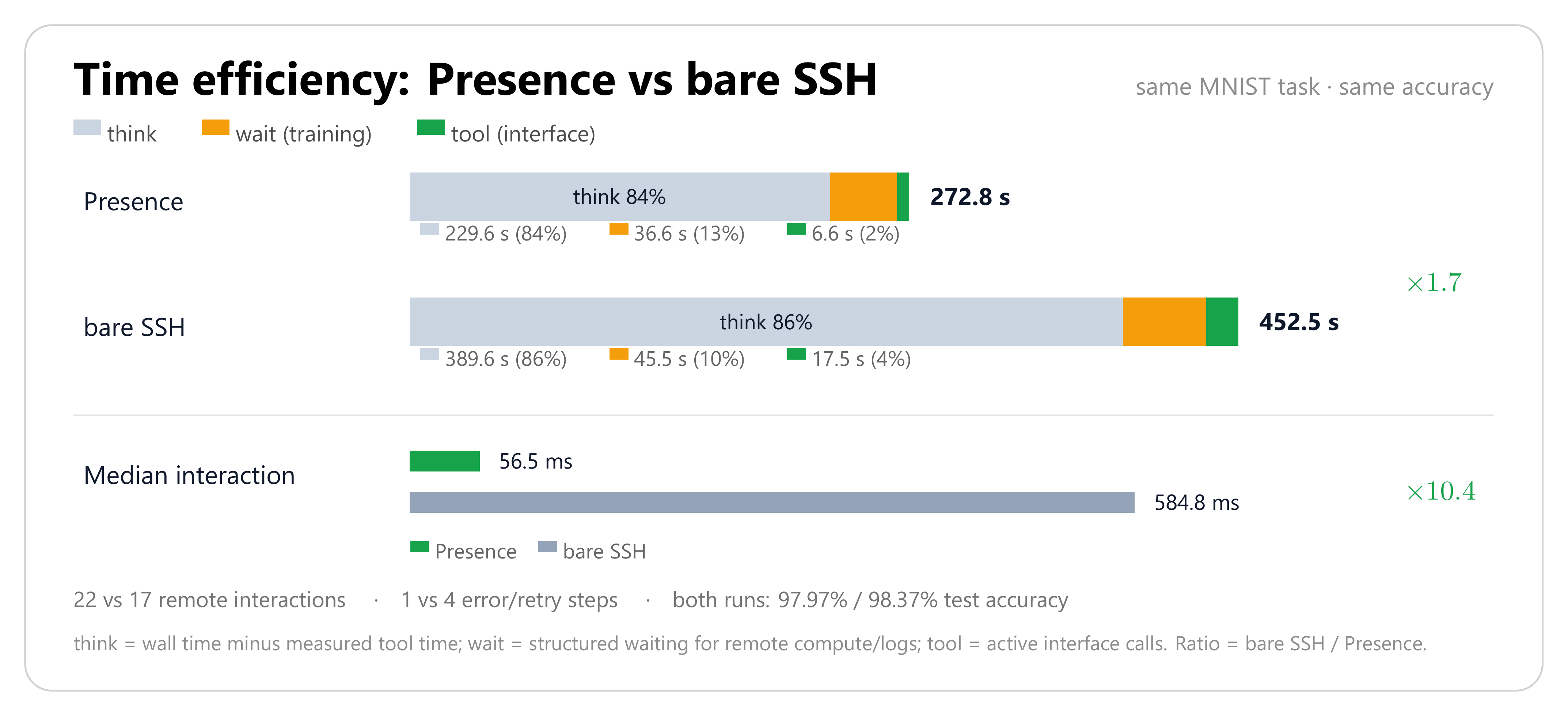
Figure 3 stacks end-to-end time into think / wait / tool. The same task through
bare ssh/scp takes 452.5 s versus 272.8 s, with a 10.4×
higher median interaction latency.
dsh plugin add @rjfan/dsh-presence@0.21.2From a source checkout:
dsh plugin add /path/to/dsh-presenceOpen Settings → Presence → New, choose a host from ~/.ssh/config (or paste a
manual ssh command), then pick a remote folder. It appears as a workspace; the
left sidebar, file tree, terminal and agent tools all use that remote directory.
A session started in that workspace is remote. A session started anywhere else (for
example a normal local project) stays local: it must pass host explicitly — or set
PRESENCE_HOST — before calling presence_exec / presence_*.
You: 把远程 8000 端口转发到本地,然后打开看看
Agent: presence_forward { remotePort: 8000 }
→ http://127.0.0.1:8000The same kernel is available to agents that cannot install DSH plugins (Codex CLI, Claude Code, OpenCode, Cursor, …).
npx -y presence-mcp # 20 tools over stdio// Claude Desktop / OpenCode style
{
"mcpServers": {
"presence": {
"command": "npx",
"args": ["-y", "presence-mcp"],
"env": {
"PRESENCE_HOST": "server",
"PRESENCE_WORKSPACE": "server:/srv/app"
}
}
}
}See mcp/README.md for Codex TOML, Claude Code, OpenCode and Cursor/Windsurf examples.
┌───────────────────────────────┐
│  DSH plugin  /  MCP server    │  two shells, one kernel
└──────────────┬────────────────┘
               │
        Presence kernel
        ├── ssh-config   hosts, ports, users, keys, jumps from ~/.ssh/config
        ├── connection   one persistent connection: SFTP / exec / PTY + pool + cancel
        └── host pool    one connection per host, created on demand, idle-collected
               │
        SSH (your existing keys, known_hosts, jumps, proxies)
               │
target: Linux / macOS, stock sshd| Agent operation | Channel | Remote dependency |
|---|---|---|
| read / write / edit / list / stat | SFTP subsystem | sftp-server (stock sshd) |
exec, search (rg/grep), git |
exec channel | commands already on the host |
| interactive terminal | shell channel + PTY | the host's login shell |
Measured on a Linux host:
| Operation | Latency |
|---|---|
ssh host '<cmd>' (new connection every time) |
520–540 ms |
| Presence connect (one handshake, key auth) | 145 ms |
Presence sftp stat |
p50 0.6 ms / p95 0.9 ms |
Presence exec true (new channel + shell) |
p50 7.6 ms |
| 8 concurrent exec channels | 15 ms total |
Keep TCP_NODELAY on: without it, request/response hits delayed ACK and p95 goes from 0.9 ms to 48 ms.
The DSH plugin exposes 25 tools. Inside a remote-workspace session relative paths
resolve against that workspace and host is optional; a local session must pass
host explicitly (or configure PRESENCE_HOST) — there is no fallback to the globally
last-activated workspace. Argument aliases are accepted at execute time
(path/file_path/filePath, old/oldString, new/newString, cwd/workdir, …),
so an agent's habitual spelling still works.
| Tool | What it does |
|---|---|
presence_hosts |
List SSH hosts, connection state and default host (format:"json" supported); workspace:true marks this session's machine and degraded rows carry the last error. default is session-scoped: this session's mounted host or PRESENCE_HOST, never a global last-active workspace. |
presence_connect |
Open/reuse a host connection and report the remote identity. |
presence_exec |
Run a remote command; pipefail, background, waitForPort, structured JSON, saveStdout; timeout defaults to 300 s; progress normalizes \r progress bars; long output spills to a remote file whose path is returned (tailLines); text reports start with host: <alias> remote cwd: <abs>; destructive commands dry-run first — confirm:true runs the whole command, confirm:"partial" runs only the safe segments. A local session must pass host. |
presence_jobs |
Background jobs: list, status, wait (with timedOut), stop (with alive/verified/portReleased), purge. Jobs persist to ~/.dsh/presence/jobs.json with pid/pgid; logPath is the job log to tail (the command's stdout/stderr on current kernels) and commandLogPath the command's own log — equal to logPath on current kernels, so use commandLogPath ?? logPath. After a restart, state is unknown until a liveness probe succeeds and the exit code may be missing. /presence/api/state job rows also carry pid, pgid, commandLogPath and persisted. wait accepts label/description/task (a short description of the actual task; the wait dock shows it), progressPattern (two capture groups, done and total, e.g. "Epoch\s+(\d+)/(\d+)") and progressUnit; the running wait appears in the floating wait dock with elapsed, progress, ETA and the last log line. |
presence_wait |
Block until exactly one remote condition is true: file {path, exists?, minBytes?, mtimeAfter?}, grep {path, pattern, count?}, process {pid\|pattern, alive?}, port {port, state:"open"\|"closed"} or job {jobId} (a job condition needs no host — the registry knows where it ran). Returns { met, timedOut, elapsedMs, observed, condition, polls }; a timeout is met:false and never an error. timeoutMs default 120 s (cap 1 h), pollMs/intervalMs default 1000 ms. Optional label/description/task (task summary), progressTotal and progressUnit feed the same wait dock (file bytes, grep matches, process/port state). |
presence_read |
Read a remote file with line numbers, offset/limit, or raw:true for verbatim content. |
presence_read_many |
Read 1–50 remote files in one call, with per-file byte/line caps. |
presence_write |
Atomic write; preserves mode; returns real mode, size and full sha256; ifMatchSha256 optimistic lock; mode:"append" appends at EOF and reports appended bytes + total size (ifMatchSha256 is overwrite-only and append rejects it); mode also accepts an octal string such as "755" to set permissions on an overwrite. |
presence_edit |
Exact-text replacement or line-range replacement, with compact diff, dryRun, JSON fields. |
presence_stat |
Batch stat for 1–100 paths: type, size, mode, mtime, optional sha256; missing paths return exists:false. |
presence_mkdir |
Create a remote directory (recursive by default); idempotent when it already exists. |
presence_move |
Rename or move a path inside the same machine; refuses to replace an existing file unless overwrite:true. |
presence_copy |
Copy a remote file (SFTP stream, or cp -p for large files) or a directory with recursive:true. |
presence_chmod |
Change permissions with an octal mode (755, 0644), optionally recursive. |
presence_diff |
Unified diff of two remote files, or a remote file against a local one; context lines and JSON stats. |
presence_tail |
Read the last N lines of a remote file, or follow it for a bounded time (follow:true, timeoutMs). |
presence_search |
Remote rg/grep search, count-only mode, JSON matches. |
presence_glob |
Find remote files by glob with size/mtime. |
presence_import |
Local → remote binary-safe upload with mode and sha256; batch paths[] (1–50) and/or a local glob into a to directory, with one result per file. |
presence_export |
Remote → local real file (content-addressed), for preview or native apps; batch paths[] or a remote glob; the local name defaults to the basename and a collision becomes name-<sha8>.ext; one result per file. A batch skips files recorded in the export manifest (~/.dsh/presence/exports/manifest.json) when the remote path, size and mtime still match (skipExisting:false re-exports); live progress goes to ~/.dsh/presence/exports/latest.json, reads use parallel SFTP requests, and each read times out after 30 s instead of hanging the call. |
presence_forward |
Forward a remote port to 127.0.0.1; open/list/close with JSON. |
presence_port_probe |
Check listeners and TCP reachability for up to 20 ports; expect:open|closed, polling. |
presence_http_probe |
Wait for port → forward → local HTTP assertions → close → verify the local port was released. |
presence_terminal |
Persistent PTY: open with cwd/command, write (ackOnly), read, close; tmux-backed sessions survive reconnects. |
presence_trash |
Recoverable delete: move to remote trash, list/restore; batch paths[]; returns sourceRemoved and restoreHint. |
presence_export { paths: ["/data/a.pt", "/data/b.pt"] }      # files:[{remotePath, localPath, bytes, sha256}]
presence_export { glob: "/data/ckpt-*.pt" }                   # every match; name-<sha8>.ext on collision
presence_import { glob: "dist/*.whl", to: "/data/wheels" }    # local → remote, one result per file
presence_write { path: "/data/train.log", mode: "append", content: "epoch 6 done\n" }
Single-path calls keep the existing path/to behaviour, so none of this is required for
one file.
| Where the path lives | Use | Why |
|---|---|---|
under the workspace mount (~/.dsh/presence/mounts/...) |
built-in read / write / edit / grep / glob |
they reach the remote machine; grep/glob are routed to it automatically |
remote absolute path outside the workspace (/data, /scratch, GPFS) |
presence_read / write / edit / stat / search / glob (list a directory with presence_exec) |
the built-in tools only see the mount, not the rest of the machine |
| local file, for preview or Office | presence_export first, then present / native open |
the mount path is virtual; only a real local file can be opened natively |
In a local session (cwd outside the mounts root) the built-in tools only touch local
files; every presence_* call needs host explicitly, or configure PRESENCE_HOST once.
presence_exec waits for the command, so it is the wrong tool for a training run, a
build or a server. The recipe:
1. presence_exec { command: "python train.py --lr 3e-4", background: true, label: "train-3e-4" }
   → { id: "j7", pid: 4242, pgid: 4242, logPath: ".../job.log", commandLogPath: ".../job.out" }
2. presence_jobs { action: "wait", jobId: "j7" }      # or presence_wait { job: { jobId: "j7" } }
3. presence_tail { path: <logPath>, follow: true }    # watch progress
   presence_wait { grep: { path: <logPath>, pattern: "epoch 6", count: 1 } }   # readiness
presence_jobs { action: "status" } gives a snapshot; stop terminates the process
group and verifies the port was released. Jobs persist to ~/.dsh/presence/jobs.json:
after a DSH restart a job shows unknown until a liveness probe succeeds (never a false
running) and its exit code may be missing.logPath is the job log to tail — the command's stdout/stderr on current kernels.
commandLogPath is the command's own log; it equals logPath unless the kernel records
a separate wrapper log, so tail commandLogPath ?? logPath.presence_wait replaces hand-written sleep+tail loops: wait for a port
(presence_wait { port: { port: 8000, state: "open" } }), a checkpoint
(presence_wait { file: { path: "/data/ckpt.pt", minBytes: 1000000 } }), a log line or
a process. A timeout returns met:false — a normal answer, not an error.done/total unit, an ETA computed from the sample rate, the last log line, and a
click-through detail view (job id, log path, samples). It polls /presence/api/waits; an
older host simply hides it. Pass progressPattern/progressUnit to presence_jobs wait
or progressTotal/progressUnit to presence_wait when you want a bar and an ETA.presence_terminal { action: "open", session: "train" } — the
tmux-backed session survives a reconnect.nohup, tmux new-session or a trailing & inside a foreground
presence_exec for long jobs: when the login-node session ends, the cluster may clean
up what it left behind. background: true already detaches through setsid; on
scheduler-managed clusters start the job with the cluster's own launcher
(rlaunch -d …, salloc/sbatch) so the scheduler owns it.rm -r/-f, git clean -fdx,
find -delete, shred, truncate and dd of= are first replayed with
no-op shims to expand their real targets; unset variables and protected paths
(workspace root, home, /, .git) are refused. A second call with
confirm:true is required to execute. A rejected mixed command also lists the
segments that are safe on their own (Safe segments you can run separately:);
confirm:"partial" runs only those. Removing one file with a literal
rm -f <path> inside the workspace is exempt — it cannot remove a tree.presence_trash for anything under a workspace: it moves the path to
~/.dsh/presence-trash/<timestamp>/ and returns a restore hint.presence_edit refuses
ambiguous anchors instead of guessing.read/write/edit share a read-before-write
guard. Path keys are canonicalised across presence://, mount paths, workspace-relative
and absolute remote paths, and successful presence_read / presence_write /
presence_edit calls count as a read (a write counts too). presence_exec running
cat file does not count — the guard cannot see shell output; read with
presence_read or the built-in read before editing.The plugin reads these environment variables on the host process:
| Variable | Default | Meaning |
|---|---|---|
PRESENCE_HOST |
— | Default SSH host for local sessions (explicit opt-in; also used by the MCP server). Remote-workspace sessions ignore it in favour of their mounted host. |
PRESENCE_WORKSPACE |
— | host:/abs/path to bind a remote workspace. |
PRESENCE_JOBS_FILE |
~/.dsh/presence/jobs.json |
Override the persisted background-job registry path. |
PRESENCE_PASSWORD_<ALIAS> |
— | Password for a host; <ALIAS> is uppercase with non-alphanumerics replaced by _. |
PRESENCE_MAX_CHANNELS |
8 | Concurrent channels per connection. |
PRESENCE_CONNECT_TIMEOUT_MS |
25000 | Connection attempt timeout. |
PRESENCE_IDLE_TIMEOUT_MS |
900000 | Idle connection timeout (connections with terminals are kept). |
PRESENCE_READ_ONLY |
false | Refuse writes/edits; reads, search and exec still work. |
PRESENCE_SFTP_TIMEOUT_MS |
30000 | Per-SFTP-request timeout; a stalled connection becomes an error instead of a pending call (1–300 s). |
PRESENCE_SFTP_RETRIES |
1 | Extra attempts for read-only SFTP requests on transient failures (0–3). |
Full configuration and the path/permission matrix are in docs/VERIFICATION.md and docs/HANDOFF.md.
npm install
npm install --prefix .dev --ignore-scripts rollup @rollup/plugin-node-resolve \
  @rollup/plugin-commonjs @rollup/plugin-terser codemirror @codemirror/language-data \
  @codemirror/theme-one-dark
node scripts/build-client.mjs
powershell -NoProfile -ExecutionPolicy Bypass -File scripts/package.ps1 -Version 0.21.2
# → dist/presence-plugin-0.21.2.zip
After a DSH update, prove the plugin still activates against the shipped runtime (Electron-as-Node; this is what caught the 0.2.1-rc.5 tool-schema tightening):
$env:ELECTRON_RUN_AS_NODE = '1'
& 'C:\...\DeepSeek Harness.exe' scripts\host-compat-check.mjs   # ACTIVATED OK with 25 tools
Tests need one SSH-reachable host unless noted:
node scripts/regression.mjs server     # transport, symlinks, timeouts, binary
node scripts/job-probe.mjs server      # jobs + port forwarding
node scripts/feature-probe.mjs server  # wait, sessions, pgid, readiness, search
node scripts/import-probe.mjs server   # local→remote binary, mode, sha256
node scripts/safety-probe.mjs server   # destructive guard + observation store
node scripts/p0-guard-probe.mjs        # guard split/partial/single-rm (no host needed)
node scripts/p1-docs-probe.mjs # README/zh/RELEASE anchors (no host needed)presence_* without host now raises
this session is local (cwd=...); pass an explicit host .... That is the intended 0.20
behavior, not a bug: the old silent fallback to the last-activated remote workspace could
run commands on another session's machine. Pass host per call, or set PRESENCE_HOST
once as the explicit opt-in default; a local session still never inherits another
session's workspace, and presence_hosts' default is session-scoped for the same reason.presence_exec { command: "cat file" } (or sed -n) does not mark the file as read; presence_read and the
built-in read do, and presence_write/presence_edit count as reads. A guarded
built-in edit after only exec cat can still fail.~/.dsh/presence/mounts/...) is virtual: it works through
ctx.fs / agent tools, but native apps (Explorer, Office, host Python) cannot
see it — use presence_export first.presence_exec defaults to a 300 s timeout; longer work must use background: true
(foreground output over the cap is spilled to a remote file, and tailLines keeps the
end of a long report). Background jobs persist to ~/.dsh/presence/jobs.json; after a
DSH restart their state is unknown until a liveness probe succeeds — never assume a
persisted job is still running, and its exit code may be missing. Tail
commandLogPath ?? logPath (logPath holds the command output on current kernels).PRESENCE_SFTP_TIMEOUT_MS),
read-only tools retry once on a transient error, and the fast tools carry a hard tool timeout
(stat/chmod/mkdir/tail 30 s, write/edit/read 60 s, search/glob 120 s). A dead connection thus
returns an error the agent can retry instead of an indefinitely pending call. Background
presence_exec, waits, export and import keep their own long-running semantics.presence_export moves at most 64 MiB per file and processes a batch sequentially.
Progress is written to ~/.dsh/presence/exports/latest.json while it runs, a stalled
read fails after 30 s instead of hanging the call, and a re-run skips files recorded in
the export manifest with the same remote path, size and mtime
(~/.dsh/presence/exports/manifest.json). For multi-GB transfers over a slow WAN use
scp/rsync/tar from a shell instead of a single export call.nohup / tmux new-session / & started inside a foreground presence_exec for long
jobs. Use background: true (detached with setsid) or presence_terminal (tmux),
and let the cluster scheduler own the job where required (rlaunch -d, salloc/sbatch).path/file_path/filePath, old/oldString,
new/newString, replaceAll/replace_all, dryRun/dry_run, cwd/workdir);
the canonical name is what the tool schema documents.MaxSessions (default 10) bounds concurrent channels; the pool uses at most 8.tmux on the target
(used automatically by presence_terminal { session }).@ file completion indexes the remote tree lazily (about 10 s per workspace);
on a very large tree the first query can take a few seconds.Issues and PRs are welcome. For a feature, open an issue describing the remote
workflow you want; for a fix, keep the diff focused and add a probe under
scripts/ when behavior changes.

CLASSIFICATION EVIDENCE
系统优先读取 GitHub Topics,再与站内分类词典和词根规则比对。当前命中: mcp。
morluto
Reverse engineer anything with agents, from app behavior down to native binaries.

deepseek-ai
DeepSeek Harness: Everything is a Plugin.

nexu-io
The 1st Collaborative AI Design Agent Workspace. Local-first and open source. Create motion, prototypes, websites, apps, dashboards, presentations, images, and videos with your team and AI agents. Share work, exchange feedback, and iterate together in one workspace.