E-Ink Retro for DeepSeek Harness
English | 简体中文









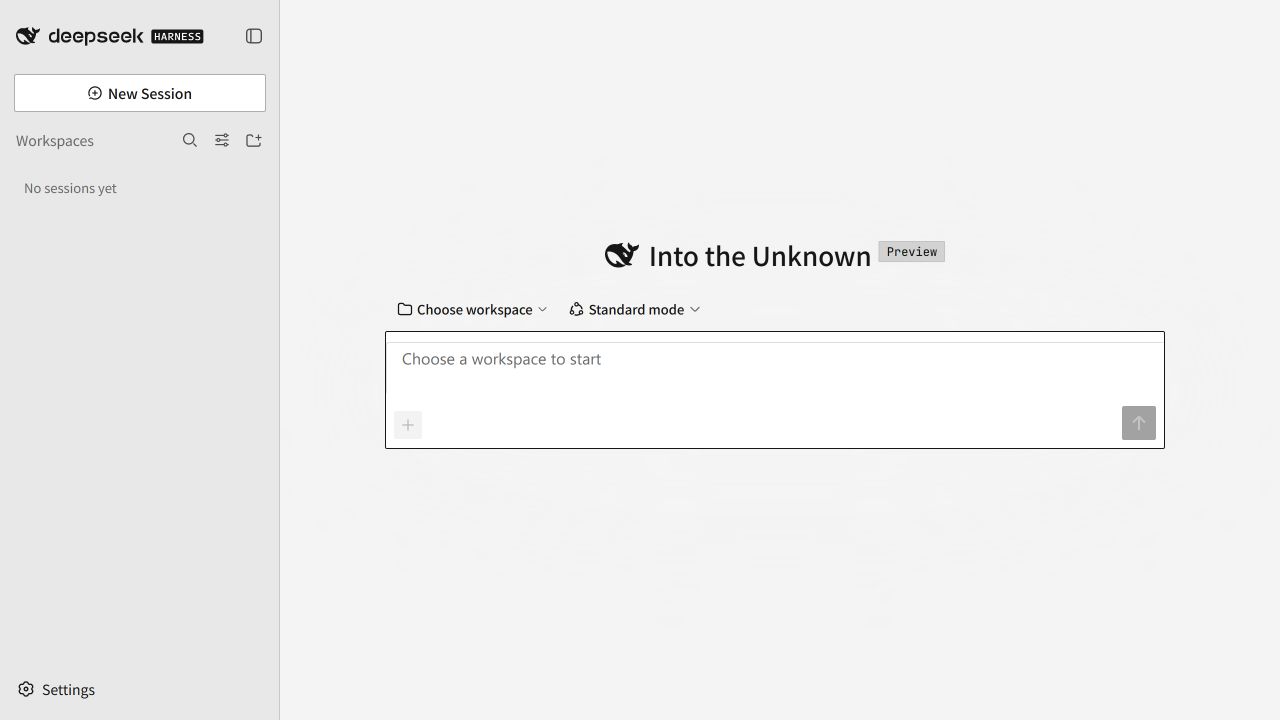
E-Ink Retro is a client-side theme for DeepSeek Harness. It uses neutral paper surfaces, near-black type, hard offset shadows, compact corners, and black-and-white selection states. The geometry takes cues from classic Macintosh interfaces while keeping the DSH layout and workflows recognizable.
Highlights
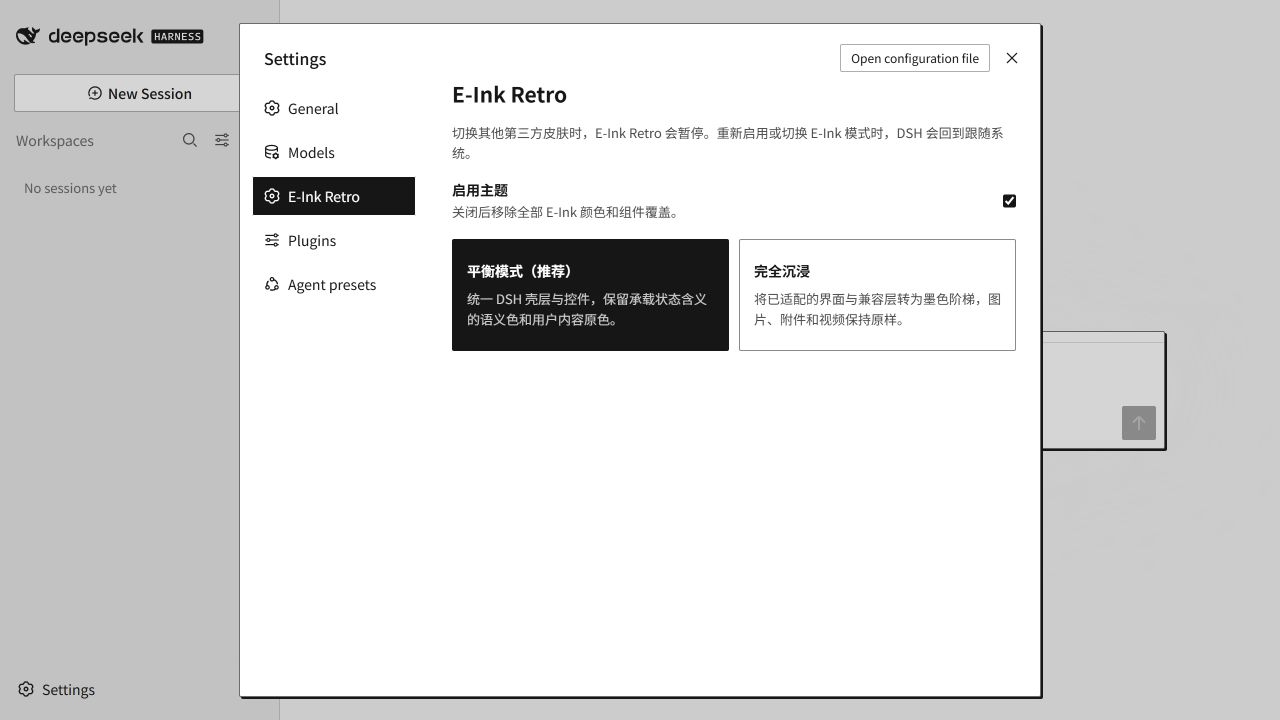
- Balanced mode applies the paper-and-ink shell while keeping semantic status colors and user media.
- Immersive mode maps supported DSH surfaces and compatibility layers to a monochrome ink ramp.
- Links, menus, form controls, tree items, and other adapted elements share a visible keyboard focus treatment.
- Images, attachments, video, canvas output, and iframe content keep their original rendering.
- Theme settings follow the DSH page language in English or Simplified Chinese, with English as the fallback.
- The theme pauses when you select another third-party theme.
Modes
| Mode |
Behavior |
| Balanced |
Applies the paper-and-ink shell and control language. Semantic status colors and user content remain available. |
| Immersive |
Maps supported DSH surfaces, status tokens, and verified compatibility layers to grayscale. User media remains unchanged. |
| Off |
Releases the theme token layer and removes the active root attribute. The plugin stays installed. |
Install
Requirements:
- DeepSeek Harness with a
web profile
- Node.js 20 or newer
pnpm available to the DSH plugin command
Install the tagged GitHub release:
dsh plugin --profile web add github:exoticknight/dsh-theme-eink-retro#v0.3.1
Restart DSH Web after installation, then open Settings → E-Ink Retro.
Update
Install the newer release tag, replacing the version in the command:
dsh plugin --profile web add github:exoticknight/dsh-theme-eink-retro#vX.Y.Z
Restart DSH Web after changing versions. The tag is intentionally pinned, so updates are explicit and reversible.
Disable or remove
Clear Enable theme in Settings → E-Ink Retro to stop applying the theme without removing the plugin.
Remove the package from the profile:
dsh plugin --profile web remove dsh-theme-eink-retro
Restart DSH Web after removal. The plugin removes its injected style and token layer during unload. Two local mode preferences remain in browser storage so a later reinstall can restore your last selection.
Roll back
Install a specific release tag again:
dsh plugin --profile web add github:exoticknight/dsh-theme-eink-retro#v0.1.0
Directories
You can find E-Ink Retro in these directories:
Use
Open Settings → E-Ink Retro, enable the theme, then select Balanced or Immersive.
Selecting another third-party theme pauses E-Ink Retro. Enabling E-Ink Retro or changing its mode while a third-party theme is active switches DSH back to System. Returning to a built-in System, Light, or Dark theme restores the selected E-Ink mode.
Compatibility
The v0.3.1 release was built and checked with:
| Component |
Version or environment |
| DeepSeek Harness |
0.1.5-rc.2 |
| Node.js |
24.2.0 |
| pnpm |
11.24.0 |
| Operating system |
Windows 10.0.26200.0 |
DSH is in developer preview. A future DSH release may change UI hooks or theme tokens and require a plugin update.
Compatibility boundaries
The theme uses DSH semantic tokens and verified component surfaces. Components that consume those tokens inherit the palette.
- Native select menus may use operating-system styling after they open.
- Plugins with hard-coded colors, Shadow DOM, or isolated rendering inherit only part of the theme.
- The optional
dsh-context adapter targets the v0.31.x interface.
- High-contrast and print media have explicit fallback treatments. This project does not claim full WCAG certification.
Privacy and storage
E-Ink Retro runs in the DSH client. Its host entry performs no theme work.
- It uses the DSH runtime, theme, and settings services.
- It changes DOM attributes, CSS, and theme tokens.
- It stores two mode preferences in browser
localStorage.
- The current source contains no network requests, telemetry, conversation access, or file access.
- Removing the plugin does not delete the two stored mode preferences.
Support
Report problems through GitHub Issues. Include the DSH version, plugin version, E-Ink mode, built-in DSH theme, screenshot, and reproduction steps.
Install from source
Clone the repository, install dependencies, and build:
npm install
npm run build
Link the checkout into DSH:
dsh plugin --profile web add link:/absolute/path/to/dsh-theme-eink-retro
Windows example:
dsh plugin --profile web add link:C:/path/to/dsh-theme-eink-retro
Development
Run the complete local check before submitting a change:
npm run check
git diff --exit-code -- lib
npm pack --dry-run
The main implementation files are:
src/client/tokens.ts: Balanced tokens and the Immersive ink-ramp overlaysrc/theme.css: design tokens, component geometry, interaction states, and compatibility adapterssrc/client/index.ts: mode storage, token installation, DSH theme coordination, settings, and cleanuptests/theme.test.mjs: package, release, and theme-boundary regression checks
Conventions:
- Keep theme CSS under
html[data-dsh-theme-eink-retro]. The plugin settings block uses .eink-retro-settings because it must remain readable while the theme is off.
- Put authored colors behind
--eink-* tokens. A component may consume an official --dsw-* semantic token when that token represents the component's DSH surface role.
- Use
--eink-rule for separators and static surfaces. Use --eink-rule-strong for operable or floating surfaces.
- Keep monochrome compatibility adapters under the
immersive attribute selector.
- Do not add a global media filter. A generated class selector requires a comment explaining why no stable hook exists.
- Localized accessible-name selectors must use substring matching, include every supported locale, and carry a structural constraint.
License
Apache License 2.0


