
模型与 MCP
待识别

rea
morluto
Reverse engineer anything with agents, from app behavior down to native binaries.

evolution301/agent-control-tower
Local control tower for AI-agent teams: async dispatch, a mandatory self-review gate, adversarial review (break-it-prove-it), verified acceptance, compounding skills — CLI + DSH plugin + a live isometric dashboard.
PROJECT TOPICS
INSTALL REFERENCE
dsh plugin --profile web add github:evolution301/agent-control-tower
该命令指向仓库当前默认分支;尚无绑定当前 commit 的完整验证结果。
PROJECT README
One agent to talk to. Many agents doing the work. Evidence before "done".
A local control tower for role-based AI agent teams — dispatch, report, verify, accept or rework. DSH-first, adapter-portable, no SaaS, no database, no daemon.








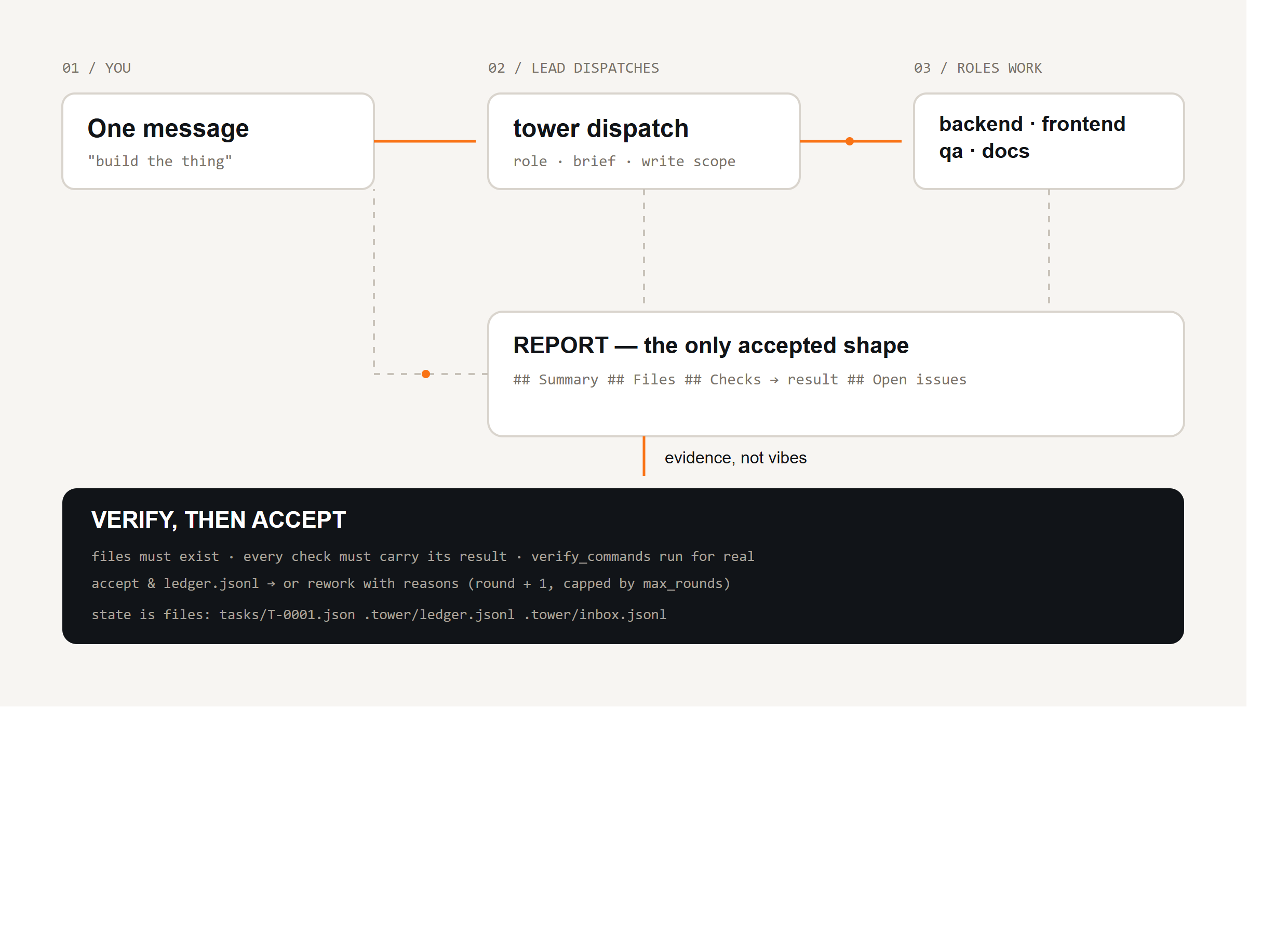
You can already get one agent to write code, one to write copy, one to review. What breaks is the handoff between them — in five predictable ways:
| What actually happens | What it costs you |
|---|---|
| Self-grading — the agent that did the work also reports "done, tests pass". It never ran them. | You ship a bug and find it in production. |
| Context rot — a long session compacts its history, and the deliverable was "in the conversation". | Re-doing work, contradicting earlier decisions, circular rounds. |
| Silent collisions — two agents edit the same file in the same round; both report success. | Lost work, regressions nobody can explain. |
| No audit trail — which role changed what, on which instruction? | You cannot review, reproduce, or hand the project over. |
| Ping-pong — "fix it" → "fixed" → "still broken". Nothing tracks rounds or forces escalation. | Hours burned; you become the message bus. |
agent-control-tower is the missing middle layer.
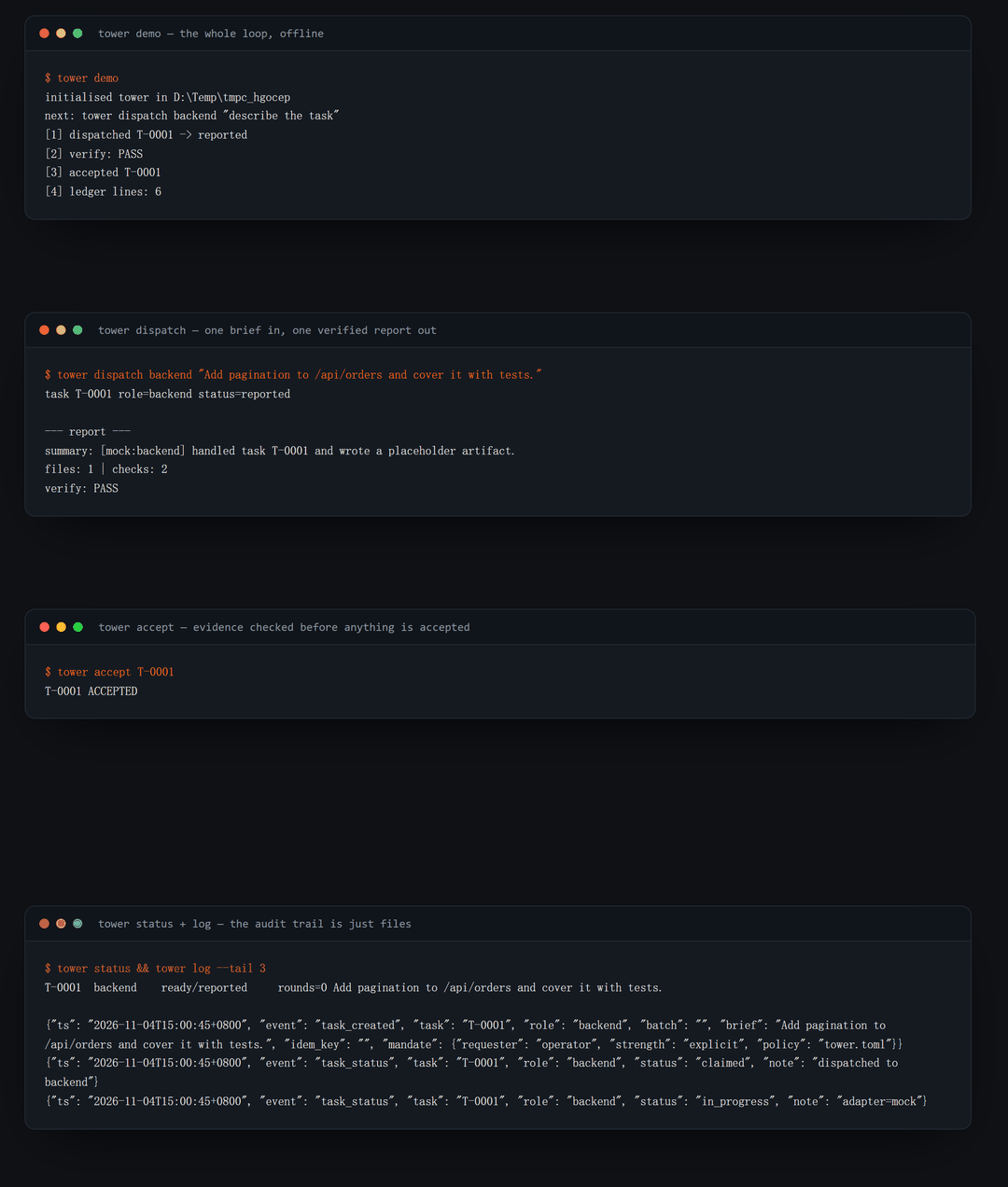
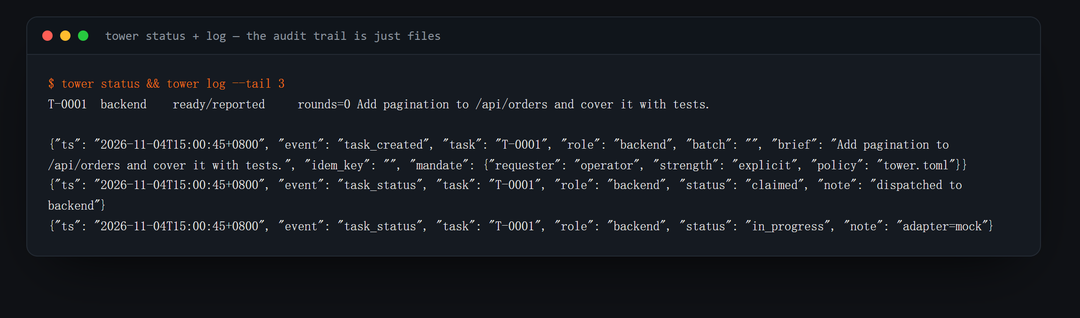
Real output: tower demo → tower dispatch → tower accept → tower status / tower log
| Dispatch | Verify & accept |
|---|---|
 |
 |
| Audit trail — just files |
|---|
 |
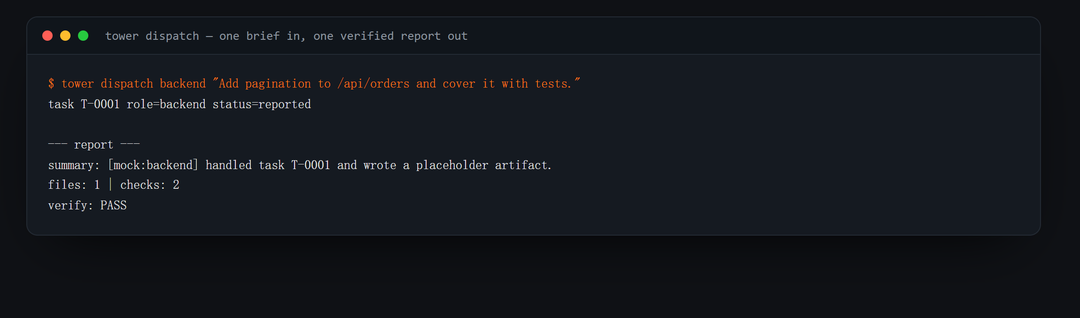
tower dispatch frontend "Rework the home layout. Deliver before/after screenshots at 1440 and 390."
tower inbox                      # what came back
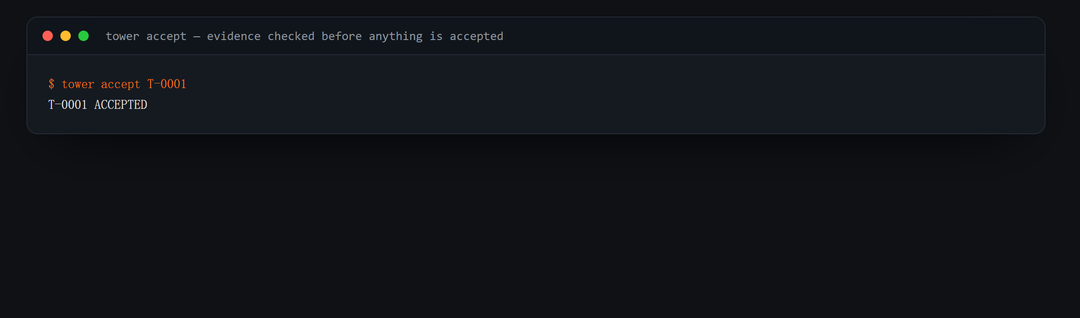
tower accept T-0001              # files exist? checks carry results? verify_commands pass?
tower rework T-0001 --note "Checks list no results; re-run the suite"Good fit
tower demo runs the loop offline in under a second.Not a good fit
| Without the tower | With the tower |
|---|---|
| You paste briefs between windows | tower dispatch <role> "<brief>" — contract and write scope included |
| "Done ✅", no evidence | Reports must list Files (must exist) and Checks (must carry a result); verify_commands run for real |
| Deliverables live in chat | Deliverables in roles/<role>/, reports in <task>-REPORT.md |
| Nobody knows who changed what | Append-only .tower/ledger.jsonl, timestamped |
| Rounds loop forever | round counter + max_rounds → the tower stops and tells you to escalate |
| Two agents overwrite each other | write_scopes per role, one directory per role |
| Work lost after compaction | State on disk; tower rework T-0012 resumes with the note attached |
| Can't hand the project over | git log of reports and tasks is the handover doc |
| You re-read every report to see if a human is needed | tower attention lists only ready / blocked / failed |
| A retry or a double-click creates duplicate work | tower dispatch --key <id> returns the existing task |
A bot edited a theme file on the server; the local working copy never got the change, and the next normal upload silently erased it (2026-11-11). The tower now carries the check that makes that impossible to do by accident:
tower deploy check generatepress-child/functions.php --remote ./functions.php
# in_sync       → nothing to upload
# local_changed → safe to upload (only local moved)
# remote_drift  → REFUSE: pull first (`tower deploy pull ...`)
init accepts the current server state as baseline, pull brings the server copy
into local (local file backed up under .tower/deploy/backup/), done verifies an
upload landed and advances the baseline. Every action is ledgered, a receipt is
written under .tower/deploy/receipts/, and --role <role> also appends to
roles/<role>/DEPLOY-SYNC.md. How the remote file is read is one config line:
deploy:
  fetch: ["{python}", "-m", "control_tower.deploy_fetch",
          "--cwd", "<site>/generatepress-child", "--remote", "{remote}"]
control_tower.deploy_fetch imports the project's w.py and reads the file via
w.sync_request({"action": "read_file", …}) — generic for w.py-based sites. Put the
protocol in docs/deploy-rules.md and it rides every dispatch prompt.
git clone https://github.com/evolution301/agent-control-tower.git
cd agent-control-tower
python -m venv .venv && source .venv/bin/activate   # Windows: .venv\Scripts\activate
pip install -e .
Python 3.10+. One runtime dependency (PyYAML).
tower demo[1] dispatched T-0001 -> reported
[2] verify: PASS
[3] accepted T-0001
[4] ledger lines: 5The mock adapter writes a placeholder artifact and a real report, so the entire
dispatch → report → verify → accept loop is deterministic and CI-friendly.
The pattern was extracted from a real DeepSeek Harness deployment: one lead session steering several long-lived role sessions through a multi-week build, verifying every delivery.
# tower.toml
roles:
  frontend:
    description: Layout, components, styling, browser verification.
    adapter: dsh
    write_scopes: ["web/"]

adapters:
  dsh:
    base_url: "http://127.0.0.1:65163"
    sessions:
      frontend: "session-acc99990-..."
→ Full walkthrough: docs/dsh-quickstart.md — create role sessions, wire config, run the loop, plus the five failure modes the reference project hit and how the code prevents them.
packages/dsh-towerA companion bundle registers five tools on the harness tool registry, so the session never leaves the conversation:
dsh plugin --profile <name> add ./packages/dsh-towertower_dispatch · tower_inbox · tower_accept · tower_rework · tower_status
→ packages/dsh-tower
tower panel serves one read-only page on 127.0.0.1 (default 8787, --port to
move it). It answers three questions in the order a person asks them:
Several projects, one switcher. Each project keeps its own tower.toml and
.tower/; tower projects add <path> (or scan) registers them and the page grows
project pills plus an all projects view. tower projects use <name> marks the
active one — the panel defaults to it, and the DSH bundle's tower_* tools follow it
(tower_use switches it from inside a session, no restart).
Deep links: ?lang=zh, ?theme=dark, ?project=<name>, ?project=__all__.
tower dispatch --async queues the task and returns its id in under a second; a
background tower worker process (started automatically on first use) runs the
adapter, relays peer messages and runs auto-triage, then lands an async_settled
notice in tower inbox. Set dispatch_mode: async in tower.toml (or
roles.<name>.dispatch_mode) to make it the default; --no-auto and every other
flag behave as in sync mode.
tower relay --to <target> -m "..." delivers a message to any DSH session —
a session id, a unique session-title substring, or the alias tower (this
tower's own inbox). With --await-receipt, a worker watches for a reply carrying
the relay id (the peer answers with tower relay --to tower --reply <id> -m "...") and lands a relay_receipt — or relay_timeout — in the inbox.
In the DSH plugin this is tower_dispatch {async: true} and the new
tower_relay tool.
dispatch_mode: async      # tower default (per-role: roles.<name>.dispatch_mode)
workers: 4                # threads inside one `tower worker` process
notify:
  kind: lead_session      # inbox (default) | lead_session — one message pushed to the lead's session
  session: session-…
async_roles: [seo, ops]   # role-level override as a list
Relay flags: --to role:<name> targets a role's session; --wait <file> uses a
file as the receipt (its content, once it appears); --timeout 45m uses the same
duration grammar as --due. Settlement notices read
[tower] T-00xx settled: accepted | role=… | summary=…, land in tower inbox,
and — with notify.kind: lead_session — are also pushed to the lead's session.
.tower/.lock serialises board writes; .tower/events.jsonl is the
enqueued→settled→notified audit trail.
The control room lives at /scene: an isometric glass tower where each role is a robot,
floors are departments, LED strips show alert state, and approving / replying / repairing
happens in place (every action lands in the ledger). Data comes from /api/scene, i.e. from
the same task files this README describes.
tower panel keeps a stable URL: it reuses the port this workspace used last
time (.tower/panel-port), else 8787, else the next free port — and remembers the
choice, so a bookmarked page keeps working. Two panels can no longer share one port.
When the installed code changes (a plugin update), the running panel detects it and
restarts itself, and the page reloads once the new instance answers — no more
"the board is silently showing yesterday's build".
Every number has a written formula. The board is for people, so the model is specified once — docs/board-model.md — and the page, the CLI and the panel all read the same decisions:
| Queue | Who owns it |
|---|---|
| 需要你 / needs you | a person: only blocked or failed (retries exhausted) |
| 待总控 / tower queue | the tower: verify → accept, or rework with the failure reasons |
| 进行中 / in flight | the bot |
| 已完成 / done | nobody: accepted tasks never occupy a queue |
tower triage closes that loop; tower dispatch runs it automatically after a
report (--no-auto opts out), so an accepted-by-verifier job never waits for a human.
Two renderings of the same snapshot — the terminal (tower board) and a local read-only web panel
(tower panel). Person-states first, healthy work takes no space.
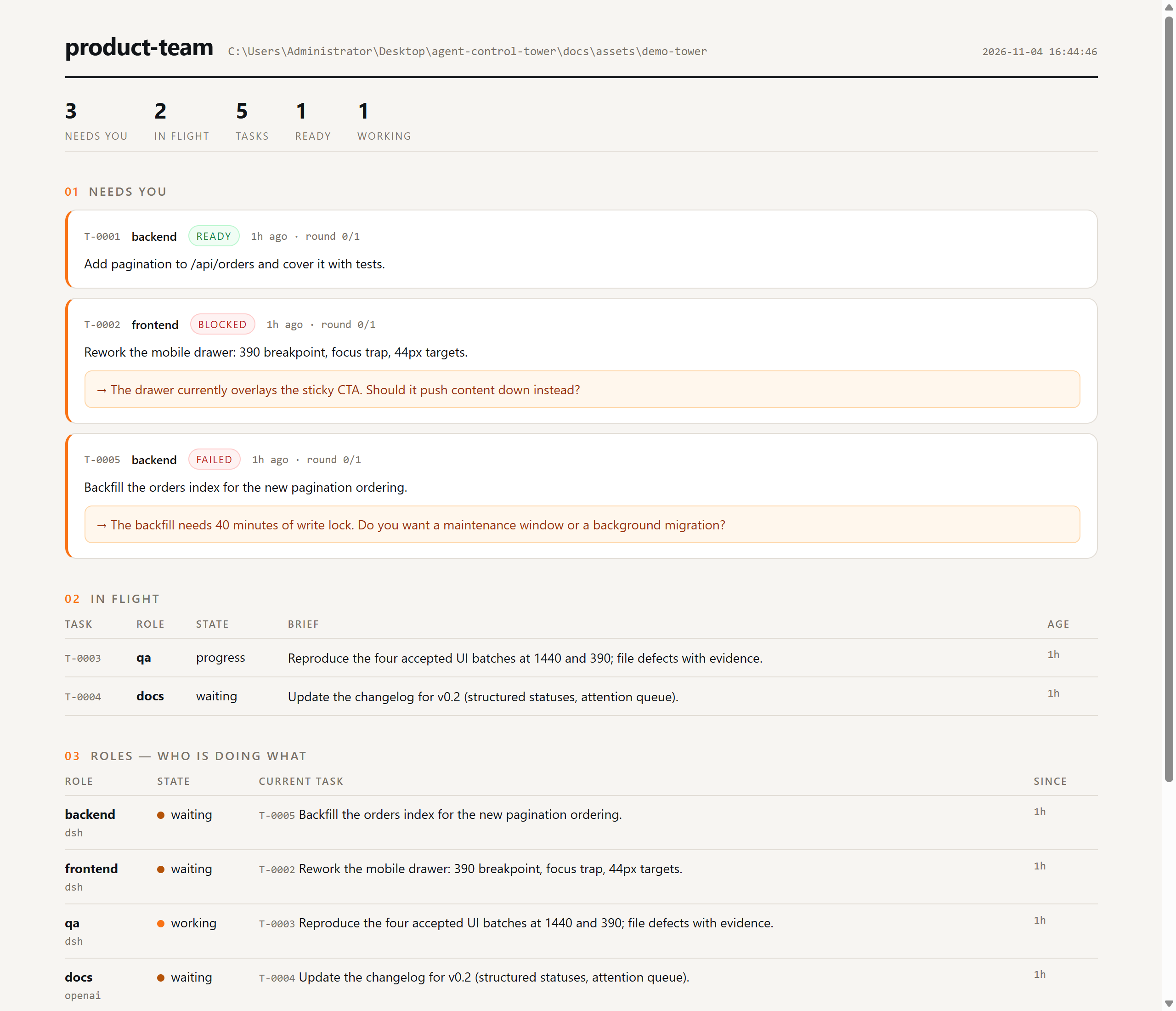
tower board            # print once
tower board --watch    # refresh in place (tmux/ssh friendly)
tower panel            # http://127.0.0.1:8787/  (read-only, auto-refresh 2s)
The panel shows needs you (ready / blocked / failed, each with its one question), then what is in flight, then what every role is doing right now, then the tail of the ledger. It reads the same files the CLI does — no database, no daemon, no writes.
Resolution is exactly: --workspace <dir> > a tower.toml found by walking up
from the cwd > an error. The CLI deliberately does not fall back to the
global active-project pointer (tower projects use): with several towers alive
that silently routed say / dispatch / accept into the wrong tower
(2026-11-10 field report). The pointer only steers the GUI panel.
Every write command (dispatch, accept, rework, relay, say, escalate,
batch, restate, review, attention claim|resolve) prints
resolved workspace = <path> on stderr first, so the caller can see the target
even when stdout is machine-readable (--json).
tower --workspace G:/projects/tower-a dispatch ops "deploy"An adapter is the only component that knows how to make an agent act. Same contract for all four:
| Adapter | Drives | Use when |
|---|---|---|
dsh |
a live DeepSeek Harness session (session/prompt, queued) |
primary: long-lived roles with browser + shell tools |
cli |
any agent binary that takes a prompt (claude -p, codex exec, Aider, your script) |
you already run agent CLIs |
openai |
any OpenAI-compatible /chat/completions with a small run_shell loop |
hosted models, vLLM, Ollama |
mock |
nothing (writes a placeholder artifact) | tests, demos, CI |
Adding one is ~40 lines → docs/adapters.md.
## Status         → progress | waiting | ready | blocked | failed | dropped
## Summary        → 2–5 sentences
## Files          → - <path> — <what changed>          (must exist on disk)
## Checks         → - <command run> → <result seen>    (a bare command fails)
## Open issues    → anything unfinished, or "none"
## Attention      → only when status is blocked/failed: one concrete question
The status vocabulary is a closed set, borrowed from DeepSeek's
dsh-superagent research prototype: the
lead routes on a state, not on prose, and tower attention shows only the tasks that are actually
waiting for a person. See docs/superagent-ideas.md for what we borrowed
and what we deliberately left out.
tower accept mechanically rejects: a missing/empty section · a check line without a result · a
listed file that does not exist · any failing entry in verify_commands.
verify_commands:
  - "pytest -q"
  - "npm run build"
That is the difference between "the agent said it works" and "the tower checked".
| Command | Purpose |
|---|---|
tower init <dir> |
scaffold config + role folders |
tower dispatch <role> "<brief>" [--due 90m] |
create and run one task (idempotent with --key, deadline with --due) |
tower dispatch <role> "<brief>" --restate |
restatement gate: the role first says back what the brief means; no work runs |
tower restate ok <task> |
accept that restatement, then dispatch the work |
tower say <from> <to> "…" |
bot-to-bot note: queued into the peer's session + filed for the lead, fire-and-forget |
tower huddle role1 role2 … --topic "…" |
up to six roles, two bounded rounds; minutes land in .tower/huddles/ |
tower stats [--all] [--days 14] |
business view: verified rate, lead time, throughput, per-role stats |
tower projects list / scan / add / remove / use |
many towers, one switcher: what the panel and tower_* tools follow |
tower supervise |
chase every open task past its deadline in its own session |
tower batch role1 role2 --brief "…" |
fan one brief out to several roles |
tower inbox [--all] [--read] |
reports filed by roles (the full log) |
tower attention |
only the tasks waiting on a person |
tower board [--watch] / tower panel |
the same picture, in a terminal or a local web page |
tower accept <task> |
verify, then accept (auto-rejects to rework) |
tower rework <task> --note "…" |
send back with reasons and re-dispatch |
tower status [--json] |
task board |
tower show <task> / tower log |
inspect one task / tail the ledger |
tower demo |
offline end-to-end demo |
tower doctor |
validate config, adapter options, keys, sessions |
--restate buys one cheap turn before an expensive one. The role answers with only
## Restatement / ## Assumptions / ## Done looks like; the task waits in restating, shows up under
needs you, and cannot be accepted — no report exists yet. tower restate ok <task> copies the
accepted text into the work prompt as ## Confirmed understanding, then dispatches. The gate fails
closed: a non-zero exit or a missing section leaves the task failed, never restating.
my-project/
├── tower.toml              # roles, adapters, verify commands
├── roles/
│   ├── backend/            # this role's only write area
│   │   ├── AGENT.md
│   │   └── T-0001-REPORT.md
│   ├── frontend/
│   └── qa/
└── .tower/
    ├── tasks/T-0001.json   # materialised task view
    ├── ledger.jsonl        # append-only event log (source of truth)
└── inbox.jsonl # reports + unread flag| single agent | agent framework (graph/DSL) | agent-control-tower | |
|---|---|---|---|
| Who routes the work | the one agent, in its head | the graph you wrote | the lead, explicitly, per task |
| Deliverable | chat text | node outputs | files + a four-section report |
| "Done" means | the agent said so | the node finished | the tower verified it |
| Audit trail | scrollback | framework logs | ledger.jsonl you can git diff |
| Setup | prompt | graph + runtime + infra | pip install + one YAML |
| Runs offline / in CI | no | sometimes | yes (tower demo) |
Do I need DSH to use it? No. DSH is the primary adapter because that is where the pattern came
from; cli, openai and mock follow the same contract.
Does it run the agents itself? No. It renders the prompt, calls your adapter, and checks what came back. The agent runtime stays yours.
Can agents talk to each other? No. Hub-and-spoke on purpose: the lead routes, so the task tree stays inspectable and two roles cannot silently converge on the same file.
What if a role keeps failing? round increments on every rework; when round > max_rounds the
tower stops and tells you to escalate instead of looping.
Is the ledger safe to commit? Yes — append-only JSONL; committing it puts the audit trail in
git log. Add .tower/ to .gitignore if you only want deliverables.
Where does it write? Only inside the tower workspace: roles/<role>/ for deliverables and
.tower/ for state.
| Doc | What's inside |
|---|---|
| DSH quickstart | the primary setup, end to end, plus five failure modes it prevents |
| Architecture | components, state machine, why files instead of a queue |
| Adapters | mock / cli / dsh / openai, and how to add your own |
| Borrowed from dsh-superagent | the five ideas we adopted, and what we left out |
| Contributing | ground rules, PR checklist, adapter guide |
MIT — see LICENSE.
dsh-tower bundle follows the harness bundle conventions from the
DeepSeek Harness docs: dsh.bundle +
cordis.patch.yml + ctx.tools.register.docs/assets/build_assets.py — no mock-ups.Context hygiene: tower ctx prints each session's contextPressure (⚠ at ≥50%, John's rule) and the DSH plugin's tower_compact { session } forces the native /compact machinery in-process — no extra turn.
DSH ships built-in auto-compaction (@deepseek-ai/dsh-compaction-basic, mounted by default). Its threshold lives in compaction-basic.thresholdRatio (default 0.8); set it to 0.5 in your cordis patch for a global auto-compact-at-50% rule — no plugin needed:
- id: compaction-basic
  config:
    thresholdRatio: 0.5
The plugin's tower_compact { session } tool remains the manual one-shot trigger; tower ctx still prints live pressure per session.
CLASSIFICATION EVIDENCE
系统优先读取 GitHub Topics,再与站内分类词典和词根规则比对。当前命中: deepseek。
morluto
Reverse engineer anything with agents, from app behavior down to native binaries.

deepseek-ai
DeepSeek Harness: Everything is a Plugin.

nexu-io
The 1st Collaborative AI Design Agent Workspace. Local-first and open source. Create motion, prototypes, websites, apps, dashboards, presentations, images, and videos with your team and AI agents. Share work, exchange feedback, and iterate together in one workspace.