
其他
插件

dsh-bili-scroll
c1overzz
DSH 插件:每天替你刷一轮 B站,读字幕挑出值得的、写一份日报,值得的 @ 你
PROJECT TOPICS
INSTALL REFERENCE
dsh plugin --profile web add github:ericddm/dsh-ToDoList
该命令指向仓库当前默认分支;尚无绑定当前 commit 的完整验证结果。
PROJECT README
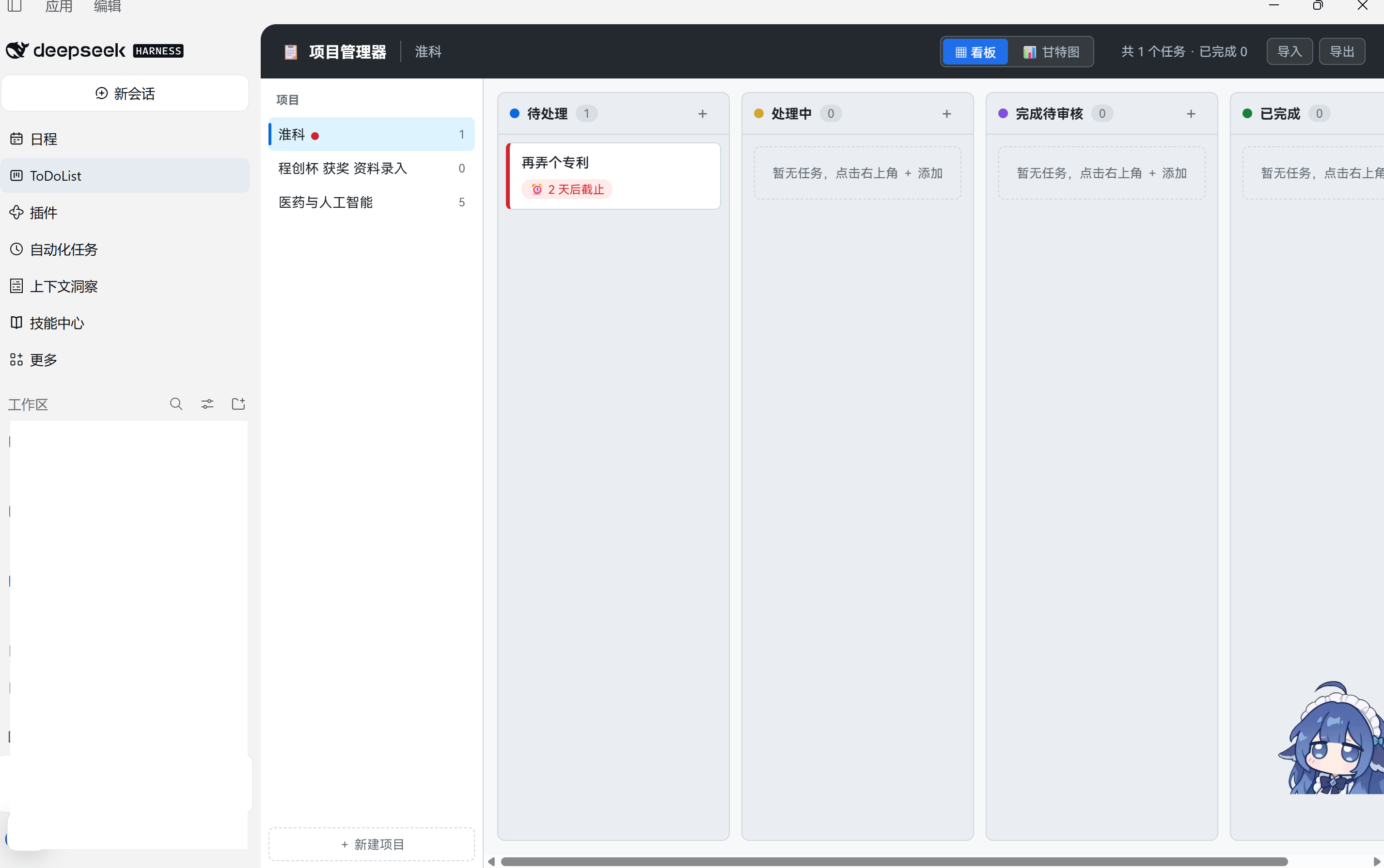
把一块看板 + 甘特图的项目进度管理器挂进 DeepSeek Harness(DSH)的左边栏——就在「日程」下面,点开即用,数据存在本地。
插件名
dsh-todolist,侧栏入口名 ToDoList(面板标题仍是「项目进度管理器」)。单文件 HTML、零依赖、零网络请求。
localStorage(键 sh-pm-v1),不联网、不上传、不依赖任何第三方服务。前置条件:DSH 客户端(桌面版或带 Web 前端的版本,需要宿主提供 webServer 服务)+ Node.js ^22.19.0 || >=24.0.0。
可以直接让 DSH 安装 github.com/ericddm/dsh-ToDoList.git,也可以按如下步骤手动操作。
1. 拿到代码
git clone https://github.com/ericddm/dsh-ToDoList.git(也可以直接下载 ZIP 解压,效果一样。)
2. 装进 profile
把 <插件目录> 换成你解压后的绝对路径,--profile 后面按你的实际 profile 名改(桌面版是 desktop)。dsh 在 DSH 安装目录下的 win\resources\runtime\cli\bin\dsh.cmd(不在 PATH 里),例如:
& "D:\Program Files\DeepSeekHarness\win\resources\runtime\cli\bin\dsh.cmd" plugin --profile desktop add "C:\path\to\dsh-ToDoList"# dsh 在 PATH 里(Linux / macOS / 自己装的 CLI)就能这么写
dsh plugin --profile desktop add /abs/path/to/dsh-ToDoList安装成功会打印 dependencies: + dsh-todolist 0.1.0 <- ...。如果命令以退出码 1 结束但打印了这行,安装其实已经成功——那多半是 profile 里别的插件版本不兼容在报错,与本插件无关。
3. 彻底重启 DSH
关掉 DSH 所有窗口与后台进程,再重新打开。侧栏「日程」下方就会出现 ToDoList。
为什么必须重启:DSH 的客户端模块在启动时扫描并缓存包元数据,热加载不会重新扫描新装的插件。改代码同理——改完重启才生效。
& "D:\Program Files\DeepSeekHarness\win\resources\runtime\cli\bin\dsh.cmd" plugin --profile desktop remove dsh-todolist重启 DSH。卸载不会删数据:localStorage 里的 sh-pm-v1 还在,装回来就能接着用。
插件默认带一份完整的看板页面(assets/index.html),开箱即用。如果你已经有自己的 HTML(比如自己改过样式),按下面的优先级覆盖,改完不用重启,面板重新点开就是新版(宿主每次请求都重新读取):
| 优先级 | 方式 | 适用场景 |
|---|---|---|
| 1 | 环境变量 DSH_TODOLIST_HTML 指向 HTML 绝对路径 |
临时切换、多套页面 |
| 2 | 插件目录下的 config.json:{ "html": "D:\\我的项目\\index.html" }(参考 config.example.json) |
长期固定,config.json 已在 .gitignore 里,不会误提交 |
| 3 | 直接替换 assets/index.html |
想连同插件一起分发自己的页面 |
指向的路径不存在时,会自动回落到自带页面,不会白屏。想知道当前用的是哪一份:
# 在 DSH 里打开面板后,同源访问(或浏览器里带上 DSH 的 cookie)
GET /dsh-todolist/status
# → {"ok":true,"page":"...\\assets\\index.html","source":"bundled", ...}
自定义页面需要自己实现持久化。插件只是把它原样托管并注入一个「导入 / 导出」小脚本,不假设页面内部的数据结构——唯一约定是数据放在
localStorage的sh-pm-v1键里,这样导出/导入才能用。
DSH 渲染进程 (dsh-app://app)
│
├── 侧栏 sidebar.panellist ← lib/client.js 注册 order:-9 / label:"ToDoList"
│
└── 主区域 main slot
    └── <iframe src="/dsh-todolist/app">   ← 同源,不用 sandbox
            │
            └── 宿主半身 lib/index.js
                ├─ 读页面:env → config.json → assets/index.html
                ├─ 在 </body> 前注入 bridge.js(顶栏导入/导出)
                └─ 以 text/html; charset=utf-8 返回
为什么用 iframe 而不是把界面改写成 React 组件:看板拖拽、甘特图定位、弹窗这套交互重写一遍必然失真,而 iframe 是同源自家内容,样式隔离、事件隔离,还能让任意 HTML 直接接进来。
宿主路由(均为同源):
| 路由 | 说明 |
|---|---|
GET /dsh-todolist/app |
页面本体(iframe 用的就是它) |
GET /dsh-todolist/bridge.js |
注入的桥接脚本(顶栏导入/导出) |
GET /dsh-todolist/status |
JSON 状态:当前页面来源、路径、字节数 |
/ 也会返回页面,方便直接在地址栏打开;其它路径 404,非 GET/HEAD 405。
dsh-app://app 源下的 localStorage['sh-pm-v1'],结构 { projects: [{ id, name, createdAt, items: [{ id, title, due, col, createdAt }] }], activeId }。.json。file:// 直接打开过这份 HTML,那是另一个源,两边数据不互通——用「导出 → 导入」搬一次即可。| 现象 | 原因 / 处理 |
|---|---|
| 侧栏没有 ToDoList | 没彻底重启 DSH;或包没进 profile 的 bundles。查 <profile>/package.json 的 dsh.profile.bundles 里有没有 dsh-todolist。 |
| 面板一直转圈 | 宿主路由没起来。可能 webServer 服务不可用(版本太老),或端口冲突。 |
| 面板报「渲染出错」 | 错误边界会把堆栈显示出来,先重启;仍然不行就把堆栈提 issue。 |
| 页面是空的 / 不像自己的页面 | 看 /dsh-todolist/status 的 source,确认是否回落到了 bundled(说明配置的路径不对)。 |
装的时候卡两分钟再报 atomic-write: timed out |
profile 目录里有残留的 package.json.lock(内容是已退出的进程号)。删掉锁文件重试。 |
npm test # = node test/smoke.mjs && node test/bridge-dom.mjs两个测试都是零依赖的:
test/smoke.mjs:假 ctx / 假 webServer / 假 React,验证路由与页面输出(三种页面来源、桥接注入位置、字节数、404/405)、以及浏览器半身的注册契约(面板 key、侧栏 order:-9、label、图标、iframe 无 sandbox)。test/bridge-dom.mjs:用 node:vm + 手写假 DOM 跑注入脚本,验证顶栏按钮、导出内容、覆盖导入(含二次确认、坏 JSON 拦截、取消不覆盖)、Esc 关闭。改完跑一遍再重启 DSH。
MIT © 2026 ericddm
A sidebar plugin for DeepSeek Harness: it puts a kanban + Gantt project tracker right under the Schedule entry. The UI is a single self-contained HTML page served by the plugin's host half over a same-origin route and embedded in an iframe, so nothing is rewritten and any HTML page can be plugged in.
git clone https://github.com/ericddm/dsh-ToDoList.git
dsh plugin --profile desktop add /absolute/path/to/dsh-ToDoList
# then restart DSH completely
Data lives in the renderer's localStorage (sh-pm-v1) under the dsh-app://app origin; the page's top bar has built-in export/import. Point it at your own page with DSH_TODOLIST_HTML=/abs/path/index.html or a local config.json ({"html": "..."}). Run npm test for the two zero-dependency test suites. MIT licensed.
CLASSIFICATION EVIDENCE
系统优先读取 GitHub Topics,再与站内分类词典和词根规则比对。当前命中: 无有效分类标签。
c1overzz
DSH 插件:每天替你刷一轮 B站,读字幕挑出值得的、写一份日报,值得的 @ 你

hellowind777
一个自主的高级智能伙伴,不仅分析问题,更持续工作直到完成实现和验证。

xing-shuyin
Just open your browser — get all your work done.