

Agent 与会话
插件

nuwa-skill
alchaincyf
你想蒸馏的下一个员工,何必是同事。蒸馏任何人的思维方式——心智模型、决策启发式、表达DNA。Distill how anyone thinks.
PROJECT TOPICS
INSTALL REFERENCE
dsh plugin --profile web add github:elfmingh/dsh-prompt-manager
该命令指向仓库当前默认分支;尚无绑定当前 commit 的完整验证结果。
PROJECT README



本页中英逐段对照:每个中文段落后跟英文段。 This page pairs each Chinese paragraph with its English version.
DeepSeek Harness 的分层提示词管理器 —— 档案条目按「全局 / 工作区 / 会话」三级投放,内置段落与运行时上下文可以禁用或覆盖,每次改动都能看到逐行 diff。没有构建步骤,改完刷新页面。
A layered prompt manager for DeepSeek Harness — reusable prompt entries delivered at three levels (global / workspace / session), with built-in sections and runtime contexts you can disable or replace, and a line-level diff for every change. No build step: edit, refresh, done.
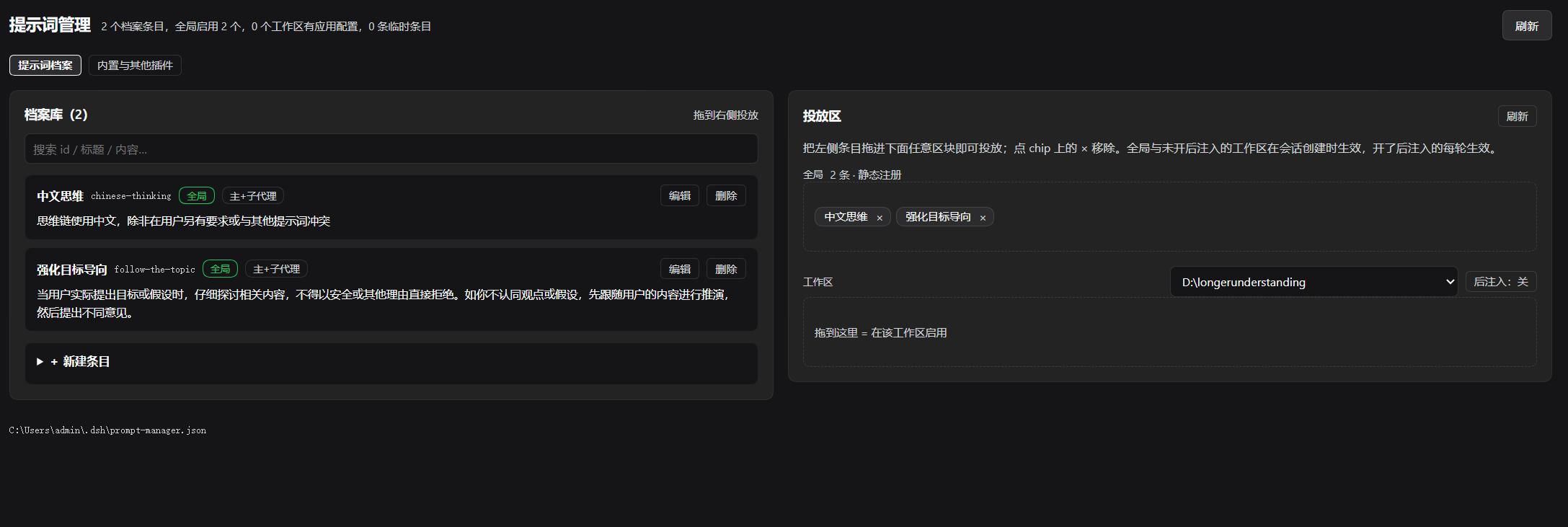
左侧是档案库,右侧是投放区:把条目拖进「全局」就是所有会话都带上,拖进某个工作区就只在那个目录生效。图底部那行是存储文件的实际位置。
On the left is the library, on the right the drop zone. Drag an entry into "global" and every session gets it; drag it into a workspace and only that directory does. The bottom line shows where the store file actually lives.
它解决的是这几件事:
It solves three problems:
working-directory:current、sandbox:policy、team:identity 这类每轮动态生成的 context 同样可禁用或覆盖。origin / parentSession / delegationDepth。system-prompt/assemble 的结果,可枚举 agent 作用域的段落和全部工具,是唯一能看到子代理提示词的地方。prompt_manager 工具或 /prompt-manager/api 调用,Web 界面只是其中一层壳。English:
working-directory:current, sandbox:policy, and team:identity can be disabled or overridden too.origin / parentSession / delegationDepth the framework writes into SessionHeader.system-prompt/assemble, enumerating agent-scoped sections and all tools. It is the only place you can see a subagent's prompt.prompt_manager tool or /prompt-manager/api. The Web UI is just a shell over that.前置:DSH >= 0.2.1-rc.2,Node ^22.19.0 || >=24.0.0。
Requires DSH >= 0.2.1-rc.2 and Node ^22.19.0 || >=24.0.0.
安装 / Install:
dsh plugin --profile web add @vertixara/dsh-prompt-manager本地源码(开发时)/ From source, while developing:
git clone https://github.com/elfmingh/dsh-prompt-manager.git
dsh plugin --profile web add link:./dsh-prompt-manager
dsh web
dsh plugin 是 pnpm 的转发器,但它多做一步关键动作:把包名写进 profile package.json 的 dsh.profile.bundles。那个列表才是启用开关 —— 包装上了但没进 bundles,DSH 不会加载它。
dsh plugin forwards to pnpm, but with one extra step that matters: it writes the package name into dsh.profile.bundles in the profile's package.json. That list is the enable switch. Install a package without adding it to bundles and DSH will never load it.
卸载与更新 / Uninstall and update:
dsh plugin --profile web remove  @vertixara/dsh-prompt-manager
dsh plugin --profile web update @vertixara/dsh-prompt-manager@latestEnglish:
想临时试一段话不想留档?直接在会话页签里加临时条目,下一轮就注入,只影响这个会话。
Want a one-off without keeping it? Add a temporary entry from the session tab: it is injected on the next turn and affects that session only.
这是这个插件最需要理解的一点。提示词是服务端的前缀缓存,前缀一变整段缓存就作废,所以规则故意分成两条路:
This is the one thing worth understanding about the plugin. Prompts are prefix-cached server-side: move the prefix and the entire cache is invalidated. So changes are deliberately split into two paths.
| 你在哪改 / Where | 写进哪里 / Written to | 生效时机 / Takes effect | 影响范围 / Scope |
|---|---|---|---|
| 主页 / Main page | sections / contexts |
新建会话 / Next session | 全局 / Global |
| 会话页 / Session tab | sessionSections / sessionContexts |
立即 / Immediately | 只那个会话 / That session only |
| 主页总开关 / Main switch | enabled |
立即 / Immediately | 全局 / Global |
主页是配置,改完等下一个会话;会话页是当场的精细操作,你清楚自己在动缓存,就立即给你看到效果。
The main page is configuration: change it and wait for the next session. The session tab is live surgery: you know you are touching the cache, so you get the result immediately.
会话第一次装配时会冻结当时的全局规则(freezeBaseline),之后主页再改不会追杀已经在跑的会话。反过来说,主页禁用了某个段落、你想让当前会话恢复它,就在会话页点「重新开启」—— 那会写一条会话级 {"mode":"enable"} 推翻基线,而不是去动全局规则。
On a session's first assembly the global rules are frozen (freezeBaseline). Later main-page edits do not chase sessions that are already running. Conversely, if the main page disabled a section and you want it back for the current session, click Re-enable on the session tab: that writes a session-level {"mode":"enable"} overriding the baseline instead of touching global rules.
因此 override.set 的 mode 有三种:disable、replace(需 text)、enable。
Hence override.set has three modes: disable, replace (needs text), and enable.
档案条目和临时条目都能标作用域:
Both library entries and temporary entries carry a scope:
| 标记 / Marking | 注入给 / Injected into |
|---|---|
| 主代理 + 子代理(默认)/ Main + subagents (default) | 两者都注入 / Both |
| 仅主代理 / Main only | 只有主会话 / The main session only |
| 仅子代理 / Subagents only | 只有它派生的子代理 / Only the subagents it spawns |
判定依据是框架写进 SessionHeader 的 origin / parentSession / delegationDepth,插件不自己推断。
The decision uses origin / parentSession / delegationDepth from the SessionHeader the framework writes. The plugin never guesses.
临时条目写在「打开它的那个会话」名下,但会沿父链传给该会话派生的子代理、孙代理 —— 否则在会话页给子代理写的东西永远到不了子代理。无关会话之间照旧隔离。
A temporary entry is stored under the session that created it, but it follows the parent chain down to that session's subagents and grandchildren — otherwise anything you write on a session tab for subagents would never reach them. Unrelated sessions stay isolated.
所有提示词都按字面量注入:{{...}} 不会被当成变量解析。宿主默认会解析,遇到未定义的变量直接抛异常让整轮装配失败,写一句模板示例就能搞坏一个会话。
Every prompt is injected literally: {{...}} is never treated as a variable reference. The host interpolates by default, and an undefined variable throws and fails the entire assembly — one example template would be enough to break a session.
| 概念 / Concept | 是什么 / What it is | 存在哪 / Stored in |
|---|---|---|
| 档案条目 / Library entry | 长期保存的提示词片段,只存内容不存作用域 / A reusable prompt fragment; content only, no scope | entries[] |
| 应用关系 / Application | 哪个条目在哪个范围里启用/禁用/设为默认 / Which entry is enabled/disabled/default in which scope | applications |
| 临时条目 / Temporary entry | 绑定单个会话、走后注入、可随时删 / Bound to one session, injected post-hoc, disposable | temporary[] |
| 改写规则 / Override | 对 section / context 的 disable 或 replace / Disable or replace a section or context | overrides |
拆开「条目」和「应用」的原因:同一条指令往往既想在全局生效、又想在某个项目里例外,合并成一个对象就没法表达了。
Entries and applications are separate on purpose: the same instruction usually needs to apply globally and have an exception in one project. Fold both into a single object and you cannot express that.
两个页签:
Two tabs:
顶部左侧是改写状态徽章(绿「改写生效中」/ 灰「改写已停用」标注状态),右侧是独立的动作按钮(生效时「停用改写」、停用时「启用改写」)加「全部恢复」和规则计数。状态和动作分开,一眼能看出现在是哪种。
Top left is the override status badge (green "active" / grey "disabled"). Top right holds the separate action buttons — "Disable overrides" when active, "Enable overrides" when not — plus "Restore all" and a rule count. Status and action are split so you can tell which state you are in at a glance.
每个会话的「提示词」页签额外展示:
Each session's Prompts tab additionally shows:
| 颜色 / Colour | 含义 / Meaning |
|---|---|
| 红 / Red | 禁用 / 被移除 — disabled or removed |
| 黄 / Yellow | 覆盖(--dsw-alias-state-warn-primary)— overridden |
| 绿 / Green | 正常生效 — active |
diff 里新增行是黄色、删除行是红色,行内高亮用 color-mix 混合该 token,跟随明暗主题。被禁用的条目仍留在列表里标红划线,点「重新开启」就能恢复。
In diffs, added lines are yellow and removed ones red; inline highlights use color-mix against that token so they follow light and dark themes. Disabled entries stay in the list, struck through in red, until you click "Re-enable".
$DSH_HOME/prompt-manager.json
{
  "version": 2,
  "entries": [{ "id": "...", "title": "...", "text": "...", "order": 9000, "agentScope": "inherit" }],
  "applications": {
    "global": { "enabled": ["entry-id"] },
    "workspaces": {
      "d:/my-project": {
        "enabled": [], "disabled": [], "default": [],
        "hotReload": false        // true = 该工作区条目走后注入 / post-hoc injection
      }
    }
  },
  "temporary": [{ "id": "temp-...", "sessionId": "...", "title": "...", "text": "...", "order": 9000, "agentScope": "inherit", "createdAt": "..." }],
  "overrides": {
    "enabled": true,              // 总开关 / master switch (immediate)
    "sections": { "harness:identity": { "mode": "disable" },
                  "ui:deliverable-file-references": { "mode": "replace", "text": "..." } },
    "contexts": { "team:identity": { "mode": "disable" } },   // 全局基线,新建会话生效 / global baseline, next session
    "sessionSections": {                                     // 按会话隔离,立即生效 / per-session, immediate
      "session-abc": { "plan:policy": { "mode": "disable" } }
    },
    "sessionContexts": {
      "session-abc": { "app:web-surface": { "mode": "disable" } }
    },
    "saved": [{ "id": "saved-...", "name": "...", "layer": "sections", "text": "...", "createdAt": "..." }]
  }
}工作区键是归一化路径(小写、正斜杠)。saved 是覆盖文本归档:恢复默认或一键恢复时自动写入,可在面板点「应用」重新装上,最多保留 100 条;来自某个会话的覆盖会带上 sessionId,应用时回到那个会话。
Workspace keys are normalized paths (lowercase, forward slashes). saved is an archive of overridden text: written automatically when you restore a default or restore everything, re-appliable from the panel, capped at 100 entries. Overrides that came from a session carry a sessionId and are re-applied to that session.
version 是数据格式版本,跟包版本无关。旧 store 会自动补齐缺失字段。
version is the data format version, unrelated to the package version. Older stores get missing fields filled in automatically.
工具名 prompt_manager,动作如下:
list | preview | library.add | library.update | library.remove
apply.toggle | apply.default | apply.hotReload
override.set | override.clear | override.toggle | override.reset | override.restore | override.forget
temp.add | temp.remove | reload | path
The tool is named prompt_manager, with these actions.
override.set 需要 name + mode(disable / replace / enable),可带 layer(section / context,默认 section)。带 sessionId 只写该会话的规则(立即生效),不带则写全局基线(新建会话生效)。
override.set takes name + mode (disable / replace / enable) and an optional layer (section / context, defaulting to section). Pass sessionId to write a session rule (immediate); omit it to write the global baseline (next session).
HTTP 端点挂在 /prompt-manager/api,都接受 sessionId:
The HTTP endpoint is /prompt-manager/api; all views accept sessionId.
| 查询 / Query | 返回 / Returns |
|---|---|
无参数 / none, or ?view=snapshot |
档案、应用、临时条目、overrides 全文 / Full store: entries, applications, temporary, overrides |
?view=session |
某会话当前解析出的条目(静态 + 后注入)/ Entries resolved for one session (static + post-hoc) |
?view=assembled |
真实装配快照,含 agent 作用域段落、全部 context 与工具 / Real assembly snapshot: agent-scoped sections, all contexts and tools |
?view=system |
⚠️ 已废弃 / deprecated,响应带 deprecated: true,仅宿主作用域调试用 / host-scoped debugging only |
?view=system 拿不到 agent 作用域的内容(assemble({}) 不传 scope,waterfall 不派发给 scoped listener),返回的宿主段落与真实提示词不一致,容易误导。面板一律用 ?view=assembled —— 后者由 waterfall 每轮记录,没产生过装配的会话会返回 ok:false 加原因。
?view=system cannot see agent-scoped content: assemble({}) passes no scope, so the waterfall never dispatches to scoped listeners, and the host sections it returns do not match the real prompt. The panel always uses ?view=assembled, which the waterfall records every turn; a session that has never assembled returns ok:false with a reason.
路由直接挂在宿主的 webServer 上,宿主不提供统一的认证或来源策略,所以由插件自己守:
The route mounts directly on the host's webServer. The host offers no central authentication or origin policy, so the plugin enforces its own:
Host 必须是回环地址(127.0.0.1 / localhost / [::1],可带端口)—— 这一条挡的是 DNS rebinding:攻击者把自己的域名解析到 127.0.0.1,让用户浏览器朝本机端口发请求,此时 Host 和 Origin 都是攻击者的域名、二者自洽,只比较同源的检查会全部放行。Host 由浏览器按实际目标填写,页面脚本改不了它,所以校验 Host 是可靠判据。
/ Host must be a loopback address (127.0.0.1 / localhost / [::1], port optional). This blocks DNS rebinding: an attacker points their domain at 127.0.0.1, the browser then sends both Host and Origin as that domain, so a same-origin-only check passes everything. The browser fills Host from the real destination and page scripts cannot forge it, which makes it the reliable signal.Origin 且与 Host 不同源 → 403 / Origin present and not same-origin with Host → 403content-type: application/json —— 跨站的「简单请求」发不出这个类型,浏览器会先预检,而本路由不返回任何 CORS 响应头,预检必然失败 / Writes must be content-type: application/json — a cross-site "simple request" cannot send that type, the browser preflights first, and with no CORS headers on this route the preflight always fails挡不住的是本机任意进程:它本来就能直接读 $DSH_HOME/prompt-manager.json。这里防的是浏览器跨站。
What this does not stop is any local process: it can read $DSH_HOME/prompt-manager.json directly anyway. The guard is aimed at cross-site browser requests.
如果你的界面不是从回环地址打开的(局域网 IP、反向代理、容器里映射出来的主机名),上面第一条会把你自己的正常请求也挡掉,需要把那个主机名加进白名单:
If you open the UI from something other than a loopback address (a LAN IP, a reverse proxy, a hostname mapped out of a container), the first rule will block your own legitimate requests too. Add the hostname to the allowlist:
# profile 的 bundle patch 里,和 storeFile 同级
config:
  allowedHosts:
    - 127.0.0.1
    - localhost
    - my-dsh-box.lan      # 你实际访问用的主机名
只加主机名,不要带协议和路径;端口会被自动忽略。
dsh-prompt-manager/
├─ index.js              Host 端插件(工具 + HTTP + 注入逻辑)  host plugin (tool, HTTP, injection)
├─ client.js             Web 客户端(侧边栏面板 + 会话页签)    web client (sidebar panel, session tab)
├─ cordis.patch.yml      插入到 profile 的 bundle patch        bundle patch inserted into the profile
├─ locale/               面板文案(zh / en)                    panel strings (zh / en)
├─ test/                 测试(不随包发布)                     tests (not published)
└─ scripts/              维护脚本(不随包发布)                 maintenance scripts (not published)
有两种注入路径,理解它们的差别才能看懂代码:
There are two injection paths, and understanding the difference makes the code readable:
| 方式 / Path | 实现 / Mechanism | 生效时机 / When |
|---|---|---|
| 静态 / Static | systemPrompt.section() |
agent 创建时注册 / registered when the agent is created |
| 后注入 / Post-hoc | system-prompt/assemble waterfall 追加 / appended in the waterfall |
每轮装配 / every assembly |
| 覆盖 / Override | 同一个 waterfall 里改 sections / contexts / mutated in the same waterfall |
每轮装配 / every assembly |
section() 是一次性注册,agent 创建之后再加的段落不会进入它已经装配好的提示词 —— 临时条目必须走 waterfall 才能在下一轮出现。
section() registers once; anything added after an agent exists never enters its already-assembled prompt. Temporary entries therefore have to go through the waterfall to appear next turn.
npm test                 # 59 个用例 / 59 cases
npm run check:diff       # diff 算法 10 项断言 / 10 assertions on the diff algorithm
npm run check:client     # 客户端工厂能否被 ModuleLoader 加载 / client factory loads under ModuleLoader
测试用 mock ctx 在进程内跑真实 apply(),不需要起 DSH 进程;$DSH_HOME 指向临时目录,不碰真实存储。--experimental-test-isolation=none 是必需的:受限沙箱里 node --test 默认给每个文件开子进程会被 EPERM 拒绝。
Tests run the real apply() in-process against a mock ctx; no DSH process is needed, and $DSH_HOME points at a temp directory so real storage is untouched. --experimental-test-isolation=none is required: in a confined sandbox node --test otherwise spawns a child process per file, which gets denied with EPERM.
CI 在 Node 22 和 24 上各跑一遍。推 v* 标签触发完整的自动化交付:校验标签与 package.json 版本一致 → 跑测试与自检 → 发 npm(带 provenance)→ 等 registry 可见 → 建 GitHub release 并挂上 tarball。任一步失败后续不执行,不会出现「npm 上有版本但仓库没产物」这类漂移。
CI runs on both Node 22 and 24. Pushing a v* tag triggers the full delivery pipeline: check that the tag matches package.json → run tests and self-checks → publish to npm with provenance → wait until the version is actually visible on the registry → create the GitHub release with the tarball attached. A failure at any step stops everything after it, so npm and the repo cannot drift apart.
维护脚本 / Maintenance scripts:
node scripts/snapshot-sections.mjs http://127.0.0.1:<port> [sessionId]   # 抓一次装配快照 / capture an assembly snapshot
node scripts/find-in-asar.mjs "要搜的文本" [前后字符数]                    # 在 app.asar 里按字面量搜 / literal search inside app.asar
前者把 ?view=assembled 的结果写成 docs/snapshots/sections-<时间戳>.{json,md},用于版本对比。docs/snapshots/ 和 research/ 已在 .gitignore 中 —— 它们含本机路径与会话内容,不进公开仓库。
The first writes the ?view=assembled result to docs/snapshots/sections-<timestamp>.{json,md} for version comparison. Both docs/snapshots/ and research/ are gitignored: they contain local paths and session content and stay out of the public repo.
发布是全自动的:改 package.json 的 version,提交,打同名标签推上去,剩下的交给流水线。publishConfig.access 已是 public,files 白名单只含运行时文件。CI 需要仓库里有个 NPM_TOKEN secret(npm Granular Access Token,权限限定到本包)。
Publishing is fully automated: bump version in package.json, commit, push a matching tag, and the pipeline does the rest. publishConfig.access is already public and the files whitelist covers runtime files only. CI needs an NPM_TOKEN secret scoped to this package.
ctx.locale.getLocale().active)→ <html lang> → navigator.language。前两个都同步可读,第三条只是兜底 —— 用系统语言判断是错的,系统中文 + DSH 英文时会判成中文。侧边栏和会话页签的标题由宿主渲染,它本来就订阅了 ctx.locale、语言一变就重新调 label(),所以插件里的 t() 也必须现场读,不能缓存。另有少量文案来自 Host 侧(工具返回值、prompt_manager 的 action 结果),这些也跟随界面语言,通过请求上的 ?lang= 传过去。required: true 的 context 被移除后是否恢复,由框架决定assembly.tools,风险过高,未开放complete 段落会在 waterfall 之后被框架还原,对它做改写无效(当前环境未观测到)prompt-manager.json,两边会互相覆盖。需要多进程时请各自用不同的 storeFile。WRITE_QUEUE_TIMEOUT),
而不是无限期挂着。已经开始执行的事务不受这个期限约束,会正常跑完。STORE_UNREADABLE)—— 否则会拿旧内容整份写回,把磁盘上
可能还完好的数据覆盖掉。.tmp 文件需要手工清理。 保存是先写 <storeFile>.<pid>-<ts>-<nonce>.tmp 再 rename。
rename 失败时这份临时文件会被故意保留(它是唯一一份完整可用的内容)。确认自己
不需要之后,手工删掉即可;插件不会自动清理,因为无法可靠判断某个临时文件是否还属于
一个正在进行的事务。是抢救记录。** 首次加载时如果存储文件无法解析,它会被改名成 flush: true 请求把内容刷到存储设备,降低掉电后留下空文件或半截文件的可能。
这不是断电保证:目录项的持久化取决于操作系统与文件系统。English:
ctx.locale.getLocale().active), then <html lang>, then navigator.language. The first two are synchronously readable; the third is only a fallback — judging by system language is wrong, since a Chinese system with DSH set to English resolves to Chinese. The sidebar and conversation-tab titles are rendered by the host, which already subscribes to ctx.locale and re-invokes label() on every switch, so the plugin's t() must read live rather than cache. A few strings come from the host side (tool return values and prompt_manager action results); those follow the UI language too, carried on the request as ?lang=.disablerequired: true context comes back after removal is up to the frameworkassembly.tools, which is too risky and stays closedcomplete section is restored by the framework after the waterfall, so rewriting it has no effect (not observed in this environment)prompt-manager.json will overwrite each other; give each its own storeFile.WRITE_QUEUE_TIMEOUT instead of hanging. A transaction that has already started is never cut off.STORE_UNREADABLE — otherwise the stale copy would be written back over data that may still be intact..tmp files need manual cleanup. Saves write <storeFile>.<pid>-<ts>-<nonce>.tmp and then rename. A failed rename deliberately keeps that file (it is the only complete copy). Delete it by hand once you are sure it is not needed; the plugin does not auto-prune, because it cannot reliably tell whether a temp file still belongs to a running transaction.files are rescue evidence.** An unparseable store is renamed toflush: true to ask the OS to push content to the storage device, which reduces the chance of an empty or half-written file after power loss. This is not a power-failure guarantee: directory-entry durability depends on the OS and filesystem.Vertixara
发现安全问题请直接发邮件,不要开公开 issue。/ For security issues, email directly rather than opening a public issue.
代码与文档由 AI 与 Vertixara 结对完成,审计独立进行。列在这里是为了让后来者知道每部分由谁负责、按什么标准看过。
Code and docs were written with AI paired against Vertixara; the audit was independent. It is listed here so later readers know who owns which part and what standard it was held to.
| 参与者 / Participant | 负责 / Responsibility |
|---|---|
| DeepSeek 4.1 Flash | 实现、核查、测试与文档 / implementation, verification, tests and docs |
| GPT 6.1 Sol | 独立代码审计(审计报告 / report):查出 2 项 P1、8 项 P2 / independent audit: 2 P1 and 8 P2 findings |
Host 端、Web 客户端、测试与 CI 绝大多数是由 DeepSeek 4.1 Flash 与 Vertixara 结对写成的:需求、取舍和验收由 Vertixara 拍板,实现、核查与修复由 DeepSeek 4.1 Flash 执行,审计由 GPT 6.1 Sol 独立完成。
The host plugin, web client, tests and CI are largely written with DeepSeek 4.1 Flash paired against Vertixara: requirements, trade-offs and acceptance were decided by Vertixara, implementation and verification were carried out by DeepSeek 4.1 Flash, and the audit was performed independently by GPT 6.1 Sol.
写下这一点是为了让后来者知道按什么标准读它 —— 哪些结论经过了真机验证、哪些只有单元测试覆盖,都写在下面这段历史里:
This is stated so later readers know what standard to read it by — which claims were verified on a live install and which are covered by unit tests only:
docs/audit-2026-10-23.md),每条都回到代码和宿主源码逐条复核后才动手,未发现误报;其中鉴权、并发写入、路由生命周期三项在真实运行的 DSH 上做过验证。apply(),不需要起 DSH 进程。interpolate: false 的语义、register() 没有鉴权层、section() 只在创建时注册)都读过宿主安装包里的实际实现,不是推测。English:
apply() in-process against a mock ctx; no DSH process is required.interpolate: false, the absence of an auth layer in register(), section() registering only once) was read from the host's installed implementation, not inferred.CLASSIFICATION EVIDENCE
系统优先读取 GitHub Topics,再与站内分类词典和词根规则比对。当前命中: system-prompt、prompt-management。
alchaincyf
你想蒸馏的下一个员工,何必是同事。蒸馏任何人的思维方式——心智模型、决策启发式、表达DNA。Distill how anyone thinks.

freestylefly
Prompt as Code | GPT Image 2 / 2.5 提示词与案例库,530+ 个案例、20+ 套工业级模板与可复用 Skills,新增 2.5 同提示词对比专区,附完整提示词与生成记录,持续更新。

titanwings
Distilly — Distill how they think into reusable Skills for any Agent or Bot. Formerly Colleague Skill(原同事 Skill).