
模型与 MCP
待识别

rea
morluto
Reverse engineer anything with agents, from app behavior down to native binaries.
PROJECT TOPICS
INSTALL REFERENCE
dsh plugin --profile web add github:elfgzp/dsh-branch-worktree
该命令指向仓库当前默认分支;尚无绑定当前 commit 的完整验证结果。
PROJECT README
English | 简体中文
A DeepSeek Harness (DSH) Web UI plugin that adds a branch picker with automatic Git worktree creation to the New Session screen.
Pick the branch (or type a new branch name) right next to the workspace and agent-mode chips, then let DSH create an isolated checkout for it. The conversation starts inside that checkout, so nothing you have half-edited in your main working copy gets disturbed.

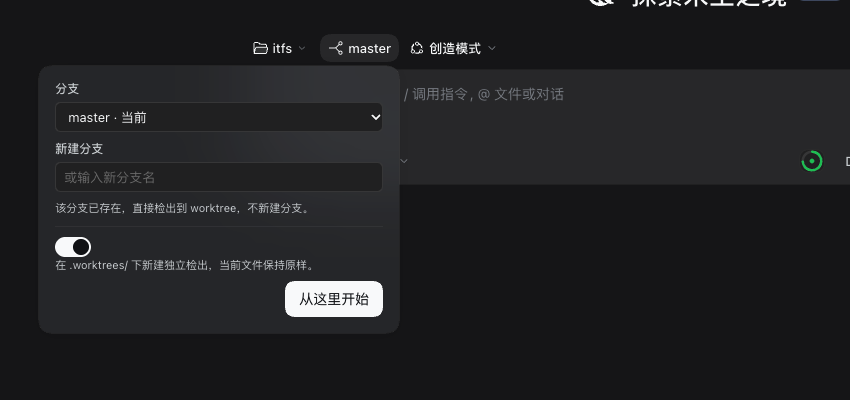
The New Session screen lets you choose a workspace and an agent mode, but a conversation always starts in the workspace directory as it is, on whichever branch is currently checked out. Parallel agent work therefore means juggling branches, stashing changes, or creating worktrees by hand before every session.
This plugin closes that gap with one extra chip:
| Control | Where it comes from |
|---|---|
| Workspace / project | DSH built-in |
| Agent mode (e.g. Creator) | DSH built-in |
| Branch, or new branch + base | this plugin |
| Automatic worktree | this plugin |
git worktree add under <repo>/.worktrees/<branch>, then registers that directory as a DSH Workspace and starts the session there. Your current checkout is never touched, so uncommitted work stays exactly where it was.git checkout the branch in the current checkout. Refused when the tree is dirty, so it can never clobber your changes.in use marker, because Git refuses to check out the same branch twice.git status — the first run appends .worktrees/ to .git/info/exclude.isRepo: false payload; the client treats that as "hide the chip", never as a repository to render.)The worktree layout it produces:
my-repo/
├── .git/
├── .worktrees/
│   ├── feature-login/      ← branch feature/login
│   └── fix-crash/          ← branch fix/crash
└── ... your main checkout, untouchedRequires DSH >= 0.2.0 and git on PATH.
Open the sidebar → Plugins → Add plugin → Install a third-party plugin (accepts npm packages, Git repositories, and local directories).
Paste the Git repository address:
https://github.com/elfgzp/dsh-branch-worktreeConfirm, then switch on Branch & Worktree under Installed plugins. Restart DSH if the UI does not pick it up right away.
In a DSH session with the plugin-manager tool enabled (Creator mode has it), just say:
从 https://github.com/elfgzp/dsh-branch-worktree 安装这个插件并启用
or in English:
Install the plugin at https://github.com/elfgzp/dsh-branch-worktree and enable it
The agent calls plugin_manager with install_bundle, which adds the dependency to your profile, appends the bundle to dsh.profile.bundles, and activates it.
git clone https://github.com/elfgzp/dsh-branch-worktree
cd dsh-branch-worktree
Then install that absolute directory through Plugins → Add plugin → Install a third-party plugin. The profile records it as a link: dependency, so later edits need only a restart (or a page reload for the browser half).
Never hand-edit the profile's
package.jsonorcordis.patch.yml. The plugin manager owns those files; editing them directly desynchronizes the bundle list.
The session opens in the resulting directory, and the workspace appears in the sidebar under the branch name.
This is the default: open the panel, press Start, done.
wt/ namespace, so they are easy to tell apart from branches you named yourself.wt/brave-otter-7f3a.git log output, and into anything the branch is pushed to — and two unrelated branches would collide on the same sentence. The draft still travels with you into the new session; it just does not name the branch..worktrees/ directory names, including the ones that only collide after the slash is flattened (wt/a-b and wt/a/b both map to wt-a-b).Turn Auto name off to get exactly the manual behavior described below.
The New Session chip only exists while the session is blank. Once a conversation is running there is a second entry point: a thin status bar across the bottom of the window shows the current working directory, and — while that directory is a Git repository that is not already a worktree — a New worktree button.
One click creates a wt/… worktree, registers it as a Workspace, and opens a
session there, so the file tree, the Git view and the changes list all point at
the new checkout. A prompt is sent telling the model to carry over uncommitted
work and to point any teammate or subagent at the new path.
Why a workspace, rather than just moving the session? DSH freezes a
session's cwd in its header at creation, and every panel roots itself on that
header — moving only the agent's working directory leaves the whole right-hand
side showing the old path. A workspace whose path is the checkout is the only
shape where the UI actually follows.
The bar hides itself once the directory is inside .worktrees/.
This is the part that is easy to misread: "Create worktree" does not imply "create branch". The rule is:
| The branch name you give | What runs |
|---|---|
| Automatic (default) | Generates an unused wt/… branch and runs git worktree add -b — creates the branch in a new worktree |
| Does not exist | git worktree add -b <branch> <path> <base> — creates the branch and checks it out in the new worktree |
| Already exists | git worktree add <path> <branch> — reuses the branch, creating nothing |
| Checked out in another worktree | Refused, because Git will not check out the same branch twice |
| Checked out in the main working copy | Refused, instead of handing the main checkout back as if it were a worktree |
That last row matters: previously, selecting the current branch with the worktree switch on returned the main checkout itself (reusedWorktree: true) — the switch appeared to work while isolating nothing. That combination is now an explicit error, so the switch means what it says.
So a new name starts a new branch, an existing name reuses one, and you never get a surprise duplicate or a silently skipped worktree. The dropdown says which path is about to be taken before you commit to it.
For a worktree run of branch feature/login in /work/my-repo:
# 1. the pool directory and its exclusion
mkdir -p /work/my-repo/.worktrees
echo '.worktrees/' >> /work/my-repo/.git/info/exclude

# 2. a new branch is created from the chosen base, or the existing branch is reused
git worktree add -b feature/login /work/my-repo/.worktrees/feature-login <base>

# 3. DSH registers /work/my-repo/.worktrees/feature-login as a Workspace
Nothing is ever deleted by this plugin. To retire a worktree:
git worktree remove .worktrees/feature-login
git branch -d feature/loginSettings → Worktree cleanup lists every linked worktree of the current workspace's repository and offers to remove the ones that are finished.
A worktree is removable only when all of these hold, and the Host re-checks them at the moment of deletion (so a page left open for an hour cannot delete work that appeared since):
main/master;Anything else is listed under Not removable with the reason, and its
directory is left alone. Removing deletes the worktree directory and, with
git branch -d, the branch.
Note the honest limitation: this reads local Git only. It cannot tell you whether the branch went through a merge request or whether that request chose "delete source branch" — it only knows the commits are in the trunk. A branch merged locally without a request is treated the same as one merged through a request.
| Message | Meaning |
|---|---|
| This workspace is not inside a Git repository. | The selected workspace has no .git; the chip would not have been shown if this was known up front. |
Branch names accept letters, digits and . _ / - only. |
The typed branch name is not a valid Git ref. |
| That branch is already checked out in another worktree. | Git will not check out the same branch twice. Pick another branch, or create a new one. |
| That branch is checked out in your main working copy. | The main checkout is not a worktree, so it cannot be isolated. Pick another branch, or turn automatic naming on. |
| A worktree directory with that name already exists. | A stale directory is in the way at .worktrees/<branch>. Remove it with git worktree prune or by hand. |
| Your current checkout has uncommitted changes. | You turned the worktree option off while the tree was dirty. Turn it back on, or commit/stash first. |
| Git refused the operation. | Any other Git failure; the Git message is shown in the dialog. |
┌──────────────────────── Browser (client.js) ────────────────────────┐
│  conversation.hero.options slot occupant                            │
│    button  ──► Modal: branch select / new branch / worktree switch  │
│                        │                                            │
│                        │  POST /branch-worktree/create               │
└────────────────────────┼────────────────────────────────────────────┘
                         ▼
┌──────────────────────── Host (index.js) ────────────────────────────┐
│  connection.requestRejection()  ← trust fence, before anything else │
│  /branch-worktree/inspect  → repo, branches, worktrees, dirty state │
│  /branch-worktree/suggest  → branch + path automatic mode would make│
│  /branch-worktree/create   → git worktree add | git checkout        │
│                            → workspaceRegistry.create(path)         │
└─────────────────────────────────────────────────────────────────────┘
                         │
                         ▼   client calls uiWorkspace.startSession(id)
                  session created with header.cwd = the new checkout
Two details are worth knowing:
header.cwd is frozen creation metadata: the system prompt's cwd, the shell tool's default workdir, and the sandbox's workspaceRoot all derive from it. The plugin therefore registers the worktree as a Workspace and opens a blank session there, rather than mutating an existing session.execFile with a literal argv — no shell interpolation of branch names. Every route validates against the connection trust fence first, so a page from another origin cannot drive Git on your machine.| Half | Surface |
|---|---|
| Host | webServer exact routes /branch-worktree/inspect, /branch-worktree/suggest, /branch-worktree/create |
| Client | conversation.hero.options (list slot), id branch-worktree, order -10 |
On sitting between the workspace and agent-mode chips: DSH ships no slot in that position. conversation.hero.workspace and conversation.hero.agentPreset are display: contents wrappers, and the only slot meant for extra controls — conversation.hero.options — is right-aligned at the end of the row. The plugin therefore injects a small scoped stylesheet that makes that container display: contents and uses order to place itself between the two shipped chips. The selectors are :has()-scoped to the New Session row, so conversation views are untouched, no other plugin's nodes are moved, and the block becomes irrelevant the day DSH grows a real slot there.
It depends on the shipped @deepseek-ai/dsh-client-ui-conversation plugin only, and uses no private APIs beyond the documented webServer, connection, workspaceRegistry, slots, locale, and uiWorkspace services.
| DSH | Status |
|---|---|
0.2.1-rc.3 |
tested |
>= 0.2.0 |
expected to work |
Both en and zh locales ship with the plugin; the UI follows the DSH language setting.
Plugins → Branch & Worktree → Remove. Worktrees and branches this plugin created are left on disk; clean them up with the git worktree remove commands shown above.
Before writing this, I looked for an existing plugin that covered the whole flow. These are the ones that exist:
| Repository | Stars | Why it was not enough |
|---|---|---|
| frederico-kluser/dsh-worktree-jump | 2 | Worktree jumping only; no branch picker at session creation |
| Letter2025/dsh-task-worktree | 2 | Task isolation, no project/mode-integrated control |
| YS-BW/dsh-plugins | 1 | General plugin collection |
| zhang-guo-wen/dsh-worktree | 0 | Incomplete |
| epik7th/dsh-task-worktree | 0 | Incomplete |
| d0nj/dsh-plugins | 0 | General plugin collection |
None combined project + agent mode + branch + automatic worktree in the New Session row, so this plugin does exactly that and nothing else.
Note that DSH already ships a non-GUI worktree capability — @deepseek-ai/dsh-experimental-worktree with its create_worktree model tool — but it is off by default in every shipped profile and is model-driven rather than part of the New Session flow. This plugin complements it; the two do not conflict.
MIT
CLASSIFICATION EVIDENCE
系统优先读取 GitHub Topics,再与站内分类词典和词根规则比对。当前命中: deepseek-harness。
morluto
Reverse engineer anything with agents, from app behavior down to native binaries.

deepseek-ai
DeepSeek Harness: Everything is a Plugin.

nexu-io
The 1st Collaborative AI Design Agent Workspace. Local-first and open source. Create motion, prototypes, websites, apps, dashboards, presentations, images, and videos with your team and AI agents. Share work, exchange feedback, and iterate together in one workspace.