
模型与 MCP
待识别

rea
morluto
Reverse engineer anything with agents, from app behavior down to native binaries.
PROJECT TOPICS
PROJECT README

在 DeepSeek Harness 里统一管理本机各个 AI Agent 的 MCP 服务器。
Manage MCP servers across every local AI agent — directly inside DeepSeek Harness.
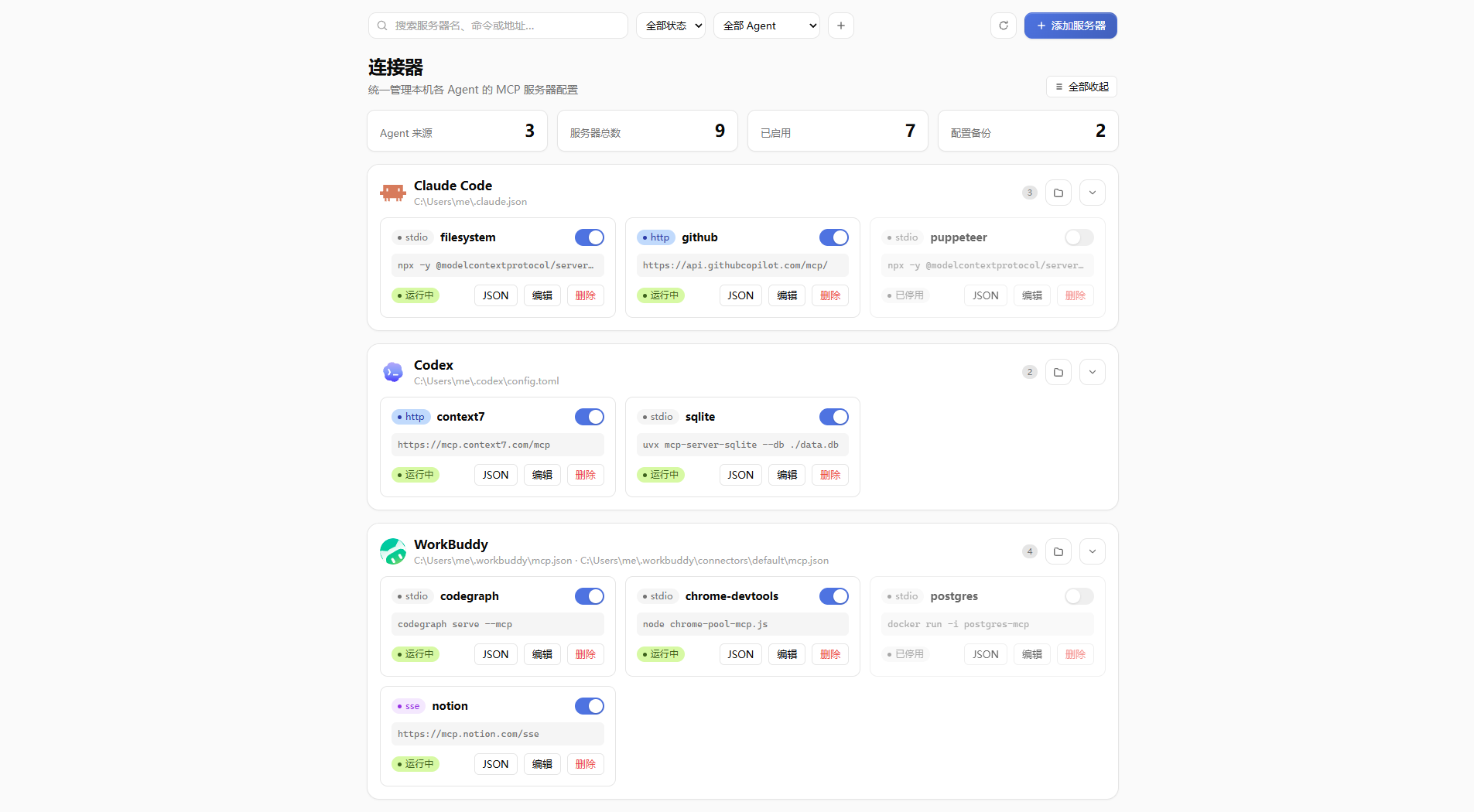
Every AI agent keeps its own MCP config in its own file, in its own format. Finding out which servers are running, and toggling one off for a single tool, means hand-editing JSON and remembering which file belongs to whom.
This plugin auto-discovers those files, shows them in one panel, and lets you toggle, add, edit and delete servers — backing up every file before it is written, with one-click rollback.
~, %APPDATA% and %LOCALAPPDATA% (macOS/Linux equivalents included), identifies configs by file name and content (mcpServers / mcp keys, [mcp_servers] sections). First scan ≈250 ms on a typical dev machine, then cached.mcpServers), OpenCode-style (mcp), Codex TOML ([mcp_servers.*]), DSH's cordis.patch.yml (@deepseek-ai/dsh-mcp-client entries), and JSONC (comments / trailing commas). TOML and YAML are rewritten entry-by-entry so comments and unrelated settings survive byte-for-byte.~/.dsh/mcp-connectors/backups/ (last 100 kept). Restore any version with one click; the restore itself is backed up too.disabled flag, so disabling removes the entry from the config and keeps its definition in the manager state; enabling writes it back.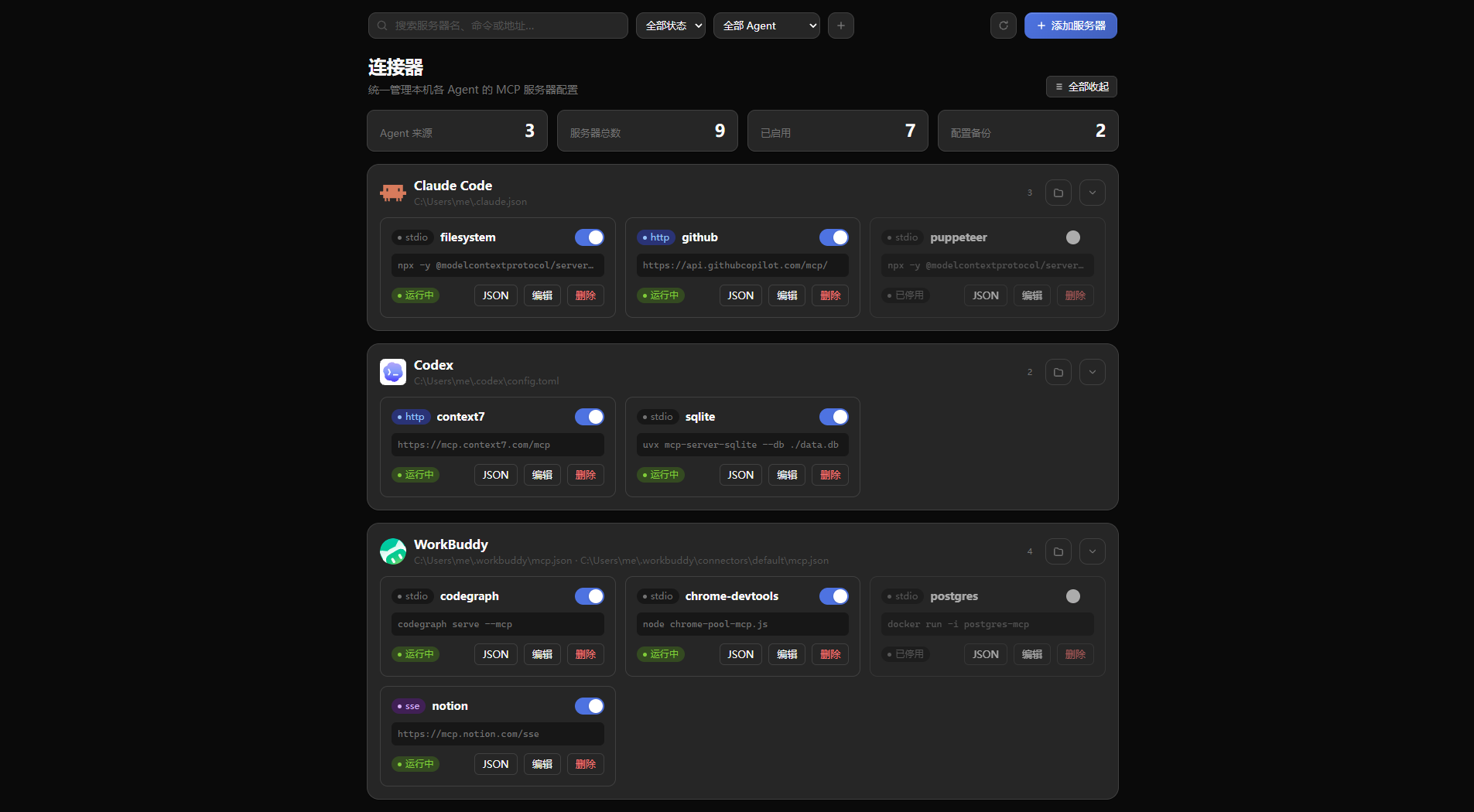
| Agent | Path | Format |
|---|---|---|
| DSH | ~/.dsh/profiles/<profile>/cordis.patch.yml |
YAML @deepseek-ai/dsh-mcp-client entries |
| DSH (legacy) | ~/.dsh/mcp.json |
JSON mcpServers |
| Claude Code | ~/.claude.json |
JSON mcpServers |
| Codex | ~/.codex/config.toml |
TOML [mcp_servers.*] |
| Cursor | ~/.cursor/mcp.json |
JSON mcpServers |
| Gemini | ~/.gemini/settings.json |
JSON mcpServers |
| Google Antigravity | ~/.gemini/config/mcp_config.json |
JSON mcpServers |
| Qwen Code | ~/.qwen/settings.json |
JSON mcpServers |
| Kimi Code | ~/.kimi-code/config.toml |
TOML |
| AtomCode | ~/.atomcode/mcp.json |
JSON mcpServers |
| OpenCode | ~/.config/opencode/opencode.json |
JSON mcp |
| Windsurf | ~/.codeium/windsurf/mcp_config.json |
JSON mcpServers |
| Trae / Trae CN | ~/.trae/mcp.json, ~/.trae-cn/mcp.json |
JSON mcpServers |
| Qoder | ~/.qoder/mcp.json |
JSON mcpServers |
| CodeBuddy / CN | ~/.codebuddy/mcp.json |
JSON mcpServers |
| WorkBuddy | ~/.workbuddy/mcp.json, ~/.workbuddy/connectors/default/mcp.json |
JSON mcpServers |
| VS Code | %APPDATA%/Code/User/mcp.json |
JSONC |
| …and anything else auto-discovered | — | — |
Paths are configurable per source; an override is stored in ~/.dsh/mcp-connectors/state.json. A source whose file does not exist simply doesn't appear.
dsh plugin --profile web add dsh-mcp-connectorsor from GitHub:
dsh plugin --profile web add https://github.com/elegant01/dsh-mcp-connectorsRestart DSH, then open Settings → Connectors. Host routes are registered at startup, so a full restart (tray → quit) is required after upgrading.
application/json, and a same-origin Origin; the host's connection.fetch gate still applies.config: block).registry.modelcontextprotocol.io (results cached for 10 minutes). mcp.so access is limited to its allowed rankings and detail pages (cached for 30 minutes, robots.txt respected, /search never touched). WorkBuddy connectors are read from the local marketplace cache. Nothing is installed or run automatically — you confirm the target agents and parameters in the panel.${VAR} credential placeholders; real secrets stay in WorkBuddy's own key store and are never written to config by the plugin.npm install
npm run typecheck
npm run build # lib/ (host unbundled, client bundled for DSH ModuleLoader)
npm test # full regression suite against a temp HOME
npm run preview # docs/preview.html — real component with fixture dataPublishing is fully automated:
node scripts/bump.cjs 0.2.0   # bump package.json + lockfile + changelog
git commit -am "chore(release): v0.2.0"
git push origin main
git tag v0.2.0 && git push origin v0.2.0
The publish.yml workflow runs the full test suite and publishes with npm Trusted Publishing (GitHub OIDC) — no NPM_TOKEN, no OTP, and provenance is signed automatically.
Agent brand marks in assets/agent-icons/ come from @lobehub/icons (MIT) and are vendored here; they are inlined into the build, so nothing is loaded from external paths at runtime.
CLASSIFICATION EVIDENCE
系统优先读取 GitHub Topics,再与站内分类词典和词根规则比对。当前命中: mcp、deepseek。
morluto
Reverse engineer anything with agents, from app behavior down to native binaries.

deepseek-ai
DeepSeek Harness: Everything is a Plugin.

nexu-io
The 1st Collaborative AI Design Agent Workspace. Local-first and open source. Create motion, prototypes, websites, apps, dashboards, presentations, images, and videos with your team and AI agents. Share work, exchange feedback, and iterate together in one workspace.