Manage ChatGPT, Codex CLI, and Claude Code accounts and track quota in one place. Use multi-model smart routing with priority and automatic failover. Install AI tools and deploy local LLMs in one click.
Note — This repository is just one of several download channels
and an issue tracker. For product information, announcements, and
commercial inquiries, visit echobird.ai.
💜 Sponsors
APIMart
Thanks to APIMart for sponsoring this project! APIMart is a low-cost API platform for AI image & video generation — GPT-Image-2 from $0.006/image, 160+ images per dollar. One async API covers both image and video: submit a task, get an ID, fetch results via polling or callback. Batch tens of thousands of images without timeouts, switch models without changing code. Pay-as-you-go with no monthly fee — sign up here to get started.
88API — AI token aggregation platform
Thanks to 88API for sponsoring this project! 88API is a one-stop token aggregation platform: a single API key provides stable access to language & coding models — GPT, Claude, Gemini, Grok, DeepSeek, Kimi, GLM and more — along with image models (GPT-Image, Gemini, Grok), video models (Seedance, Veo, MiniMax Hailuo H3, Kling) and speech (Whisper, TTS), covering everything from copywriting and image creation/editing to video generation and voice-overs. New users get free trial credits to test model capabilities, with human support on site. Operated with overseas corporate credentials — stable and dependable, official invoices, and a 1:1 top-up ratio.
GrooRoute — Official Claude and GPT models
Thanks to GrooRoute for sponsoring this project! Official Claude and GPT models are now available. We invite everyone with a curious mind to explore advanced AI, including Fable 5 and GPT-5.6. Connect directly from mainland China and get started with a single line of configuration — sign up here.
Fluxion AI
Fluxion AI helps individual developers and businesses access and manage leading AI models worldwide through a unified API. Dynamic routing across multiple upstream connections improves availability, with transparent model performance, response times, and costs. When using Fable 5.1, Fluxion AI can save up to approximately 90% compared with Claude's official API pricing.
Friends kept asking me to install Claude Code, OpenClaw, Hermes Agent… every machine was different, and some refused to pay for an LLM. Setup and explanations took forever. So I built EchoBird — an Agent inspired by Songbird, the genius netrunner from Cyberpunk 2077 who solves any tech problem for V…
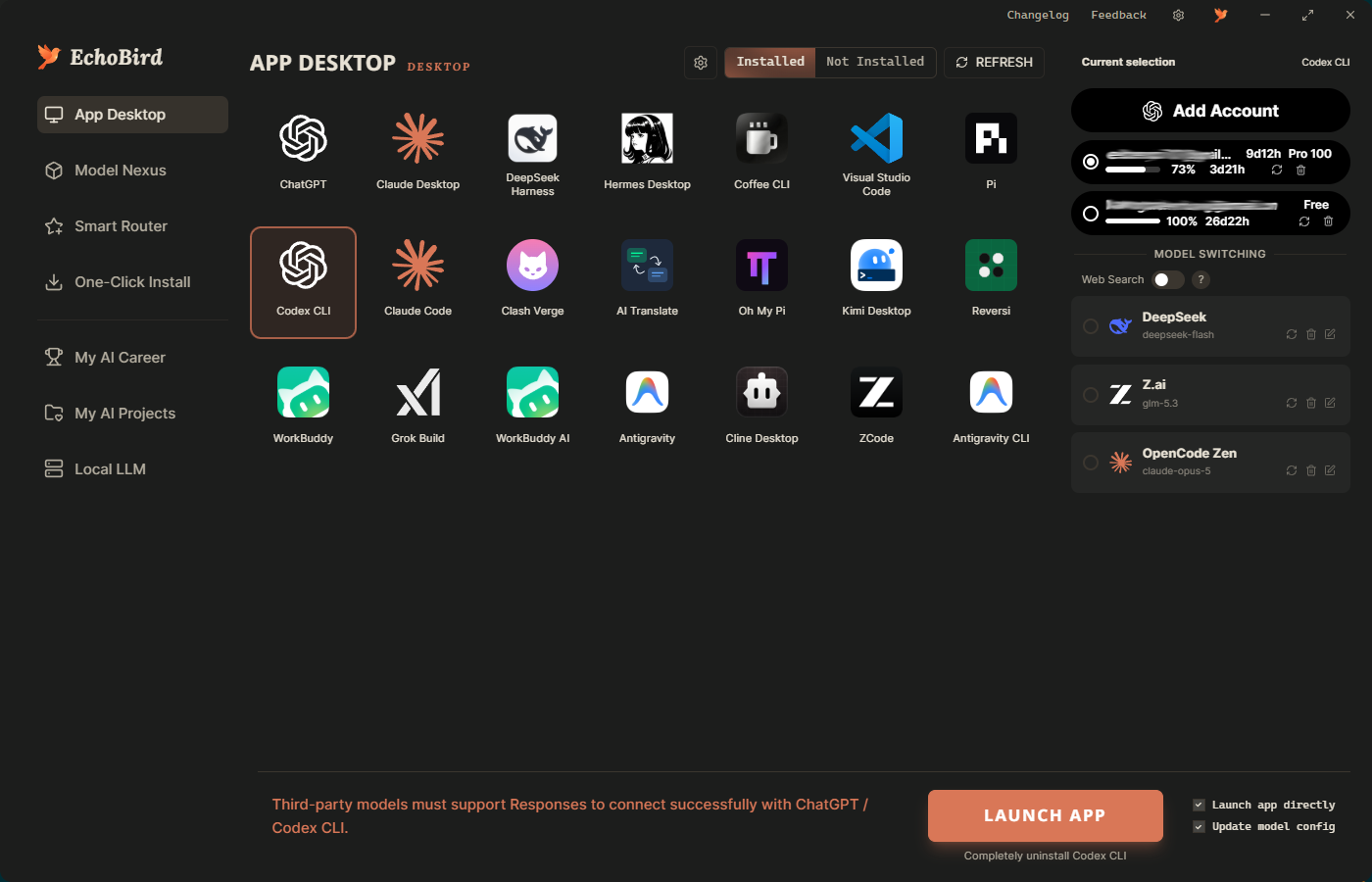
App Desktop — account and model switching
Highlights
EchoBird offers 4 scenarios sharing a unified model data hub — configure once, used everywhere.
4 scenarios
Install & Repair Agent — let an AI install and fix mainstream tools (Claude Code, OpenClaw, Hermes Agent, …); works locally and remotely
One-click local LLM — bundled vLLM / SGLang / llama.cpp runtimes; pick a quant, hit START
My AI Projects — onboard and manage your own vibe-coded apps and games inside EchoBird
App Manager — one-click launch and management for every AI / Agent app & game
Shared foundation
Model Nexus — a unified data hub for OpenAI / Anthropic / local LLMs / API Routers; configure once and all 4 scenarios pick it up; one-click latency check before you commit
Cross-platform — Windows, macOS, Linux (x64 + arm64)
Multi-account switching — ChatGPT, Codex CLI, and Claude Code
Manage multiple saved accounts in EchoBird's App Manager, view their usage quota, and choose the account to use when launching a tool.
ChatGPT desktop and Codex CLI — add OpenAI accounts through browser sign-in, then select a saved account and launch. Both tools share the local Codex account configuration, so switching affects the shared login.
Claude Code — add accounts through browser authorization, select an account, and launch Claude Code with it. View the plan, remaining 5-hour and 7-day quota, and reset countdowns when available.
Quota at a glance — check remaining quota and reset times, refresh account usage, and remove saved accounts from the same panel.
Get started: open App Manager → choose ChatGPT, Codex CLI, or Claude Code → add and authorize your accounts → select an account → launch. Account selection takes effect on launch; choose a third-party model instead when you want to use an API provider.
Multi-model smart routing — priority and automatic failover
EchoBird's Smart Router puts multiple model providers behind one local API. Add free, paid, or private models from Model Nexus, then drag the cards into your preferred order. The router tries models in that order and automatically falls back when a model is rate-limited, out of quota, or temporarily unavailable. After cooldown, it retries models in priority order.
Up to 20 models — reuse your configured models without entering their API keys again.
One endpoint for compatible tools — supports OpenAI Chat Completions and Anthropic Messages, including clients such as Claude Code.
Explicit priority — you control the order; routing follows that order rather than selecting models by task or price.
Get started: open Smart Router → add models from My Models or the free-model directory → drag to set priority → choose Auto Router for a compatible tool in App Manager. Keep EchoBird running while tools use its local API.
Smart Router switches between configured model APIs; it does not automatically rotate saved login accounts. ChatGPT / Codex CLI third-party models require the Responses API, which Smart Router does not currently expose. For those tools, use account switching or a Responses-compatible provider directly.
Supported tools — install & switch models in one click
EchoBird bundles the install references and writes each tool's native config
file, so you install from one place and — crucially — switch the model
with a single click. Configure a provider once in Model Nexus, then point
any supported tool at it; no manual TOML / JSON editing, no per-CLI re-login.
This is the part most "model switcher" repos leave you to figure out alone.
One-click install + one-click model switch
The tools below support both — install and model switching — which is
the core of what EchoBird is for:
Coding CLIs — Claude Code · Codex CLI (OpenAI) · Grok Build (xAI) ·
Kimi CLI (Moonshot) · Qwen Code · Aider · OpenCode · MiMo Code (Xiaomi) · Kilo Code ·
ZCode (Z.AI) · OpenClaw · Pi · Vibe-Trading
Searching GitHub for "switch model for Grok Build" or "switch model for
Kimi CLI or Kimi Desktop"? Those are first-class here — pick the model in Model Nexus,
hit switch, and EchoBird rewrites ~/.grok/config.toml or
~/.kimi-code/config.toml for you.
One-click install & launch
These are detected, installed, and managed by EchoBird, but model switching
is handled by the app itself (vendor-locked or no model config):
Hermes Desktop · Claude Science · Cursor · VS Code ·
Gemini Desktop · Coffee CLI
Screenshots
Model Nexus — the unified model data hub, configure once
App Manager — one-click launch and management for every AI / Agent app
Local LLM — run models on your own machine
Install & Repair Agent — chat-driven setup and troubleshooting
My AI Career — dashboard
Install
One-line install
Windows (PowerShell)
irm https://echobird.ai/install.ps1 | iex
macOS / Linux
curl -fsSL https://echobird.ai/install.sh | sh
The script auto-detects your OS, downloads the right package, and skips if you're already on the latest version.
Code — EchoBird v5.0.0 and later are licensed under the
MIT License. The full source is open — fork it, study it,
ship it. EchoBird
v4.x and earlier remain under AGPL-3.0-or-later in perpetuity
(already-released v4.x binaries are not retroactively relicensed).
See NOTICE for attribution.
Trade dress + brand — EchoBird's primary protection is its UI / UX trade
dress: the specific combination of four user-facing surfaces sharing one
central model hub, plus the bundling of two complete reference applications
(Reversi + AI Translator) as user tutorial templates. The wordmark EchoBird
is a common-law trademark of edison7009; feature labels like Model Nexus /
模型中心 are descriptive and protected only as part of the trade dress.
Forks are welcome — no need to scrub our name and logo. If your fork
honestly credits EchoBird as upstream, you may keep our identity visible
(e.g. "EchoBird Community Edition by X"). If you prefer to rebrand entirely,
that's also fine — just keep the NOTICE attribution. The hard lines are:
commercial SaaS / app-store products literally branded "EchoBird"
without permission; presenting the code as your own from-scratch original
work; and adopting three or more of our four UI surfaces side-by-side in
a competing product without independent prior-work documentation (see
NOTICE for the formal threshold). See TRADEMARKS.md
for the full policy.