

模型与 MCP
待识别

rea
morluto
Reverse engineer anything with agents, from app behavior down to native binaries.
PROJECT TOPICS
PROJECT README


简体中文 | English
A VS Code-like workspace panel plugin for DeepSeek Harness (DSH): browse the workspace, search it, and read its git state without leaving the conversation.
It is published on npm as dsh-workspace-ide; every release is built and published by GitHub Actions through npm trusted publishing (OIDC) with a signed provenance statement.
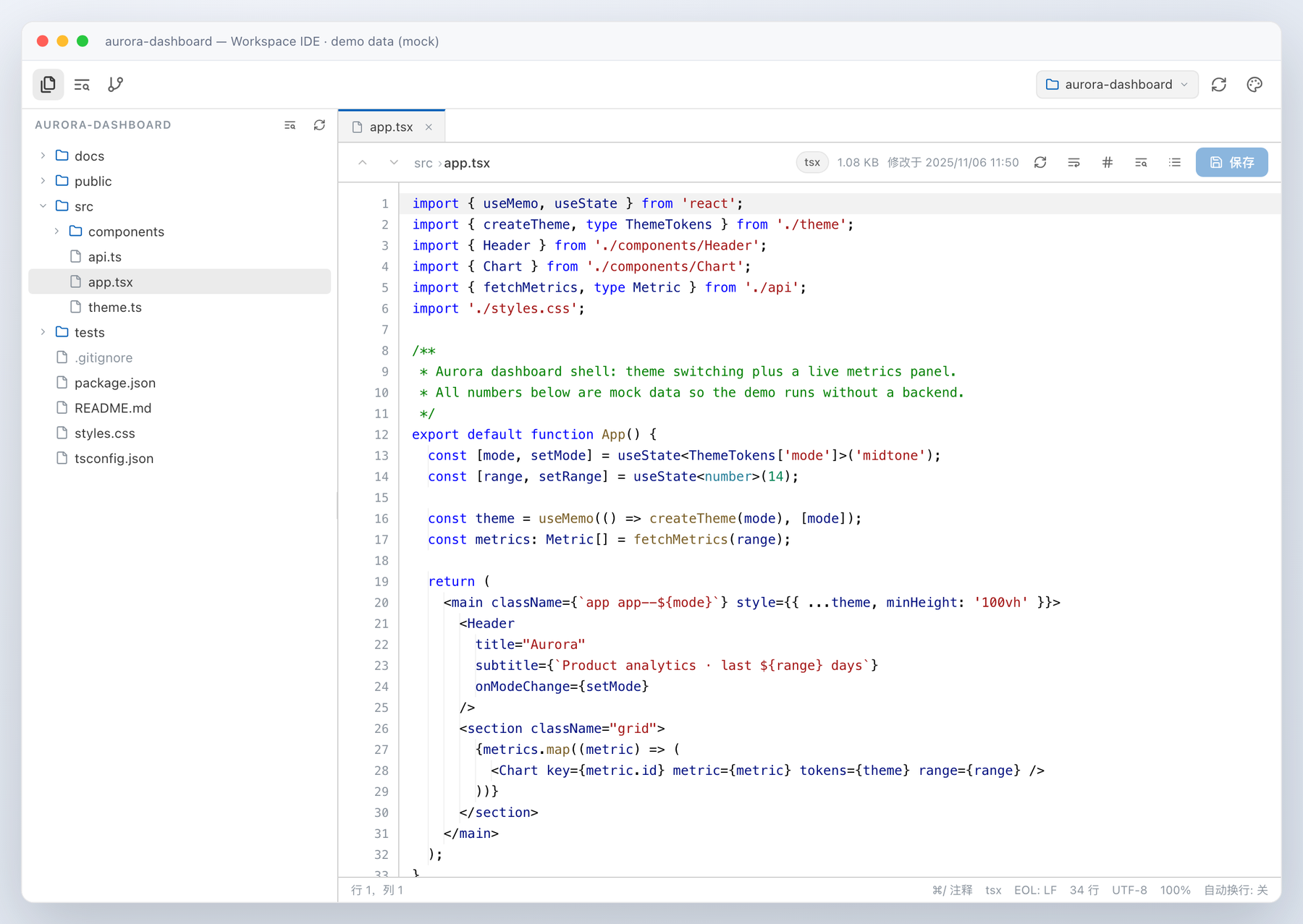
Ctrl/Cmd+P), in-file find and replace (Ctrl/Cmd+F / Ctrl/Cmd+H, with case, whole-word and regex modes), multi-tab editing with per-tab drafts and unsaved-change guards, back and forward navigation (Ctrl/Cmd+Alt+←/→), editor zoom, bracket matching, auto-pair, indent guides and line moves, comment toggling (Cmd/Ctrl+/), Markdown preview with a source toggle, image and SVG preview, and large-file and binary guards. Ctrl/Cmd+S saves.The panel ships the mainstream VS Code palettes and switches without touching the rest of DSH: Follow DSH theme (the default, live --dsw-alias-* values), Dark+, Light+, One Dark Pro, Dracula, GitHub Dark and Solarized Light.
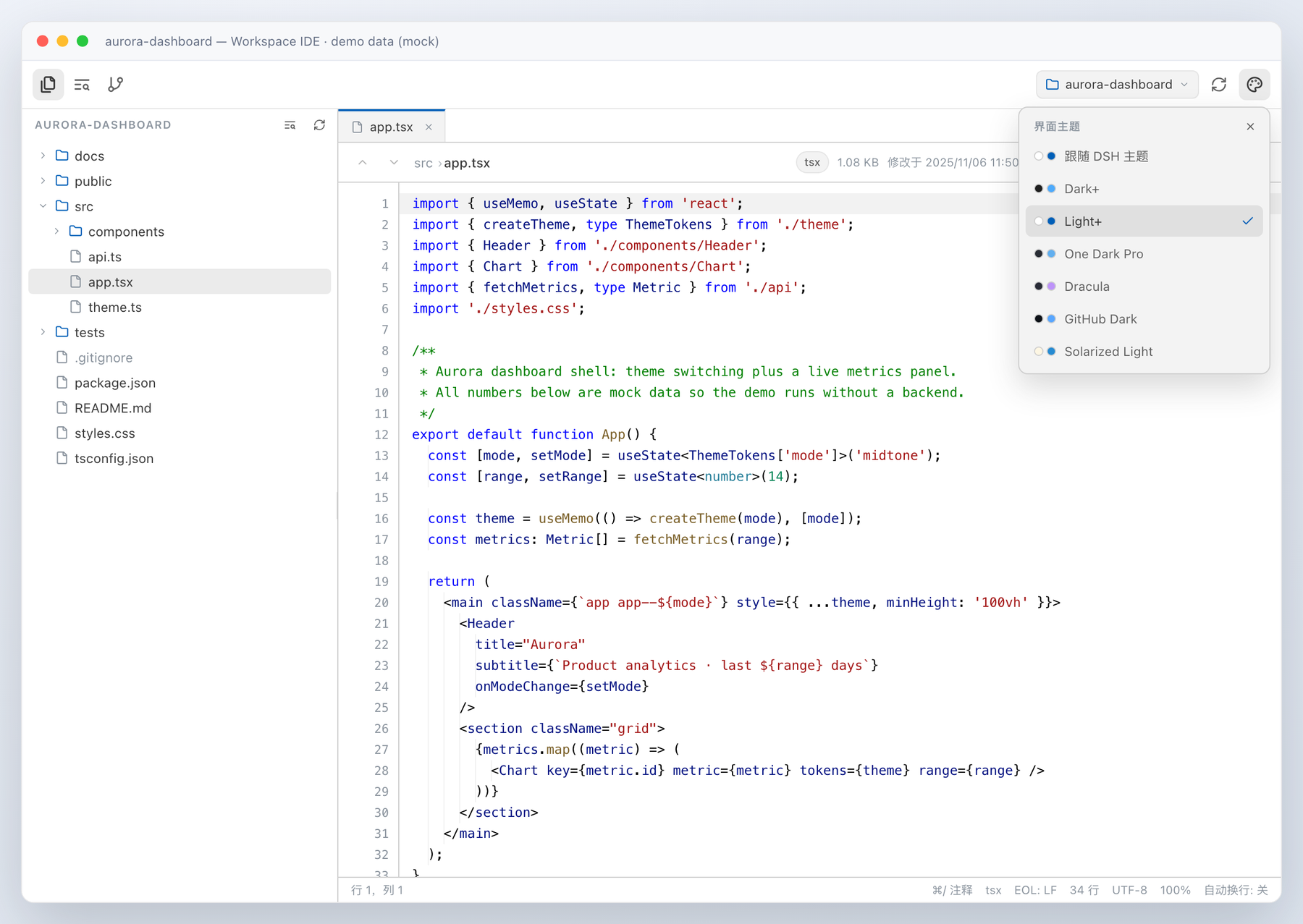
All screenshots are rendered from a synthetic demo workspace.
From a DSH session, install the published npm package (version-pinnable):
plugin_manager {
  action: "install_bundle",
  target: "dsh-workspace-ide"
}
Install straight from GitHub (main or a pinned tarball):
plugin_manager { action: "install_bundle", target: "echoVic/dsh-workspace-ide" }
plugin_manager { action: "install_bundle", target: "https://github.com/echoVic/dsh-workspace-ide/archive/refs/tags/v1.8.7.tar.gz" }
For plugin development, install the working directory with an absolute path:
plugin_manager { action: "install_bundle", target: "/absolute/path/to/dsh-workspace-ide" }The bundle is profile-wide and survives restarts. application: "applied" means it activated immediately; client changes are picked up by DSH's client HMR, and host changes load on the next Host start.
The host half validates workspace roots against the platform's native spelling, so Windows drives and UNC roots work, and win32 backslashes are normalized to POSIX separators. Shortcut hints say Cmd/Ctrl, and typography follows DSH's --dsw-font-family and --ds-font-family-code tokens, so DSH font settings apply to the panel too.
lib/index.js, lib/host/*.js) registers nine authenticated fetch routes through ctx.connection.fetch.register; filesystem access is path-checked, and everything is read-only except save (an atomic overwrite of an existing regular file) and ping. Git runs through child_process.execFile with bounded output.lib/client.js, generated from src/client/ by scripts/build-client.mjs) is one window.__ModuleLoader__.load(...) module that registers a sidebar.panellist icon and the keyed main panel, using only require('react'), the DSH theme tokens and a built-in zh/en dictionary.npm ci # dev-only tooling: the TypeScript checker
npm run typecheck # tsc --checkJs, strict, over lib/ + src/client + scripts + tests
npm run typecheck:host # lib/ under noImplicitAny
npm run typecheck:client # client sources under noImplicitAny
node scripts/build-client.mjs # rebuild lib/client.js from src/client/
node scripts/build-client.mjs --check # fail when lib/client.js is stale
node --check lib/client.js
node --test test/host/ # host route unit tests
node test/smoke/client-smoke.mjs # headless client module smoke test
python3 scripts/check-screenshots.py # README screenshots are non-blank rendersTypeScript is only a dev-time checker: sources stay plain JavaScript with JSDoc annotations, and tsc --noEmit --checkJs checks them with strict: true. There is no client bundler, no build step for the host and no runtime dependency. lib/client.js is served directly by the host and watched by DSH's client HMR, so saving a rebuilt copy updates an open Harness page without a restart.
Pushing a v* tag runs .github/workflows/publish.yml: the tag must match package.json, then npm publish runs through GitHub OIDC trusted publishing (no npm token in the repository) and npm records build provenance.
CLASSIFICATION EVIDENCE
系统优先读取 GitHub Topics,再与站内分类词典和词根规则比对。当前命中: deepseek-harness。
morluto
Reverse engineer anything with agents, from app behavior down to native binaries.

deepseek-ai
DeepSeek Harness: Everything is a Plugin.

nexu-io
The 1st Collaborative AI Design Agent Workspace. Local-first and open source. Create motion, prototypes, websites, apps, dashboards, presentations, images, and videos with your team and AI agents. Share work, exchange feedback, and iterate together in one workspace.