
模型与 MCP
待识别

rea
morluto
Reverse engineer anything with agents, from app behavior down to native binaries.
PROJECT TOPICS
INSTALL REFERENCE
dsh plugin --profile web add github:dsh-plugins-cn/dsh-remote-deck
该命令指向仓库当前默认分支;尚无绑定当前 commit 的完整验证结果。
PROJECT README
SSH workspaces for DeepSeek Harness — one window, local and remote conversations side by side.
Remote Deck connects your DSH desktop app to any number of SSH machines and turns a remote folder into an ordinary DSH workspace. Inside that workspace the agent reads, writes, searches, runs commands, opens a terminal and forwards ports on the remote host — while the UI stays the same window you already use.
sshd: SFTP for files, exec channels for commands and search,
a PTY for the terminal, direct-tcpip for port forwarding.| Console | Quick panel |
|---|---|
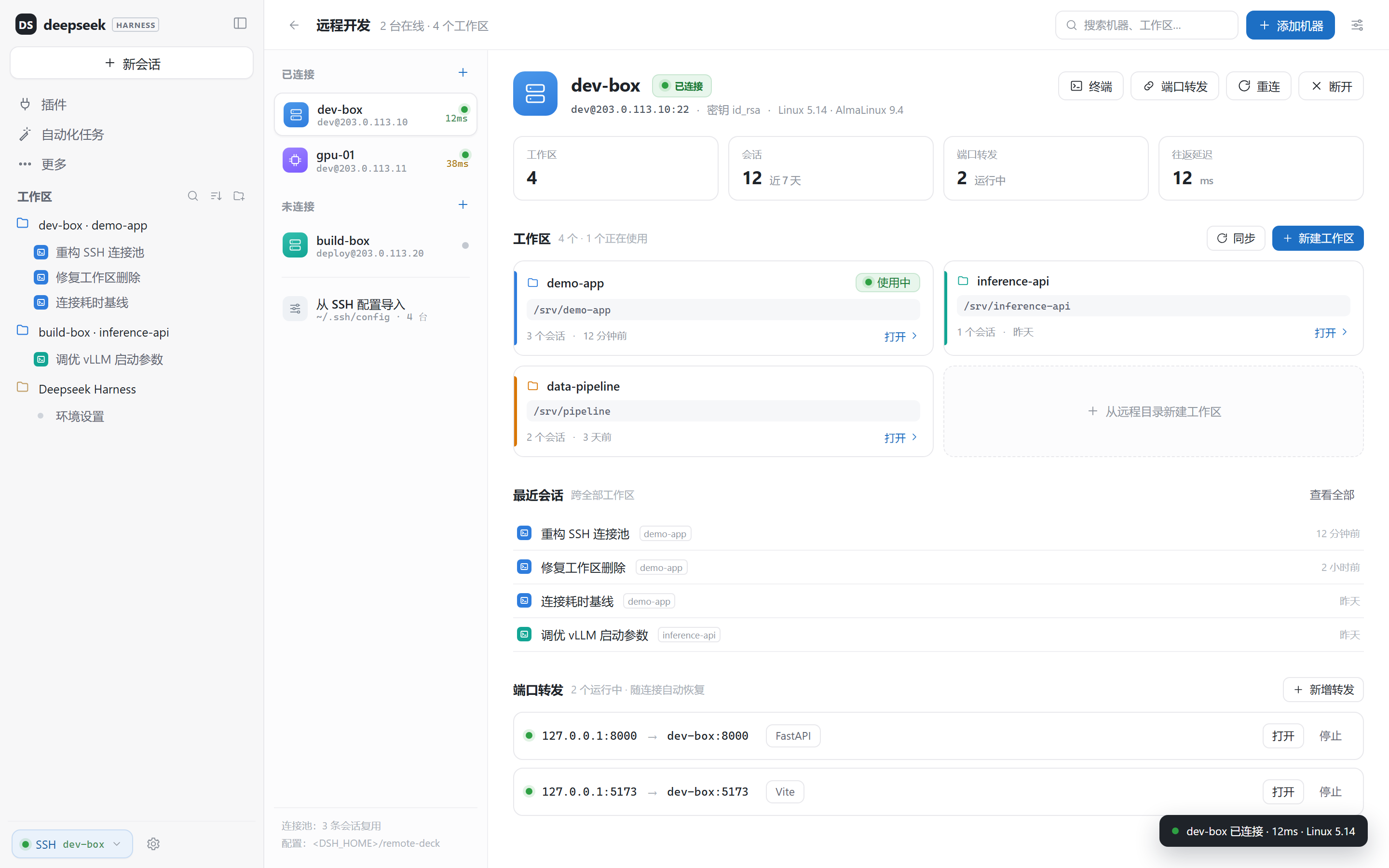 |
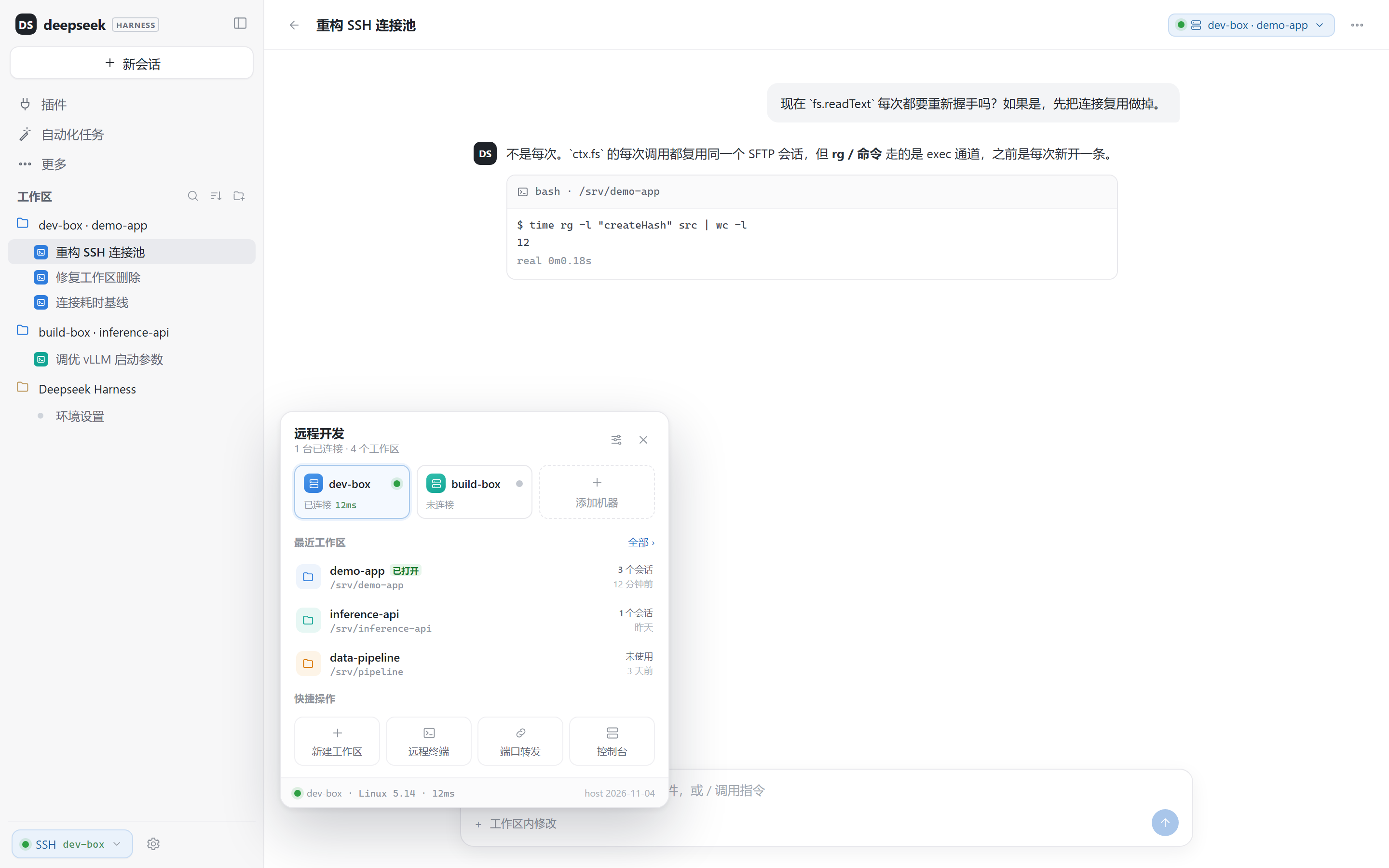 |
| Session identity | Add a machine |
|---|---|
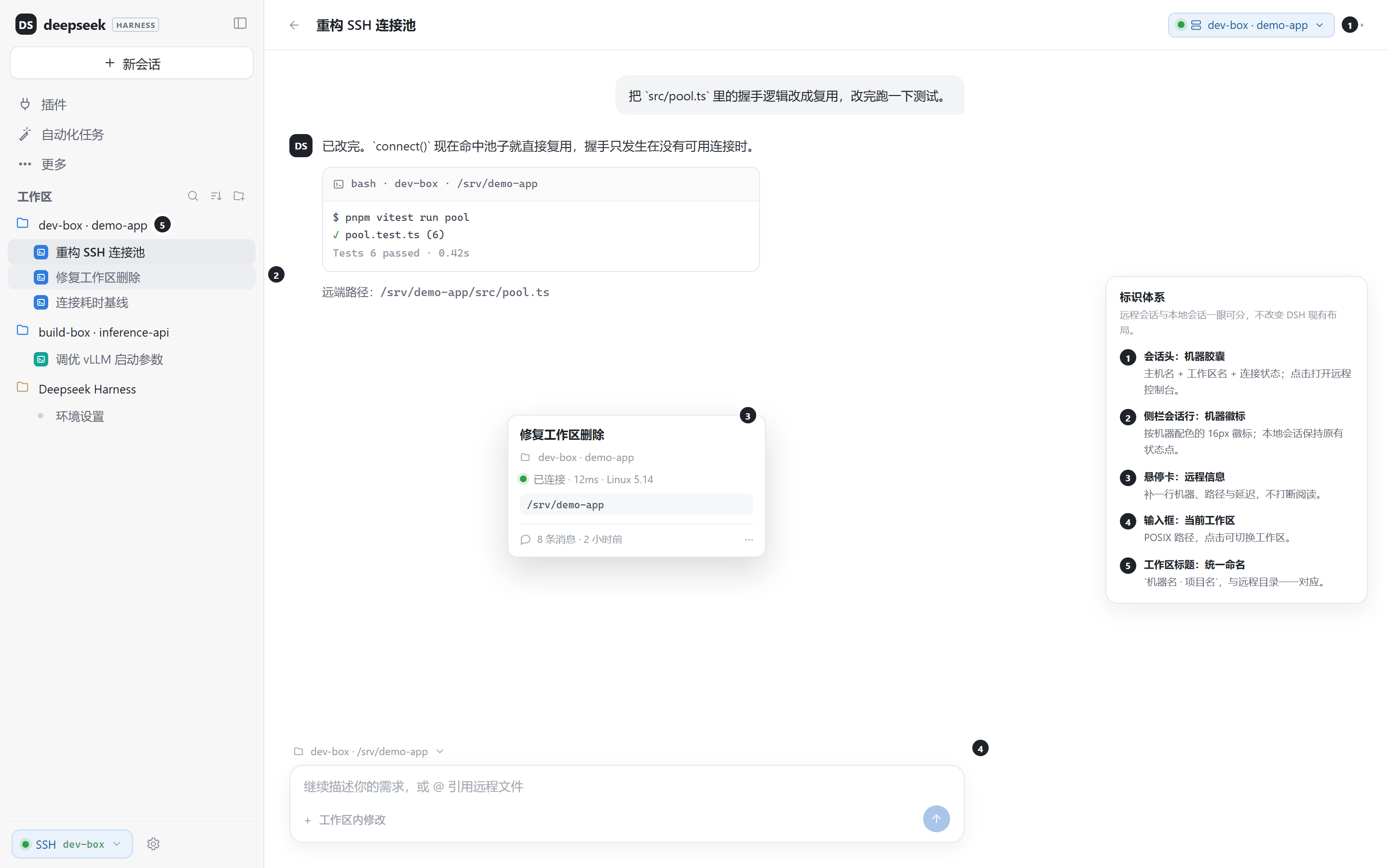 |
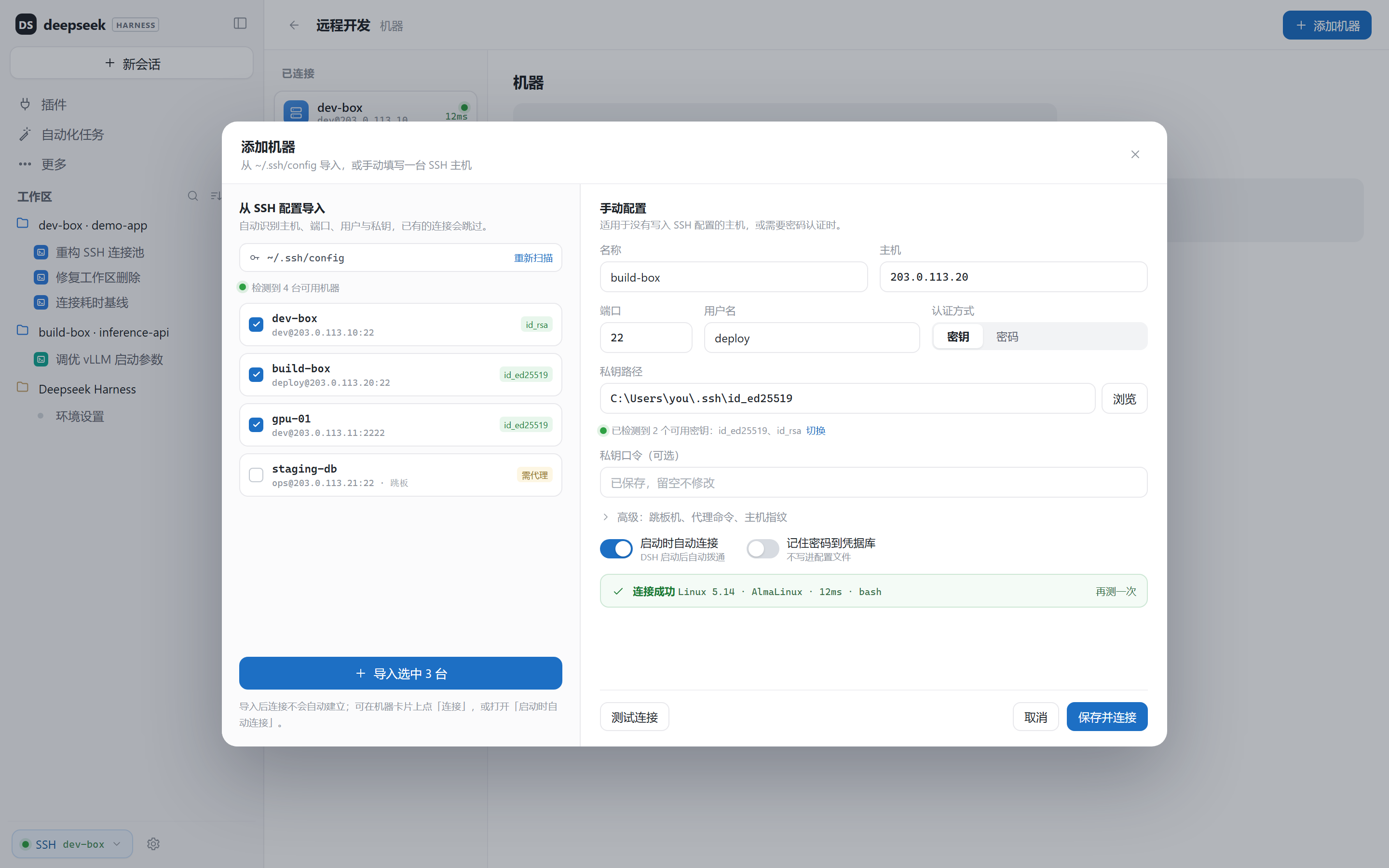 |
| New workspace | Terminal and ports |
|---|---|
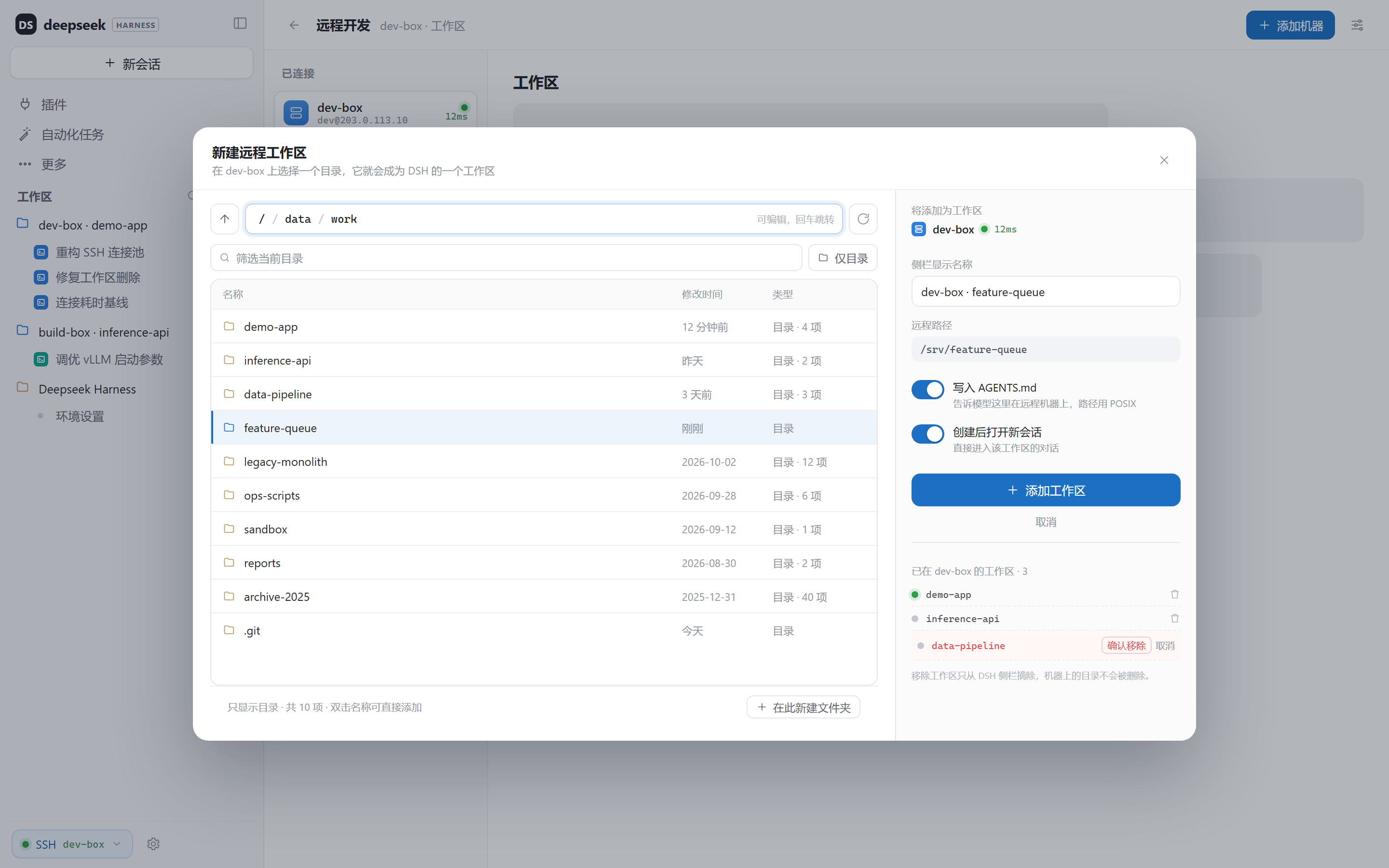 |
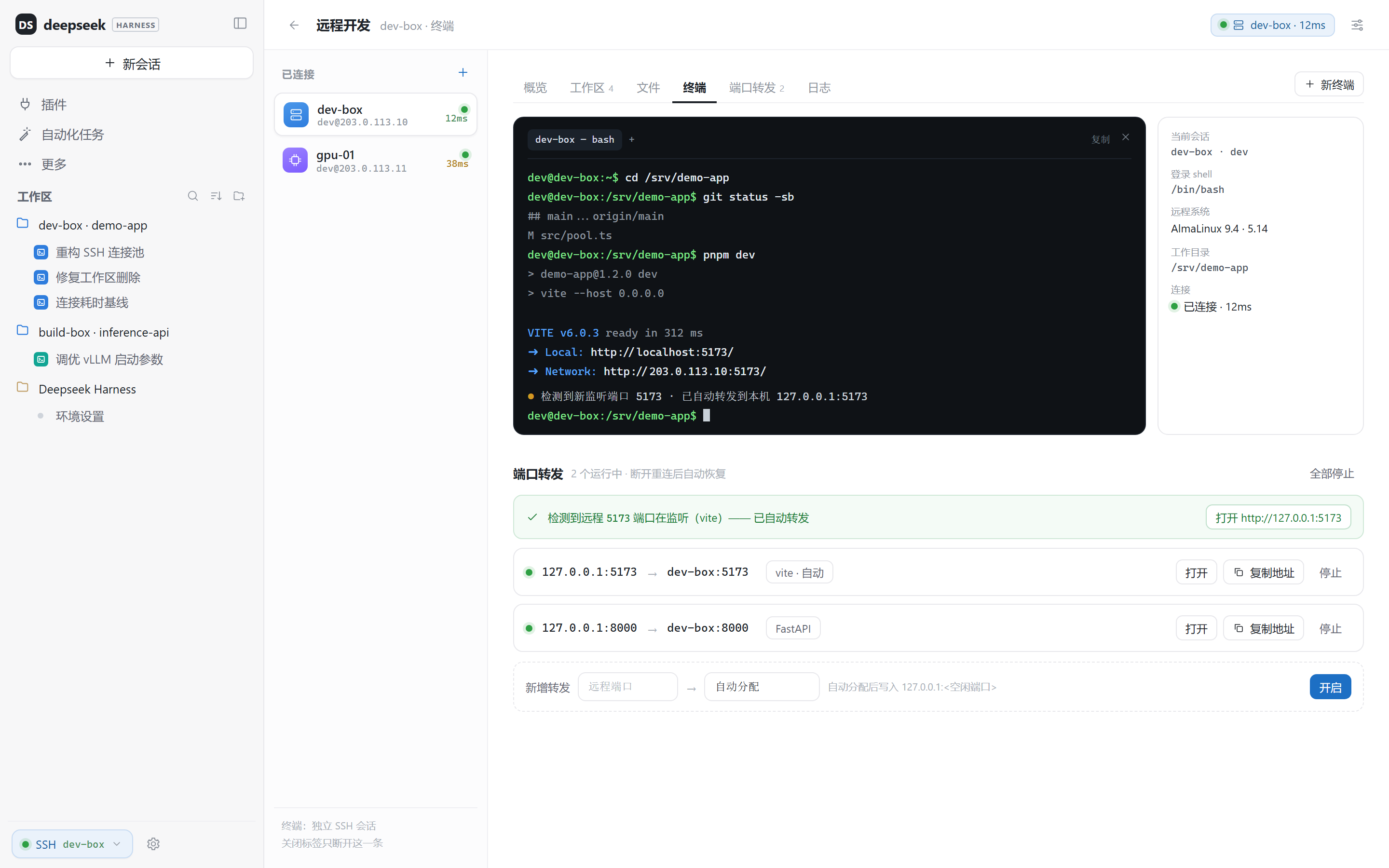 |
Screenshots are rendered from the sanitized design mockups in docs/design/v2/. Host names,
addresses and paths are demo data (dev-box, 203.0.113.10, /srv/demo-app).
| Area | What you get |
|---|---|
| Connections | Multiple hosts, key or password auth, ~/.ssh/config import, connection test with OS/latency, per-host auto-connect (off by default; toggle in the dialog, quick panel or console), keepalive and backoff reconnect |
| Workspaces | Browse remote folders with breadcrumbs, filters and keyboard navigation; add one as a DSH workspace; custom sidebar name; remove locally without touching the remote directory. Each remote workspace row shows a small connection status dot in the grouped/tree sidebar view |
| Sessions | Remote sessions get a header pill and a hover line; local sessions are unchanged. Sidebar session rows keep DSH's native leading cell, so remote and local rows align exactly |
| Console | Machine rail, host overview, stats, workspace cards, recent sessions, search, and a remote file browser with download / save-to-local / reveal |
| Terminal | Remote PTY in a full xterm.js terminal: colours, cursor, full-screen programs, paste and replay buffer |
| Ports | Automatic discovery of remote listening ports, one-click forwarding, persistence and restore on reconnect |
| Memory | Remote memory (off by default): plugin and per-machine switches, machine/workspace briefs, notes, a ≤2 KB summary injected into new remote sessions, and a remote_memory tool; data stays local |
| Theme | Light and dark, driven by DSH theme tokens |
From the plugin market (after listing) or npm:
dsh plugin add dsh-remote-deckFrom GitHub:
dsh plugin add git+https://github.com/dsh-plugins-cn/dsh-remote-deck.gitIn mainland China, use the GitHub proxy:
dsh plugin add "git+https://ghproxy.laiyouxi.com/https://github.com/dsh-plugins-cn/dsh-remote-deck.git"From a checkout:
git clone https://github.com/dsh-plugins-cn/dsh-remote-deck.git
cd dsh-remote-deck
powershell -ExecutionPolicy Bypass -File .\install.ps1 -Profile desktop
Restart DSH (or press Ctrl+R) after installing; the SSH chip appears at the bottom of the
sidebar. There is no separate navigation entry: open the quick panel from the chip and choose
控制台 / Console when you need the full console.
The plugin has no npm dependencies: ssh2 and its small dependency tree are vendored under
vendor/node_modules, and the terminal assets under vendor/xterm. Installation therefore never
runs package build scripts.
dsh-remote-sshRemote Deck is the successor of dsh-remote-ssh.
On first load it copies connections from <DSH_HOME>/remote-ssh and reuses existing workspace
stubs in place, so workspaces and sessions keep their place in the sidebar.
The old plugin keeps working until you remove it. Use one profile at a time: both plugins patch
ctx.fs, so only one of them should be enabled in a profile.
Cut over in one command (backs up package.json first and keeps the old plugin files for
rollback):
.\install.ps1 -Profile desktop -RemoveOldRoll back at any time:
.\install.ps1 -Rollback # restores package.json.bak-before-deckData stays in <DSH_HOME>/remote-deck and survives plugin reinstalls.
┌────────────────────────────── DSH desktop ──────────────────────────────┐
│ conversation · sidebar · Remote Deck console                            │
│        │ ctx.fs / ctx.shell / ripgrep / tools                            │
│        ▼                                                                │
│ host half: connection pool, workspace stubs, loopback API               │
└────────┬────────────────────────────────────────────────────────────────┘
         │ SSH (ssh2): exec channels · SFTP · PTY · port forwarding
         ▼
   remote host: sshd only (Linux / macOS)
A remote workspace is a marked stub directory under <DSH_HOME>/remote-deck/workspaces; the
marker records the connection id and the remote POSIX path. Every path under a marked workspace
resolves through SFTP; commands run through an exec channel with the remote cwd; ripgrep moves to
the host; the terminal is one PTY channel; forwarding is one local listener per port.
DSH_REMOTE_DECK_FOREGROUND_TIMEOUT_MS); when it expires the command keeps running in the
background and the tool returns its job id — it is never killed on timeout. Follow it with the
built-in job_output / job_list tools and stop it with job_kill.run_in_background: true returns a job id immediately, for servers and long acceptance runs.psql without
PGPASSWORD) fail fast with their own error instead of blocking the turn forever.DSH_REMOTE_DECK_MAX_OUTPUT_BYTES) and marked
[output truncated; …] when it exceeds the cap.job_kill signals the recorded remote pid (TERM, then KILL).
Processes detached with setsid/double fork may survive; use timeout for those.Remote commands run on the SSH host outside the local DSH sandbox/approval layer; the remote
account is the execution boundary. Pin the host key with hostKeyFingerprint on the connection
record and use a restricted account for untrusted repositories.
apply_patch is not supported on remote workspaces yet; use edit/write.
A remote Session routes POSIX paths to the SSH host and drive/backslash paths (C:\\...,
E:\\...) to the local machine, so remote development can still use local Windows
files/resources. Both worlds are intentionally reachable; review remote-sourced content before
letting it touch local paths.
The loopback API accepts the desktop dsh-app://app origin and loopback HTTP(S); every route
still requires the per-session token.
Passwords and key passphrases live in the DSH credential store, never in connections.json.
The browser half talks to the host over a loopback HTTP server guarded by a per-session token.
The terminal and forwarding endpoints are behind the same token.
Removing a workspace only unregisters it locally; remote files are never deleted by the plugin.
sshd on the remote host; Linux or macOS; remote shell bash.DSH_REMOTE_DECK_WORKSPACE_STATUS=0 to disable
the dots.~/.ssh/config import covers Host/HostName/Port/User/IdentityFile/ProxyJump; proxy commands and
host-key pinning are not wired into the connection dialogs yet.ss or netstat is required for automatic port discovery; manual forwarding still works.npm run check # syntax + manifest
npm test # parser unit tests
npm run pack:dry # inspect the published file listDesign mockups and their sanitized renders live in docs/design/v2/; acceptance runs are
recorded in the CHANGELOG. The workspace status design and its internal-DOM boundary are in
docs/WORKSPACE-STATUS.md. The version plan is in
ROADMAP.md, release steps in PUBLISH.md, and the iteration runbook
in docs/MAINTENANCE.md.
MIT
See RELEASE-POLICY.md: batch fixes, test before publishing, and use semantic versions (patch = bugfix, minor = capability).
CLASSIFICATION EVIDENCE
系统优先读取 GitHub Topics,再与站内分类词典和词根规则比对。当前命中: deepseek。
morluto
Reverse engineer anything with agents, from app behavior down to native binaries.

deepseek-ai
DeepSeek Harness: Everything is a Plugin.

nexu-io
The 1st Collaborative AI Design Agent Workspace. Local-first and open source. Create motion, prototypes, websites, apps, dashboards, presentations, images, and videos with your team and AI agents. Share work, exchange feedback, and iterate together in one workspace.