模型与 MCP
待识别

rea
morluto
Reverse engineer anything with agents, from app behavior down to native binaries.

dsh-plugin-collection/dsh-wakatime-plugin
给 DSH 加上 WakaTime 心跳上报:统计你在编辑器、终端与 AI 对话里花的时间,按项目 / 语言 / 类别归集,AI token 用量单独上报。| WakaTime heartbeat reporting for DSH: time across editors, terminals and AI sessions, split by project / language / category, with separate GenAI token reporting.
PROJECT TOPICS
INSTALL REFERENCE
dsh plugin --profile web add github:dsh-plugin-collection/dsh-wakatime-plugin
该命令指向仓库当前默认分支;尚无绑定当前 commit 的完整验证结果。
PROJECT README

English | 简体中文
Your time inside DSH, in your WakaTime dashboard.
A WakaTime heartbeat plugin for DeepSeek Harness: tracks AI-assisted coding activity — every tool call, every shell command, every turn — grouped by project / language / category, with AI token reporting.
Community integration. Not affiliated with WakaTime.
Activity inside DSH never reaches WakaTime on its own: WakaTime is fed by editor plugins, while your work here happens in a terminal and in AI conversations. This plugin bridges that gap — it listens to DSH events and turns them into WakaTime heartbeats.
write / edit → one heartbeat with line counts and languagebash command → one app heartbeat whose category comes from the command itselfai coding heartbeat carrying token usageWhat it does not do: patch DSH internals, bundle host components, or store anything beyond the local retry cache.
The WakaTime dashboard after installing:
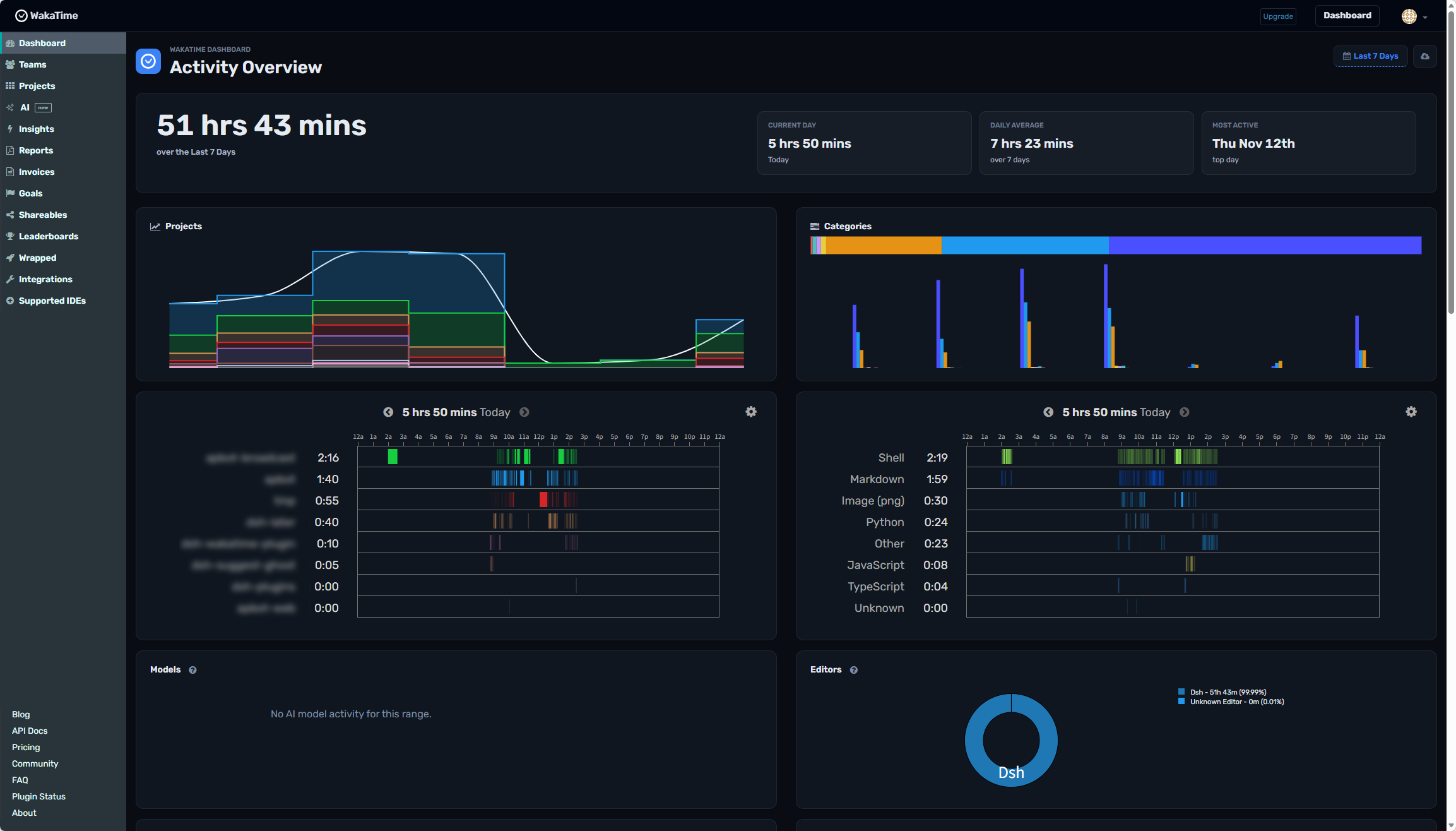
All four panels are fed by this plugin:
| Panel | Source |
|---|---|
| Projects | Each heartbeat's project, inferred from git / package.json / directory name |
| Categories | Tool → category mapping (see Category mapping) |
| Languages | Inferred from file extensions |
| Editors | Derived from the heartbeat User-Agent (dsh/1.0.0 dsh-wakatime/1.0.0), which is why "working in DSH" shows up as its own editor |
dsh plugin --profile web add dsh-wakatime-pluginRestart dsh web afterwards. Then open Settings → WakaTime and paste your API key.
From GitHub:
dsh plugin --profile web add github:dsh-plugin-collection/dsh-wakatime-pluginLocal development (from the plugin directory):
dsh plugin --profile web add /path/to/dsh-wakatime-pluginFrom source:
cd dsh-wakatime-plugin && pnpm install && pnpm buildInternal distribution: also mirrored on a private Gitea for internal use — ask the maintainer for the URL and pin a commit:
dsh plugin --profile web add <internal-repo-url>#<commit-sha>Everything lives in Settings → WakaTime and takes effect on save — no restart.
| Setting | Description |
|---|---|
| API Key | WakaTime API key (masked input). When empty it falls back to WAKATIME_API_KEY, then ~/.wakatime.cfg, then cordis.patch.yml |
| API URL | Service endpoint, default https://wakatime.com; set your own for self-hosted |
| Proxy URL | http://host:port. Empty falls back to HTTPS_PROXY, then proxy in ~/.wakatime.cfg; none forces a direct connection |
| No-proxy hosts | Comma separated, empty inherits NO_PROXY. e.g. wakatime.com connects that host directly |
| Heartbeat interval | 60000–300000 ms |
| Project name / Language | Empty = auto-detect; a value overrides it |
| Terminal app name | The entity for command heartbeats, default Terminal; set it to e.g. DSH |
| Track switches ×3 | Tool calls / user messages / AI messages |
| Cache | Enable local cache + limit (10–1000 entries) |
| Debug mode | More verbose logging |
API key precedence: settings page → WAKATIME_API_KEY → cordis.patch.yml → ~/.wakatime.cfg. Every layer only accepts a non-empty string; a malformed value is skipped with a warning and resolution continues.
Four steps to confirm it works:
loaded with API key waka_****xxxx;If step 3 stays quiet, check the local cache first:
wc -l ~/.dsh/wakatime/heartbeat-cache.jsonl0 lines or no file = healthy (the cache is only written on failure);上报失败… in the log.| Side | Notes |
|---|---|
| DSH | Supported range is engines.dsh in package.json; currently covers generations 0.1.2 – 0.2.3 (prereleases included). The host validates it at startup and disables the plugin on a mismatch |
| Node | >= 22.19 (including 24+) |
| Platform | Windows / macOS / Linux |
| WakaTime | wakatime.com, or any WakaTime-compatible self-hosted server |
| Other telemetry plugins | One heartbeat backend per profile — do not run codetime or similar alongside |
| DSH tool | WakaTime category | is_write |
|---|---|---|
write / edit |
coding |
✅ |
read / grep / glob |
browsing |
— |
bash / pwsh |
Derived from the command (below) | — |
web_search |
researching |
— |
mcp__codegraph__codegraph_explore |
code reviewing |
— |
mcp__langfuse__* |
debugging |
— |
subagent / subagent_fork / workflow / todo_write |
coding |
— |
ask_user_question / user messages |
communicating |
— |
| AI replies | ai coding |
— |
skill |
learning |
— |
| Anything else | coding |
— |
Shell categories are no longer a blanket building — an earlier implementation did that, and replaying 5290 shell heartbeats from a real account showed 98.7% of the reported "build time" was not building. Categories now come from the command:
| Command | Category |
|---|---|
ls / cat / grep / sed / head … |
browsing |
git / pnpm build / docker build … |
coding / building |
pnpm test / vitest |
running tests |
| Unrecognised | coding |
Only the bare subcommand is examined, never trailing arguments (test inside grep -n foo test/a.py does not count as a test run), and wrappers like cd … &&, sudo and npx are stripped first.
entity / category shape breaks cross-version comparisons on those dimensions;pnpm install
pnpm build # clears lib/ then rebuilds host + client
pnpm typecheck
pnpm test # vitest, 169 casessrc/
├── index.ts # entry: event listeners, timers, config migration
├── config-value.ts # volatile-ref unwrapping and per-field validation
├── wakatime.ts # HTTP client: proxy, bulk upload, per-item parsing
├── tracker.ts # event → heartbeat conversion and merging
├── cache.ts # local JSONL cache with time-based trimming
├── project.ts # git / package.json project inference
├── category.ts # shell command → category
├── language.ts # extension → language
├── diff.ts # write/edit line counts
└── types.ts # types and constantsThe heartbeats.bulk response is always 202 at the outer level; real results live in per-item status codes inside responses. An implementation that only checks response.ok reads a fully rejected batch as a full success — rejected heartbeats neither enter the cache nor raise an error, which is plain data loss.
| Per-item status | Handling |
|---|---|
2xx |
Stored |
4xx (except 429) |
Permanent failure — dropped with a warning carrying the server's reason |
429 / 5xx |
Back to cache for retry |
String fields are pre-trimmed to the server's hard limits: entity ≤ 2083, project / branch ≤ 1024; an empty string is rejected too. A trimmed entity ends with ....
缓存超过上限(N 条),最旧的 M 条心跳已被丢弃(from → to) — that line means data is genuinely being lost.The host's TokenUsage input components are disjoint: inputTokens is the uncached part only, cache hits are reported separately in cacheReadTokens, and billed input is the sum of the three.
This plugin sends the uncached part as ai_input_tokens and cache hits as ai_cached_input_tokens, and never adds them together; cacheWriteTokens has no WakaTime counterpart and is not reported.
Measured sample: one session billed 80.1M input of which 78.7M (98%+) was cache hits. Reporting only the uncached part makes WakaTime's Tokens two orders of magnitude smaller than a local dashboard.
The host's evaluatePluginCompatibility reads only the plugin's package.json:
| Condition | Behaviour |
|---|---|
engines.dsh present |
Only that range is compared; peerDependencies are ignored |
| Absent | Every @deepseek-ai/dsh* peer must be satisfied by the running version |
| Comparison | semver.satisfies(running, range, { includePrerelease: true }) |
| Failure | Logs Plugin … is incompatible with dsh … and disables the row |
Write peers as an explicit range list, not ^ prefixes, and never exact versions. Under node-semver's default semantics (no includePrerelease) a prerelease range only matches when a comparator carries an anchor for the same [major.minor.patch] tuple: ^0.2.1-rc.2 expands to >=0.2.1-rc.2 <0.3.0-0, whose anchors are 0.2.1 and 0.3.0 only — so satisfies('0.2.2-rc.1', '^0.2.1-rc.2') is false and the plugin gets disabled once the host moves to 0.2.2-rc.1. Spelling out >=0.2.2-alpha.2 <0.2.3-0 is what covers it.
Host 0.2.1 packages pin their dsh peers exactly to one version; copying that makes a plugin disappear on the next rc — on this machine webhook-runtime and webhook-github vanished that way.
Adding a peer entry is ongoing: one entry only covers that generation's rc plus its stable release; the next generation needs another.
| Wiring point | Rule |
|---|---|
WebUI slot plugins.bundle.config key |
Is the package name — not the settings namespace and not the profile entry id; a mismatch means no settings card |
@deepseek-ai/dsh-client-ui-primitives |
Must stay external; bundling it duplicates the whole icon set |
| Automatic settings projection | Requires .volatile() on Config; projection lives in the host's dsh-app-boot |
.volatile() fields arrive as ref objects |
apply() receives Object.freeze({ get }), not values. They must be unwrapped, otherwise api_url produces an invalid URL, heartbeat_interval_ms becomes 1 ms, booleans stay truthy, string fields are dropped entirely and cache_limit never trims. Handled centrally in src/config-value.ts |
Replaying 5290 shell heartbeats from a real account:
| Category | Before | After |
|---|---|---|
building |
100.0% | 1.3% |
coding |
— | 50.6% |
browsing |
— | 46.4% |
researching |
— | 0.8% |
running tests |
— | 0.5% |
debugging |
— | 0.3% |
Categories use only WakaTime's authoritative set (wakatime-cli, pkg/heartbeat/category.go): there is no deployment and no testing (the right value is running tests), and invented words do not aggregate in the dashboard.
bash / pwsh heartbeats have type: app. Per wakatime-cli's definition ("AppType represents an app entity") the entity should be an app name, not a command line. Treating the whole command as the entity scattered 5281 shell heartbeats into 5158 distinct entities, 98.2% of them seen exactly once — no aggregation value, and one keystroke away from the 2083-character limit and per-item 400s.
It now comes from the "Terminal app name" setting (default Terminal); what the command does is expressed by category. The merge key inside the 5-second window is entity + category, otherwise an ls would overwrite a pnpm test from four seconds earlier under the same app name.
User message / AI reply heartbeats deliberately keep dsh-session-<id> as the entity: its cardinality is bounded by the session count and it is the only dimension that drills down by session.
The outbound proxy is taken from settings page → env vars → ~/.wakatime.cfg → direct, first match wins. A layer that is not a valid http(s) URL is ignored with a warning and resolution continues.
With debug on, startup logs a line 网络出口 经代理 http://…(来源:设置页) that answers which route is actually in use. Credentials in a proxy URL are masked to ***:*** before logging.
NO_PROXY / "No-proxy hosts" accept *, exact hosts and .suffix entries (example.com also matches its subdomains).
Why the plugin must read the cfg: measured on the same machine, curl direct, curl via proxy and node direct were all 20/20 while the plugin intermittently got fetch failed — because it was the only link not going through the proxy that was already configured in ~/.wakatime.cfg.
Since 2026-10 WakaTime answers read endpoints (/users/current, /users/current/projects, /users/current/heartbeats) with:
403 API Keys are only for plugins, use your personal oauth tokenwhile the write endpoint heartbeats.bulk still accepts plugin keys. This is an upstream policy change, not an auth bug in this plugin.
One consequence: the "Project name" dropdown in settings depended on /users/current/projects, so it was permanently empty and has been removed — the field is free text now. Also, do not read that 403 as a dead key: judge the key by the write endpoint or by the failure warnings.
Plugin not loaded: does lib/ exist? Run pnpm build. Any incompatibility line in the log?
No settings card: confirm the plugin is in the profile's bundles; fully restart dsh web; check the browser console.
Heartbeats not sending, in this order (an earlier version went silent for a full week):
~/.dsh/wakatime/heartbeat-cache.jsonl is only written on failure. Persistent growth or pinning at the limit means sends are failing and older heartbeats are being pushed out; that activity is unrecoverable.ctx.logger never reaches the stdout capture file, so logger-only means no log at all — the direct reason two silent outages went unnoticed). Key lines: 上报失败…, 缓存超过上限…已被丢弃, N/M 条心跳被逐条拒绝并已丢弃…, cache flush failed….未配置 WakaTime API Key = no usable value in any layer; WakaTime API Key 无效 = the server returned 401; 上报失败…(cause: …) = transport. Diagnostics carry cause (ECONNRESET / ETIMEDOUT / ENOTFOUND…), not just fetch failed.apply called; artifact mtime=… pid=… answers which build this process loaded. Hot reload can leave an old fiber sending with old code; restart DSH fully when behaviour disagrees with the source.MIT © wujue
CLASSIFICATION EVIDENCE
系统优先读取 GitHub Topics,再与站内分类词典和词根规则比对。当前命中: deepseek-harness。
morluto
Reverse engineer anything with agents, from app behavior down to native binaries.

deepseek-ai
DeepSeek Harness: Everything is a Plugin.

nexu-io
The 1st Collaborative AI Design Agent Workspace. Local-first and open source. Create motion, prototypes, websites, apps, dashboards, presentations, images, and videos with your team and AI agents. Share work, exchange feedback, and iterate together in one workspace.