

其他
完整应用

deepseek-harness
deepseek-ai
DeepSeek Harness: Everything is a Plugin.

dsh-mixxed/dsh-client-ui-settings-mcp
在 DeepSeek Harness 设置页管理 MCP 服务器:运行时添加/编辑/启停/重连/删除,实时状态、自动重连,中英双语界面。MCP server manager for DeepSeek Harness — add, edit, enable/disable, reconnect & delete MCP servers from the web settings page, with live status and auto-reconnect.
PROJECT TOPICS
PROJECT README
Manage MCP servers right from the DeepSeek Harness Web settings page — add, edit, enable/disable, reconnect and delete servers at runtime, with live status, automatic reconnect and config-file hot sync.
mcp__<serverName>__<tool> for every session.$DSH_HOME/ui-settings-mcp.json is watched; external edits take effect within ~1 s, no restart needed.--dsw-alias-* token overrides from appearance plugins); UI ships in 简体中文 / English.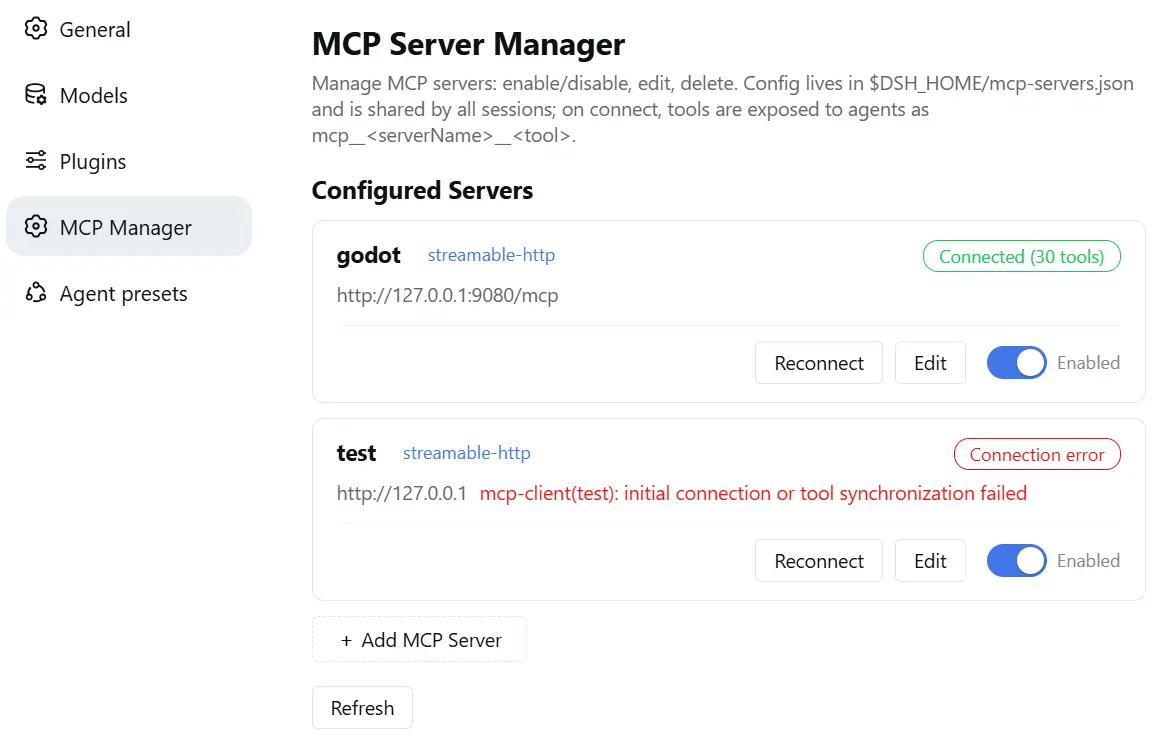
Option 1 — from npm (easiest):
dsh plugin --profile web add @dsh-mixxed/dsh-client-ui-settings-mcpThe package declares dsh.bundle, so dsh plugin add installs it and automatically appends it to the profile's dsh.profile.bundles layer stack — the plugin row mounts on the next boot. No manual cordis.patch.yml editing.
Upgrading an install that predates the bundle declaration: remove the legacy ui-settings-mcp row from $DSH_HOME/profiles/<name>/cordis.patch.yml — the bundle layer now supplies it, and leaving both would mount the id twice.
Option 2 — from source:
Clone and build:
git clone https://github.com/dsh-mixxed/dsh-client-ui-settings-mcp.git
cd dsh-client-ui-settings-mcp && npm install && npm run build   # lib/ is generated by esbuild (prepack does it on publish)
Install into the profile from the folder that contains the clone (no absolute path needed):
dsh plugin --profile web add ./dsh-client-ui-settings-mcpThe local package also declares dsh.bundle, so the profile-layer auto-mount above applies the same way.
Then — restart dsh web and hard-refresh the browser page (Ctrl+Shift+R) so the new __DSH_BOOT__ loads, then open Settings → MCP Server Manager and add your first server.
Note: hot reload of
cordis.patch.ymlis disabled on the Web surface (DSH's shared HMR row is off), so configuration changes need a restart. Plugin-set changes (new rows) need a restart for the clientpkgMetacache to notice the new package.
Follow every step, in order:
dsh plugin --profile <profile> add @dsh-mixxed/dsh-client-ui-settings-mcp in the profile you use (or npm install @dsh-mixxed/dsh-client-ui-settings-mcp in $DSH_HOME/profiles/<profile> and use Option 2 below for the file layout).cd dsh-client-ui-settings-mcp, run npm install --ignore-scripts && npm run build (produces self-contained lib/index.js + lib/client.js; zero runtime dependencies), then run dsh plugin --profile <profile> add <path-to-clone> from the clone's parent directory (or link the folder into $DSH_HOME/profiles/<profile>/node_modules/@dsh-mixxed/dsh-client-ui-settings-mcp — directory junction on Windows, symlink on POSIX).dsh.bundle, so dsh plugin add appends it to the profile's bundle layers automatically (verify with dsh --profile <profile> --dump-config: the ui-settings-mcp row must be present).dsh web (Web-surface config hot reload is disabled) and tell the user to hard-refresh the browser so the settings page shows the new section.GET http://127.0.0.1:3080/ui-settings-mcp/api/health must return {"ok":true,"name":"ui-settings-mcp","version":"<x.y.z>",...}.Open Settings → MCP Server Manager:
serverName is immutable); saving hot-reconfigures the live connection.streamable-http (URL + optional headers) or stdio (command + args), with a configurable connection-wait timeout.| Status | Meaning |
|---|---|
| Connected (n tools) | tools are registered |
| Connecting | handshake / reconnecting in progress |
| Offline | was connected, but the server process is unreachable (probed) |
| Error | initial connect failed (reason shown) or 30 s connect timeout |
| Disabled | switched off — not connected, no tools |
$DSH_HOME/ui-settings-mcp.json — shared by every profile and session:
{
  "version": 1,
  "servers": [
    { "serverName": "my-server", "transport": "streamable-http", "url": "http://127.0.0.1:8080/mcp", "enabled": true }
  ]
}
The file is watched live: manual edits (add / remove / change / enable) take effect within ~1 s; POST /ui-settings-mcp/api/reload triggers it on demand.
| Method | Path | Purpose |
|---|---|---|
| GET | /ui-settings-mcp/api/health |
liveness + version + store path |
| GET | /ui-settings-mcp/api/servers |
list with live (probed) status |
| GET | /ui-settings-mcp/api/servers/<name> |
single server |
| POST | /ui-settings-mcp/api/servers |
add & connect |
| POST | /ui-settings-mcp/api/servers/<name>/update |
update config & hot-reconnect (serverName immutable) |
| POST | /ui-settings-mcp/api/servers/<name>/toggle |
enable / disable ({"enabled": true|false}) |
| POST | /ui-settings-mcp/api/servers/<name>/reconnect |
disconnect & reconnect |
| DELETE | /ui-settings-mcp/api/servers/<name> |
disconnect & delete |
| POST | /ui-settings-mcp/api/reload |
re-read the config file from disk |
The /ui-settings-mcp/* API can start stdio servers — i.e. execute arbitrary commands — so it is gated by the bind address:
dsh web binds to 127.0.0.1 (the default), the API is open — the single-user local posture.dsh web binds to a non-loopback address (--host 0.0.0.0), the manager logs a loud error and *rejects all `/ui-settings-mcp/` requests** (403) because stdio servers execute arbitrary commands. There is no remote-management path.Authorization headers for a specific MCP server) is configured per server in the add/edit form's Headers field — the API itself needs no token.npm install # build-only devDependencies
npm run build # esbuild: lib/index.js (host, fully bundled) + lib/client.js (browser)
npm run watch # watch the client bundle (works with dsh-client-hmr)Publishing: bump version in package.json, then npm publish (the prepack script builds lib/ automatically before packing; the package ships lib/, cordis.patch.yml (the dsh.bundle patch layer), both READMEs + LICENSE).
No runtime dependencies: the host half inlines @deepseek-ai/dsh-mcp-client, the MCP SDK and cross-spawn; the browser half is a closure-factory bundle served by DSH's client module system.
failOnStartupError is on, so a failed first connect shows error and retries up to every 60 s; once connected, mcp-client's own reconnect handles drops.streamable-http servers (any HTTP response counts as reachable); stdio servers are not probed./ui-settings-mcp/* has no user accounts or remote-management path; when the web server binds to a non-loopback address all requests are rejected (see Security; stdio servers execute arbitrary commands).MIT
CLASSIFICATION EVIDENCE
系统优先读取 GitHub Topics,再与站内分类词典和词根规则比对。当前命中: 无有效分类标签。
deepseek-ai
DeepSeek Harness: Everything is a Plugin.

anywhere-labs
为 DeepSeek Harness (DSH) 插件生态打造的现代化桌面端解决方案。万物皆「插件」,桌面本身也是「插件」。

walkinglabs
Harness engineering beginner tutorial, from 0 to 1