
模型与 MCP
待识别

rea
morluto
Reverse engineer anything with agents, from app behavior down to native binaries.
PROJECT TOPICS
INSTALL REFERENCE
dsh plugin --profile web add github:drm-nz/dsh-model-advanced
该命令指向仓库当前默认分支;尚无绑定当前 commit 的完整验证结果。
PROJECT README
Per-model default reasoning level and image handoff for text-only models — added to the existing Settings → Models page.
Model adapters describe a model once, provider-wide and statically. Two things an agent actually needs cannot be expressed that way:
This plugin adds a card at the bottom of the Models page that configures both, and implements the runtime behaviour behind them.
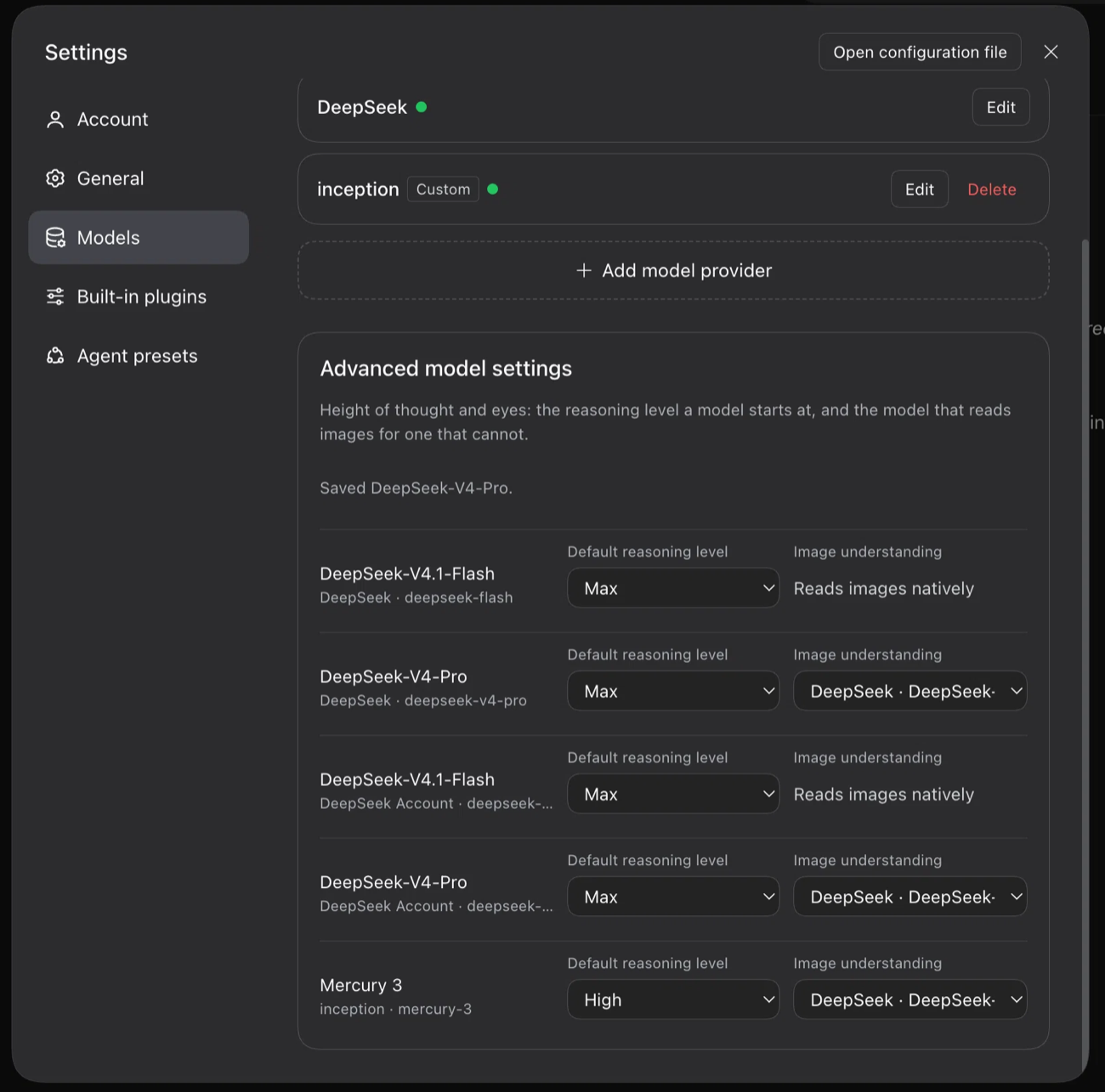
The card this plugin adds, at the bottom of Settings → Models: a starting reasoning level for each model, and — for a model that cannot see — the model that reads images on its behalf.
Requires a DeepSeek Harness install with the plugin manager.
dsh plugin --profile desktop add github:drm-nz/dsh-model-advancedThen restart the app. This plugin has a host half (lib/index.js) and a browser
half (lib/client.js); the host half loads at boot, and the browser half is served
from the installed package, so neither picks up without a restart.
dsh plugin --profile desktop add link:/absolute/path/to/dsh-model-advancedor add the link: dependency to the profile's package.json, run pnpm install there,
and restart. A linked package resolves its dependencies and peers from its own
directory, so they must be installed there too.
The shipped cordis.patch.yml names its entry bare (dsh-model-advanced), not
relatively. A link: install's real directory sits outside node_modules, and this
plugin imports Harness packages, so a bare name resolves through the profile's
dependency mapping — a relative name would bypass it and the import would fail.
To remove it:
dsh plugin --profile desktop remove dsh-model-advancedRequires the Harness packages it builds on (@deepseek-ai/dsh-llm,
@deepseek-ai/dsh-tools, @deepseek-ai/schemastery) to resolve from the profile, and
they should match the running Harness version — the plugin decorates runtime
prototypes, so it is version-coupled by nature. See Compatibility below.
One row per configured model, under the model list:
| Column | What it sets |
|---|---|
| Model | The model's name, provider, and id |
| Default reasoning level | The level a conversation starts at when it has not picked one. Empty option = no override |
| Image understanding | For a model that cannot read images: the configured model that reads them on its behalf |
Both choices are stored in this plugin's own settings namespace (model-advanced),
keyed provider/model — not in the adapters'. That is what keeps two models on one
provider independent, and what lets a model the adapters cannot describe still get a
default.
Four seams, because a level can be chosen — or never chosen — in several places:
resolveModelInfo is decorated so the model catalogue states the configured
level, and so the composer's Effort menu opens on it.prepareCall is decorated so a call that names no level is prepared with the
configured one. configure(controls, modelInfo) is the Harness's own seam for
choosing request controls; it runs after the agent loop has fixed and validated the
step's route and effort, which is why the default belongs there.resolveCallConfig is decorated so a caller that resolves a selection without
naming a level (the Session controller validating a model switch, for instance) sees
the configured level instead of the adapter's own default.Do not fill the level from an agent/request listener. The agent loop fixes a
step's route and effort before that waterfall and rejects a result that names a
different effort (… proposed reasoning effort "high" after step preparation fixed "adapter default"; use agent.model.select() before step preparation). That rejection
fails the whole turn before dispatch. Applying the level in prepareCall is equivalent
for what is sent, and leaves the validated proposal untouched.
All three prototype decorations are restored on dispose. A caller that picks its own level — the session-title service does — keeps precedence, and a configured level the model no longer offers is ignored instead of failing the call. Because the prepared header names the level explicitly rather than as an adapter default, the session's recorded model selection adopts it, so later steps do not depend on the seam at all.
Configure a delegate for a model that does not read images. Then, when a turn carries an image:
[dsh-image-handoff:<id>] marker which is read back from
session history, so retries and later turns never re-bill the delegate.For follow-up questions the model calls:
inspect_image(image_id, question)which hands the same image to the delegate again with the question. This exists so a text-only model is not stuck with a single fixed reading of an image forever.
A delegate failure does not end the turn — it becomes a note in the transcript saying what could not be read.
Capability is resolved in this order, cheapest first:
discoverModels, asked only for models the configuration does not describe, so
an ordinary page load stays offline.The card writes this namespace; it can also be edited directly.
- id: model-advanced
  config:
    modelDefaults:
      "deepseek/deepseek-chat": high
    imageDelegates:
      "deepseek/deepseek-chat": { provider: openai, model: gpt-5-mini }
    imageCapable:
"openai/o4-mini": true| Key | Shape | Meaning |
|---|---|---|
modelDefaults |
provider/model → effort id |
Starting reasoning level for that model |
imageDelegates |
provider/model → { provider, model } |
The model that reads images on this one's behalf |
imageCapable |
provider/model → true |
Pins image capability when it cannot be discovered |
Effort ids must match the adapter's own level ids; the card lists them, so pick from there rather than guessing.
Every boot, after the composition settles, the plugin appends one line to
~/.dsh/health.log — the one place a silent degradation becomes visible:
2026-11-01T02:00:42Z dsh-model-advanced ok   patch=live effort=live tool=live defaults=2/2
2026-11-01T02:00:42Z dsh-model-advanced warn patch=live effort=live tool=live defaults=1/2 stale=deepseek/old-model
patch — the catalogue and config-resolution decorations are still the functions this
plugin installed. dead means a Harness internal moved and the defaults stop applying.effort — the prepareCall decoration is live: calls that name no level get the
configured one. dead means the default is not reaching dispatch.tool — inspect_image registered.defaults — how many configured defaults were read back from
resolveModelInfo and found to name a level their model still offers. stale=
names the ones that do not, which is what a renamed effort id looks like.Read it with:
tail -n 2 ~/.dsh/health.log        # both plugins, when both are installed
grep -v ' ok ' ~/.dsh/health.log   # only problems
Set DSH_HEALTH_LOG to write somewhere else. A diagnostics failure never stops the
plugin from loading.
A failed check is also raised in the client: the composer shows a warning toast — the same primitive the app's own notices use — saying how many defaults are not applying. It appears once per page load, retires on its own, and renders nothing at all when the plugin is healthy.
The client decides this from the model catalogue rather than from a log: the host half
reports the configured level as reasoning.defaultEffort, so a default that is
configured but not reported means the decoration is gone. A model that is no longer
in your configuration is ignored — that is stale configuration, not a broken seam.
To see the warning deliberately, set a default to a reasoning level its model does not offer (the card lists only valid levels, so edit the settings document directly) and restart. Remove the entry and restart again to clear it.
Verified on a real boot of DeepSeek Harness 0.2.1-rc.5 (macOS desktop profile) on 2026-11-01, with five configured model defaults:
2026-11-01T02:03:32Z dsh-model-advanced ok patch=live tool=live defaults=5/5That line is the compatibility datapoint worth checking after you upgrade: it names the
Harness version this plugin was last confirmed against. It predates 0.1.1, which added
the effort= token when the level moved to the prepareCall seam — after Harness
0.2.2 builds started rejecting an effort change proposed from agent/request.
This plugin reaches into Harness internals rather than wrapping a public extension point, which is a deliberate trade: there is no public seam for "change this model's default effort" or "read this image for a model that cannot".
What that means in practice:
resolveModelInfo, resolveCallConfig, or prepareCall, the card still
renders and saves settings, but the defaults stop being applied — with no error in the
UI. The startup self-check is the detector: look for patch=dead or effort=dead in
~/.dsh/health.log first.agent/request seam it used through 0.1.0 was rejected by 0.2.2 builds; 0.1.1 moved
to prepareCall.node --test covers the prepareCall
decoration against a faithful fake of the runtime's prepare contract (explicit choices
win, unsupported levels are ignored, unconfigured routes keep the adapter default).
The rest of the behaviour depends on a live composition (LLM runtime, settings
documents, agent sessions) and is still verified by hand after an upgrade.inspect_image call.| Path | Purpose |
|---|---|
lib/index.js |
Host half: config schema, prototype decorations, handoff, inspect_image |
lib/effort-default.js |
The prepareCall decoration that applies a configured default level |
test/effort-default.test.js |
Unit tests for that decoration's prepare contract |
lib/client.js |
Browser half: the card in the Models page footer slot |
cordis.patch.yml |
Bundle patch that inserts the plugin row |
docs/advanced-model-settings.png |
Screenshot of the card, shown at the top |
MIT.
CLASSIFICATION EVIDENCE
系统优先读取 GitHub Topics,再与站内分类词典和词根规则比对。当前命中: llm、deepseek-harness。
morluto
Reverse engineer anything with agents, from app behavior down to native binaries.

deepseek-ai
DeepSeek Harness: Everything is a Plugin.

nexu-io
The 1st Collaborative AI Design Agent Workspace. Local-first and open source. Create motion, prototypes, websites, apps, dashboards, presentations, images, and videos with your team and AI agents. Share work, exchange feedback, and iterate together in one workspace.