
模型与 MCP
待识别

rea
morluto
Reverse engineer anything with agents, from app behavior down to native binaries.
PROJECT TOPICS
INSTALL REFERENCE
dsh plugin --profile web add github:donggongailv/dsh-find-in-conversation
该命令指向仓库当前默认分支;尚无绑定当前 commit 的完整验证结果。
PROJECT README

A macOS-style find bar for the current DeepSeek Harness conversation.



English | 中文
DeepSeek Harness keeps long conversations in one scrollable transcript. This plugin adds a small, keyboard-first find bar so you can jump through matches without losing your place.
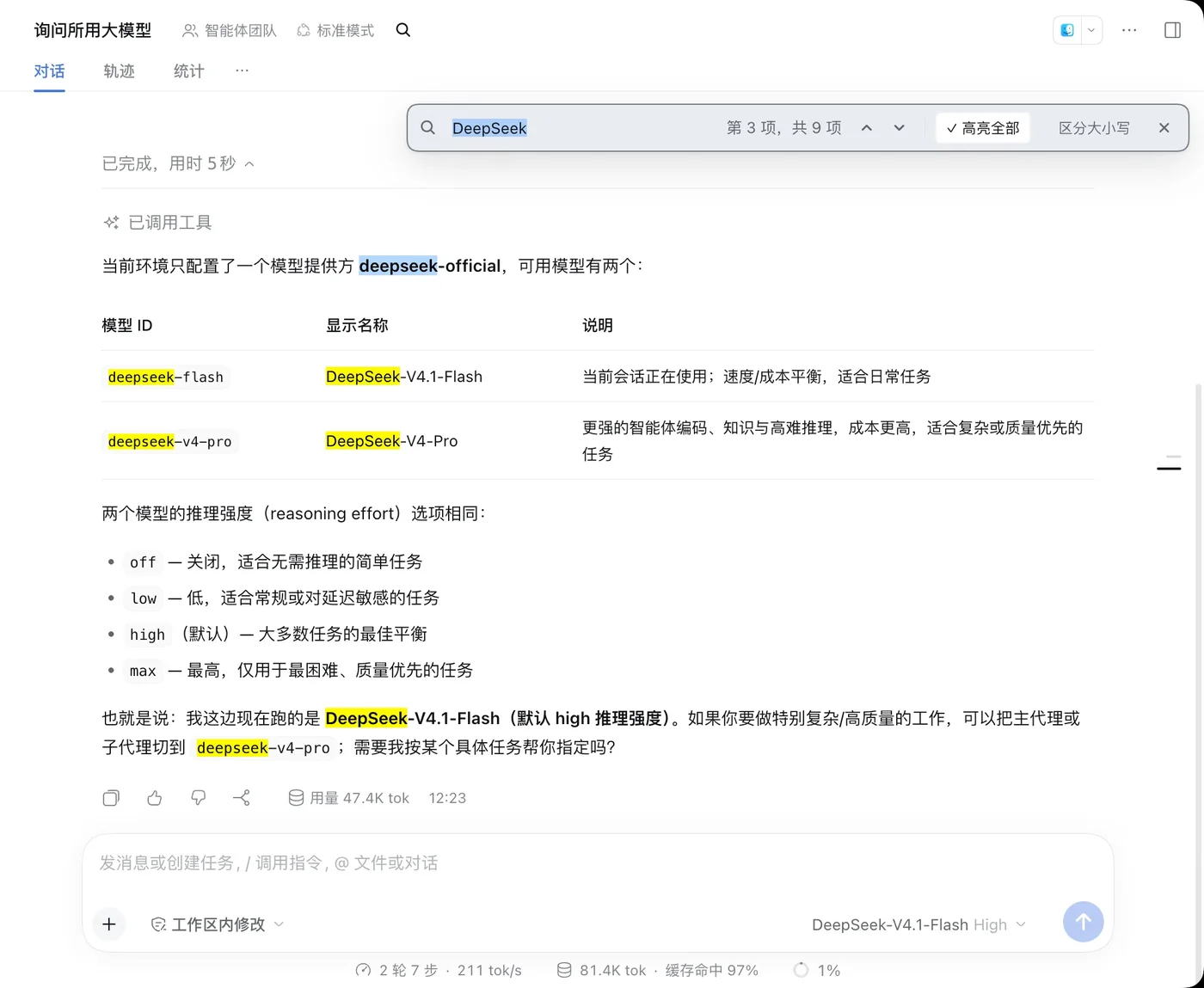
The screenshot shows the find bar over a conversation. Other matches stay yellow; the active match settles into blue after the 500 ms pulse.
It is intentionally client-only: no host tools, no session events, no network requests, and no changes to the conversation text.
⌘G / ⇧⌘G re-anchors to the first fully visible match on the current
screen instead of continuing from the old active index; later presses move
from that anchor.#FFFB00 with black text. The
active match starts yellow with a short scaled halo, then settles into
#B4D8FD with black text.| macOS | Windows / Linux | Action |
|---|---|---|
⌘F |
Ctrl+F |
Open the find bar and focus the input. Press again to reselect the query. |
⌘G |
Ctrl+G |
Next match. |
⇧⌘G |
Ctrl+Shift+G |
Previous match. |
Esc |
Esc |
Close the bar and restore the previous focus. |
Enter / ⇧Enter |
Enter / Shift+Enter |
Next / previous match while the input is focused. |
On macOS, Ctrl+F is deliberately not intercepted. On Windows and Linux,
the Meta key is not intercepted.
Install the bundle from npm as dsh-find-in-conversation.
Open the Plugins page in DeepSeek Harness, install
dsh-find-in-conversation, and enable it.
If you use the DSH CLI, install through the plugin command (check
dsh plugin --help for the exact profile flag on your build):
dsh plugin --profile <profile> add dsh-find-in-conversationRemove it with:
dsh plugin --profile <profile> remove dsh-find-in-conversationOpen a conversation and press ⌘F on macOS or Ctrl+F on Windows/Linux.
Installing directly from the repository is also supported:
git+https://github.com/donggongailv/dsh-find-in-conversation.gitUse the Plugins page's external-bundle install or:
dsh plugin --profile <profile> add git+https://github.com/donggongailv/dsh-find-in-conversation.gitFor development, clone the repository and install the directory through the DSH Plugin Manager or your profile's bundle list:
git clone https://github.com/donggongailv/dsh-find-in-conversation.git
cd dsh-find-in-conversation
npm install
npm test
Requirements:
>=0.2.2-rc.1 <0.3.0-0The plugin is client-only; there is no server-side configuration.
conversation.session.header.actions and uses a
body portal for its fixed-position UI.[data-conversation-session] transcript and ignores the composer, sidebar,
and plugin UI.CSS.highlights; conversation DOM is never wrapped
or rewritten.MutationObserver keeps results fresh while a response streams
or collapsible content changes.git clone https://github.com/donggongailv/dsh-find-in-conversation.git
cd dsh-find-in-conversation
npm install
npm test
npm run check
npm run format:checkThere is no build step. client.js is the browser module loaded directly by the
Harness module loader; React and React DOM are supplied by the platform, not
bundled.
npm test validates the manifest, patch, locales, client entry point, icon, and
license files. npm run check also runs node --check client.js.
| Path | Purpose |
|---|---|
client.js |
The complete client-side plugin: UI, search, highlights, shortcuts. |
index.js |
Host half; intentionally empty because the plugin is client-only. |
package.json |
Package metadata and DSH client/bundle declarations. |
cordis.patch.yml |
Inserts the dsh-find-in-conversation plugin row. |
locale/ |
Plugin Manager title and description metadata. |
assets/icon.svg |
Original vector icon in the DSH house style. |
test/ |
Manifest, asset, and packaging checks. |
.github/workflows/ci.yml |
Formatting and test CI. |
MIT © imhansai.
The icon is an original SVG drawing, licensed under MIT.
CLASSIFICATION EVIDENCE
系统优先读取 GitHub Topics,再与站内分类词典和词根规则比对。当前命中: deepseek、deepseek-harness。
morluto
Reverse engineer anything with agents, from app behavior down to native binaries.

deepseek-ai
DeepSeek Harness: Everything is a Plugin.

nexu-io
The 1st Collaborative AI Design Agent Workspace. Local-first and open source. Create motion, prototypes, websites, apps, dashboards, presentations, images, and videos with your team and AI agents. Share work, exchange feedback, and iterate together in one workspace.