
模型与 MCP
待识别

rea
morluto
Reverse engineer anything with agents, from app behavior down to native binaries.
PROJECT TOPICS
INSTALL REFERENCE
dsh plugin --profile web add github:dongfangxy/dsh-archive-cleaner
该命令指向仓库当前默认分支;尚无绑定当前 commit 的完整验证结果。
PROJECT README


DeepSeek Harness(DSH)插件:清理已归档的对话/会话,释放磁盘空间。
中文说明 · English · 更新日志 · MIT License
DSH 里的「归档」只是把对话从侧栏藏起来,
session.v4.jsonl.zstd一个字节都不会删, 而且界面上没有任何删除入口。用久了,几百 MB 没人会再打开的会话就一直躺在磁盘上。 这个插件在 设置 → 通用 里加一行,列出全部已归档会话(工作区、创建时间、占用大小), 勾选后把它们移进隔离区——或者,如果你明确勾选,直接删除。
适用关键词:DeepSeek Harness 插件 / DSH plugin / 会话归档清理 / 对话清理 / 磁盘空间 / archive cleaner / session cleanup / cordis bundle。
DSH 把每个会话的完整日志写在:
$DSH_HOME/sessions/<工作区>/<session-id>/session.v4.jsonl.zstd「归档」只是把 id 记进 $DSH_HOME/storages/workspace.json 的 global.archivedSessionIds,
界面上从此看不见它——但文件、统计缓存 session_projcache.json 里的记录,全都还在。
官方的右键菜单只有「置顶 / 归档 / 取消归档 / 重命名 / 派生 / 复制 Session ID」,没有删除。
实测一个用了几个月的 profile:38 个已归档会话,合计 133.9 MB,其中一个单会话就有 10.2 MB。
| 步骤 | 结果 |
|---|---|
| 打开 设置 → 通用 | 多出一行「清理已归档工作区」 |
| 点「开始清理」 | 弹窗列出全部已归档会话:工作区路径、创建时间、会话 id、占用大小、勾选框 |
| 勾选后点「下一步」 | 进入确认页:条数、合计大小、隔离目录,以及「直接删除文件」选项 |
| 确认 | 所选会话被移到 $DSH_HOME/.session-trash/<时间戳>/,并在旁边写 restore-map.json |
| 勾选「直接删除文件(不保留隔离区)」 | 同上,但目录被真正删除:没有隔离区、没有 restore-map,不可恢复 |
| 重启 DSH | 侧栏不再列出这些会话 |
1. 选择要清理的会话——工作区路径、会话 id、占用大小;磁盘上已无文件的会标注 「磁盘上已不存在,选中只清登记」。
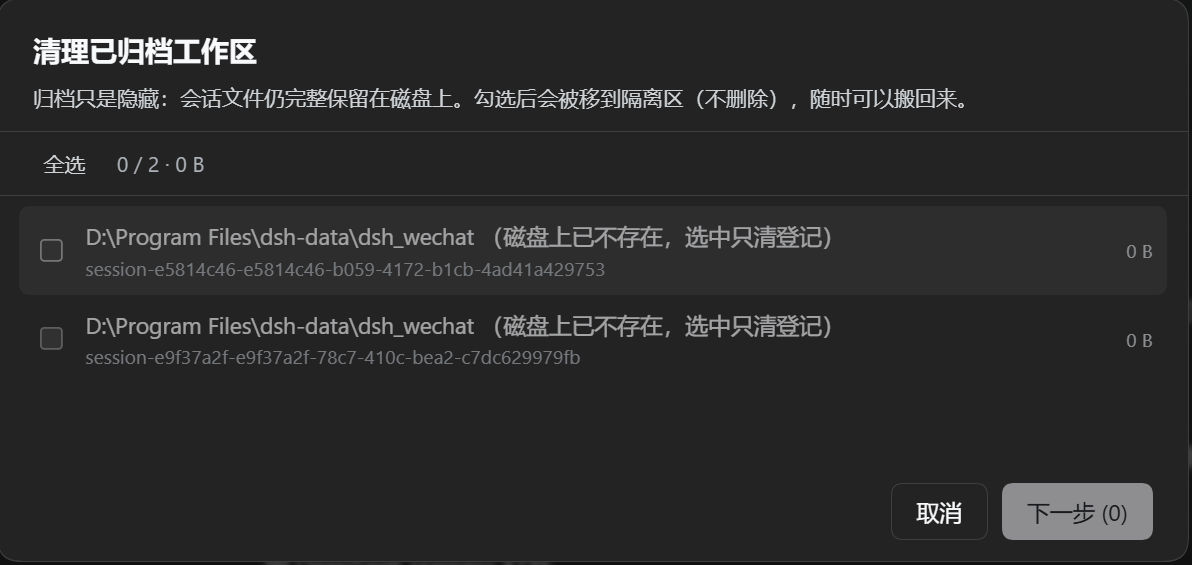
2. 二次确认——条数、合计大小、隔离目录,以及「直接删除文件」选项。默认不删除, 按钮是「确认清理」;勾选删除后按钮变成「彻底删除」。
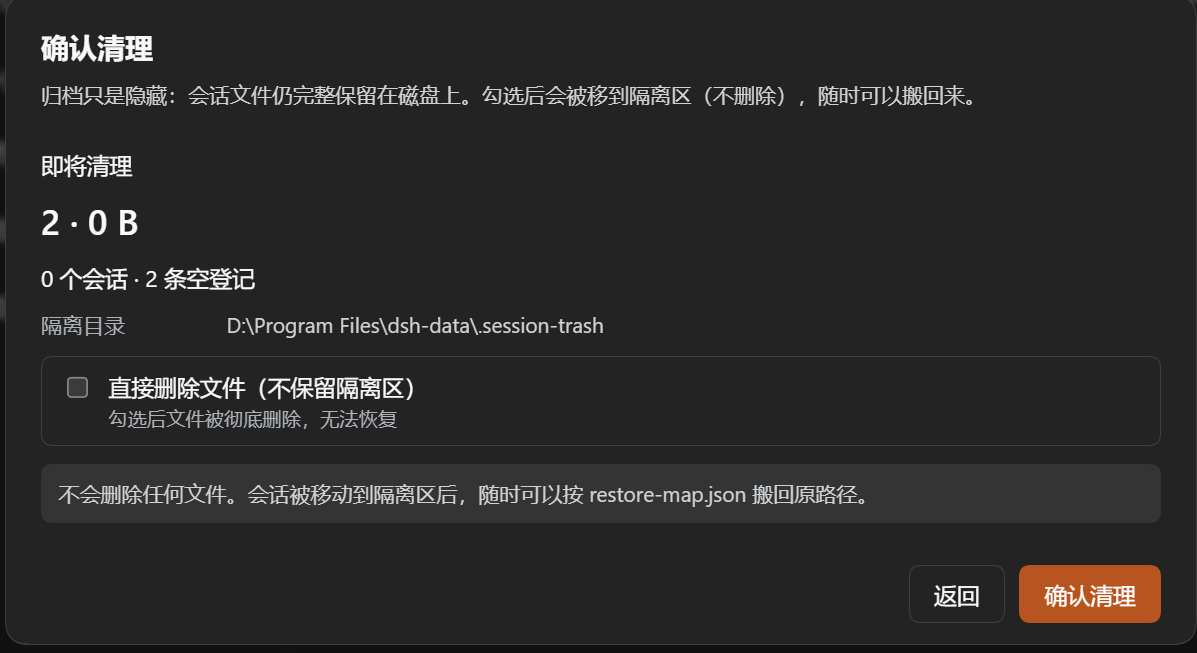
| 模式 | 行为 | 可否恢复 |
|---|---|---|
| 隔离(默认) | rename() 到 .session-trash/<时间戳>/<id>,写 restore-map.json 记录原路径与工作区 |
可以:把目录搬回 restore-map.json 里的路径,重启即可 |
| 直接删除(需在确认页显式勾选) | rm -rf 会话目录,只保留注册表裁剪 |
不可以 |
两种模式都会把 id 从 workspace.json 的三处(archivedSessionIds、pinnedSessionIds、
各工作区的 sessionIds)和 session_projcache.json 里剔除,改写前先存
*.bak-<时间戳> 备份。
最省事的方式(会把依赖写进 profile,之后 pnpm install 不会把它清掉):
dsh plugin add github:dongfangxy/dsh-archive-cleaner应用内同样可以:设置 → 插件 → Add plugin,填同一串。
不要把仓库目录手工拷进 node_modules——下一次 pnpm install 会把它当多余包删除。
要改源码,就声明一个 link: 依赖:
// <profile>/package.json
"dependencies": {
  "dsh-archive-cleaner": "link:<本仓库的绝对路径>"
}
然后 pnpm install --dir <profile>,重启 DSH。
archivedSessionIds 里,否则跳过并说明原因;$DSH_HOME/sessions/ 之内;mode 只接受 quarantine / purge,其他值在任何文件被碰之前返回错误;workspace.json.bak-<时间戳>、session_projcache.json.bak-<时间戳>;@deepseek-ai/dsh-client-ui-settings-account 里,没有留给第三方的插槽;workspace.json;未来 DSH 若改变该文件结构,列表会变空而不是瞎猜;npm test # node --test "test/*.test.mjs"测试会在系统临时目录里搭一个假 profile,覆盖:列目录与统计、隔离、注册表裁剪、
直接删除、非法 id、路径穿越、空选择、空归档集。client.js 由宿主的模块加载器执行,
可以 require('react')、require('react-dom')。
MIT © Chengxi Zhang
A DeepSeek Harness (DSH) plugin that cleans up archived conversations and frees disk space.
DSH keeps every session log at $DSH_HOME/sessions/<workspace>/<session-id>/session.v4.jsonl.zstd.
Archiving only appends the id to global.archivedSessionIds in
$DSH_HOME/storages/workspace.json, which hides the row from the sidebar — the bytes, and the
entry in session_projcache.json, stay exactly where they were. The row menu offers pin,
archive, unarchive, rename, fork and copy-session-id, but no delete.
On one profile in daily use this added up to 38 archived sessions, 133.9 MB, with a single session taking 10.2 MB.
| Step | Result |
|---|---|
| Open Settings → General | One extra row: Clean archived workspaces |
| Click Open | A dialog lists every archived session: workspace, creation time, id, size, checkbox |
| Select rows, click Next | A confirmation page repeats the count, the total size and the quarantine folder |
| Confirm | Selected sessions move to $DSH_HOME/.session-trash/<timestamp>/ with a restore-map.json |
| Tick Delete the files instead of quarantining them | Same flow, but the directories are removed: no quarantine, no restore map, irreversible |
| Restart DSH | The sidebar stops listing them |
1. Choose what to clean — workspace path, session id, size. Sessions whose files are already gone are marked no longer on disk and only lose their registry entry.
2. Confirm — count, total size, quarantine folder, and the delete option. With the box unticked the button reads Confirm cleanup; ticking it switches the button to Delete permanently.
| Mode | Behaviour | Reversible |
|---|---|---|
| Quarantine (default) | rename() into .session-trash/<timestamp>/<id>, with a restore-map.json recording the original path and workspace |
Yes — move the directory back and restart |
| Delete (opt-in on the confirm page) | rm -rf the session directory; only the registry entries are pruned |
No |
Both modes prune the id from three places in workspace.json (archivedSessionIds,
pinnedSessionIds, every workspace's sessionIds) and from session_projcache.json, writing a
*.bak-<timestamp> copy of each file first.
dsh plugin add github:dongfangxy/dsh-archive-cleanerThe same string works in the app: Settings → Plugins → Add plugin.
Do not copy the checkout into node_modules: the next pnpm install prunes it. For a local
checkout declare a link: dependency in <profile>/package.json and run
pnpm install --dir <profile>.
$DSH_HOME/sessions/, or it is refused.mode accepts quarantine or purge only; an unknown value is rejected before any file is touched.*.bak-<timestamp>.@deepseek-ai/dsh-client-ui-settings-account and exposes no slot.workspace.json, the
list comes back empty rather than guessing.npm test # node --test "test/*.test.mjs"The tests build a throwaway profile under the OS temp directory and cover listing,
quarantine, registry pruning, purge, malformed ids, path traversal, empty selection and an
empty archive set. client.js runs under the host module loader and may require('react')
and require('react-dom').
MIT © Chengxi Zhang
CLASSIFICATION EVIDENCE
系统优先读取 GitHub Topics,再与站内分类词典和词根规则比对。当前命中: deepseek、deepseek-harness。
morluto
Reverse engineer anything with agents, from app behavior down to native binaries.

deepseek-ai
DeepSeek Harness: Everything is a Plugin.

nexu-io
The 1st Collaborative AI Design Agent Workspace. Local-first and open source. Create motion, prototypes, websites, apps, dashboards, presentations, images, and videos with your team and AI agents. Share work, exchange feedback, and iterate together in one workspace.