
模型与 MCP
待识别

rea
morluto
Reverse engineer anything with agents, from app behavior down to native binaries.
PROJECT TOPICS
INSTALL REFERENCE
dsh plugin --profile web add github:doctorllll/dsh-living-plan
该命令指向仓库当前默认分支;尚无绑定当前 commit 的完整验证结果。
PROJECT README
English · 中文
A DeepSeek Harness (DSH) plugin with a host half and a web client half. Not an agent skill.
Gives every DSH session a living plan: one Markdown file that the model writes before it starts and keeps up to date while it works. Every save becomes a new version and is posted into the conversation; after a compaction it is posted again, with the user's own words that the compaction replaced quoted verbatim. Through long sessions, repeated compaction and changes of mind, the model keeps working towards what the user wants now.
It fills the gap between the built-in /plan (a one-off review) and goal (a one-line target): where a long task stands now and what comes next.
dsh web, headless, PTC mode)
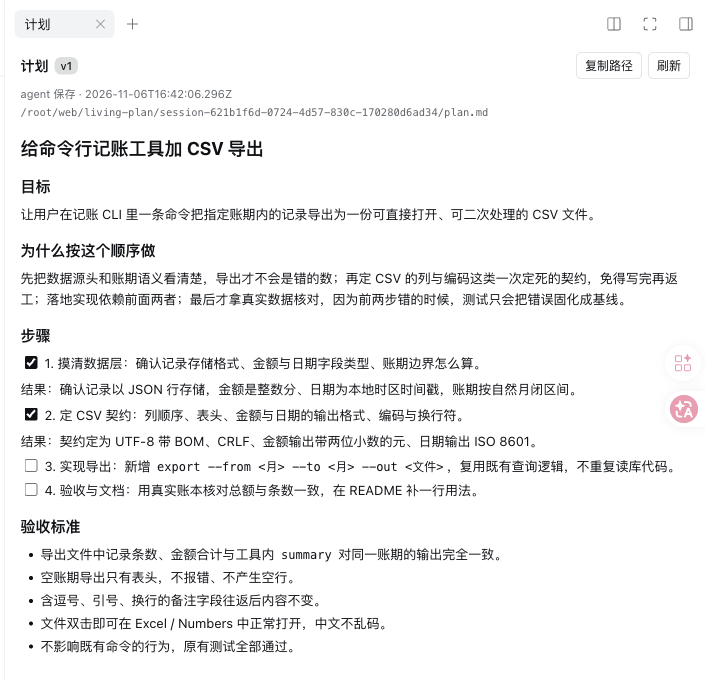
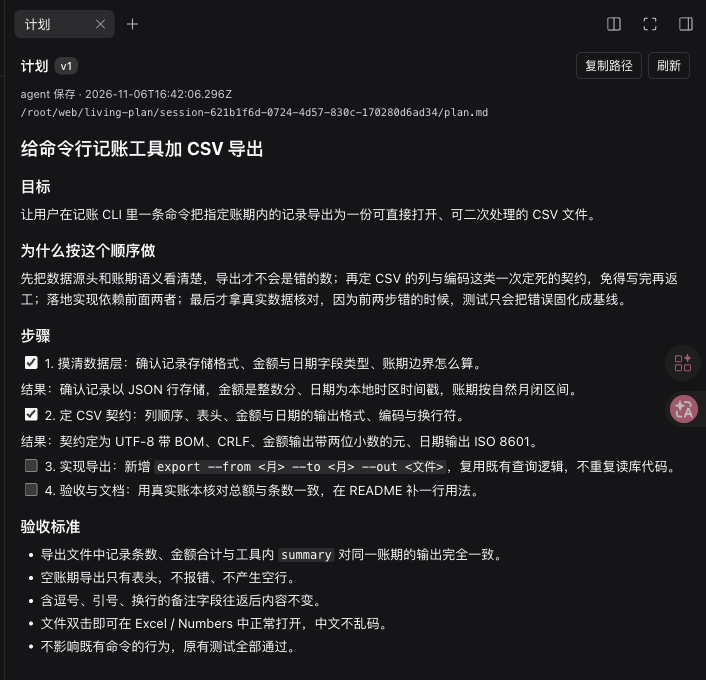
The 「计划」 (Plan) panel in the right sidebar: current version, who changed it, the file path, the rendered plan, and older versions below. Follows the app's light and dark themes. (The UI and the prompt text are in Chinese.)
The built-in /plan is a review gate: once approved, the plan lives only in a tool call, has no versions, and is not re-injected into later requests. goal keeps a single sentence, not "what is done, what is next, what has been decided". After a compaction or a hand-over, the model has to guess from a summary.
dsh-living-plan keeps the plan in a fixed per-session file:
$DSH_HOME/living-plan/<session-id>/plan.md, one per session, outside your workspace repository.living-plan message when there is a new version (your edits included), when a compaction swallowed the last copy, or when the last copy is refreshSteps steps back. The system prompt holds only a fixed note on what the plan is for, so saving a plan never rewrites the cached prompt prefix.remindAfterSteps steps, a short reminder quotes the user and asks the model to update the plan first. A long session with no plan gets one reminder too.staleSteps steps (default 20), a short note asks what got done, what turned up and whether the next step changed — update the plan if so, carry on if not. It asks again at most every staleSteps steps, and a new version restarts the count. Only with placement: message.plan_edit replaces the passages that changed and leaves the rest untouched; plan_write writes the whole plan, for a first draft or a reshaping.plan_write / plan_edit or edit by you bumps the version; old ones go to history/vNNNN.md.plan.md directly is a supported path; the next step posts it as a new version.plan_write / plan_edit are accepted only if the model has seen the current version. If the file changed in between (for example you edited it), the write is refused with PLAN_STALE and the model must plan_read first, so it never overwrites your edit with a stale copy.includeSubagents: false).The prompt tells the model what the plan is for, to write one unprompted for anything bigger than a quick question or a small fix, to keep it current as the work moves, and to put the user's latest words above older plan text (update the plan before acting on a change of mind). How the plan is written is the model's own business: 0.3.x gave a six-part skeleton and checked for a user quote and acceptance criteria, which turned plans into form-filling, so 0.4.0 dropped both. The plugin keeps the system around the plan: storage and versions, posting, bringing it back after compaction, and reminders to update.
Requirements: DSH 0.2.2-rc.1 (others untested; 0.3.0 needs the sessionProjections service); quit the desktop app before installing.
dsh plugin --profile <profile> add github:doctorllll/dsh-living-plan#v0.4.0The desktop app's desktop profile only accepts the CLI bundled with the app (a dsh on your PATH refuses with managed exclusively by the Electron application). On macOS:
"/Applications/DeepSeek Harness.app/Contents/Resources/runtime/cli/bin/dsh" \
  plugin --profile desktop add github:doctorllll/dsh-living-plan#v0.4.0
Reopen the app afterwards. The plugin applies to new sessions in that profile.
Only some profiles. The plugin is host-level: once installed in a profile, every session there gets the plan section, including sessions of custom presets. If a profile should not have it (say, a chat bot whose sessions have no plan_* tools), disable it in that profile's or home's cordis.patch.yml:
- id: living-plan
disabled: trueUpgrade: re-run plugin add with the new tag and reopen the app. Uninstall: dsh plugin --profile <profile> remove dsh-living-plan; plan files under $DSH_HOME/living-plan/ are kept.
Override by id in the profile's cordis.patch.yml:
- id: living-plan
  config:
    includeSubagents: false   # true = subagent sessions keep their own plans
    maxPlanBytes: 24576       # plan size limit; plan_write over it returns PLAN_LIMIT
    historyLimit: 50          # how many old versions to keep; 0 = none
    placement: message        # message = post into the conversation; system = the 0.2.x behaviour (plan in the system prompt)
    refreshSteps: 40          # re-post after this many steps; 0 = never
    remindAfterSteps: 3       # remind when the plan has not moved this many steps after the user spoke; 0 = off
    staleSteps: 20            # ask about progress when the plan has not changed this many steps; 0 = off
    noPlanAfterSteps: 8       # remind once when a session has no plan after this many steps; 0 = off
    ledgerMaxBytes: 6144      # cap on the verbatim user words posted with the plan
    sectionOrder: 950         # where the plugin's section sits in the prompt
    home: null                # defaults to $DSH_HOME, then ~/.dsh
placement: system is the fallback switch: one line and a restart bring back the old behaviour (the change-of-mind and no-plan reminders keep working; the progress reminder does not).
plan_read({ version? }) — returns markdown, version, bytes, path, exists, truncated, and marks this version as seen. With version, reads an earlier version back from the history (and marks nothing).plan_write({ markdown, note? }) — writes the whole plan and creates the next version. Fails with PLAN_STALE (changed since the model saw it; read first) or PLAN_LIMIT (too large).plan_edit({ old_string, new_string, note? }) for one place, or plan_edit({ edits: [{ old_string, new_string }], note? }) for several — replaces the given passages and leaves everything else as it is; all edits of a call are saved as one version or none is. Each old_string must be copied exactly from the current plan and occur once. Fails with PLAN_EDIT (no plan yet, text not found or found more than once, nothing to change), PLAN_STALE or PLAN_LIMIT.In PTC mode the model can only call run_code directly, so it calls them from code: await tools.plan_write({ markdown: "# Plan\n\n- [ ] first step" }). Sessions created before installing may cache the old tool declarations; open a new session.
$DSH_HOME/living-plan/<session-id>/
├── plan.md          current text
├── meta.json        version / hash / bytes / updatedAt / updatedBy
└── history/
    ├── v0001.md
    └── index.jsonl  only when plan_write / plan_edit passed a note
Directories are 0700 and files 0600; writes go through a temp file and rename. The session id is sanitised before it becomes a path.
The 「计划」 card in the right sidebar shows the current version, update time, whether the agent or you changed it, and the path; renders headings, task checkboxes, code, quotes and tables; refreshes every 5 seconds; lets you open any older version read-only; and has copy-path and refresh buttons. It reads the local route GET /api/living-plan?sessionId=…[&version=N], never marks a version as seen for the model, and only serves live sessions.
| Case | Plan injected | Plan file | plan_write |
|---|---|---|---|
| New session | once written | empty, created on demand | yes |
| Same session resumed | yes (not re-posted while still in the conversation) | continues | yes |
| Branch / moved to another workspace (DSH copies it into a new session id) | yes | inherits the parent's plan as shown at the copy, as its version 1 | yes |
| Subagent (default) | no | none | no |
/plan still works as the official review gate; after approval, have the model save the same plan with plan_write.
| Symptom | Cause / fix |
|---|---|
profile "desktop" is managed exclusively by the Electron application |
You used the dsh on your PATH; use the app's bundled CLI |
| No 「计划」 in the right sidebar | Restart the app and open a new session |
Model says it has no plan_write |
In PTC call tools.plan_write from run_code; open a new session |
PLAN_STALE |
The file changed after the model saw it; plan_read, then write |
PLAN_LIMIT |
The plan exceeds maxPlanBytes; trim it to what a successor needs |
Panel shows session-not-live |
The session is not running; the panel only serves live sessions |
npm test            # 24 unit tests on the store and the delivery rules (no DSH needed)
node --check lib/index.js lib/client.js| File | Content |
|---|---|
lib/core.js |
storage, versions, hashes, external-edit detection, edits in place (no DSH dependency) |
lib/deliver.js |
session projection, when to post and remind, message rendering (no DSH dependency) |
lib/index.js |
host plugin: prompt section, posting on agent/pre-step, plan_read / plan_write / plan_edit, HTTP route |
lib/client.js |
web client: the panel, a hand-written module-loader bundle using react / react/jsx-runtime only, no build step |
cordis.patch.yml |
bundle mount row and defaults |
plan_write / plan_edit or by editing the file.agent/created, agent/pre-step, agent.ctx.systemPrompt.section, sessionProjections, session.eventAt, the sourceEventSeqs of compaction replacements, ctx.tools.register, webServer.register); re-test after DSH upgrades.source.kind: user messages (what the user typed, headless or scheduled task text).Please open an issue.
MIT, see LICENSE.
CLASSIFICATION EVIDENCE
系统优先读取 GitHub Topics,再与站内分类词典和词根规则比对。当前命中: deepseek、deepseek-harness。
morluto
Reverse engineer anything with agents, from app behavior down to native binaries.

deepseek-ai
DeepSeek Harness: Everything is a Plugin.

nexu-io
The 1st Collaborative AI Design Agent Workspace. Local-first and open source. Create motion, prototypes, websites, apps, dashboards, presentations, images, and videos with your team and AI agents. Share work, exchange feedback, and iterate together in one workspace.