
Agent 与会话
插件

nuwa-skill
alchaincyf
你想蒸馏的下一个员工,何必是同事。蒸馏任何人的思维方式——心智模型、决策启发式、表达DNA。Distill how anyone thinks.
PROJECT TOPICS
INSTALL REFERENCE
dsh plugin --profile web add github:dingyi222666/dsh-session-notification
该命令指向仓库当前默认分支;尚无绑定当前 commit 的完整验证结果。
PROJECT README

English | 中文
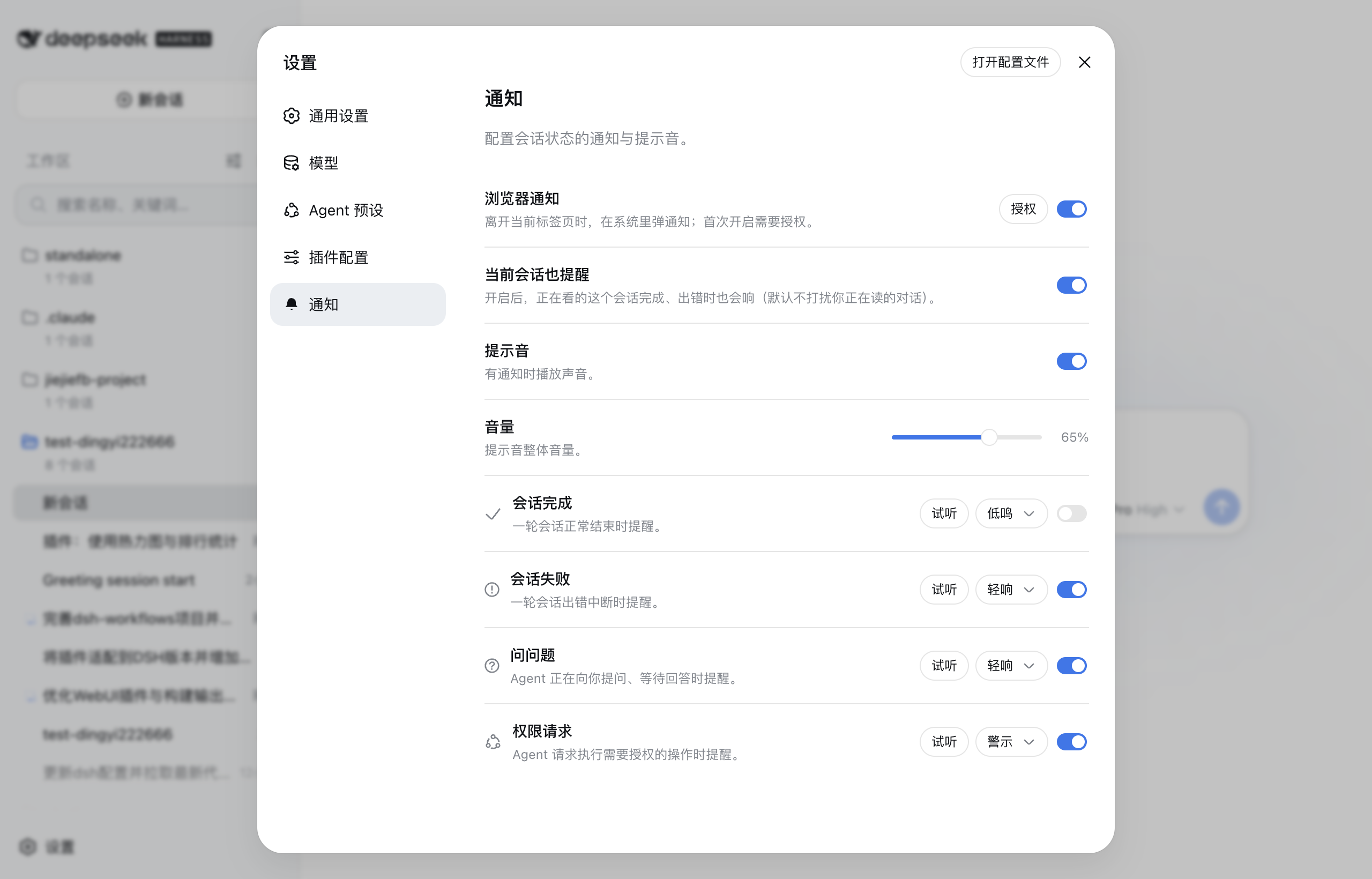
A notification plugin for the dsh web GUI. When a session finishes, hits an error, asks you a question, or needs your permission, you get a heads-up: a sound plays, and when you step away from the tab a system notification keeps you in the loop.
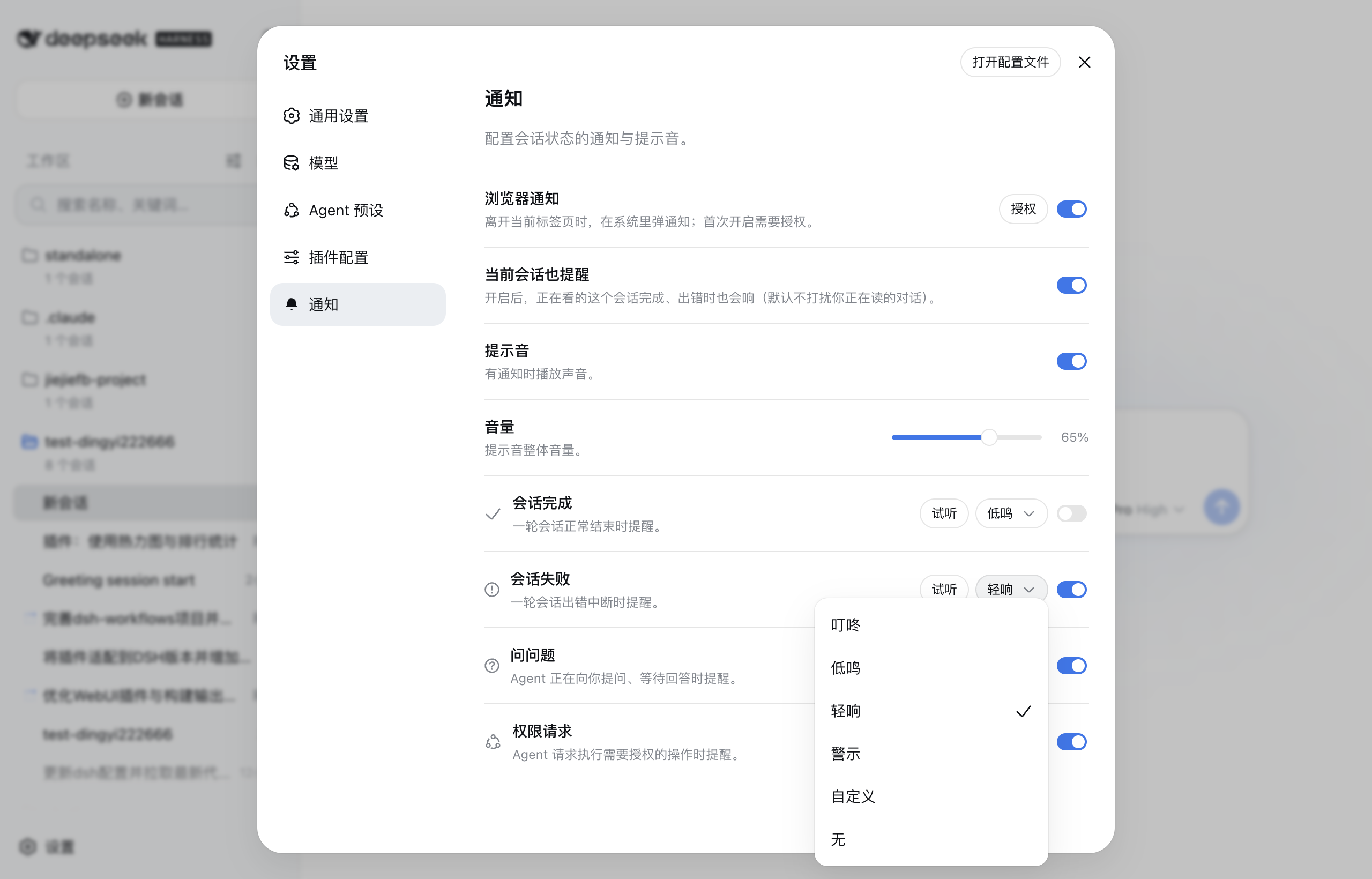
| The settings panel with the Notifications entry in the sidebar and the section content | The sound picker for each kind (the official dropdown) |
|---|---|
 |
 |
# Install from npm (requires dsh >= 0.2.1-rc.2)
dsh plugin --profile web add @dingyi222666/dsh-session-notification
# Restart dsh web for it to take effect
dsh web
Everything lives in this plugin — no harness (host) changes:
settings.section), exactly like official sections.| Kind | When it fires | Default sound |
|---|---|---|
| Session completed | A turn ends normally (turn/end completed) |
chime |
| Session failed | A turn breaks with an error, or the host reports an agent error | fault |
| Question asked | The agent is waiting for your answer (question/requested) |
pop |
| Permission requested | The agent requests an authorized operation (approval/requested) |
alert |
Each kind can be enabled or disabled and reassigned to any of the four built-in sound effects (or muted). The four sounds are synthesized with Web Audio — no audio files are shipped — and the master volume is adjustable with the official-style slider (0–100%). A fixed loudness boost (~+6 dB) with a soft limiter on the playback chain makes every sound noticeably louder without distortion; custom audio feeds the same chain. The shared AudioContext is suspended as soon as playback is over and resumed by the next sound, so an idle notification never keeps the system audio stream (or a macOS sleep assertion) open.
Beyond the four built-in sounds, each kind accepts your own audio file (mp3/ogg/wav, up to 1 MB): pick Custom audio on a kind's row to upload one, and it replaces the built-in for that kind — with a Replace and remove affordance, plus the Custom audio in use tag. Custom files are stored browser-locally (they are device media, not shared preferences).
Browser (system-level) notifications are off by default; turning the switch on asks for the browser's permission first (a user gesture). Once granted, a notification is shown when the event's session is not the one you are reading, or when the tab is in the background. Notifications carry the page's own icon (the favicon the harness serves). A completed session's notification carries its final reply text (the last assistant message). Clicking a notification focuses the page and opens that session (Web and desktop alike). The Test notification button in the section sends one immediately to verify the channel once permission is granted.
The session you are reading stays quiet by default — its own events don't interrupt you while you are actually watching it. The Current session alerts picker widens that:
| The session you are reading, while you are… | Hidden or minimized (default) | When switched away | Always |
|---|---|---|---|
| watching it with DSH focused | 🔕 Quiet | 🔕 Quiet | ✅ Alert |
| switched to another app, DSH still on screen | 🔕 Quiet | ✅ Alert | ✅ Alert |
| in another tab, or the window is minimized | ✅ Alert | ✅ Alert | ✅ Alert |
Notify for picks the scope (default Main, after subagents): All sessions alerts for every session including subagents; Main only alerts for the main session as soon as it goes idle; Main, after subagents holds that alert until every subagent the main session spawned has finished, so a run that only paused between subagent waves never interrupts you early (failures always alert immediately).
The plugin runs unchanged inside the dsh desktop application — the Electron shell loads the same Web client and plugin graph. Desktop notifications are native OS notifications: the shell grants notification permission by default, so turning Browser notifications on is enough and no permission prompt appears. A notification carries the application icon (the page favicon is used on Web; under dsh-app:// the page icon is skipped so the packaged app icon shows instead), is marked silent so the OS alert sound never doubles the plugin's own sound, and clicking one restores/focuses the window through the shell's app activation and opens that session's conversation — closing the window only hides it.
The desktop app owns $DSH_HOME/profiles/desktop and the CLI refuses to manage it, so install the plugin from the app's Plugins page (Settings → Plugins) instead of dsh plugin --profile desktop. Preferences are browser-local to that renderer, so they are separate from the Web profile's.
The plugin registers a Notifications section in the settings panel (Settings ⚙ → Notifications):
Preferences are stored browser-locally (localStorage) under the dsh-session-notification key — no host settings-namespace exposure required — so they persist across sessions and sync across tabs, and never depend on a harness change.
The browser half watches the sessions list snapshot and each session's conversation snapshot — no polling, no new wire channels:
running edge true→false ends a run; the run is classified failed when a new turn-error node or a host agent-error appeared during it, otherwise completed (a failure that a retry recovered reads as completed).question / approval) raises the question / permission kinds, with the question text or the tool name+reason in the notification body.yarn run build — builds the browser bundle (lib/client.js) and the Node half (lib/index.js).src/client/notification-service.ts — the engine (classification) and dispatcher (gating); src/client/settings-store.ts — the settings section bridge; src/client/NotificationsSection.tsx — the section UI; src/client/sounds.ts + src/client/custom-audio.ts — the built-in and custom sounds.yarn test — behavior tests; yarn run typecheck — type gate.@deepseek-ai/dsh-* types install from npm as devDependencies (^0.2.1-rc.2, with the now-stable @deepseek-ai/cordis ^4.0.5 and @deepseek-ai/schemastery ^3.18.5 matching the dsh peers); no checkout path mappings. The 0.2.1 line removed the runtime invariant-plugin mechanism (as of alpha.1), so the former ./invariant companion is gone.dsh web restart; browser-bundle changes need a rebuild (yarn run build) — a --dev server hot-reloads them.active but disarmed (for example after a restart) reads as a continuation, so its idle edge stays unannounced until the goal changes or is resumed.None. The plugin is a pure client-side observer over the already-logged session state; nothing here reaches a model request.
None; this package neither assembles nor sends provider requests.
CLASSIFICATION EVIDENCE
系统优先读取 GitHub Topics,再与站内分类词典和词根规则比对。当前命中: 会话、提示词。
alchaincyf
你想蒸馏的下一个员工,何必是同事。蒸馏任何人的思维方式——心智模型、决策启发式、表达DNA。Distill how anyone thinks.

freestylefly
Prompt as Code | GPT Image 2 / 2.5 提示词与案例库,530+ 个案例、20+ 套工业级模板与可复用 Skills,新增 2.5 同提示词对比专区,附完整提示词与生成记录,持续更新。

titanwings
Distilly — Distill how they think into reusable Skills for any Agent or Bot. Formerly Colleague Skill(原同事 Skill).