

Agent 与会话
插件

nuwa-skill
alchaincyf
你想蒸馏的下一个员工,何必是同事。蒸馏任何人的思维方式——心智模型、决策启发式、表达DNA。Distill how anyone thinks.
PROJECT TOPICS
INSTALL REFERENCE
dsh plugin --profile web add github:davidmercer0620-ai/dsh-game-preview
该命令指向仓库当前默认分支;尚无绑定当前 commit 的完整验证结果。
PROJECT README




Play your game inside the sidebar while the agent codes it.
Run a Cocos / Godot / Unity / WeChat project, capture the native engine window, forward your mouse and keyboard, and iterate without ever leaving DeepSeek Harness. Then package it — Web zip, Android APK, or a project script like build:taptap — from the same panel.
Made by 邮差游戏工作室 / Postman Game Studio.
English · 简体中文 · 繁體中文 · 日本語 · 한국어 · Deutsch · Español · Français
# as a DSH bundle (needs DeepSeek Harness on Windows 10/11)
plugin_manager install_bundle(target: "github:davidmercer0620-ai/dsh-game-preview")
Or add the plugin-market index and install from Settings → Plugins → Discover:
https://raw.githubusercontent.com/davidmercer0620-ai/dsh-game-preview/main/docs/plugin-index.jsonThen open a game project and click ▷ 预览 in the chat header.
Maintainers: node scripts/release.mjs --yes runs the checks, regenerates the
plugin index, tags, pushes and publishes the release (--publish adds npm).
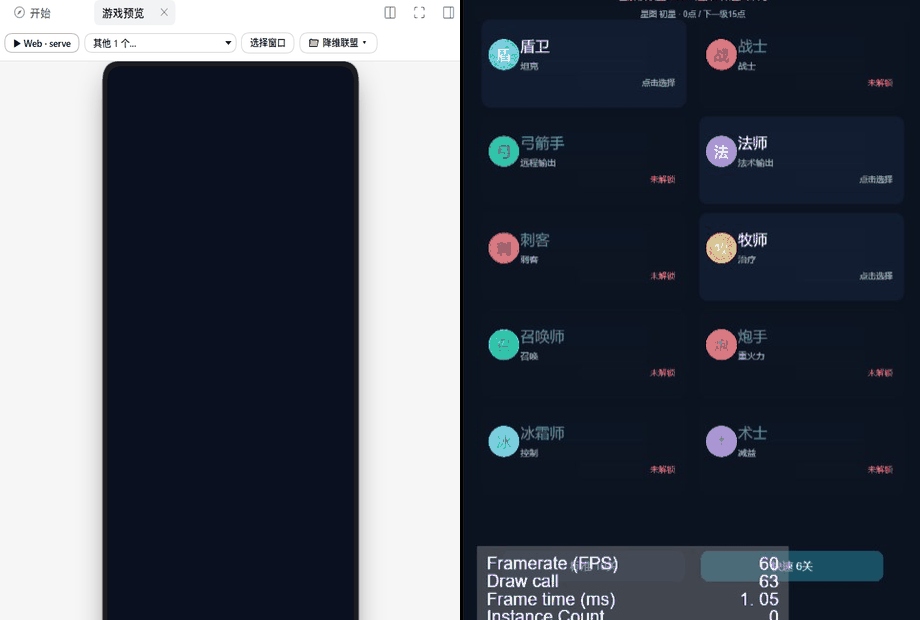
The 游戏预览 tab: engine/build chips, a real 390×844 phone viewport, and the run bar with packaging, console and export below.
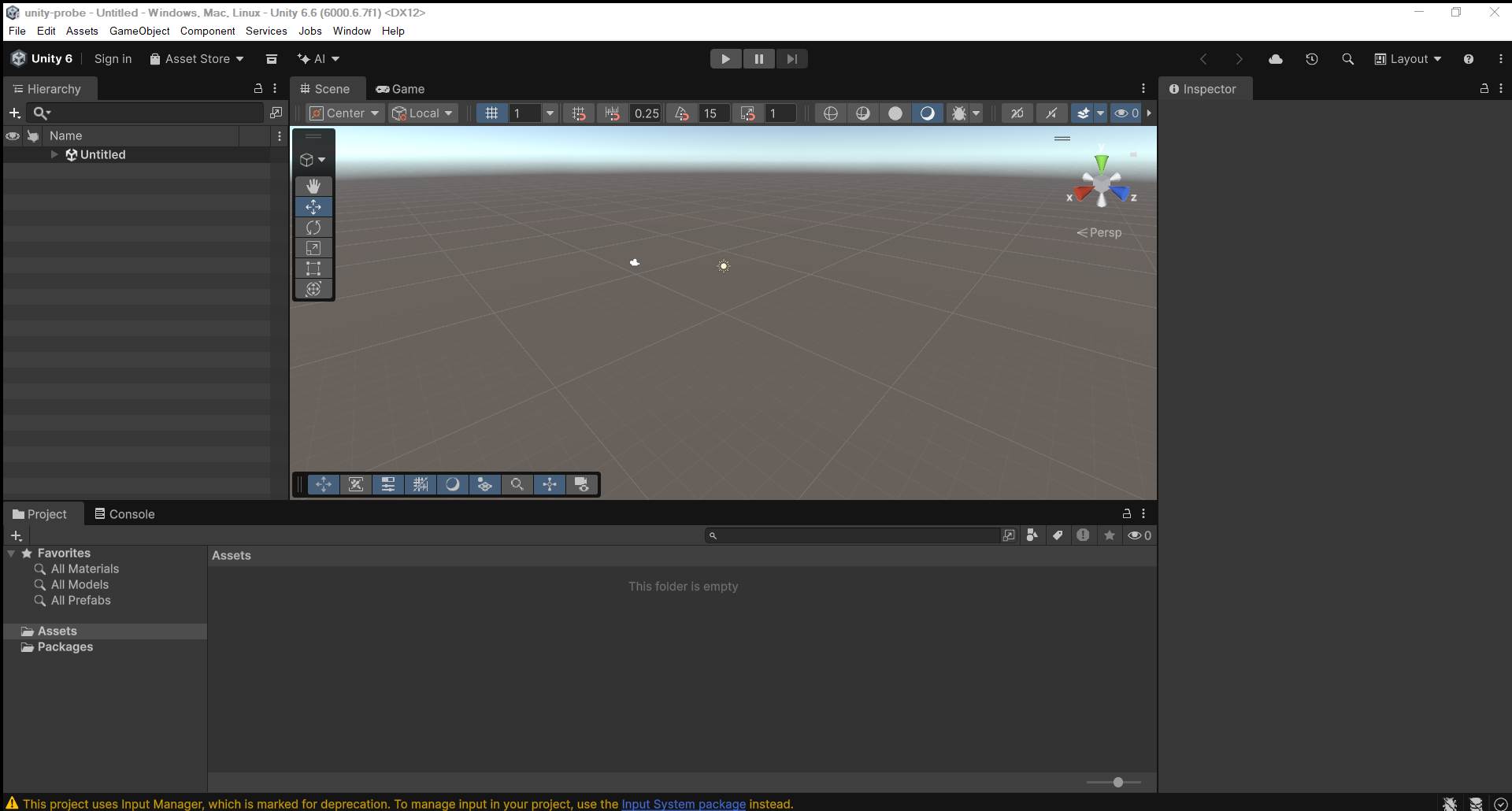
The Unity editor captured live into the sidebar — 1920×1030 at 15 fps, cropped to the Game view, keyboard and mouse forwarded.
A senior developer reviewed an early build and said it plainly:
"The preview is just a screen recording in the sidebar — useless with two monitors. The agent drives Unity through scripts in the background, the editor does nothing until the final test, then it flashes and the scene is finished."
That is right, and it changed the design. Watching a live feed of an idle editor is pointless. What you actually want is the moment the agent was done:
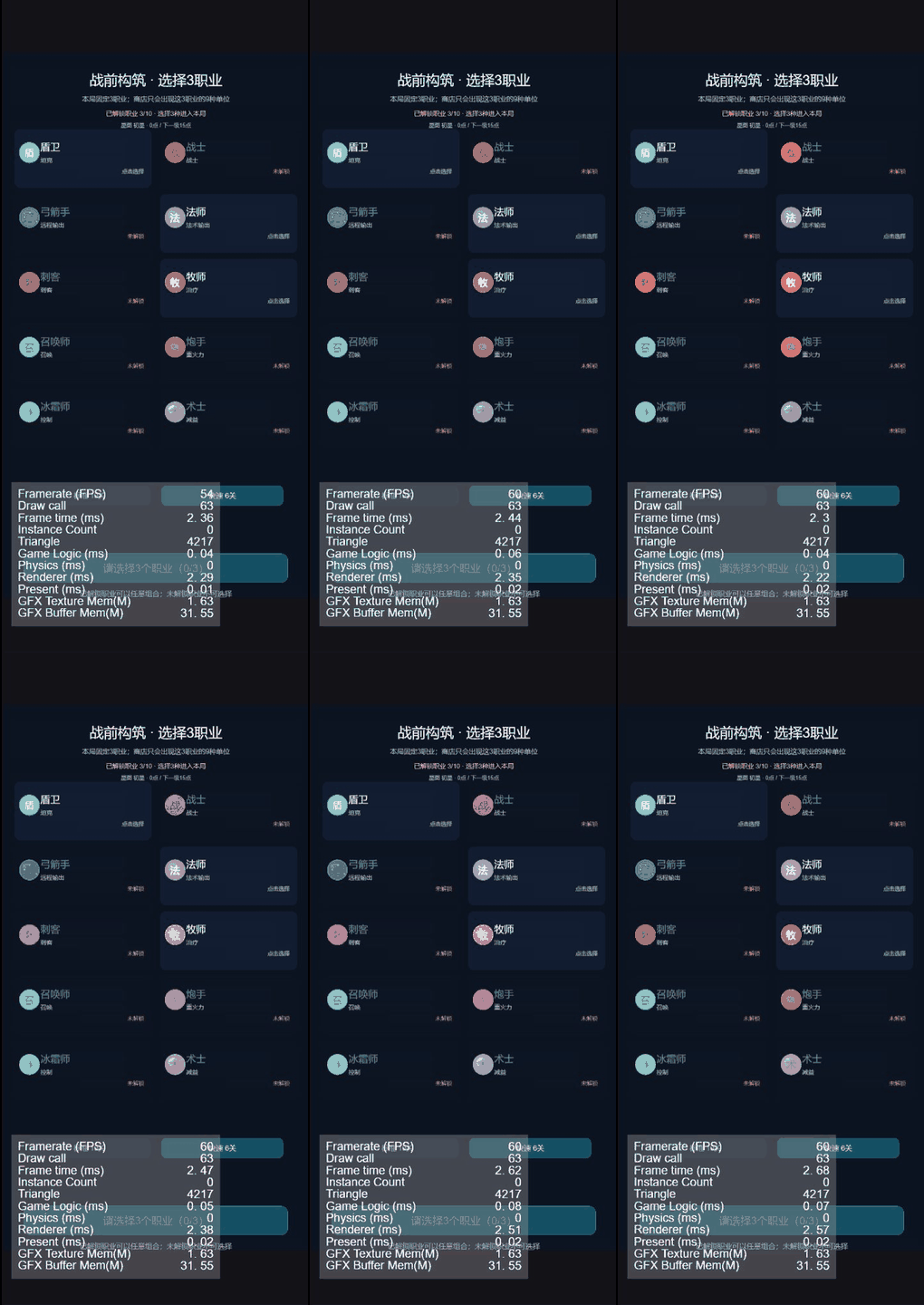
Eight stills out of a 45-second recording of a finished build — what the agent produced, not a live feed.
Every engine has one loop that is faster than all the others. The panel picks that loop automatically:
| Engine | Fastest loop | What the preview does |
|---|---|---|
| Cocos Creator | Editor browser preview (~1 s) | Connects to localhost:7456, keeps the editor's HMR |
| Godot | F5 → native window (~2 s) | godot --path ., captures the window |
| Unity | Editor Play mode (~3 s) | Unity.exe -projectPath, captures the editor, follows the splash → editor window swap |
| WeChat mini game | DevTools build (~90 s) | Opens the project in WeChat DevTools |
| Web / static | dev server or plain files | Starts the script, or serves the folder as-is |
| Engine builds | build/web-desktop/index.html |
Serves the exported bundle, PC or phone viewport |
It never asks "which engine are you using?" — detection decides; when nothing matches you get a manual URL.
| Native window capture | PrintWindow + a two-thread capture/encode pipeline, 15–24 fps; sharp (native size) or smooth (1100 px, ~24–30 fps) |
| Play inside the panel | 🖱 forwards mouse and keyboard to the captured window — DPI-corrected, with F1–F12, arrows and modifiers |
| Crop to the Game view | ✂ drag a rectangle over the capture and keep only that part; remembered per window title |
| PC / phone / auto viewports | Real 1280×720 and 390×844 logical viewports, scaled to fit — the game's media queries see a phone |
| Auto start | Opening the tab restores the last window or config for that project and starts it |
| Dirty counter | Saving does not reload; the panel shows how many changes are waiting, then one click reruns |
| Agent tools | game_preview_run / game_preview_status / game_preview_stop / game_preview_windows |
| Package the game | 📦 exports a Web zip, an Android APK (reusing the project's own android/ shell), or a Windows EXE when the toolchain exists |
| Project scripts, one click | The export panel lists package.json scripts (build/release/verify/bench), android/build.sh, build_apk.js and tools/build-platform.mjs and runs them with a live log |
| Bundle size budget | Per-platform sizes against the store limits (WeChat/Douyin/TapTap 4 MB, web 32 MB), warn at 80%; click a row for the directory/extension/file breakdown |
| Phone preview by QR | Shares the running static build over the LAN behind a random token, shows a QR (host-side python-qrcode, no client dependency), expires after 30 minutes |
| Build history | Every export and project-script run is appended to .dsh-game-preview/history.json; the panel shows duration and byte delta |
| Pipeline bar | 改动 → 运行 → 自检 → 打包, live: a pulsing dot while the workspace is changing, parsed percent for long build jobs, elapsed seconds |
| Project board | A thumbnail wall of every workspace with its latest recorded frame; click to switch the panel |
| Playtest replay | game_preview_playtest replays {wait, click, key, shot} steps against a window and returns the screenshots plus the page errors collected during the run |
| One-command check | game_preview_check runs the whole chain — page errors, fps, a still, an optional playtest, a pixel diff against the previous check, bundle sizes and cropping candidates — and answers pass / warn / fail with evidence paths |
| Visual diff | Compares two frames (or the last two recorded) with Pillow: changed-pixel share plus a diff image, so a broken UI is a number, not an opinion |
| Engine crop report | Scans scenes, prefabs and scripts for engine component usage and lists which Cocos feature-cropping modules are unused, with the engine bundle size |
| Agent eyes | game_preview_screenshot saves the current frame into the project and returns its path; game_preview_logs returns the process tail, so the agent can inspect the game itself |
| The page reports itself | Every served document gets a tiny probe: uncaught errors with stacks, unhandled rejections, console.error, failed asset loads, and a measured frame rate. The chips row shows ⚠ 3 or 58fps, and game_preview_console hands the same list to the agent |
| Hotkeys | F full-bleed · R reload · Esc leave |
plugin_manager install_bundle(target: "@deepseek-ai/dsh-experimental-plugin-market-bundle")https://raw.githubusercontent.com/davidmercer0620-ai/dsh-game-preview/main/docs/plugin-index.jsonThe index pins an exact commit per version, so an install from it is reproducible.
Requires DeepSeek Harness 0.2.x and Node.js 22+.
# from a local checkout (links the folder into the profile)
dsh plugin --profile <profile> add /absolute/path/to/dsh-game-preview
or ask the agent inside DSH:
plugin_manager install_bundle(target: "C:\\path\\to\\dsh-game-preview")Then reload the page (Ctrl+R): a ▶ button appears next to the session title, and 游戏预览 shows up in the right sidebar's “+”.
Native capture, input forwarding and engine launching are Windows 10/11 only. Web previews work everywhere.
●3; press ▶ or let the agent call game_preview_run.The 📦 导出 button opens three targets and shows live readiness for each:
| Target | What it does | Needs |
|---|---|---|
| Web zip | zips the detected static build into <project>/dist |
nothing |
| Android APK | runs the project's own android/build.sh (or gradle assembleDebug) with JAVA_HOME/ANDROID_HOME injected, then copies the APK to dist/ |
JDK 17 + Android SDK + Gradle + an android/ Gradle project |
| Windows EXE | builds the Cocos windows platform and copies the .exe |
Visual Studio C++ + CMake + Cocos Creator |
Toolchain paths are discovered where Windows actually keeps them (JAVA_HOME, D:/Android/sdk, D:/jdk*, %USERPROFILE%/.gradle/wrapper/dists, Program Files\\Java), not just PATH.
Projects that pick their entry file by environment variable can use 构建参数… (e.g. ZAOWU_SRC=index_v5_0.html); it is remembered per project.
Edit the row in your profile's cordis.patch.yml:
- id: dsh-game-preview
  config:
    port: 7317             # control API start port (probes 16 ports)
    captureFps: 20         # target capture rate
    captureWidth: 0        # downscale before JPEG; 0 = native
    captureQuality: 70     # JPEG quality
    captureWaitMs: 30000   # how long to wait for the engine window
    godotExe: ''           # absolute path when not on PATH
    unityExe: ''           # <version>\Editor\Unity.exe
    cocosEditor: ''        # CocosCreator.exe
    wechatCli: ''          # WeChat DevTools cli.bat
DSH Web UI
├── session header ▶            ──┐
├── right sidebar tab "游戏预览"   │ opens the tab
│      ├── config bar / stage    │
│      └── playtest bar          │
└──────────────┬─────────────────┘
               │ iframe bridge (postMessage + long-poll)
               ▼
Host plugin
├── same-origin routes /api/game-preview/*
├── loopback control API 127.0.0.1:7317 (fallback)
├── workspace scan + watcher (dirty counter)
├── engine / dev-server lifecycle
├── host/window.js          capture bridge + input injection
└── host/window-capture.ps1 resident C# helper (DPI aware, two-thread pipeline)
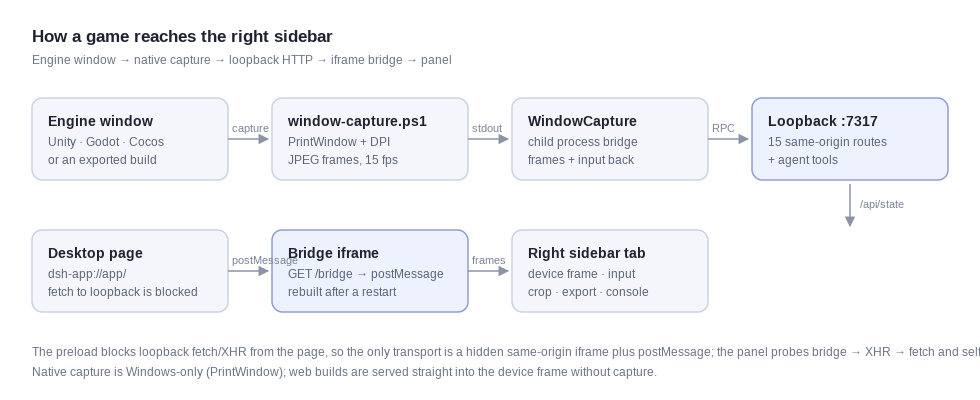
The desktop app runs its page on dsh-app://app/, where fetch and XMLHttpRequest to loopback are intercepted. The panel therefore talks to the host through a hidden iframe served by the host itself (GET /bridge), and falls back to same-origin routes and the loopback API when that is unavailable.
PrintWindow: a 4K window at native size drops to ~10 fps — use smooth.node --check index.js && node --check client.js && node --check host/window.js
node scripts/harness.mjs # host: control API, detection, capture, input, routes
node scripts/client-harness.mjs # client: registration and every UI stateReinstall the plugin after changing the host half; reload the page after changing the client half.
MIT
Star the repo — it is the signal that tells me to keep the Windows capture path alive. Issues with a screenshot are even better than stars: the panel can capture its own frame, so a bug report with game_preview_screenshot output is reproducible.
CLASSIFICATION EVIDENCE
系统优先读取 GitHub Topics,再与站内分类词典和词根规则比对。当前命中: ai-agent。
alchaincyf
你想蒸馏的下一个员工,何必是同事。蒸馏任何人的思维方式——心智模型、决策启发式、表达DNA。Distill how anyone thinks.

freestylefly
Prompt as Code | GPT Image 2 / 2.5 提示词与案例库,530+ 个案例、20+ 套工业级模板与可复用 Skills,新增 2.5 同提示词对比专区,附完整提示词与生成记录,持续更新。

titanwings
Distilly — Distill how they think into reusable Skills for any Agent or Bot. Formerly Colleague Skill(原同事 Skill).