
模型与 MCP
待识别

rea
morluto
Reverse engineer anything with agents, from app behavior down to native binaries.
PROJECT TOPICS
INSTALL REFERENCE
dsh plugin --profile web add github:darlingsakurua/dsh-novels
该命令指向仓库当前默认分支;尚无绑定当前 commit 的完整验证结果。
PROJECT README
English | 简体中文
Read .txt novels inside DeepSeek Harness: import a file, get chapters split
automatically, and read it in a full panel next to the conversation — or as five
quiet lines under the last message, in the conversation's own typography.
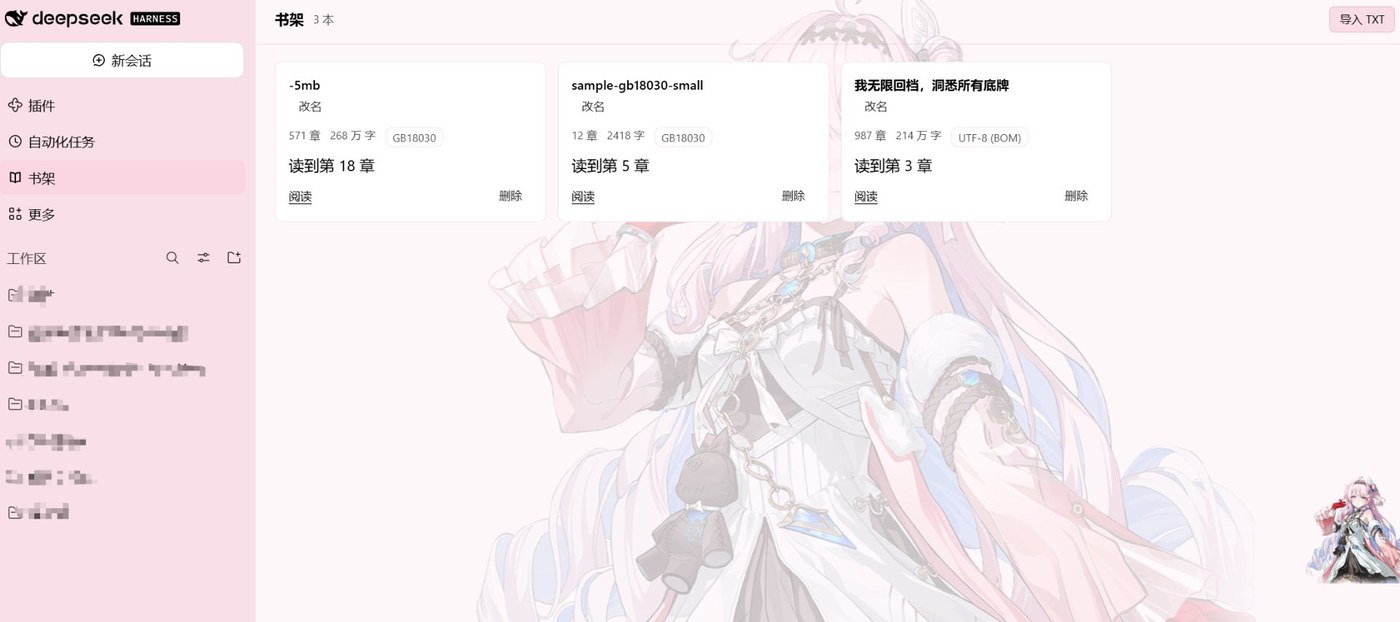
Status: 0.1.6 — upload, shelf, reader, progress restore, rename, delete, reader prefs (font size, line height, page width), upload progress, long-book table-of-contents grouping, empty/error/loading states, show or open the folder that holds your uploaded files, and an inline mode that prints five lines of the current chapter at the bottom of the conversation instead of taking the whole centre column.
Features:
Two ways to read the same book: the full panel (shelf + reader) or the inline strip (five lines above the composer, dressed in the transcript's own font, size, indent and line height).
The sidebar 书架 icon opens the full shelf whenever no novel is on screen, and only closes the inline strip when one is — it never takes the centre column by surprise. The reader's Inline mode button hands the open book to the strip and returns the centre column to the chat; double-clicking the strip (or its ⤢ button) brings the full reader back.
Import .txt by button or drag & drop; 20 MB cap, UTF-8/BOM/GB18030/GBK/Big5/UTF-16.
Automatic chapter split with a 4000-character block fallback.
Shelf cards show chapter/character counts, encoding, reading progress bar and "读到第 N 章"; rename in place; delete with confirmation.
Storage row above the shelf shows the absolute data folder and opens it; each
card has a Location button that reveals (and selects) that book's .txt in
the OS file manager. The browser cannot do this itself, so the Host spawns
explorer.exe /select,… (Windows), open -R (macOS) or xdg-open (Linux). The
client only posts the book id — never a path.
Uploaded bodies keep the book's name: books/<title>.txt (+ .chapters.json).
Renaming a book renames both files, a second book with the same title becomes
<title> (2).txt, and characters Windows forbids (\ / : * ? " < > |) are
replaced before the name touches the disk. Older <id>.txt layouts migrate on
the next start.
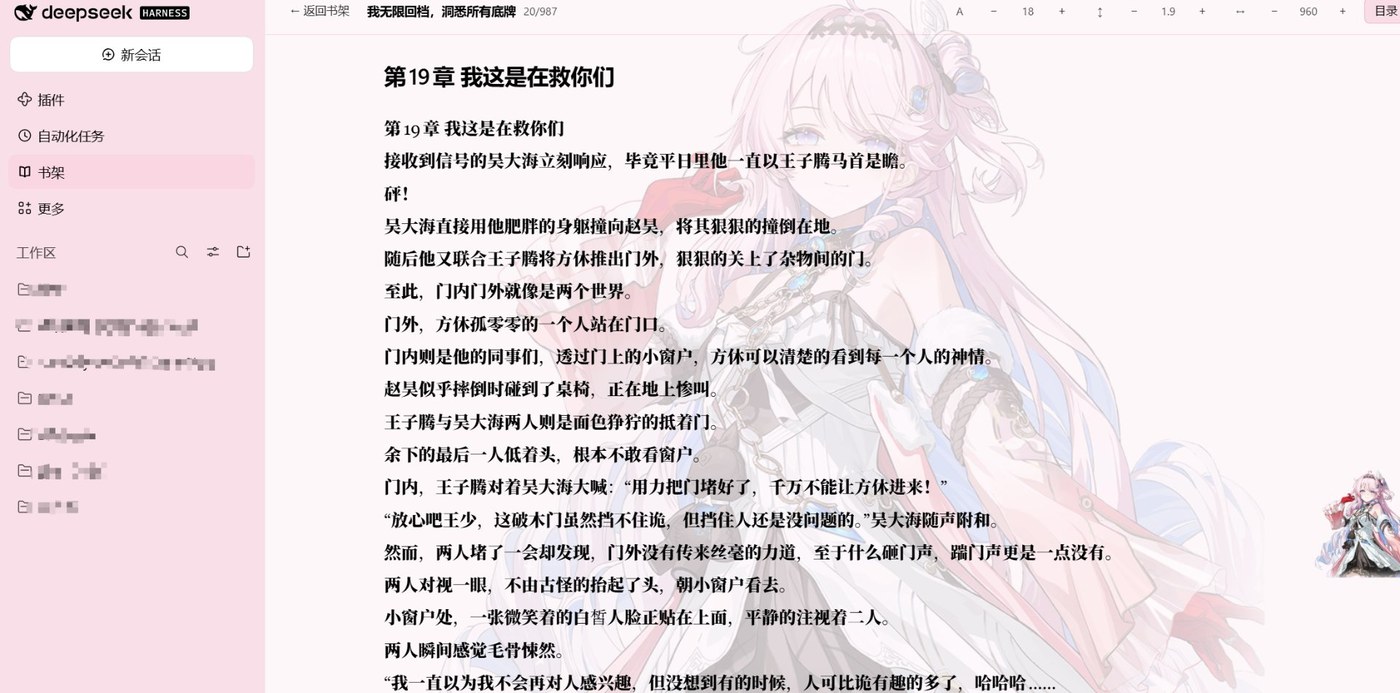
Reader: table of contents, previous/next chapter, font size, line height, page width, inline mode, keyboard (← → PageUp PageDown Space j k Esc Ctrl±), chapter counter and a bottom progress line.
Inline strip: five lines of prose, no title, no buttons, no chapter counter; ← → change chapters, ↓/PageUp/PageDown/j/Space scroll three lines at a time, Esc hides it. It scrolls (the whole chapter stays in the DOM) instead of cutting the text, and it reads the newest assistant message's computed font/line-height/width/indent so it looks like part of the conversation.
Reading position (chapter + scroll offset) and reader prefs persist on the Host,
so they survive a reload and a restart. /api ports change every launch, so the
client keeps no state of its own.
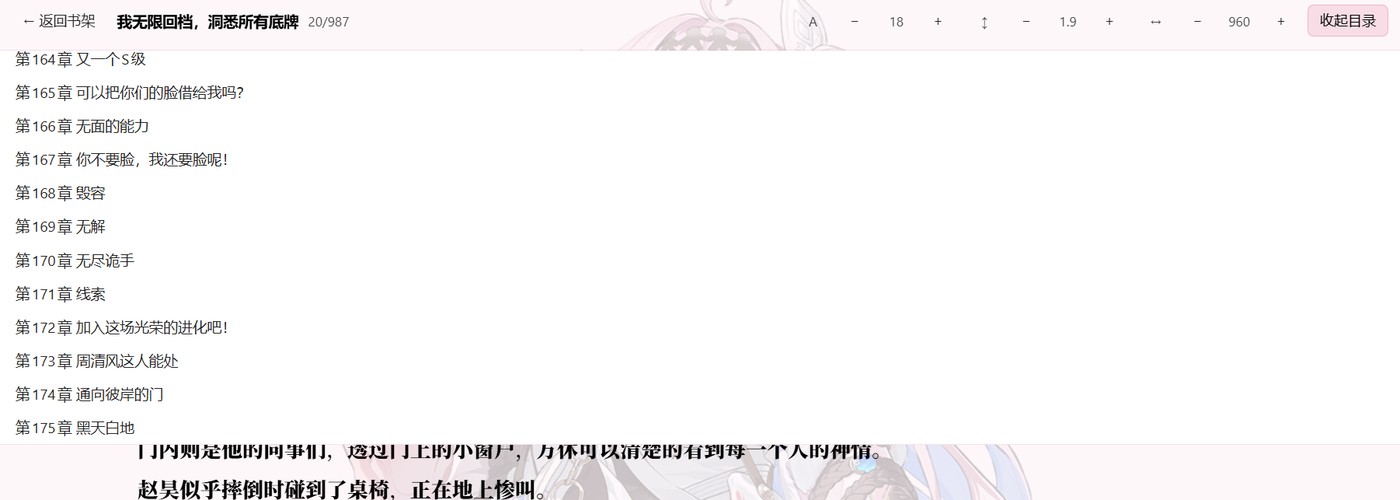
Long books (>300 chapters) get a grouped table of contents (100-chapter blocks, only the active block expanded).
Reader — table of contents, font size / line height / page width controls, chapter counter, keyboard navigation.
Grouped table of contents — books over 300 chapters are split into blocks of 100, with only the current block expanded.
| Full panel | Inline strip | |
|---|---|---|
| Where | centre column, main slot |
above the composer, conversation.input.dock |
| Size | whole panel | five lines (max-height: 8.4em), scrollable |
| Enter | 书架 icon, or ⤢ in the strip | Inline mode button in the reader toolbar |
| Leave | ← 返回书架 | 书架 icon, Esc, or ⤢ back to the panel |
The strip has no chrome: no title, no toolbar, no chapter number. Its typography is
copied from the newest assistant message (font size, line height, family, colour,
column width, left indent) via typographyFrom(), so the five lines sit on the
same grid as the surrounding prose. Paragraph spacing matches the transcript's
16 px.
Both modes share the same Host state: chapter, scroll offset and reader prefs are
written through PATCH /books/{id}/progress and PATCH /prefs, and the strip
updates its cached book before hiding, so reopening it lands where you left off.
When the strip is opened it picks the book you were last reading (started books
first, then the most recently updated).
The stylesheet is installed once into document.head when the plugin
activates (ensureStyles(), tag style[data-plugin-css="dsh-novels/panel.css"]).
It used to be a <style> element rendered inside the shelf's own tree. Every
rule lives in the same string, so the shelf looked right — but opening a book
unmounted the shelf, the style element went with it, and the reader lost the
whole sheet: no height:100%, no flex column, no overflow:auto. The symptom
was a reader that could not scroll and a chapter footer pushed out of the panel.
Keeping the sheet in head makes it independent of whichever view is mounted.
render.test.mjs asserts both halves of that contract (sheet in head, no
<style> inside the panel tree).
The inline strip does not rely on the sheet for its size: INLINE_BOX_STYLE
carries max-height: 8.4em and overflow-y: auto on the element itself, and the
paragraph spacing is applied as inline styles, so a stale or missing stylesheet
can never let a whole chapter flood the composer area. A runtime probe logs
(console.error) if the strip ever measures taller than 200 px.
# clone once, then install from the DSH profile that should carry the plugin
git clone https://github.com/darlingsakurua/dsh-novels.git
plugin_manager install_bundle target="<path-to-your-clone>"
The bundle is linked (not copied), so edits under client/ and lib/ apply
after the plugin is reloaded (plugin_manager set_plugin target="include:dsh-novels" enabled=false then true).
dsh-novels/
  package.json         dsh.bundle.patch + dsh.client (platform: web)
  cordis.patch.yml     inserts the bundle into the profile
  icon.svg             sidebar glyph (currentColor)
  locale/{zh,en}.json  panel title for the sidebar tooltip
  lib/index.mjs        Host half: HTTP routes under /dsh-novels/api/v1
  lib/store.mjs        Host half: library index, atomic writes, path checks
  client/index.mjs     Web half: shelf + reader, plus the text pipeline
Data lives in <profileDir>/plugin-data/dsh-novels/:
library.json            {version, prefs, books[]}
books/<id>.txt          normalized UTF-8 body
books/<id>.chapters.json [{i, title, start}]All routes are gated exactly like the shipped /api channel (the request must
carry the browser session the shell already forwards).
| Method | Path | Purpose |
|---|---|---|
| GET | /ping |
diagnostics (dataDir, bookCount, version) |
| GET | /library |
books + reader prefs |
| POST | /books |
{name, text, encoding, chapters} → book |
| GET | /books/{id} |
book + chapter offsets |
| GET | /books/{id}/text |
full body as text/plain |
| PATCH | /books/{id} |
rename ({title, author}) |
| PATCH | /books/{id}/progress |
{chapterIndex, offsetChars, percent} |
| DELETE | /books/{id} |
remove book and its files |
| POST | /reveal |
open the books/ folder in the OS file manager |
| POST | /books/{id}/reveal |
reveal + select that book's .txt |
| PATCH | /prefs |
{fontSize, lineHeight, measure, fontFamily} |
Envelopes are {ok: true, ...} or {ok: false, error, message}; request bodies
are capped at 24 MB for uploads and 64 KB for everything else. The client rejects
files over 20 MB before reading them; the Host cap leaves room for the JSON
envelope (body + chapter offsets).
client/index.mjs decodes bytes in this order: BOM (UTF-8/UTF-16) → strict
UTF-8 → GB18030 → GBK → Big5. Line endings are normalized to \n before
chapter offsets are computed, because every offset is a character index into
that normalized text.
Chapter headings are matched with ^第…[章节回卷篇部集] and
^Chapter/Part/Book N. A heading with less than 200 characters before the next
one is treated as a false positive and dropped (the previous chapter absorbs
it); the final chapter is always kept. Files with no heading at all are split
into 4000-character blocks.
Tables of contents above 300 chapters are rendered in blocks of 100 (1–100,
101–200, …) with only the block holding the current chapter expanded. Grouping
by the first character of the title was tried first and abandoned: nearly every
Chinese chapter heading starts with 第, so it produced a single bucket.
No test runner needed — plain Node scripts, each printing ok/FAIL lines:
node _test/store.test.mjs        # Host store: index, atomic writes, clamping
node _test/client-parse.test.mjs # decode/normalize/split (bundled client code)
node _test/host-api.test.mjs     # routes, envelopes, 401/403 gate, limits
node _test/perf.test.mjs         # 5 MB GB18030 sample end to end
node _test/render.test.mjs       # shelf → upload → read → delete → inline strip, headless React
render.test.mjs loads the real client bundle with a miniature React (hooks +
static tree) and points fetch at a server wired to the plugin's own Host
routes, so the browser flow is exercised without a browser. _test/tmp/
holds its throwaway profiles. Its last section covers the hybrid behaviour: the
icon opens the full shelf, the reader's inline button moves the same book into the
strip, the icon then only closes the strip.
_test/make-sample.mjs regenerates the GB18030 samples in samples/
(the 5 MB one is handy for checking upload time by hand).
These cannot be automated from here (the sandbox cannot start a browser):
samples/sample-gb18030-small.txt and samples/sample-gb18030-5mb.txt.--dsw-alias-* tokens.set_plugin target="include:dsh-novels" enabled=false):
the 书架 icon disappears and /dsh-novels/api/v1/ping returns 404; re-enable
and refresh to get it back with the same books.@deepseek-ai/dsh-client-*; only react and the builtins.document.body or use an iframe; the panel is a React tree in a slot.
(The stylesheet is a <style> in head, installed imperatively — like the
shell's own style service does — not DOM inside the panel.)--dsw-alias-* tokens only — no literal colors.window./dsh-novels/api/v1; /api belongs to the connection channel.MIT © 2026 darlingsakurua
CLASSIFICATION EVIDENCE
系统优先读取 GitHub Topics,再与站内分类词典和词根规则比对。当前命中: deepseek-harness。
morluto
Reverse engineer anything with agents, from app behavior down to native binaries.

deepseek-ai
DeepSeek Harness: Everything is a Plugin.

nexu-io
The 1st Collaborative AI Design Agent Workspace. Local-first and open source. Create motion, prototypes, websites, apps, dashboards, presentations, images, and videos with your team and AI agents. Share work, exchange feedback, and iterate together in one workspace.