DSH Relay
A resilient terminal workspace for DeepSeek Harness.
远端优先 · 可重连 · 就在终端里




SSH 断了。会话还在。接回来继续。
“Relay” 说的是这件事:显示可以消失,会话不必跟着消失。宿主进程活着,同一句命令接回来
就回到原来的会话 —— 转写、计划卡片、审批、排队中的消息都在原处。
这是远程优先的终端工作区,不只是“一个 SSH 风格的界面”。
断线时正在跑的那一轮会怎样?取决于 /disconnect:
默认 pause —— 当前这一轮在窗口离开时停下,会话本身不丢,接回来接着用;
显式设成 continue —— 当前这一轮在显示端离开后继续在后台跑完。
两种策略下宿主都不退出。演示动图用的是 continue(字幕里标了),别把它当成默认行为。
npm 包名没有变,安装命令也没有变。 发布坐标仍然是 dsh-ssh-tui;
DSH Relay 是产品展示名。见 docs/decisions/brand-dsh-relay.md。
npm i -g @deepseek-ai/dsh
dsh plugin --profile tui add dsh-ssh-tui@latest
dsh --profile tui
需要 Node.js ≥ 22.19 和 DeepSeek Harness CLI。断开之后接回来:dsh --profile tui --resume。
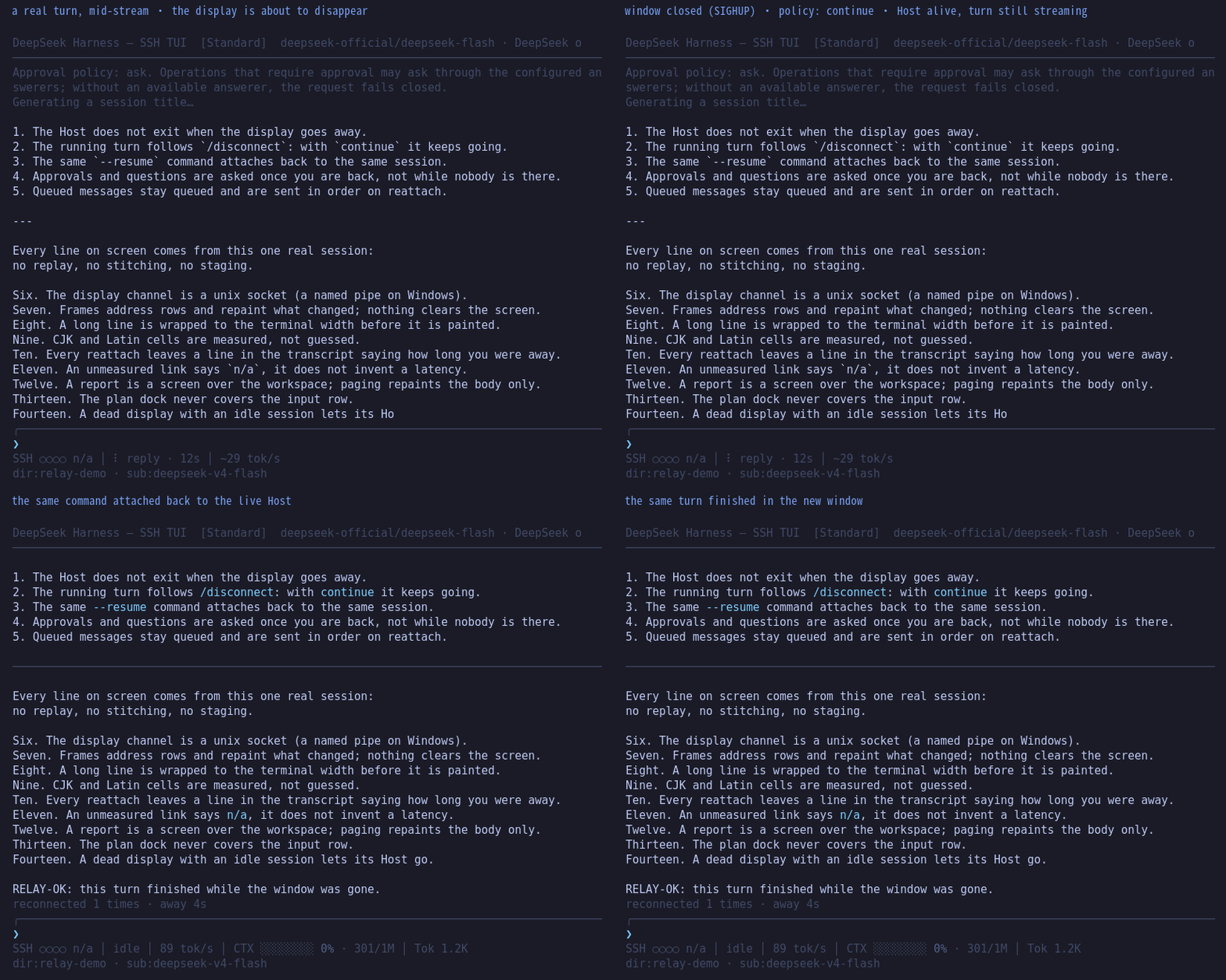
实拍,不是摆拍:真 PTY、真宿主、真 SIGHUP、真 resume(npm run screenshots:reconnect 可重放)。
演示显式设了 /disconnect continue,所以画面上这一轮在窗口消失后跑完了;换成默认的 pause,
同一段会停在中断处,会话照样接得回来。
English: README.en.md
已测,不是号称
在 100×20 下实测,每个动作 40 次取中位(npm run bench;本节由 npm run bench:report 生成,
不是手抄的):
| 动作 |
毫秒 |
字节 |
寻址行 |
整屏清屏 |
| 流式输出时的一次重绘 |
1.64 |
501 |
3 |
0 |
| 等待卡片时钟走一格 |
1.28 |
465 |
3 |
0 |
| 报告屏翻一页(PgDn / PgUp) |
1.41 |
2457 |
17 |
0 |
| 菜单里移动一次光标 |
1.27 |
588 |
4 |
0 |
| 向导字段里打一个字符 |
0.38 |
140 |
1 |
0 |
五个动作合计 0 次整屏清屏。这条是这一版的性能承诺:不管终端多慢、链路多差,
画面按行增量重绘,不会因为一次 tick 把整屏重画一遍。
跑法就是上面两条命令;这两条断言在 CI 的每一条腿上都会重跑(Linux 与 Windows、四个宿主版本)。
链路上的承诺另有真 PTY 探针:断链重接、断线后宿主存活、带历史的 resume、以及"终端不回光标位置"
时的链路显示,各自一个脚本,全部在 CI 里跑(npm run freeze 会把它们列出来)。
你在我们没覆盖过的终端上试过 DSH Relay 吗?
提一份终端兼容报告 —— 不用读代码,填一张表就行,
结果会进 docs/terminals.md 的「社区实测」区。
如果 DSH Relay 让你的远程会话更可靠了,
给仓库点个 star 能帮别的终端用户找到它。
30 秒开始
上面三条命令装好就进工作区。之后常用的几条:
恢复旧会话:
dsh --profile tui --resume
更新:
dsh plugin --profile tui add dsh-ssh-tui@latest
dsh plugin 由 profile 内的 pnpm 管理依赖。更新时请显式带 @latest,否则已有 lockfile 可能继续沿用旧版本。
Windows 用户见 Windows 指南。
为什么会有这个 TUI
DeepSeek Harness 已经有 Web、headless 和不断扩展的插件生态。
dsh-ssh-tui 不试图把浏览器搬进终端。
它解决另一类问题:
连接不可靠
SSH 会断、笔记本会合盖、网络会切换、跳板机会超时。
正在运行的回合不应该因为显示终端消失,就和整个 Harness Host 一起死亡。
dsh-ssh-tui 将 Host 与显示端分离:
Harness session
      │
      ▼
   TUI Host
      │
      ├── 当前 SSH / terminal
      │
      └── 断线后重新 attach
忙碌中的 Host 可以在显示端离开后继续存在;重新连接后,同一条命令即可接回。
终端环境并不统一
Linux PTY、Windows ConPTY、SSH、旧控制台、不同 OSC / mouse / clipboard 能力,并不是同一种终端。
本项目不会假定:
process.stdin/stdout == terminal == display == host
而是显式区分:
Harness Host
    ↓
Display Transport
    ↓
Terminal Capability
TTY 是一种能力,不是宿主存在的前提。
这也是为什么在没有真实终端的 Host 中,插件应该安全地不激活,而不是让宿主一起崩掉。
Harness 本身仍在快速变化
本项目把 兼容性当成功能维护,而不是发版后顺便测试。
当前声明窗口:
| DeepSeek Harness |
状态 |
0.1.7-rc.1 / 0.1.7-rc.2 |
✅ 支持 |
0.2.0-rc.1 / 0.2.0-rc.2 |
✅ 支持 |
0.1.5 及更早 |
❌ 自 dsh-ssh-tui 0.8.0 起不再支持 |
声明范围:
>=0.1.7-rc.1 <0.1.8
|| >=0.2.0-rc.1 <0.2.1
发布前会针对支持线重新安装依赖并运行类型检查、测试和真实终端探针。
不是:
“安装没有报错,所以应该能用。”
而是尽量回答:
“这个 Harness 版本、这个 Host、这个终端路径,我们实际验证过什么?”
同一个 Harness,终端里看到完整过程
官方 headless 很适合一次性任务:
dsh --profile headless "..."
它完成任务后将最终回复写到 stdout。
如果你需要持续观察思考、工具、diff、子代理、计划和审批,则可以进入 TUI。
下面是同一个任务:
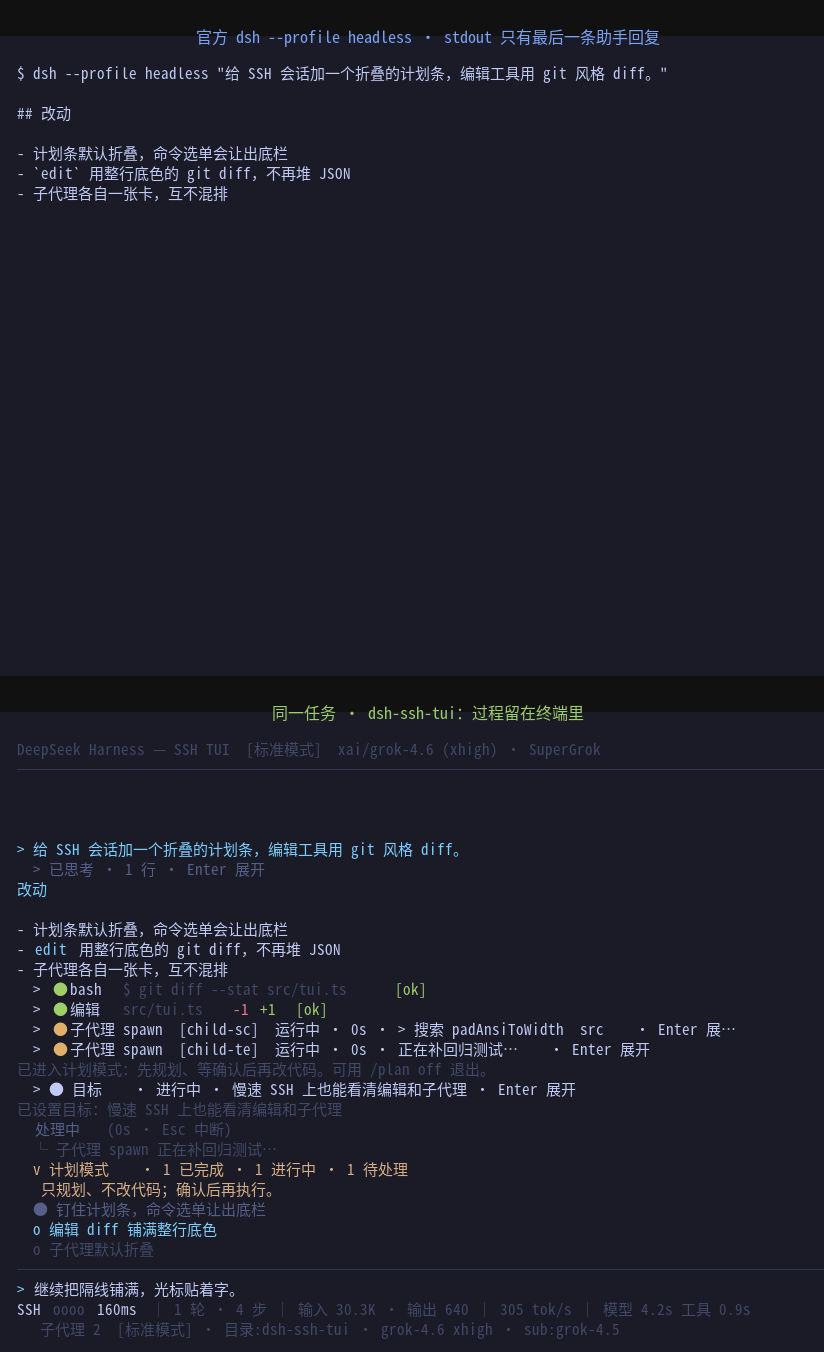
在 TUI 中:
- reasoning 可折叠、可实时展开;
- 工具调用以卡片呈现;
- edit 显示 git 风格 diff;
- 子代理独立显示;
- plan / approval / ask-user 直接进入交互界面;
- 模型输出持续流式显示,而不是等整个任务结束。
为弱网而设计
TUI 使用纯 ANSI 和增量重绘,不依赖浏览器或重量级远程 UI。
下面是在 2 kB/s 限速下回放真实绘制事件:
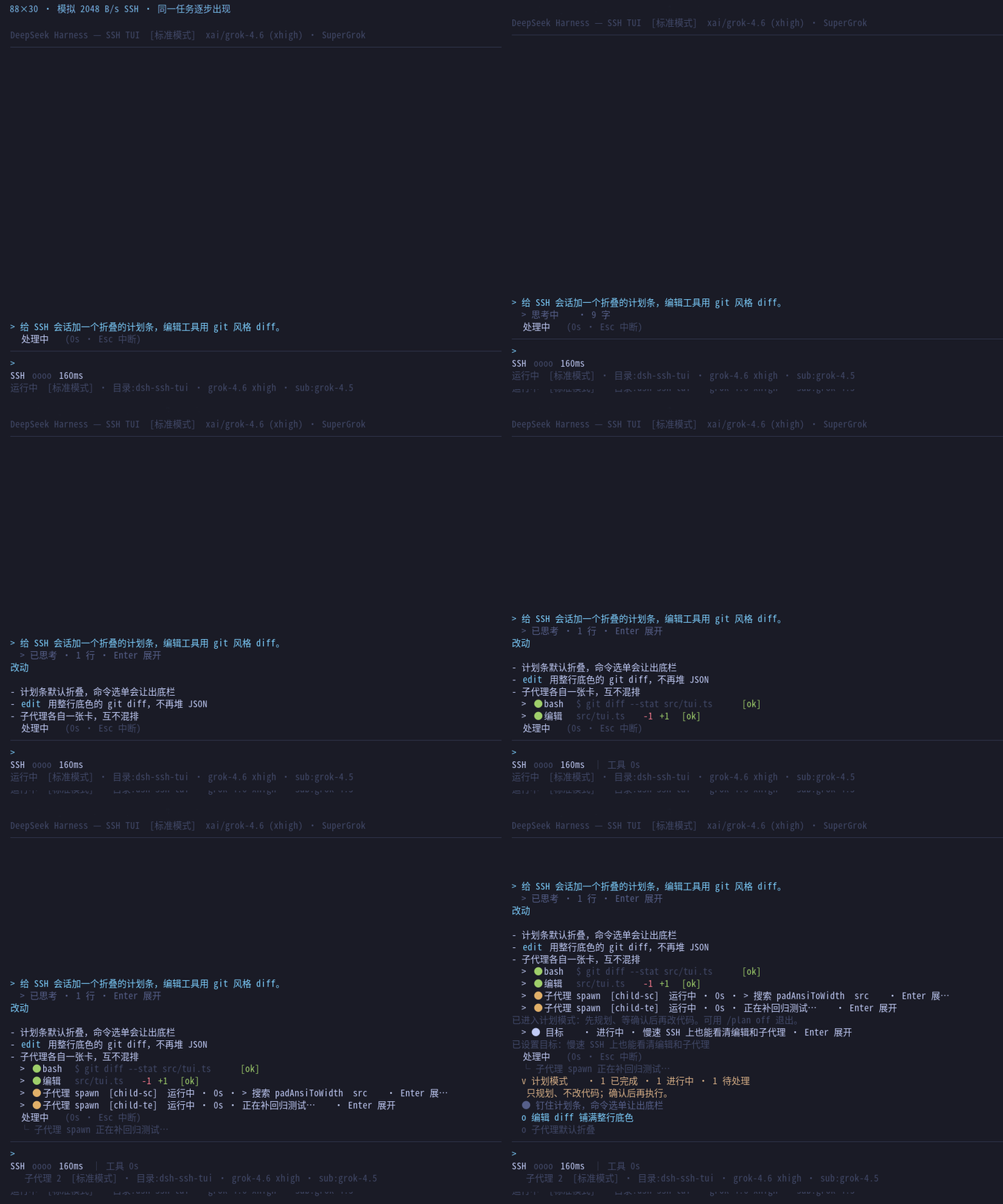
该样例可以直接复现:
npm run screenshots:slow
对应数据保存在:
docs/screenshots/slow-link.json
目标不是做一个网络 benchmark。
目标是确保:
链路越差,界面可以降级;任务本身不能跟着失去可用性。
核心能力
Terminal-native workspace
- 纯 ANSI 渲染;
- Markdown、标题、列表、引用、代码块;
- 工具卡片与 git 风格 diff;
- reasoning 折叠与实时查看;
- plan / approval / ask-user-question;
- 子代理独立状态卡;
- 状态行按一眼扫读的顺序回答五个问题:链路健康、正在做什么、tok/s、额度余量、上下文占用(宽度不够时按优先级逐项收敛,窄屏更简洁而不是更拥挤);轮数 / 步数 / 模型时间 / 工具时间 / 缓存命中移出常驻行,仍可在
/status 与 /diag 查看;
/model、/mode、/submodel 等 Harness 能力直接进入终端。
Session continuity
--resume 历史会话选择;- SSH / terminal 断开后重新 attach;
- 一个 session 只允许一个写 Host;
- 新窗口接管时旧显示端有明确退出语义;
- Host 异常退出后可以从 Harness 日志恢复。
Terminal capability handling
- truecolor / 256 / 8 / no-color;
- Windows Terminal / ConPTY;
- OSC 52 clipboard 能力判断;
- mouse / hyperlink / terminal title 能力控制;
- UTF-8 不可用时 ASCII fallback;
DSH_TUI_LINE_MODE=1 纯行模式,可用于 tee、日志和屏幕阅读器。
Safety and diagnostics
/doctor:检查 profile、依赖和 Harness 组合;/diag:检查当前 Host、显示通道和 terminal capability;/approval auto:自动处理明确安全或明确危险的操作;- 无法确定的动作仍回到用户审批;
- Host / terminal 不满足运行条件时尽量 fail-safe,而不是破坏宿主。
SSH 断了之后
如果只是空闲状态断开,Host 会退出,之后从持久化会话恢复即可。
如果模型正在:
- reasoning;
- 回复;
- 调工具;
- 运行子代理;
TUI 可以保留 Host,并允许重新接入(保留的是宿主;这一轮本身是否在断线期间继续跑,看
/disconnect 的策略)。
dsh --profile tui --resume
或者指定会话:
dsh --profile tui --resume <session-id>
默认策略下,断线会避免无人值守地继续执行需要用户交互的工作。
如果明确希望当前回合在 SSH 断开后继续:
/disconnect continue
重新连接后再 attach 即可。
完整生命周期、锁、接管、链路探测与 idle-exit 规则:
Remote Operations
Windows
Windows 不是“顺便能跑”的平台。
本项目对 Windows 单独处理:
- ConPTY 输入与终端能力;
- Host / display 生命周期;
- Windows Terminal 与传统控制台差异;
- UTF-8 / ASCII fallback;
- named pipe display transport;
- terminal close / reconnect;
- Windows CI 与真实终端探针。
安装方式与 Linux 相同:
npm i -g @deepseek-ai/dsh
dsh plugin --profile tui add dsh-ssh-tui@latest
dsh --profile tui
完整说明:
在 Windows 上使用
官方 Harness Desktop
⚠ 不要把本插件加进 Desktop(或 web)profile。 这不是"装了没用",是会让应用崩:
Desktop 的宿主命令行走的是 web app 的语法(它传 --no-open),而命令行在 dsh 里没有仲裁——profile 里每个 app
都会用自己的语法解析同一份 argv,遇到不认识的旗标直接退出进程。0.8.2 起本插件的 startup 行会在识别到
"这条命令行不属于我"(Desktop 启动器,或 web app 已接管)时不认领它;0.8.1 及更早则会以
error: unknown option '--no-open' 让宿主退出 1,应用随即报 dsh desktop host exited with 1 并崩。
万一已经加进去了:从 profiles\desktop\cordis.patch.yml 里删掉 ssh-tui-startup / ssh-tui /
ssh-tui-routes / ssh-tui-subagent 四行(或从备份恢复该文件),应用立刻恢复。
官方 Desktop 是 GUI 应用,本身不需要这个 TUI。
Desktop 内部的 Harness Host 和真正的 console runtime 也不是一回事。
当前 Desktop 启动链没有为终端插件提供真实 TTY,因此:
Desktop Host
    │
    ├── Harness services
    │
    └── no real terminal
在这种环境中,dsh-ssh-tui 会识别缺少 terminal capability,并保持惰性:
- 不创建显示 Host;
- 不获取 TUI session lock;
- 不挂终端相关 timer;
- 不启动 update check;
- 不应该因为插件无法绘制 TUI 而让 Desktop Host 一起失败。
如果你希望使用终端界面,请安装真正的 CLI,并从真实终端启动:
npm i -g @deepseek-ai/dsh
dsh --profile tui
Desktop / no-TTY Host 的诊断与上游问题记录:
Desktop-safe 不等于“把 TUI 嵌进 Desktop GUI”。
前者是 Host compatibility;后者需要宿主提供合适的 display transport。
Host、Display、Terminal
项目目前遵循一个简单原则:
             ┌──────────────┐
             │ Harness Host │
             └──────┬───────┘
                    │
              session / events
                    │
             ┌──────▼───────┐
             │   TUI Host   │
             └──────┬───────┘
                    │
             display transport
                    │
        ┌───────────┴───────────┐
        ▼                       ▼
   real TTY / SSH           stdio relay
        │
        ▼
 terminal capability
这带来几个约束:
- Host 的生命周期不应由某一个显示窗口决定。
- 没有 TTY 不等于 Harness Host 不合法。
- 终端能力必须检测或明确声明,不能凭平台名称猜。
- 掉线、resize、terminal close 都是正常生命周期事件,而不是异常世界。
- 兼容性需要可测试,而不是依赖“在作者机器上能跑”。
维护者侧的生命周期与平台设计:
适合谁
推荐使用 dsh-ssh-tui,如果你经常:
- SSH 到服务器上写代码;
- 通过公司跳板机工作;
- 使用远程开发机 / 测试机;
- 网络延迟高或连接偶尔中断;
- 需要 Windows Terminal / ConPTY;
- 希望 Harness 更新后仍有明确兼容边界;
- 更在意 session continuity 和终端可靠性,而不是浏览器级视觉能力。
如果只跑一次任务并获取最终文本:
dsh --profile headless "..."
通常更加简单。
如果需要浏览器富交互,则继续使用 Harness Web / Desktop。
它们解决的是不同问题。
常用命令
# 启动
dsh --profile tui

# 恢复 / 接入会话
dsh --profile tui --resume

# 更新
dsh plugin --profile tui add dsh-ssh-tui@latest

# 卸载
dsh plugin --profile tui remove dsh-ssh-tui
TUI 内:
/doctor
/diag
/model
/mode
/submodel
/status
/disconnect
/approval
排障
优先运行:
/doctor
检查 profile / Harness / plugin 组合。
当前会话、Host、显示端或 terminal capability 有问题:
/diag
Windows:
docs/windows.md
SSH、掉线、Host 生命周期:
docs/remote-ops.md
Desktop:
docs/desktop.md
终端能力:
docs/terminals.md
底层平台设计:
docs/platform.md
提交 issue 时,建议同时附上 /doctor 与 /diag 输出。
可选:SuperGrok / X Premium
如果已经有 SuperGrok / X Premium,可以使用独立插件:
dsh-llm-xai-oauth
安装到当前 TUI profile:
dsh plugin --profile tui add dsh-llm-xai-oauth@latest
它和本 TUI 独立:headless、Web 或其它 profile 也可以使用。
Development
git clone https://github.com/cyjyyd/dsh-ssh-tui.git
cd dsh-ssh-tui

npm install
npm run build
npm test
两条不跑"有没有坏"、而跑"有没有守住"的命令:
npm run freeze   # B2 冻结:八条不变量 + 七条退役路径(unclassified / live source rows / …)
npm run bench    # 性能基线:流式 / 等待 / 报告翻页 / 菜单移动 / 向导打字,并断言都不整屏重画
真实终端、断线与平台行为由额外 probe 覆盖。
项目的目标不是让模拟测试代替终端,而是让:
unit / contract tests
        +
real terminal probes
        +
cross-platform CI
共同定义“支持”。
Documentation
Project philosophy
这个项目最初是为 SSH、跳板机和弱网环境做的。
这些环境迫使它很早就面对一些桌面应用容易忽略的问题:
- 如果窗口消失,谁拥有 session?
- 如果网络断了,正在运行的任务怎么办?
- 如果没有 TTY,插件应该怎么退出?
- 如果 Windows 和 POSIX 的进程生命周期不同,谁负责 Host?
- 如果终端说自己支持某种能力,但实际上不支持,谁承担后果?
- 如果 Harness 明天换一个 Host,UI 是否必须全部重写?
因此现在更准确的定义不是:
一个 SSH 专用 TUI。
而是:
一个把 SSH 当作最严苛真实环境之一来设计的 DeepSeek Harness terminal frontend。
SSH-first.
Host-aware.
Reconnectable.
Compatibility-tested.
License
MIT


