

模型与 MCP
待识别

rea
morluto
Reverse engineer anything with agents, from app behavior down to native binaries.
PROJECT TOPICS
INSTALL REFERENCE
dsh plugin --profile web add github:cxv117793-blip/dsh-sidebar-overflow
该命令指向仓库当前默认分支;尚无绑定当前 commit 的完整验证结果。
PROJECT README
把左侧边栏里不常用的入口收进「更多」,哪些留在外面由你决定。 点一下收起、点一下放回,改完立刻生效,DSH 重启后依然记得。



中文 | English
DSH 的左侧边栏装得下十几个入口之后就开始拥挤:插件、插件市场、自动化任务、灵枢、上下文洞察、WSL…… 常用的其实没几个。
这个插件不新增按钮、也不改官方侧边栏的行为。它往官方的 sidebar.panellist.actions 槽位注册一条,官方那条「更多」就会出现在主导航列表末尾;点开是一张清单,列出当前所有入口,每个都能单独决定留在侧边栏还是收进「更多」。
收进去的没有消失 —— 点「更多」照样能打开,点「显示到侧边栏」就回来。
| 收起之后 | 菜单里可以逐个切换 |
|---|---|
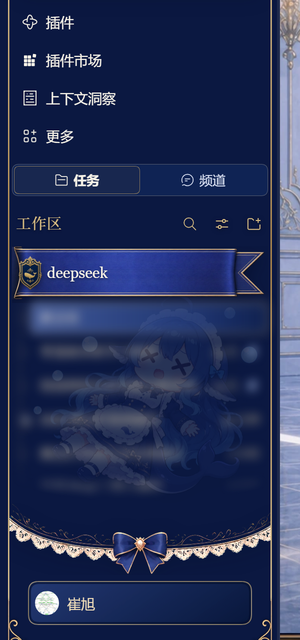 |
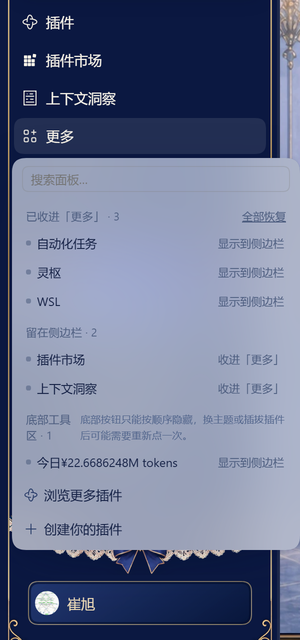 |
菜单顶部的搜索框,入口多了以后按名字筛:
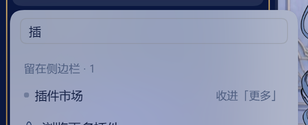
| 逐个选择 | 菜单里列出全部入口,一行一个,右边一个按钮切换「收进『更多』/ 显示到侧边栏」 |
| 搜索过滤 | 菜单顶部有搜索框,输两个字就筛出来;无匹配时给明确空态,不会误显示成「还没收起任何按钮」 |
| 一键还原 | 「全部恢复」把 panel: 与 footer: 两类键一次清空,全部放回 |
| 失效条目清理 | 插件卸载后配置里会残留 panel:<已删除的id>,菜单会提示「另有 N 个条目已失效」,点「全部恢复」即可清掉 |
| 底部工具区 | 侧边栏底部那排小按钮(用量、余额之类)也能隐藏 |
| 即时生效 | 点完就变,不用刷新、不用重启 |
| 重启保留 | 选择写进 profile 的 cordis.patch.yml,DSH 重启后自动回放 |
| 中英双语 | 跟随 DSH 语言设置 |
桌面版不要用 dsh plugin --profile desktop ... 改 profile —— 该 profile 由应用内的插件管理器独占,命令行会直接拒绝(profile "desktop" is managed exclusively by the Electron application)。
三种装法,任选其一:
设置 → 插件 → 添加插件 → 从本地目录,选中本仓库根目录。
在同一个安装框里粘贴:
https://github.com/cxv117793-blip/dsh-sidebar-overflow.tgz三个地址,按需选:
| 用途 | 地址 |
|---|---|
| 永远指向最新版(文件名固定) | https://github.com/cxv117793-blip/dsh-sidebar-overflow/releases/latest/download/dsh-sidebar-overflow.tgz |
| 锁定 v0.1.2 | https://github.com/cxv117793-blip/dsh-sidebar-overflow/releases/download/v0.1.2/dsh-sidebar-overflow-0.1.2.tgz |
也可以先下载再装:
curl -L -o dsh-sidebar-overflow.tgz \
  https://github.com/cxv117793-blip/dsh-sidebar-overflow/releases/latest/download/dsh-sidebar-overflow.tgz
非 desktop 的 profile 才可以用命令行:
dsh plugin --profile <你的profile> add file:<本仓库绝对路径>完全退出应用(文件 → 退出,或托盘右键退出)再启动。
刷新页面不够 —— 客户端模块只在应用启动时装配一次。这一步没做,界面不会出现「更多」。装好后主导航列表末尾会多出一行「更多」(宽侧边栏时带文字,窄侧边栏时只有一个图标)。
点侧边栏里的「更多」:
「插件」这个入口是故意锁死的 —— 它是插件管理器的入口,收起来就没地方装插件了。点它会提示「该面板不能收起」。
「更多」按钮是常驻的:插件一装上,它就在主导航列表末尾,不管你有没有收过东西(因为插件往 sidebar.panellist.actions 槽位注册了一条,官方 shell 只要看到该槽位非空就渲染这个按钮)。全部恢复后按钮不会消失,但菜单会显示「还没有收起来的按钮」,侧边栏看起来和没装插件时一样。
选择存在 profile 的 cordis.patch.yml 里,由插件自己的 Config 声明:
- id: dsh-sidebar-overflow
  name: dsh-sidebar-overflow
  config:
    hidden:
      - panel:dsh-wsl
      - panel:dsh-market
      - footer:0
键名规则:
| 前缀 | 含义 | 例子 |
|---|---|---|
panel: |
主导航面板,后接 sidebar.panellist 里的面板 id |
panel:dsh-wsl |
footer: |
底部工具区第 N 个按钮(按渲染顺序,从 0 数) | footer:0 |
footer: 记的是位置而不是 id —— 那些按钮渲染进 DOM 时既不带 id 也没有 data 标记,只能数位置。这是本插件最主要的粗糙之处,见下面的「已知限制」。
手工改法:改完完全退出再启动。想重置就删掉 hidden 整段(等价于空数组)。
全部走官方扩展点,不劫持 DOM 结构、不打补丁、不替换组件:
让「更多」按钮出现
官方 sidebar shell 里 hasEntryActions 直接来自 ctx.slots.entriesOfSlot("sidebar.panellist.actions").length > 0。本插件注册一条进该槽位,官方按钮就渲染出来,菜单内容由我们提供。
控制主列表显示谁
官方 shell 用 panels.filter(({ id }) => id === "plugins" || !unpinned.includes(id)) 决定主列表,unpinned 来自 createPanelPins() 的内存 store。它的写入口 setPinned(id, pinned) 由 sidebar 插件通过 injectProps() 下发;本插件在 apply() 里从 ctx.slots.entriesOfSlot("sidebar")[0].inject() 取到同一份闭包,所以启动时不用打开菜单就能恢复收纳状态。
setPinned 是幂等的(状态已一致就直接 return),所以重复调用不会引发重渲染循环。
持久化
官方 pin store 是纯内存态(刷新即还原)。落盘由本插件 Host 半边的 Config(hidden: string[])承担,走 configForms 实时读写 —— 点一下立刻写进 cordis.patch.yml。
字段全部标了 .volatile():它的语义是「值变化不触发插件重载」,不是「不落盘」。配置照常写入磁盘。
底部工具区
sidebar.footer.action 没有对应的官方 pin 机制,只能按 DOM 兄弟节点顺序做 best-effort 隐藏;匹配不到就静默跳过,不影响主功能。
启动稳定性
只硬注入 slots。locale 与 configForms 都是启动后期才就位的服务:locale 自己注入 remote + configForms,而 configForms 的宿主 ui-settings 挂在 remote → connection 这条重连链下游,首次连接成功的事件必然晚于宿主的启动检查点。Cordis 的 inject 数组全是必需依赖——其中任一服务重新 provide(uid 变化)就会让纤维先 unload 再 reload,这段时间状态是 UNLOADING/LOADING。如果它们写在主条目的 inject 里,宿主检查那一刻就可能读到 loading,判定 entry did not activate 并中止整个 UI 挂载(v0.1.0 在部分机器上偶发启动失败即此故)。现在改成 ctx.inject(["locale", "configForms"], (sub) => {…}) 子纤维注入:主条目只依赖稳定的 slots,服务到齐后子纤维自己加载,中途抖动不再波及主条目。
Host 半边(lib/index.js)只有 43 行,只声明设置项,apply() 是故意空的。
| 限制 | 原因 |
|---|---|
| 底部工具区按顺序而不是按 id 记忆 | 那些按钮渲染进 DOM 时既不带 id 也没有 data 标记,只能数位置。加减插件后序号会变,表现为「隐藏错了一个」 |
| 换主题后底部隐藏可能失效 | 同上,主题可能改变节点层级 |
| 「插件」入口不能收 | 锁死的,见上 |
| 没有拖拽排序 | 这一版只做「收起 / 显示」,不做重排 |
| 菜单不记忆滚动位置 | 每次打开都从顶部开始 |
如果底部那条「失效条目」的提示一直在,点「全部恢复」就能清干净。
装完看不到「更多」按钮?
按钮是常驻的,正常情况下装完并完全退出重启后就会出现。看不到的话,首先确认确实完全退出应用了 —— 客户端模块只在启动时装配,刷新页面不算。再确认插件在 设置 → 插件 里是启用状态。
刷新页面后收纳状态没了?
说明配置没写进磁盘。检查 设置 → 插件 → dsh-sidebar-overflow 是否有设置项,以及 profile 的 cordis.patch.yml 里有没有 config.hidden。本插件启动时的恢复依赖这份配置。
底部那个按钮隐藏错了位置? 这就是「按顺序记忆」的代价:装/卸插件后序号整体平移。打开菜单,把当前错位的那两项重新点一遍即可。
会不会把侧边栏搞坏?
不会。插件停用/卸载时会把官方 pin store 还原成全可见、并用 data-dso-hid 标记还原被藏起来的底部按钮,不需要刷新自救。所有 DOM 操作都包在 try/catch 里,取不到元素就静默跳过。
支持哪些 DSH 版本?
开发与实测环境是 DSH 0.2.1-rc.3(CLI 0.2.0-rc.2)。插件只硬依赖 slots,locale 与 configForms 走子纤维注入,没有声明 engines.dsh 硬约束 —— 但它确实没有在更老的版本上验证过。
cordis.patch.yml 里 dsh-sidebar-overflow 的 config.hidden。hidden 配置会残留,但不影响任何东西;想干净就删掉那几行。没有构建步骤 —— 源码直接就是产物。
git clone https://github.com/cxv117793-blip/dsh-sidebar-overflow.git
cd dsh-sidebar-overflow

node --check lib/client.js
node --check lib/index.js
装到本地 profile 调试(desktop 用应用内「从本地目录」安装):
dsh plugin --profile <profile> add file:<本仓库绝对路径>改完客户端代码后完全退出应用再启动;只刷新页面不会重新加载模块。
结构:
lib/index.js      宿主半边:只声明 Config,43 行
lib/client.js     浏览器半边:菜单 UI + 收纳逻辑,816 行
locale/{zh,en}.json
cordis.patch.yml  loader 补丁,告诉 DSH 有这么一个插件
icon.svg
docs/ README 用的截图(不打进 npm 包)dsh-sidebar-overflow adds a More entry to the end of the DeepSeek Harness left sidebar's panel list, so you can choose — entry by entry — which icons stay visible and which collapse into that menu.
DSH's left rail gets crowded fast once a handful of plugins are installed. The plugin lists every entry in one menu and lets you toggle each of them between in the sidebar and collected into More. Collected entries are not gone — one click on More and they are back.
Highlights:
panel: and footer: keys and puts everything back.panel:<id> entries behind; the menu reports them and Restore all removes them.cordis.patch.yml
and replayed on the next launch.Desktop profiles are owned by the in-app plugin manager; dsh plugin --profile desktop ...
is refused on purpose. Use Settings → Plugins → Add plugin and pick either the cloned
directory, the GitHub URL, or a .tgz from
Releases.
Then fully quit the app — reloading the page does not load the client module.
Non-desktop profiles can use the CLI:
dsh plugin --profile <profile> add file:<absolute-path-to-this-repo>Everything goes through official extension points — no DOM hijacking, no monkey-patching, no component replacement:
sidebar.panellist.actions is
non-empty (entriesOfSlot(...).length > 0). We register one entry there and supply the
menu body.setPinned() closure, obtained from
ctx.slots.entriesOfSlot("sidebar")[0].inject() — the same closure the shell itself uses,
so state is restored at startup without opening the menu.Config (hidden: string[]), written live through
configForms into the profile's cordis.patch.yml. Fields are marked .volatile(),
which means "do not reload the plugin on change" — not "do not persist".slots is a hard inject. locale and configForms arrive late — locale
injects remote + configForms, and configForms' host ui-settings sits
downstream of the remote → connection reconnect loop, so the first successful
connection always happens after the host's boot checkpoint. A cordis inject array is
all-required: re-providing any entry (new uid) unloads and reloads the fiber, and the
fiber reads LOADING/UNLOADING meanwhile. Declared on the main entry, that window
could be sampled by the boot check, which then reports entry did not activate and
aborts the whole UI mount. They now live in a ctx.inject([...], (sub) => {…}) child
fiber, so the main entry only depends on the stable slots service.Footer actions are remembered by position, not by id, because those buttons render without any identifier. After installing or removing plugins the indices shift; toggle them again if a hide lands on the wrong button.
Developed and tested against DSH 0.2.1-rc.3. The plugin declares no engines.dsh
constraint; it only relies on the slots, locale and configForms service faces, but has
not been verified on older releases.
Requires Node ^22.19.0 || >=24.0.0.
CLASSIFICATION EVIDENCE
系统优先读取 GitHub Topics,再与站内分类词典和词根规则比对。当前命中: deepseek、deepseek-harness。
morluto
Reverse engineer anything with agents, from app behavior down to native binaries.

deepseek-ai
DeepSeek Harness: Everything is a Plugin.

nexu-io
The 1st Collaborative AI Design Agent Workspace. Local-first and open source. Create motion, prototypes, websites, apps, dashboards, presentations, images, and videos with your team and AI agents. Share work, exchange feedback, and iterate together in one workspace.