
模型与 MCP
待识别

rea
morluto
Reverse engineer anything with agents, from app behavior down to native binaries.
PROJECT TOPICS
INSTALL REFERENCE
dsh plugin --profile web add github:crease123/dsh-journal-calendar
该命令指向仓库当前默认分支;尚无绑定当前 commit 的完整验证结果。
PROJECT README
English | 中文
Watch the Calendar plugin tutorial on Bilibili (Chinese)
A daily journal the agent keeps on its own, for DeepSeek Harness (DSH). One sentence it adds to the system prompt makes recording part of the agent's job, so it writes what you did and what you intend to do into one JSON file per day, and the Web UI draws those files as a calendar in the right sidebar.
If the plugin is useful to you, a star on the repository is the simplest way to say so — and the ? in the month header opens that same page.
Status: verified against DSH 0.2.2-rc.1 on Node 22.19.0 and 26.4.0; latest release 0.6.2.
dir optionThe plugin registers the journal_record tool and one prompt sentence telling the agent that recording is part of its job. The tool takes a kind (todo = an intention, checkable; memory = something that happened), a one-line title, one tag, and optionally date and time. Recording the same id twice returns the stored entry instead of appending a second one, so a retried tool call is safe.
Entries may specify only a date: time is optional for both todos and memories. When omitted, no current time is added and the calendar shows no time. Remove the entire time property when editing JSON; do not leave a key without a value.
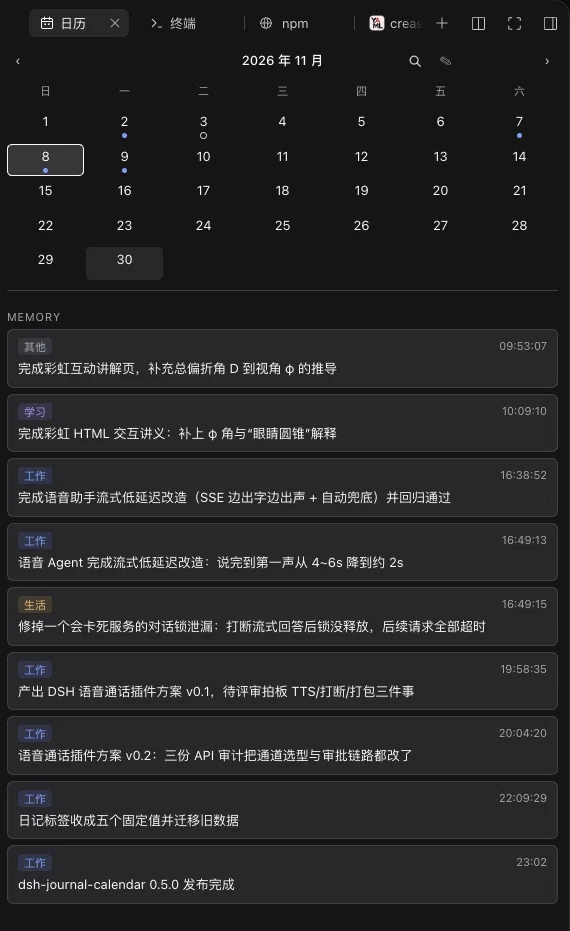
Everything the agent writes lands on its day in the card, and everything in the card can be driven from the card: the duty sentence is editable there, days are marked by what they hold, entries are searchable, and a memory links back to the conversation that recorded it.
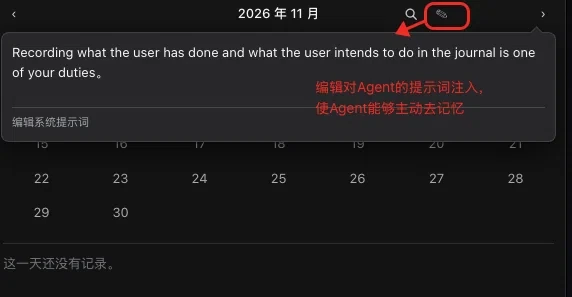
The sentence is what makes the recording proactive rather than something you have to ask for. Its default is:
Recording what the user has done and what the user intends to do in the journal is one of your duties.
It is one prompt section, registered with the tool and gated on the tool's presence, so a profile that removes the tool loses the instruction with it.
That sentence is yours to rewrite. The ✎ button beside the month heading opens a small editor prefilled with the text now in effect; the button turns into ✓ once the draft differs from what is in effect, and committing it saves. Escape, a click outside the editor, or a second ✎ discards the draft. The text lands in $DSH_HOME/journal/duty.md (beside the day files, following dir), and the next message already carries it — the section is re-read on every prompt assembly, so no reload is involved. Saving an empty editor deletes the file and restores the built-in sentence. The limit is 2000 characters, and the text is inserted verbatim, so a {{ in it is your own writing rather than a variable reference. That is the lever for how eagerly the agent records, and what it considers worth recording.
tag is one of five fixed values — work, study, life, health, other — and the card draws it as a chip: 工作, 学习, 生活, 健康, 其他 in Chinese, Work…Other in English. A closed set is what keeps the journal scannable: with free-form labels it drifted to 342 distinct tags over 227 entries, and every extra one made the chips harder to read. The tool lists the five with what each covers, so the agent can pick one without guessing.
The chip is tinted with its tag's hue — blue for work, violet for study, amber for life, green for health, grey for other — and the same chip appears on a todo row beside the title, so both sections read at one glance. The tint is mixed against the theme's label colour, so the five hues stay legible in the light and the dark surface alike.
Day files written before this change carry free-form tags arrays. They are read back as one tag: a label that names one of the five maps to it, anything else becomes other, and an entry with no labels keeps none. No file has to be rewritten for the card to work.
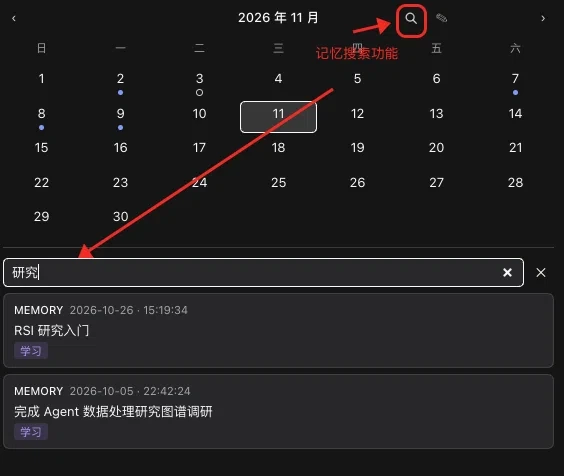
The magnifier button beside the month heading turns the lower half of the card into a keyword search. It matches every stored entry, memories and todos alike, on title and tag, case-insensitively and newest day first — only what the card draws, so every hit is something you can see; each hit carries its kind, day, and tag. A tag matches by the word the chip shows, in either language, so 工作 and work find the same entries. Picking a hit switches the calendar to that day, closes the search, and flashes the entry in the day list. One query stops at 100 hits, so a search cannot stream the whole journal into the sidebar. The scan runs in the Host over the same day files the card already reads; nothing is indexed ahead of time.
An entry recorded from a conversation also stores that Session and the turn it came from, so a memory in the card is a link: clicking one switches to the conversation and scrolls to the turn the entry was recorded in, with a brief highlight. Entries written outside a conversation (hand-edited files, or anything recorded before this existed) carry no source and stay plain text. The scroll addresses turns through the Web client's data-chat-turn attribute; if a future client stops publishing it, the click still opens the conversation and simply does not scroll.
A calendar cell says what the day holds: a hollow ring while a todo is still open, a green dot once every todo is done, a blue dot when only memories were recorded, and nothing at all when the day is empty. Clicking a todo row flips it, and the change goes straight back to that day's file. A memory already happened, so it has no box to tick.
The ? in the month header opens the project on GitHub, where this README lives and where the star button is one click away. The card therefore ships no second copy of the guide to fall out of date.
One bundle row mounts all three faces:
| Face | What it is |
|---|---|
| Host service | journal, a Remote namespace over $DSH_HOME/journal |
| Tool | journal_record, plus a standing-duty prompt section |
| Browser half | the calendar card, a right-sidebar tab |
The card shows a month grid with a marker per day, and below it the selected day's TO DO and MEMORY sections. Todos carry a checkbox that writes straight back to the day file.
dsh plugin --profile web add dsh-journal-calendarThen reload the page. The 日历 / Journal tab appears in the right sidebar.
That resolves the published package from your configured npm registry and ships a prebuilt tarball, so nothing is compiled on your machine and no build authorization is needed. dsh plugin forwards to pnpm, so pnpm must be on the machine. Pin a version with dsh-journal-calendar@0.6.2. A bare name resolves to the newest release pnpm's supply-chain policy already trusts: that policy holds back any version published less than 24 hours ago, so pin the exact version to install the latest one right after a release. To remove it again:
dsh plugin --profile web remove dsh-journal-calendarEvery release attaches that same prebuilt tarball to its GitHub release, which covers a registry that has not mirrored the release yet:
dsh plugin --profile web add https://github.com/crease123/dsh-journal-calendar/releases/download/v0.6.2/dsh-journal-calendar-0.6.2.tgzBuilding from source works too, and is what you get before a release exists:
dsh plugin --profile web add git+https://github.com/crease123/dsh-journal-calendarThat fetches source, so it builds on your machine. The first attempt stops, because pnpm refuses to run a git-hosted package's build script until you allow that exact package. dsh prints the key to paste under allowBuilds in the profile's pnpm-workspace.yaml; add it and re-run. Treat that authorization as permission for this package's code to run on your machine at install time, and pin a commit (…#<sha>) if you want the installed code to stay fixed.
Every path ends at the same prebuilt artifact: the release tarball is byte-identical to the package the registry serves (one sha1 covers both), and both install with no authorization step at all; the git+https:// install builds on your machine through its authorization step. Each boots with no warnings and reads and writes real day files.
One JSON file per day, at $DSH_HOME/journal/<YYYY-MM-DD>.json (~/.dsh/journal by default). Each file is the complete record of that day:
{
  "version": 1,
  "date": "2026-09-30",
  "entries": [
    { "id": "…", "kind": "todo", "time": "20:00", "title": "跑 2 公里", "done": false }
  ]
}
Point it somewhere else by giving the row a dir:
- id: journal
  name: dsh-journal-calendar
  config:
    dir: /absolute/path/to/journal
Your entries are plain files you own. Anything that can read JSON can read them, and editing them by hand is supported: keep every entry id and the top-level "version": 1.
The service treats a file it cannot parse as a hard error rather than rebuilding it, because silently rewriting a day would destroy the record it holds.
pnpm install
pnpm run build      # tsc (both faces) then tsdown (both bundles)
pnpm run test
pnpm run typecheck
pnpm pack           # builds, then writes the publishable tarball
The repository owns its own tool roots — pnpm-workspace.yaml and vitest.config.ts exist so pnpm and Vitest do not walk up into an ancestor repository when this package is developed inside a DSH checkout.
generated/ holds the Typert artifacts (typert.host.*, typert.remote-client.*) that the Host contributes and the browser bundle inlines. They are generated, not built here:
@deepseek-ai/dsh-typert-generator discovers contributing packages only under <root>/packages, and identifies TypertRemoteService by requiring that symbol to be declared in a registered package. A package that takes @deepseek-ai/dsh-typert-protocol from node_modules therefore can never be analyzed in place.
pnpm run regen-typert bridges that gap by itself: it copies this repository's src/ into the checkout under the upstream experimental name, registers the scaffold in the Host aggregate for the length of one run, runs the generator, and restores the checkout byte-for-byte afterwards. Only packages/typert/generator must be built in the checkout (pnpm run build); the script refuses to emit an artifact that does not name every Remote method this package declares, so a stale copy cannot pass silently:
DSH_CHECKOUT=/path/to/deepseek-harness pnpm run regen-typertThe checkout's packages/typert/generator must be built first. Rerun whenever a @Remote method's name, signature, or return type changes, or when the Remote error table changes. scripts/typert-identity.mjs states the identity rewrite the artifacts need, and tests/build-artifacts.spec.ts fails the suite if a regenerated artifact still names the upstream package — the Typert loader rejects such a contribution at boot.
Restart the DSH host after regenerating. The Typert loader registers a package's Host face from its ./typert export and caches the imported manifest per package name for the life of the process, while a hot reload of the package withdraws its strict definitions without committing a replacement. The running card then fails every call with its strict definition was withdrawn and SRC fallback is forbidden, even though the artifacts on disk are correct. A restart registers them once, from the new files.
./clientnpx publint reports one warning: ./lib/client.js is CommonJS inside a "type": "module" package, so Node would read it as ESM.
Leave it. The browser module table fetches that file's bytes and materializes it through window.__ModuleLoader__.load({ id, factory }); Node never resolves or imports it, so the extension it is judged by never applies. Renaming it to .cjs to silence the warning would depart from every DSH client plugin, all of which ship lib/client.js under "type": "module".
Declared through peerDependencies and engines.dsh. Verified end to end against DSH 0.2.2-rc.1: install, boot, bundle delivery, and the month / day / setDone endpoints reading and writing real day files.
The line starts there because the generated Remote contribution imports @deepseek-ai/dsh-typert-protocol/remote-info, which protocols before 0.2.1-rc.2 do not export. Older DSH builds are refused at install time rather than failing on the first call.
On Node 22.19.0 and 26.4.0, the same acceptance run passes and the host artifacts load. Node 24 and 25 sit between two verified versions; engines.node names the two release lines DSH itself supports.
Every DSH range names each supported release line explicitly, for example >=0.2.2-rc.1 <0.3.0-0. This is not decoration: node-semver only lets a prerelease version satisfy a range when a comparator in that range shares the version's exact major.minor.patch tuple and carries a prerelease tag itself. A broad-looking >=0.2.2-rc.1 <0.3.0 silently excludes 0.2.3-rc.1 — pnpm only warns, and the install resolves to something neither side intended. tests/manifest.spec.ts pins the ranges to the versions an acceptance run exercised.
DSH reads these ranges at install time and refuses an incompatible plugin, restoring the profile manifest — verified by installing a deliberately-incompatible copy and watching it rejected. But DSH evaluates them with includePrerelease, so a range too broad for your package manager still passes there. That asymmetry is exactly why the ranges are pinned by a test instead of eyeballed.
The repository is the source of truth for the npm package and for the community listing.
npm login --registry https://registry.npmjs.org
npm publish
prepack builds before the tarball is written, so npm publish ships compiled output and installs need no build step. publishConfig pins both the public access level and the official registry, because a machine configured against a mirror would otherwise publish somewhere no one else can install from. Check what would ship with npm publish --dry-run.
npm requires two-factor authentication for publishing. An account without 2FA — or a token without Bypass 2FA — cannot publish directly: the upload lands in the staging area instead (npm stage publish), and the version goes live only through npm stage approve <stage-id>, which proves presence in the browser. Enabling 2FA on the account is what makes that approval complete; without it, the approval cannot prove anything and the registry rejects it.
To list it in the dsh-market plugin market, open a PR that adds one file — data/plugins/crease123__dsh-journal-calendar.yml — to the awesome-dsh-plugin registry:
url: https://github.com/crease123/dsh-journal-calendar
name: crease123/dsh-journal-calendar
category: memory
tarball: https://github.com/crease123/dsh-journal-calendar/releases/download/v0.6.2/dsh-journal-calendar-0.6.2.tgz
description:
  en: "Start with the author tutorial (Chinese): https://www.bilibili.com/video/BV1jQsN6gEhQ/ . An agent-kept daily journal: one sentence injected into the system prompt makes recording one of the agent's duties, so what you have done and what you intend to do is written as dated todos and memories with optional times, one JSON file per day under the DSH home, and drawn on the right sidebar's month calendar — a hollow ring while a todo is still open, a green dot once every todo is done, a blue dot when the day holds only memories; that injected sentence is rewritten from the calendar itself, which is how you set how eagerly and how the agent records; every entry carries one of five tags (work, study, life, health, other) drawn as a colour-coded chip, todos can be checked off from the card, titles and tags are searchable across every day, and clicking a memory opens the conversation that recorded it and stops at that turn; the ? beside the month heading opens the project on GitHub."
  zh: '推荐先看作者教学视频:https://www.bilibili.com/video/BV1jQsN6gEhQ/ 。助手主动维护的每日日志:它往系统提示词里注入一句话,把「记录用户做过的事和打算做的事」列为助手的职责,于是这些事被写成带日期的待办与记事(时间可省略),存放在 DSH home 下一天一个的 JSON 文件里,并画在右侧栏的月历上——有待办没做完的那天是空心圈,待办都做完是绿点,只记了记事的那天是蓝点;这句话可以直接在日历上改写,用它调整助手记忆的主动性与策略;每条记录带五个标签之一(工作 / 学习 / 生活 / 健康 / 其他)并显示为同色 chip,待办可以在卡片上勾选,全部日期的标题与标签都能搜索,点击一条记在对话里的记录会打开那次会话并停在对应轮次;月份标题旁的 ? 打开 GitHub 上的项目仓库。'
The description leads with what the plugin does rather than how it stores it, because the registry already lists AloneFu/dsh-calendar-plugin, which also draws a month grid with per-day markers in the sidebar. The difference is what the entries are and who writes them — that plugin views an existing Obsidian vault, while this one has the agent maintain its own day files under the DSH home. A registry reviewer checks an entry against the plugin, and asks whether an existing entry already covers it, so the line has to carry that distinction. Screenshots are declared separately, in this repository's screenshots.json, so they can change without another registry pull request.
The registry's url must match the repository exactly, and the repository must carry the dsh-plugin GitHub topic and be at least one day old. The published package's repository field points at the same URL, which is what links the two.
@Remote method's signature is not a self-contained operation here.data-chat-turn attribute; a client that stops publishing it opens the conversation without scrolling, and entries written before the anchor existed have no source at all.todo here is not todo_write. The calendar's todos are durable, one JSON file per day; the built-in todo_write tool is a per-session list. Both read as "记录一下" to a model, and no prompt currently distinguishes them.MIT. See LICENSE.
CLASSIFICATION EVIDENCE
系统优先读取 GitHub Topics,再与站内分类词典和词根规则比对。当前命中: deepseek。
morluto
Reverse engineer anything with agents, from app behavior down to native binaries.

deepseek-ai
DeepSeek Harness: Everything is a Plugin.

nexu-io
The 1st Collaborative AI Design Agent Workspace. Local-first and open source. Create motion, prototypes, websites, apps, dashboards, presentations, images, and videos with your team and AI agents. Share work, exchange feedback, and iterate together in one workspace.