
模型与 MCP
待识别

rea
morluto
Reverse engineer anything with agents, from app behavior down to native binaries.
PROJECT TOPICS
INSTALL REFERENCE
dsh plugin --profile web add github:colerehbein/dsh-hermes-kit
该命令指向仓库当前默认分支;尚无绑定当前 commit 的完整验证结果。
PROJECT README
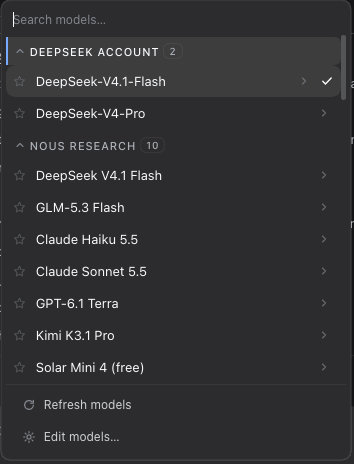
Three DeepSeek Harness plugins that replace weak surfaces with Hermes desktop's versions — a searchable model picker with favorites and per-model reasoning, a Projects view, and a Toolbox panel (skills, provider health, kanban) — plus the CLI kit the harness was missing: durable memory that consolidates itself, a self-improvement loop over real transcripts, restore-safe checkpoints, and evidence about which skills actually fire.
git clone https://github.com/colerehbein/dsh-hermes-kit.git
cd dsh-hermes-kit
./install.sh
One command. It copies each plugin into your DSH profile, registers them (dependency, bundle entry, node_modules link), and installs the CLIs into ~/.dsh/bin with their three skills. Quit and reopen DeepSeek Harness — the Host composes its plugin graph at boot, so a page reload alone is not enough — and the picker is there.
./install.sh --dry-run        # print every change, touch nothing
./install.sh --profile web    # target a named profile (default: most recently used)
./install.sh --no-tools       # plugins only, skip the CLIs
Needs bash, python3, and an existing DSH profile.
| Plugin | What it does |
|---|---|
Model picker — packages/model-picker |
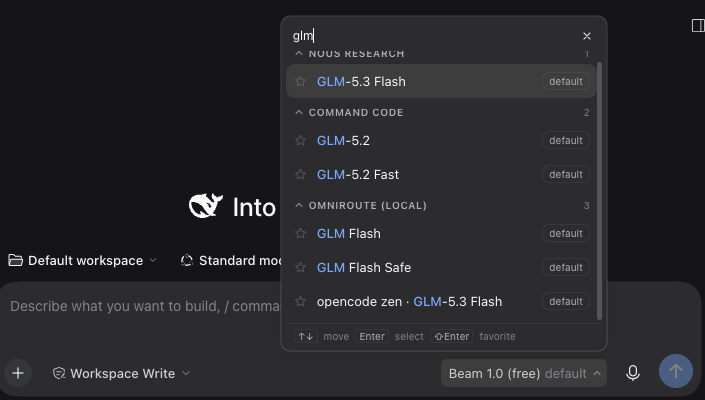
Replaces the composer's model seat: search with match highlighting, favorites, collapsible provider groups, per-model reasoning levels, and an Edit models dialog that decides which models appear at all. Large providers start collapsed. |
Projects page — packages/projects-page |
A read-only Projects panel: registry roster, open TODO.md items, subfolders, newest sessions, session hover marks. |
Seven sidebar panels — packages/toolbox |
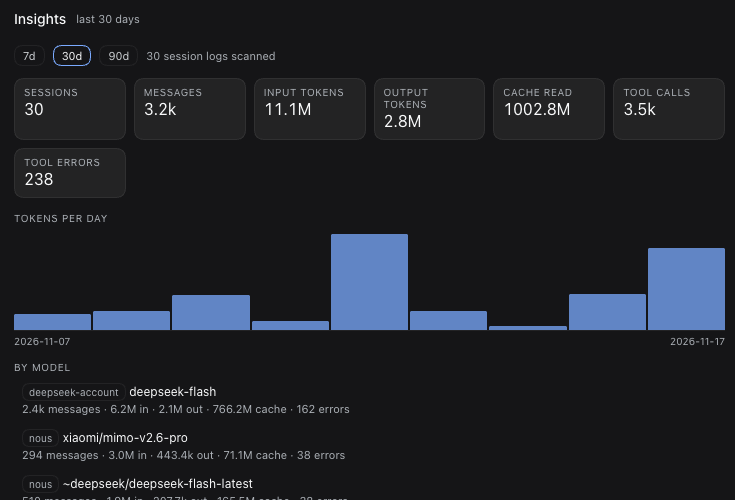
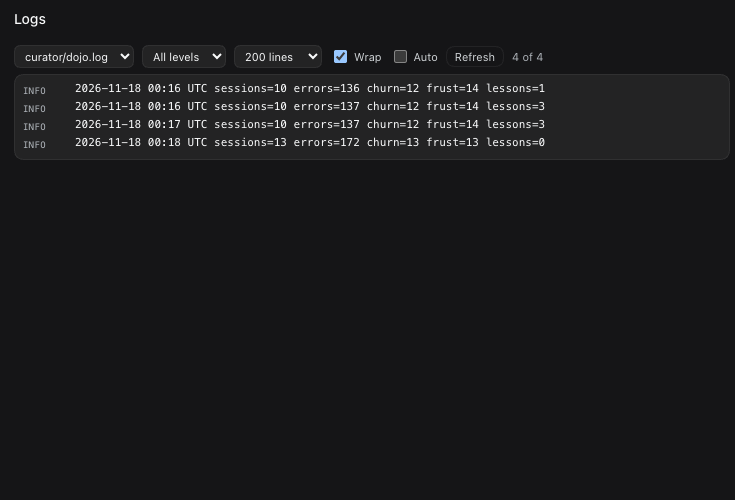
Skills manager, provider health, kanban (multi-board, assignees, priority, archive, bulk actions), session dashboard, usage insights, log viewer, and a memory browser — plus read-aloud and background notifications in the conversation header. |
tools/dsh-kit| Command | What it does |
|---|---|
mem |
SQLite+FTS5 memory across sessions: add, search, brief, forget. install-brief feeds the brief into ~/.dsh/AGENTS.md, so every new session starts with it. |
ckpt |
Shadow-git snapshots stored outside the workspace — git reset --hard cannot destroy them. |
curator |
Reads ~/.dsh/sessions/**/*.jsonl.zstd and reports skill loads, tool error rates, and skills that never fire. |
mem-consolidate |
Automatic memory retention: mines finished transcripts for standing rules the user stated, gates them for precision, writes the survivors, republishes the brief. |
dojo |
Self-improvement over real transcripts: tool-error signatures, identical calls repeated 3+ times, and frustration turns — into a report plus reviewable proposals. |
proj |
Imports a Hermes projects.db into ~/.dsh/projects/projects.json — the registry the Projects page reads. |
extras/skill-audit |
Inventories a skill library, finds duplicate and broken entries, plans a retirement with a dry run. |
Four skills (dsh-memory, dsh-dojo, dsh-checkpoints, dsh-curator) ship with the CLIs, so the agent knows when to reach for each tool.
mem-consolidate and dojo are the two pieces that make the kit improve itself rather than just record. Both read the same transcripts, and both refuse to act on injected context: only user/message events with source.kind == "user" count as human speech, because everything else in a transcript is a system reminder, a skill catalogue, or a time stamp. dojo never edits a skill or an instruction file on its own — it writes proposals for a human to accept.
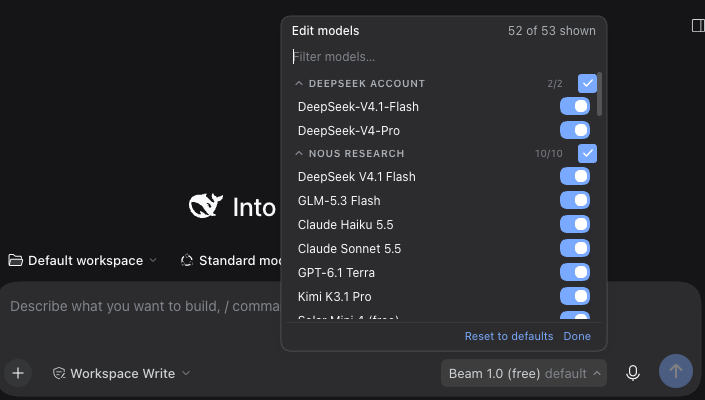
Shift+Enter). A favorite is exempt from the visibility filter and is never listed twice.default / off / low / medium / high for that exact model, and picking one commits model + effort.on/total counters, a filter, and Reset to defaults.Reset clears both keys.↑/↓ move the highlight, Enter selects, Shift+Enter stars, Esc leaves the editor or closes. Focus stays in the search field.DSH decides what a route serves from cordis.patch.yml, so a hand-written model list drifts the moment a provider renames a model. tools/sync-models.py regenerates one provider's block from its own listing endpoint:
python3 tools/sync-models.py --config ~/.dsh/profiles/desktop/cordis.patch.yml \
    --provider nous --url https://inference-api.nousresearch.com/v1/models --key-env NOUS_API_KEY
It keeps ids, names, context windows, input modalities and the reasoning levels the provider advertises (dropping any level DSH does not accept, which would invalidate the whole provider). The Host reads this file at boot, so a relaunch is what applies it.
The picker shadows the stock conversation.input.model occupant at priority: -1 (a single slot renders the lowest priority and requires distinct priorities) and reuses the same per-session modelDirectories service, so model switches keep DSH's durable behaviour.
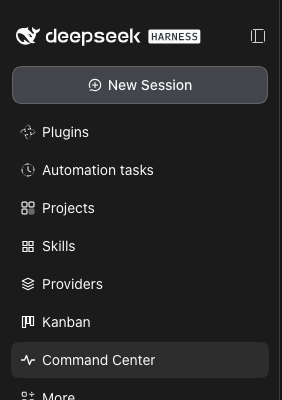
Four separate sidebar panels from one package.
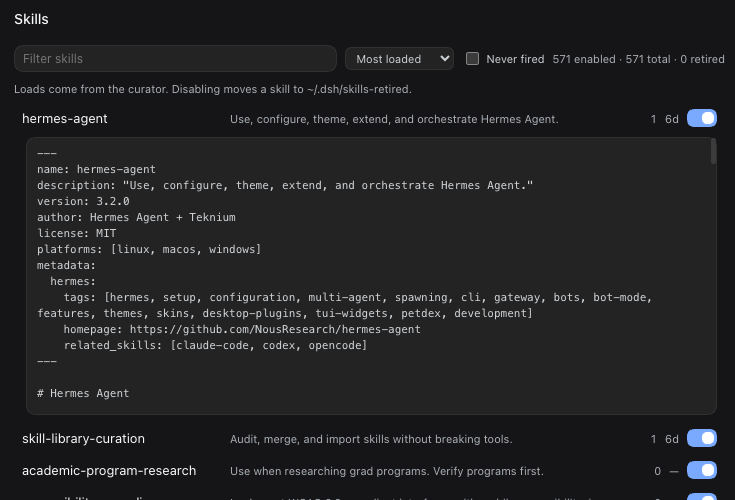
Skills — every skill with its curator load count and last-seen time, sortable by loads/recent/name, a "never fired" filter, duplicate-name badges, an inline preview of the skill body, and a switch. Disabling moves the skill to ~/.dsh/skills-retired and back, because a leading dot does not hide a skill from DSH's catalogue.
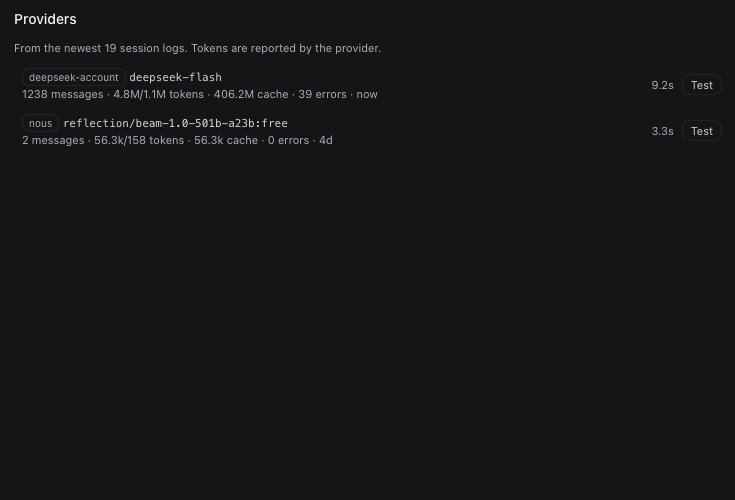
Providers — per provider/model totals from the newest 40 session logs: messages, input/output/cache tokens, mean response time, errors, last used — plus a Test button that makes one timed one-token call to that exact route.
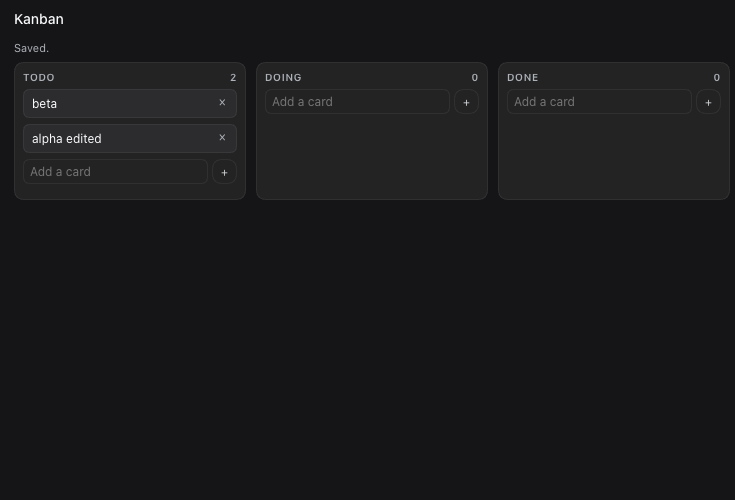
Kanban — multiple boards persisted at ~/.dsh/toolbox/board.json. Drag a card to any position, double-click to edit its text, assignee and priority, select several cards for bulk move/archive/delete, and toggle archived cards. The agent gets a kanban tool with the same actions (list/add/move/remove/archive/assign/priority), so it can read and change the board too.
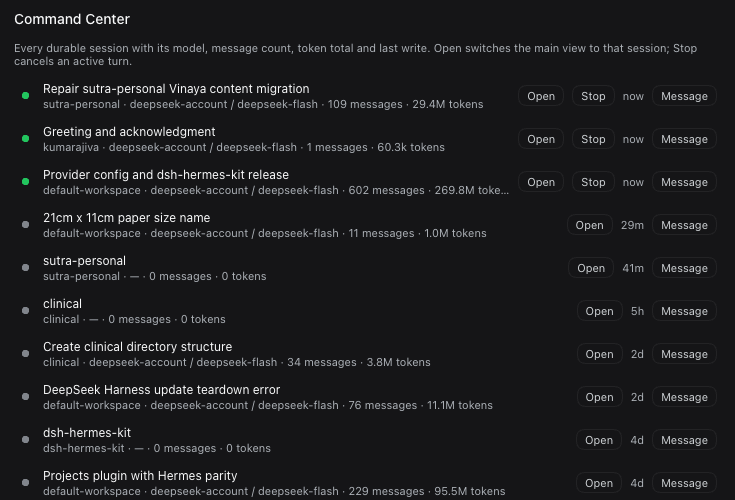
Command Center — every durable session with its status, model, message count, token total and last write. Open switches the main view to that session, Message queues a prompt (steers it when the session is running), and Stop cancels an active turn.
Insights — tokens, messages, tool calls and tool errors per day, per model and per tool over 7/30/90 days, read from the session logs. No cost is shown because DSH's catalog carries no price table; inventing one would be worse than omitting it.
Logs — a viewer over the log files that exist (~/.dsh/profiles/*/hub.log, the kit's own logs, ~/Library/Logs/DeepSeek Harness), with a severity filter, tail size, wrap toggle and auto-refresh.
Memory — browse, search, add, pin and forget notes in the same SQLite store mem writes, without a terminal.
Read aloud / notify — two buttons in the conversation header: speak the last answer with the browser's speech engine, and fire a desktop notification when a turn finishes while the window is in the background.
Reads ~/.dsh/projects/projects.json (populate it with proj import or proj adopt <path>), each project's TODO.md, its top-level folders, and the session index. Registers a sidebar panel, a session-row hover mark, and a main panel; the Host half exposes three read-only /api/projects-page/* routes. No writes, no personal roster in the package.
providers/providers.example.yml carries the 51-model, 4-route setup these plugins were built against: Nous Research, Command Code (chat and its Anthropic Messages-only Claude models), and a local OmniRoute. Keys stay in DSH's credential store; the file names references only.
Prefer the plugin manager? Each package installs on its own:
plugin_manager install_bundle file:$PWD/packages/model-picker
plugin_manager install_bundle file:$PWD/packages/projects-page
plugin_manager install_bundle file:$PWD/packages/toolbox
The CLIs are independent of the plugins: ./tools/dsh-kit/install.sh.
If you already run an older copy of either plugin, disable it first — two occupants of the model seat at the same priority refuse to register, and two Projects panels both appear in the sidebar.
# plugins: remove the two entries from <profile>/package.json (dependencies + bundles)
rm -rf ~/.dsh/profiles/<profile>/created-plugins/model-picker \
       ~/.dsh/profiles/<profile>/created-plugins/projects-page
rm ~/.dsh/profiles/<profile>/node_modules/@dsh-local/{hermes-model-picker,projects-page}

# CLIs
rm ~/.dsh/bin/{mem,mem-consolidate,dojo,ckpt,curator,proj,import-memory,install-brief}
rm -rf ~/.dsh/skills/{dsh-memory,dsh-dojo,dsh-checkpoints,dsh-curator}
Data stays under ~/.dsh/{memory,curator,checkpoints,projects}.
Client plugins against DSH's internal slot and service APIs (0.2.x): ctx.slots, ctx.locale, ctx.modelDirectories, and the conversation.input.model contract. An upstream slot-contract change can break them; the kit is versioned as a whole.
MIT — see LICENSE.
CLASSIFICATION EVIDENCE
系统优先读取 GitHub Topics,再与站内分类词典和词根规则比对。当前命中: deepseek-harness。
morluto
Reverse engineer anything with agents, from app behavior down to native binaries.

deepseek-ai
DeepSeek Harness: Everything is a Plugin.

nexu-io
The 1st Collaborative AI Design Agent Workspace. Local-first and open source. Create motion, prototypes, websites, apps, dashboards, presentations, images, and videos with your team and AI agents. Share work, exchange feedback, and iterate together in one workspace.