模型与 MCP
待识别

rea
morluto
Reverse engineer anything with agents, from app behavior down to native binaries.

coldgust/dsh-translation-assistant
面向 DeepSeek Harness 的 AI 翻译工作流插件:文本、文件、截图与整个文件夹由 AI 翻译,术语与文风规范自动附带;评分与评语转化为重写指令,支持双模型协作,一个负责翻译、一个负责评审。/ An AI translation workflow plugin for DeepSeek Harness: text, files, screenshots, and whole folders translated with your guidelines attached; scores and comments become rewrite instructions; one model translates, another reviews.
PROJECT TOPICS
INSTALL REFERENCE
dsh plugin --profile web add github:coldgust/dsh-translation-assistant
该命令指向仓库当前默认分支;尚无绑定当前 commit 的完整验证结果。
PROJECT README
A DeepSeek Harness plugin that turns translation into an AI workflow: the model drafts, you direct. Text, files, screenshots, and whole folders are translated by AI; your glossary and style rules ride along on every request; every score and comment you leave becomes the instruction for an AI rewrite; and each pass keeps a rollback point. The job shifts from typing translations to judging them.
What the AI workflow changes
| Before | With Translation Assistant |
|---|---|
| Type every segment; look terms up as you go | AI drafts the full text in one pass — a .translation-spec/ glossary and style rules are attached to every request automatically |
| Mark problems, then retype the fixes | Score a segment and write one comment; Apply suggestion turns both into the rewrite instruction for that segment |
| Copy-paste files into a translator tab, one at a time | Point the workspace at a folder: batch translation walks every pending file and writes the results back to disk while you review what has landed |
| One model has to do everything | One model translates, another reviews: the draft comes from a fast model, and a stronger one scores it and rewrites from its own comments |
| Switch windows to translate a snippet from chat | The same engine is an Agent tool — the assistant translates and reviews inside the conversation |
Highlights
.translation-spec/ folder holds glossary and style documents; translation, retranslation, scoring, and batch jobs all include them.translation_assistant calls (translate | retranslate | score | score_document) inside chat.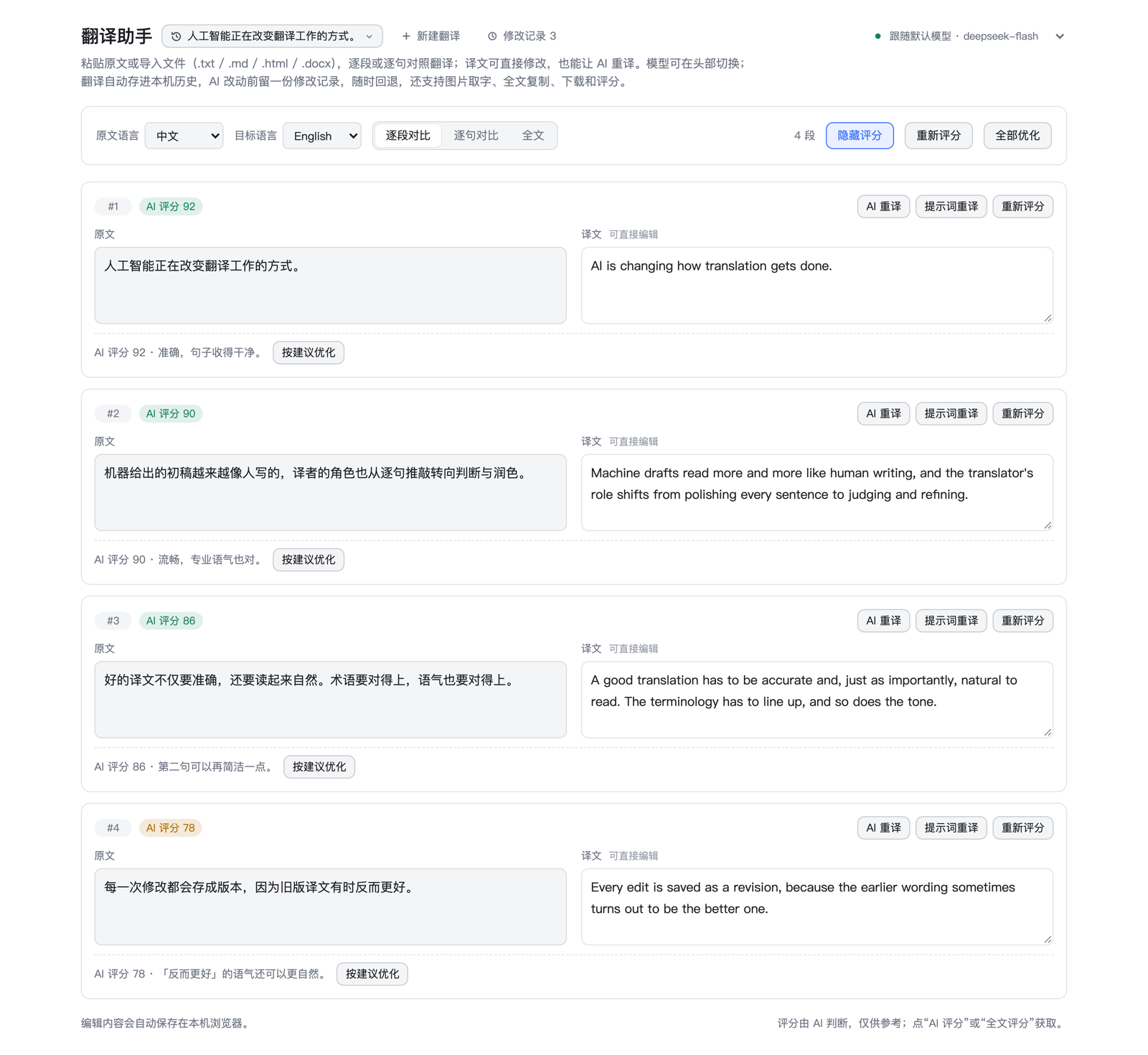
One line from a terminal:
dsh plugin --profile web add dsh-translation-assistantOr from the GUI: Plugins → Add plugin, enter dsh-translation-assistant, press Install, then Enable now.
Local checkout, Git address, manual registry, and upgrading or uninstalling: docs/install.md.
By paragraph or By sentence, both returned in one pass; speed-first mode runs chunks concurrently and shows a Translating n/m counter.
Three AI translation modes, picked on the new-translation form and in the full-text card. When a response does not match the chosen protocol, the pass falls back to batching without raising an error.
| Mode | Trait | Best for |
|---|---|---|
| Coherence first | One request for the full text, the fullest context | Essays, reports — the default |
| Alignment first | JSON-array protocol, the strongest paragraph alignment | Glossaries, subtitles, strict side-by-side layouts |
| Speed first | Chunked three-way concurrency, fastest on long texts | Time-boxed bulk jobs |
Files — drop or pick .txt, .md, .log, .html, .htm, .docx (Word files are unpacked in the browser; the original never leaves the machine).
Images — paste or pick a screenshot; AI transcribes it, then translates.
dsh web), a collapsible manual path entry serves as the fallback; an outdated Host side (404) points to a Harness restart.translated/ subfolder (default), a suffixed sibling copy, over the original, or stays on the page only without touching disk; .docx translations always save as .md. Proofread edits can auto-save or wait for the save button.Translate all walks the pending files in order and saves each result; a stop ends the run after the file in flight. While workspace content is open, the workspace button shows the project's name..translation-spec/ folder in the workspace holds guideline documents (glossary.md, style.md, …) that ride along on every AI pass; the drawer can view, edit, create, and delete them, and the banner shows which guidelines are active.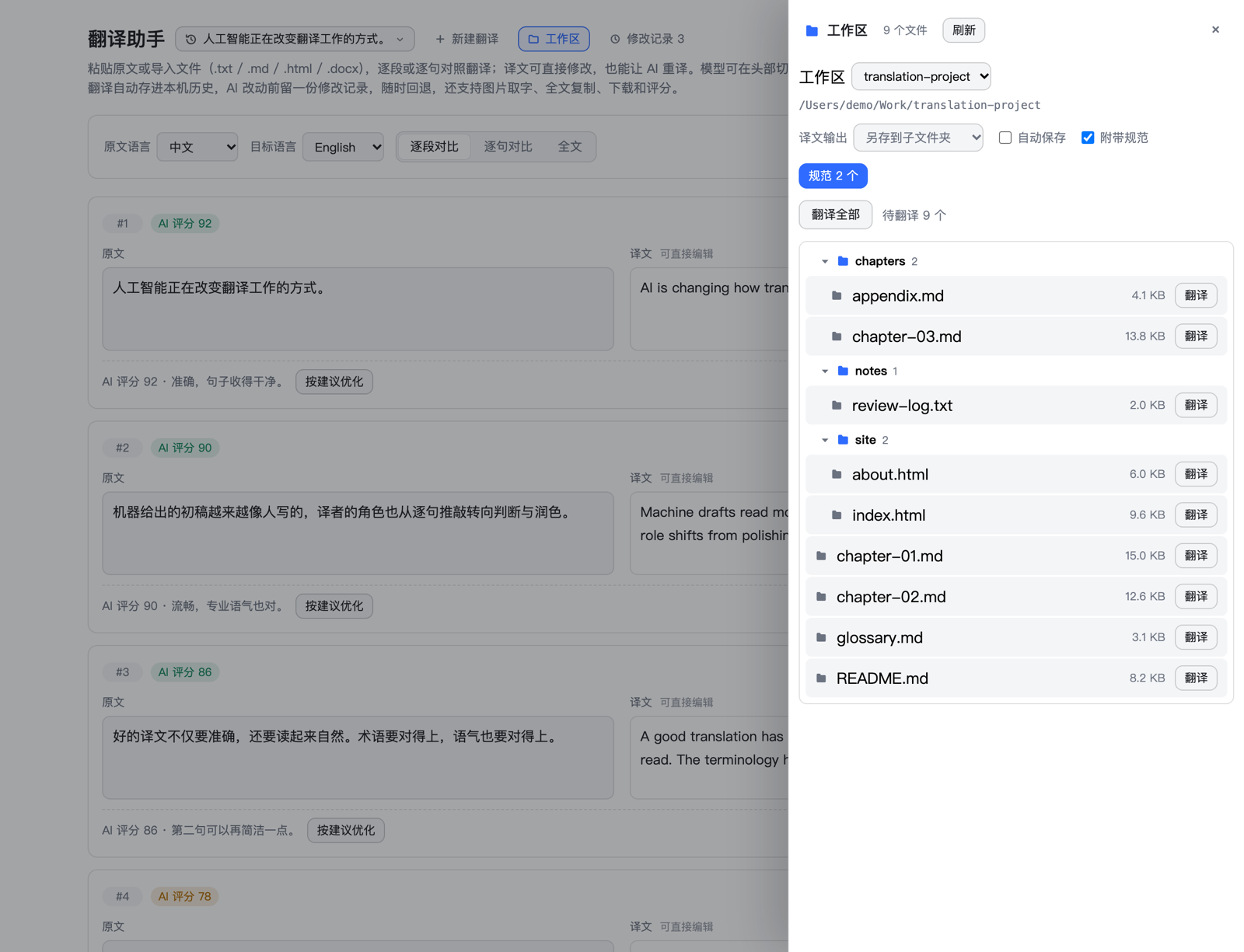
AI retranslate redoes one segment; Retranslate with prompt adds an instruction such as "more colloquial". Both follow the translation mode and leave one revision per pass.Apply suggestion sends a score and its comment back as the instruction for a fresh AI pass; Apply all rewrites every scored segment three at a time.Stop button sits beside every running pass; in-flight requests are cancelled, and rewrites that already landed are kept.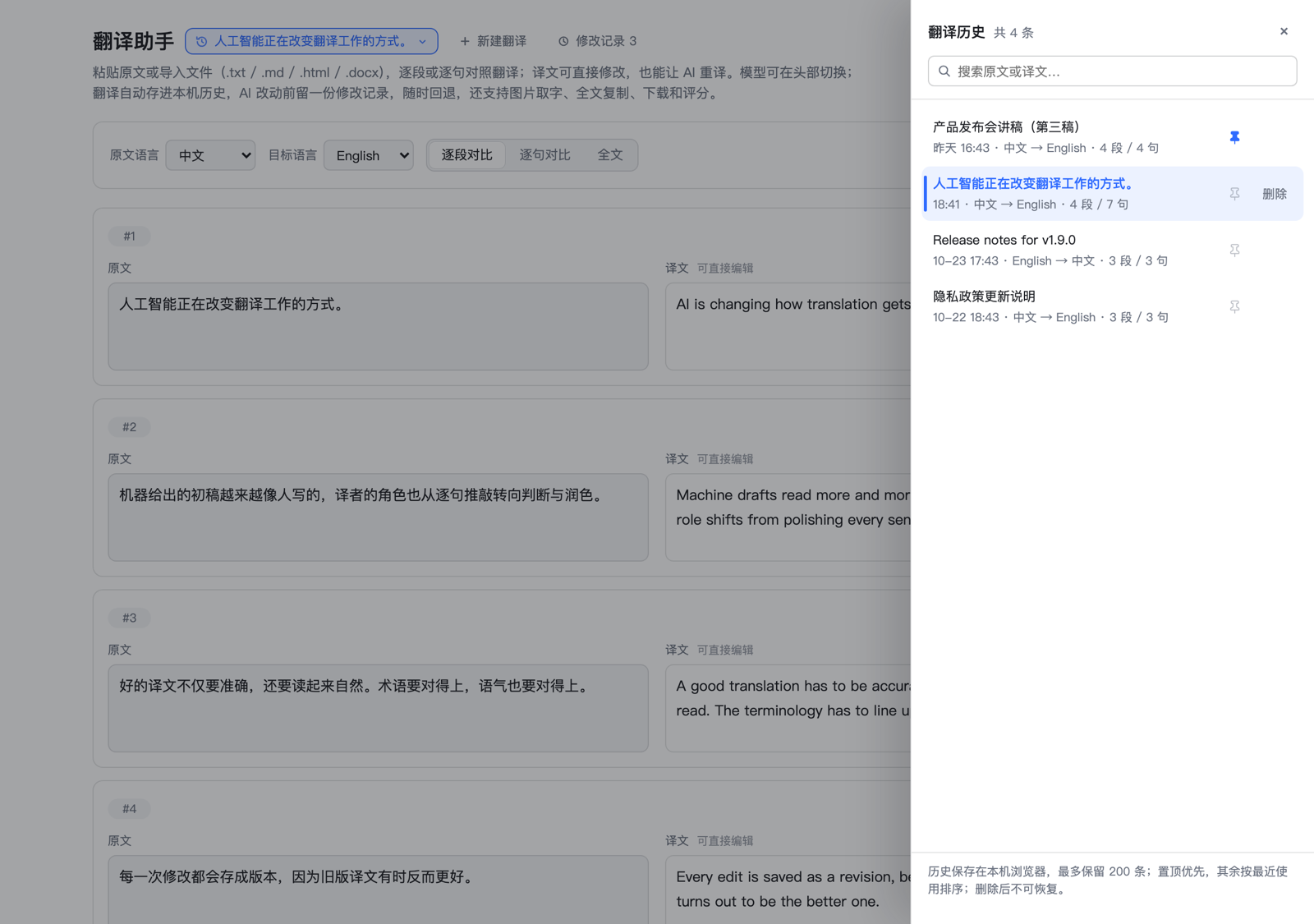
Follow default tracks the profile, any other entry pins the route for translation, retranslation, scoring, and OCR — so a cheap model can draft while a stronger one reviews. Outside providers register through Harness settings — a worked example in docs/bilibili-index-translate.md.translation_assistant Agent tool (translate | retranslate | score | score_document), so the chat assistant can translate or review text as part of its own workflow.One model drafts, another reviews. Translate with a fast model, then switch to your strongest model and run Score all, then Apply all. Each rewrite carries the score and its comment as the instruction, so the strong model fixes exactly what it criticised — and every pass leaves a revision, so comparing and rolling back is one click.
A whole folder under your rules. Drop a glossary.md and a style.md into .translation-spec/, point the workspace at the project, and press Translate all: every file is translated with the same guidelines attached and written back to disk, and you review the results side by side afterwards.
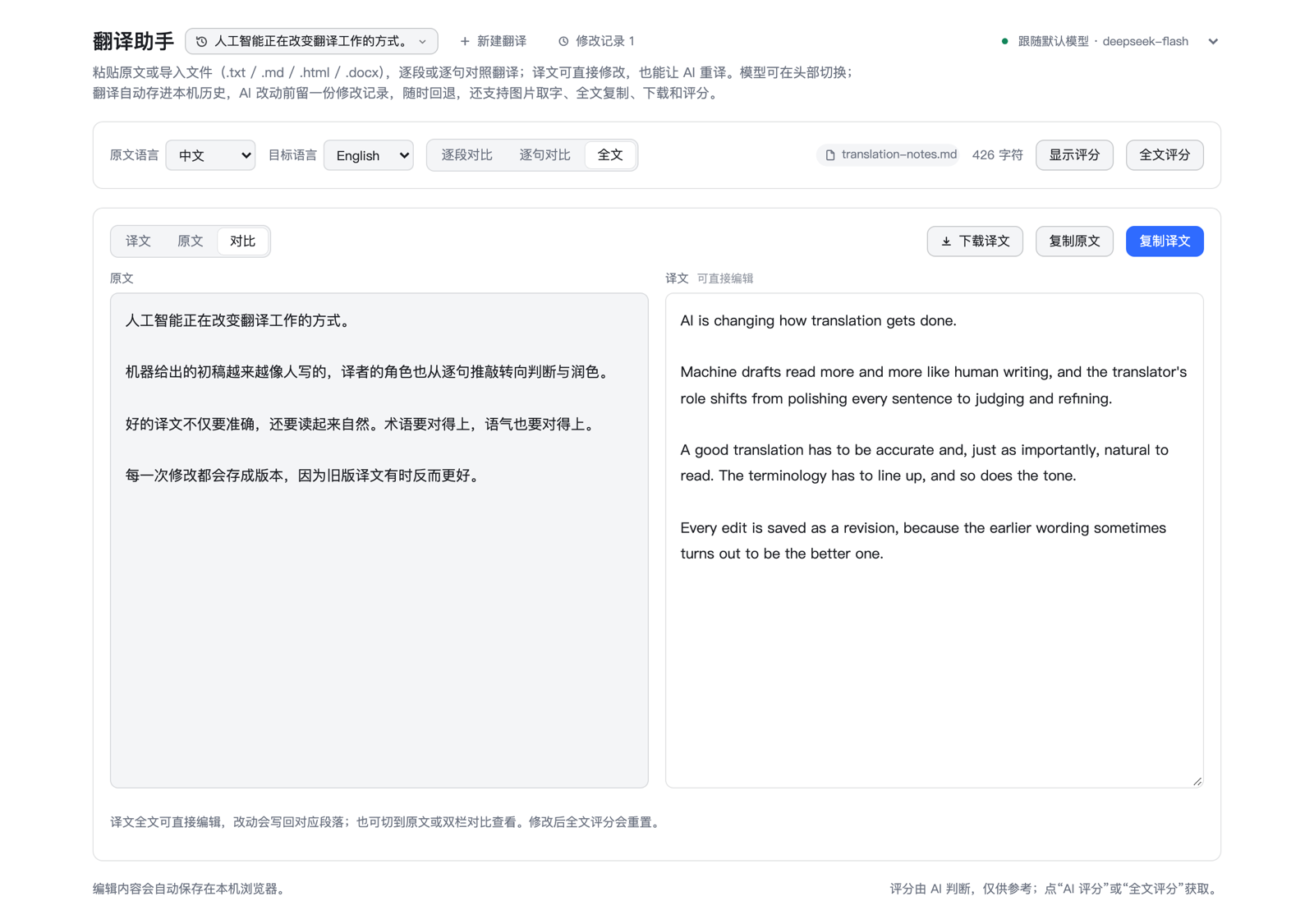
A whole document, end to end. Drop a .docx, .md, or .html file: it is translated in one request, and Download translation writes the result back in the same shape with the paragraph structure intact.
src/host/index.ts registers a same-origin /dsh-translation/api route and the Agent tool, src/host/engine.ts does the model work (no Harness imports), and src/client/ holds the browser half split by function: entry, dictionaries, stylesheet, core helpers, leaf components and the page component. pnpm build writes the shipped lib/ artifacts. POSTs are origin-checked and capped at 24 MiB, and every request can pin a route: { provider, model }.
Endpoints, configuration fields, on-device storage, the full limits, and maintainer notes: docs/reference.md.
History, edits, and preferences never leave the browser; only the text being translated, retranslated, scored, or read from an image is sent to the model route. Clearing site data for the Harness origin erases the history — there is no server-side copy.
pnpm install
pnpm check
The profile links this checkout: run pnpm build after edits, then lib/client.js hot-swaps into the open page; Host changes need a Harness restart. The screenshots in docs/screenshots/ are real renders against mocked data — retake them after layout changes.
CLASSIFICATION EVIDENCE
系统优先读取 GitHub Topics,再与站内分类词典和词根规则比对。当前命中: deepseek、deepseek-harness。
morluto
Reverse engineer anything with agents, from app behavior down to native binaries.

deepseek-ai
DeepSeek Harness: Everything is a Plugin.

nexu-io
The 1st Collaborative AI Design Agent Workspace. Local-first and open source. Create motion, prototypes, websites, apps, dashboards, presentations, images, and videos with your team and AI agents. Share work, exchange feedback, and iterate together in one workspace.