

模型与 MCP
待识别

rea
morluto
Reverse engineer anything with agents, from app behavior down to native binaries.
PROJECT TOPICS
PROJECT README


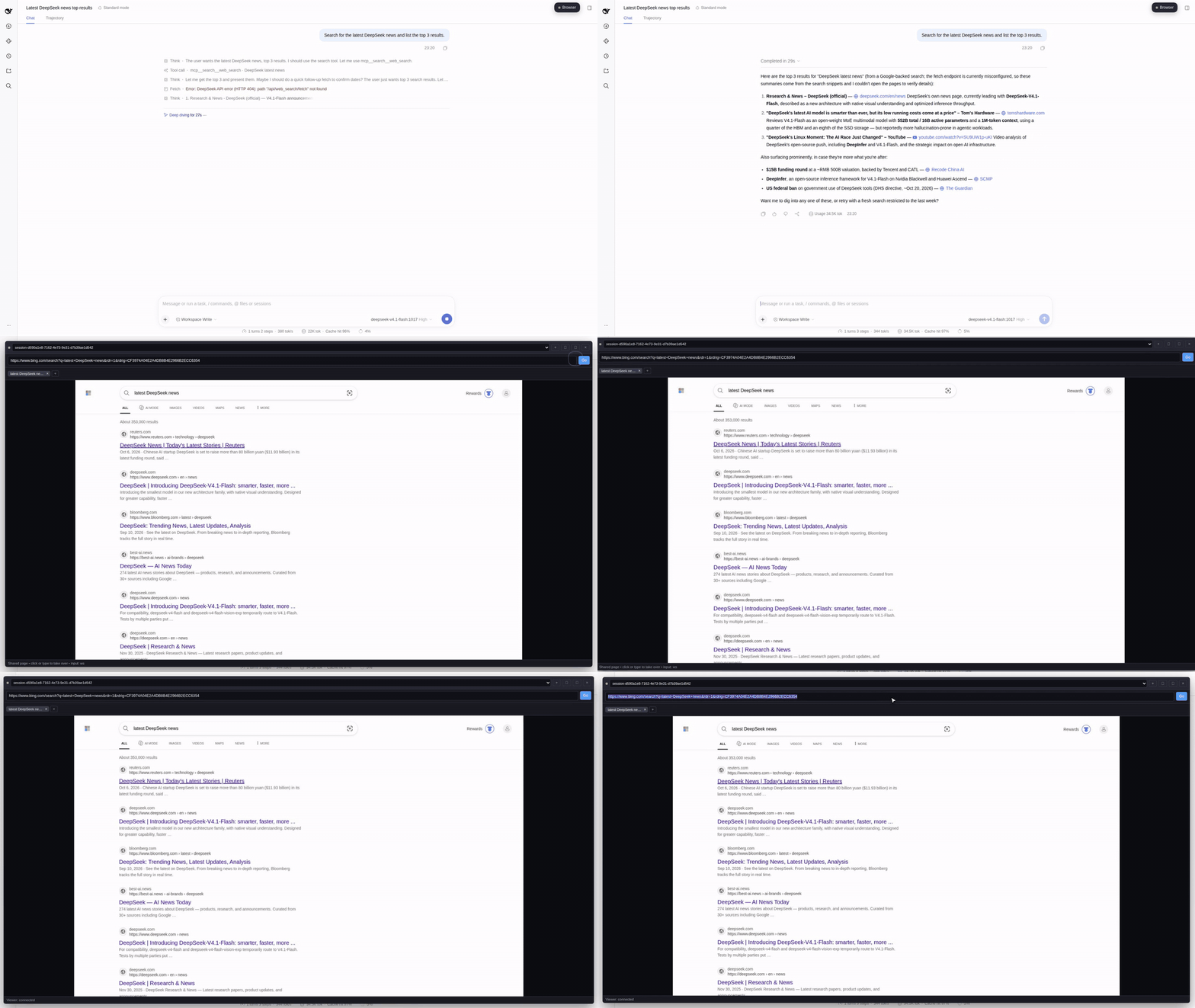
Give your DeepSeek Harness agent a real browser — and watch it work.
A live Chromium for every DSH session: the agent drives it, you watch it in a panel inside the UI, and you can take over with your own mouse and keyboard at any time. Backed by a ranked search gateway (SearXNG, Google CSE, Gemini, Brave, Vertex, DuckDuckGo) with whole-web Google results.
flowchart LR
  subgraph UI["DSH web UI"]
    Panel["Browser panel<br/>screencast · WS input · tabs"]
    Settings["Search settings<br/>ranking · keys · stack address"]
  end
  Host["Host plugin<br/>/dsh-browser/* proxy · browser_* tools"]
  Browser["Browser service<br/>internal :8790"]
  Viewer["Viewer<br/>internal :8791"]
  Gateway["Gateway :8787<br/>/browser /viewer<br/>/mcp /config /test"]
  Chrome["Dedicated Chromium<br/>one profile per session"]
  Chain["Providers (ranked)<br/>searxng → cse → gemini → brave → vertex → ddg"]

  Panel --> Host
  Settings --> Host
  Host --> Gateway
  Gateway --> Browser
  Gateway --> Viewer
  Browser --> Chrome
  Viewer -->|"same page, live"| Chrome
Gateway --> Chain17 agent tools: navigate, snapshot, click, type, press, scroll, tabs, screenshot, search, wait_for, find, batch, console, network. CAPTCHA or consent page? The agent pauses and asks — you finish it in the panel, by design, never automated.
git clone https://github.com/codeadeel/dsh-browser.git && cd dsh-browser
cp .env.example .env              # optional; defaults are fine
docker compose up -d --build     # one command, whole backend

curl -s http://127.0.0.1:8787/health          # gateway
curl -s http://127.0.0.1:8787/browser/health  # browser, internal
curl -s http://127.0.0.1:8787/viewer/health   # viewer, internal

dsh --profile web --no-open --host 127.0.0.1 --port 3000
Only the gateway port (8787) is published. The browser, viewer, SearXNG, and Brave MCP stay on the compose network. For a remote DSH host, bind the gateway to a private/VPN address (or use an SSH tunnel) and enter its URL in the plugin page.
| Where | Setting | Default | Notes |
|---|---|---|---|
Stack .env |
GATEWAY_BIND |
127.0.0.1 |
Host interface for the only published backend port. Use a private/VPN IP for a remote DSH; 0.0.0.0 only behind a firewall. |
Stack .env |
GATEWAY_PORT |
8787 |
Host gateway port. |
Stack .env |
search/browser settings | see .env.example |
Optional stack/host-dev knobs. Search keys can be set in the plugin UI. |
| DSH UI | Stack gateway address | http://127.0.0.1:8787 |
One URL only; persisted. Use the local URL when the backend is on this host, otherwise the backend’s reachable URL. |
| DSH env (optional) | DSH_BROWSER_GATEWAY_URL |
unset | First-run seed only. Normal setups use the UI. |
For Cloudflare Tunnel or a reverse proxy, keep GATEWAY_BIND=127.0.0.1 and
point the tunnel at http://127.0.0.1:8787. The public HTTPS URL goes in the
plugin UI; no stack port needs to be exposed.
From the DSH UI — open the ?token= URL DSH printed:
github:codeadeel/dsh-browser#path:panel into the package field
(leave Registry on the default npm registry — its custom address is for
private registries, not plugin specs)The panel registers the ranked search tool natively. There is no separate
MCP client, DSH patch, or --patch flag to add.
From the CLI:
dsh plugin --profile web add "github:codeadeel/dsh-browser#path:panel"For a local dev link, run pnpm install in the repo first so the panel's
ws dependency resolves.
flowchart LR
  P["dsh-browser-panel"] --> A["UI: Plugins → Add plugin<br/>paste the GitHub URL"]
  P --> B["CLI: dsh plugin add<br/>github:codeadeel/dsh-browser#…&path=panel"]
  P --> C["dev: link:/path/panel"]
Click the Browser button. In Plugins → dsh-browser-panel set the
Stack gateway address (default http://127.0.0.1:8787; a remote stack
uses its public/private gateway URL), choose your provider order, save, and
run Test search.
Then ask the agent: "search for the DeepSeek R2 release date, open the top result, and summarize it" — and watch it happen in the panel.
flowchart LR
  A["mcp__search__web_search"] --> G["gateway /search"]
  G --> C{"ranked chain"}
  C -->|"first hit wins"| R["results"]
C -->|"brave 422 / idle?"| F["falls to gemini → … → duckduckgo"]BRAVE_API_KEY from the stack .env at startup./browser, viewer at /viewer. DSH_BROWSER_GATEWAY_URL
is only a first-run seed. The stack can live on another machine. Plain HTTP
end to end unless you put it behind TLS.flowchart LR
Agent["agent browser_* tools"] --> Chrome["Chromium<br/>(session = DSH session id)"]
Human["human in the panel"] -->|"watch · click · type"| Chromeflowchart TB
subgraph base["docker compose up -d --build"]
S["searxng"]
B["brave-mcp"]
G["gateway :8787 — only published port<br/>search + /browser + /viewer"]
BR["browser (internal) :8790/:8791"]
end
D["dsh (--profile web)"]
P["playwright-mcp (--profile extra)"]panel/ what you see in DSH (panel UI, settings, host bridge)
src/search/ the gateway + ranked search
src/browser/ Chromium sessions + the live viewer
docs/demo/ the 35s product demo + preview
docker-compose.yml + Dockerfile the whole backend, one commandDocs: docs/README.md — the full first-run guide.
docs/walkthrough.md — the 10-minute tour.
Architecture for contributors: docs/architecture.md.
MIT license.
CLASSIFICATION EVIDENCE
系统优先读取 GitHub Topics,再与站内分类词典和词根规则比对。当前命中: mcp、deepseek-harnes。
morluto
Reverse engineer anything with agents, from app behavior down to native binaries.

deepseek-ai
DeepSeek Harness: Everything is a Plugin.

nexu-io
The 1st Collaborative AI Design Agent Workspace. Local-first and open source. Create motion, prototypes, websites, apps, dashboards, presentations, images, and videos with your team and AI agents. Share work, exchange feedback, and iterate together in one workspace.