
其他
完整应用

deepseek-harness
deepseek-ai
DeepSeek Harness: Everything is a Plugin.
PROJECT TOPICS
INSTALL REFERENCE
dsh plugin --profile web add github:civaapple-alt/mini-dsh
该命令指向仓库当前默认分支;尚无绑定当前 commit 的完整验证结果。
PROJECT README
本项目是一个极简版(Educational & Minimalist)的 DeepSeek Harness 架构实现,专门用于学习与验证 Cordis 框架的核心设计哲学:“Everything is a plugin”(一切皆插件)。
📖 推荐必读学习指南:
- 🚀 《从 CLI 启动到浏览器端动态插件加载全流程》:全流程时序图、
window.__MINI_BOOT__详解、client-shell.js运作机制与 DSH 源码对标!- 🛡️ 《Capability Seam(能力接缝)与可移植执行世界深入指南》:Service Definition / Provider / Consumer 三元角色模型与本地/云端沙箱无感切换!
- 🧩 《预设配置体系指南:部署级 Profile vs 会话级 Preset 与 Include & Patch》:Cordis 作用域隔离(
ctx.isolate)、多租户会话与全局增量补丁机制!- 🔥 《Schemastery 配置校验与 HMR 实时热重载指南》:声明式 Schema 校验与文件变更实时热重载!
- 📝 《架构决策记录 (Agent Notes / ADRs)》:包含所有核心架构决策的中英文演进记录。
统一的插件模型(Cordis Plugin):
apply(ctx, config))形式组织。ctx.inject(['server', 'slots']))实现插件之间的拓扑解耦与延迟挂载。ctx.effect() 中,支持干净的生命周期管理与销毁(Disposer)。配置驱动的 Profile 机制:
profiles/web.yml、profiles/base.yml)声明启用的插件及其配置参数。前后端对称的插件组合架构(Host + Client-Web):
host-webserver 插件提供 ctx.server 基础 HTTP 服务。host-client-modules 插件自动扫描已加载插件的 package.json(带有 mini.client 字段),组装 window.__MINI_BOOT__ 启动图,并分发 /plugins/:id/client.js。client-slots 插件提供 ctx.slots 插槽机制(main.cards、sidebar.widgets)。client-shell 动态 import 插件的前端 Bundle,并在浏览器端的 Cordis 中执行 apply(ctx),将 UI 挂载到对应 Slot。全栈插件自包含(Full-Stack Plugin):
@mini-dsh/plugin-greeter 和 @mini-dsh/plugin-counter 为例:src/index.ts:向 Host 提供后端 Service 并挂载 API 路由(如 /api/greet、/api/count)。src/client.ts:向 Client 注册前端交互卡片/控件。profiles/web.yml 中添加一行插件名称,前后端能力就会全自动装配上线!mini-dsh/
├── package.json # 根目录配置与工作区脚本
├── pnpm-workspace.yaml # pnpm monorepo 配置
├── tsconfig.base.json # 基础 TypeScript 配置
├── profiles/ # 【部署级 Profile】:全局基础设施组装 (Web/Base/Local/Sandbox/Goal/HMR)
│ ├── base.yml # Headless 模式(仅基础后端插件与任务运行器)
│ ├── web.yml # Web GUI 模式(包含 Web 服务与全栈 UI 插件)
│ ├── local.yml # 本地执行世界 Profile(LocalExecutor + ToolBash)
│ ├── sandbox.yml # 安全沙箱执行世界 Profile(SandboxExecutor + ToolBash)
│ ├── presets.yml # 多会话隔离演示 Profile(SessionManager + PresetsDemo)
│ ├── goal.yml # 增量补丁 Profile(Include base.yml + Patch Insert Goal 领域)
│ └── hmr.yml # 实时热重载与 Schemastery 校验 Profile
├── presets/ # 【会话级 Preset】:用户在每个 Chat 独享的 Agent 预设
│ ├── minimal.yml # 极简模式:仅分配 ToolBash 与精简 Prompt
│ └── standard.yml # 标准模式:分配 Greeter + Counter + ToolBash 全套工具
├── apps/
│ └── cli/ # Host 启动入口 (支持 Include & Patch 动态递归解析与 Schemastery 校验)
└── packages/
├── seams/ # Capability Seams (抽象服务契约层)
│ └── executor/ # Executor 契约包 (@mini-dsh/seam-executor)
├── providers/ # Service Providers (具体能力提供方)
│ ├── executor-local/ # 本地进程执行提供方 (@mini-dsh/provider-executor-local)
│ └── executor-sandbox/ # 远程安全沙箱提供方 (@mini-dsh/provider-executor-sandbox)
├── host/
│ ├── webserver/ # Host HTTP 服务插件 (ctx.server)
│ ├── client-modules/ # Client 模块扫描与 Bundle 分发 (ctx.clientModules)
│ ├── session-manager/ # 会话管理与 Preset 子上下文隔离 (ctx.sessions)
│ └── hmr/ # 热模块替换与配置监听插件 (@mini-dsh/host-hmr)
├── client/
│ ├── slots/ # 浏览器 UI 插槽系统 (ctx.slots)
│ └── shell/ # 浏览器 Cordis 引导内核 (AppWebEntry)
└── plugins/
├── greeter/ # 问候服务全栈插件 (导出 Schemastery Config Schema)
├── counter/ # 计数器全栈插件 (后端状态 + 前端组件)
├── tool-bash/ # 面向模型的 Bash 工具插件 (Consumer)
├── task-runner/ # Headless 任务运行器插件 (多步骤工作流编排与事件发射)
├── presets-demo/ # 多会话作用域隔离演示插件
├── goal/ # 持久化目标状态机领域插件 (@mini-dsh/plugin-goal)
├── tool-goal/ # 面向模型的 Goal 工具插件 (@mini-dsh/plugin-tool-goal)
└── hmr-demo/ # HMR 与 Schemastery 演示插件 (@mini-dsh/plugin-hmr-demo)# 1. 在 mini-dsh 目录下安装依赖
pnpm install
# 2. 构建所有前端 Client Bundle 与 TypeScript 产物
pnpm run buildpnpm start
# 或者指定 profile:
# pnpm --filter @mini-dsh/cli start --profile web在浏览器中打开:http://localhost:3000
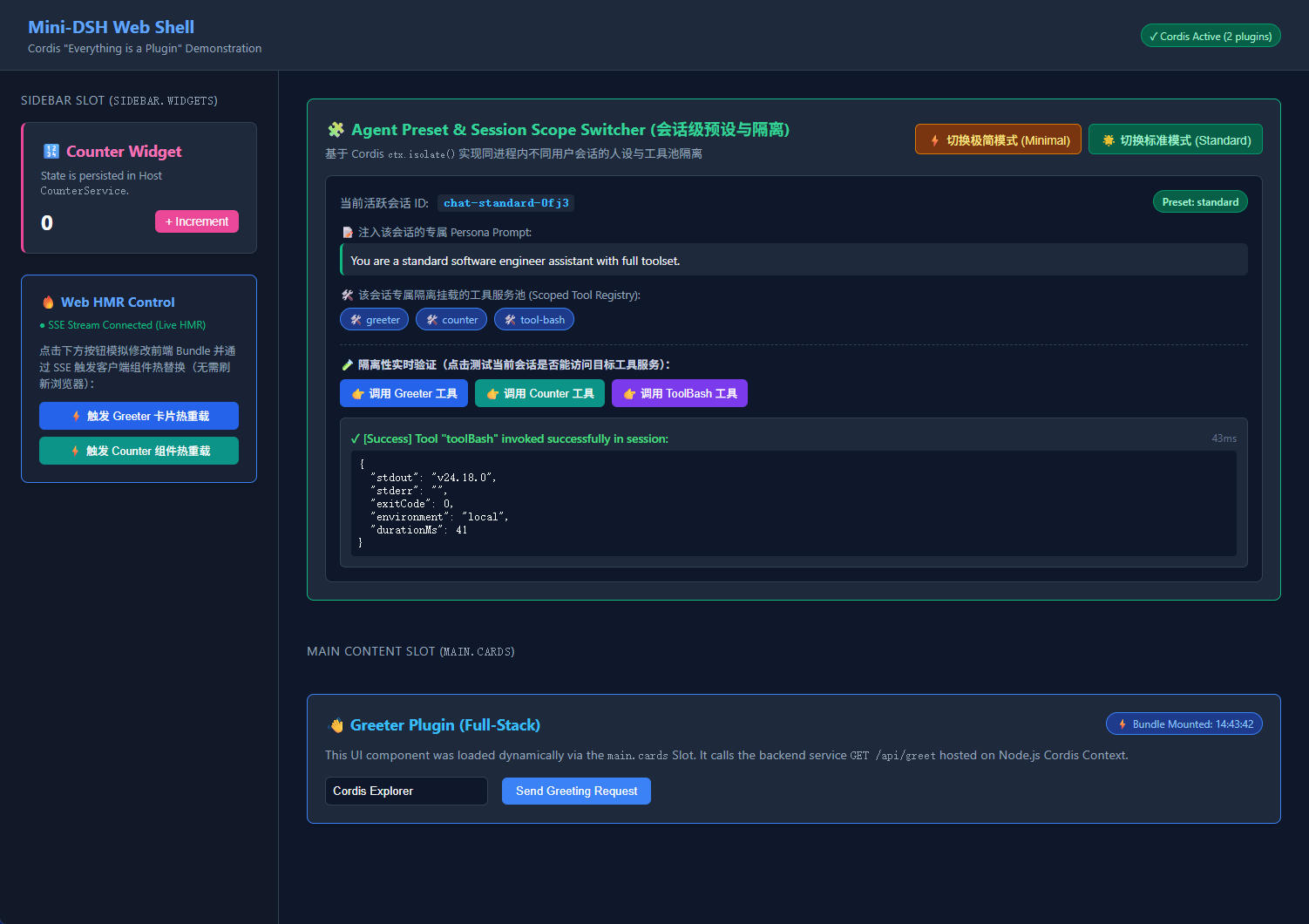
@mini-dsh/plugin-greeter 自动将问候卡片挂载到 main.cards 插槽,并在点击时请求 Host 的 GET /api/greet。@mini-dsh/plugin-counter 自动将计数器组件挂载到 sidebar.widgets 插槽,并在点击时请求 Host 的 POST /api/count。/api/presets 与 /api/sessions/create 接口支持按预设动态创建新会话。# 运行 base profile 下的默认多步骤任务
pnpm start:base
# 或者动态传入自定义任务指令 (模拟 dsh --profile headless "task")
pnpm start:task "Nightly Security Audit and Build"完全对标 DeepSeek Harness 的 examples/headless-agent/goal.cordis.yml,在无需复制粘贴 100+ 行配置的情况下,通过 Include + patches.insert 动态叠加 Goal 状态机:
pnpm start:goal控制台输出:
[Include & Patch] 📦 Including base profile: "./base.yml"
[Include & Patch] ➕ [Insert Patch] Injected 2 plugin(s): @mini-dsh/plugin-goal, @mini-dsh/plugin-tool-goal
[Goal Domain] 🎯 Initialized. Persisted goal state machine active.
[Consumer ToolGoal] 🛠️  Model-facing Goal tool registered (bound to `ctx.goals`).
=======================================================
▶ [TaskRunner] Starting Task: "Deploy Mini-DSH Headless Task"
=======================================================
[Goal Domain] 🎯 Created Goal: "Deploy Mini-DSH Headless Task" (Status: active, Round: 1)
[Step 1/4] Context init: "Hello from Headless Base Profile, Agent Engineer!"
[Goal Domain] 🔄 Goal "Deploy Mini-DSH Headless Task" advanced to Round 2
[Step 2/4] Iteration #1 metric = 110
[Goal Domain] 🔄 Goal "Deploy Mini-DSH Headless Task" advanced to Round 3
[Step 3/4] Iteration #2 metric = 120
[Goal Domain] 🎯 Goal "Deploy Mini-DSH Headless Task" status updated to: completed仅通过切换 Profile 配置,即可实现上层工具无感跨环境迁移:
pnpm start:local[Local Host Process] 🖥️ Executing: "node -v",直接在本地环境中快速执行指令。pnpm start:sandbox[Cloud Sandbox VM: e2b-secure-container-prod] 🔒 Safely isolating;tool-bash 与 task-runner 业务代码 0 修改,命令已自动路由并安全隔离在沙箱容器中执行!验证在同一个 Node.js 进程中,两个不同 Preset 的会话如何通过 Cordis 子上下文(isolate)实现能力隔离:
pnpm start:presets控制台隔离结果对比:
minimal):Prompt 为极简指令,工具池仅拥有 ['tool-bash'],ctx.counter 处于隔离排除状态;standard):Prompt 为全功能指令,完整装配 ['greeter', 'counter', 'tool-bash']。验证在无需重启 Node.js 进程的前提下,外部修改配置文件如何被 HmrService 实时捕获并驱动插件内部状态瞬间热替换:
pnpm start:hmr控制台输出:
[Cordis Loader] Applying plugin: @mini-dsh/plugin-greeter
[Schemastery] 🛡️ Validated config & injected defaults for "@mini-dsh/plugin-greeter"
[Plugin Greeter] Initialized with prefix: "Initial Greeter" (Enthusiasm: !)
...
[Before HMR] Initial Greeter Output: "Initial Greeter, Bob!"
[Simulated External Editor] 📝 Modifying "scratch-live-config.json" to v2...
[Host HMR] 🔥 Detected change in "scratch-live-config.json"! Triggering live reload...
[After HMR] Hot-Reloaded Greeter Output: "🔥 Hot-Reloaded Super Greeter (v2), Bob!!!!"
✔ [HMR Demo] Live Hot-Reload test completed successfully!打开 profiles/web.yml,在 plugin-counter 节点下增加 disabled: true:
- name: '@mini-dsh/plugin-counter'
  disabled: true
重启服务并刷新浏览器:
Counter 插件未加载,未注册 /api/count 路由。sidebar.widgets 插槽中的计数器组件完全消失,系统其他功能丝毫不受影响。打开 profiles/base.yml,将 @mini-dsh/plugin-counter 设为 disabled: true:
pnpm start:basetask-runner:自动检测到 counter 缺失,执行降级逻辑,依然稳定完成工作流!本项目采用 MIT 许可证。
CLASSIFICATION EVIDENCE
系统优先读取 GitHub Topics,再与站内分类词典和词根规则比对。当前命中: 无有效分类标签。
deepseek-ai
DeepSeek Harness: Everything is a Plugin.

anywhere-labs
为 DeepSeek Harness (DSH) 插件生态打造的现代化桌面端解决方案。万物皆「插件」,桌面本身也是「插件」。

walkinglabs
Harness engineering beginner tutorial, from 0 to 1