其他
完整应用

deepseek-harness
deepseek-ai
DeepSeek Harness: Everything is a Plugin.

chou109/dsh-toolkit
DeepSeek Harness 增强工具包,四个即插即用的小工具合而为一——粘贴图片自动识图、工作区一键在资源管理器/VS Code/终端打开并可复制路径、消息历史侧栏、已归档会话面板。一条命令安装全部组件。 a DeepSeek Harness enhancement pack — four tools in one: paste-image auto-vision, one-click workspace open (Explorer/VS Code/terminal) plus path copy, a message rail, and an archived-sessions panel. One command installs all.
PROJECT TOPICS
INSTALL REFERENCE
dsh plugin --profile web add github:chou109/dsh-toolkit
该命令指向仓库当前默认分支;尚无绑定当前 commit 的完整验证结果。
PROJECT README
A DeepSeek Harness enhancement pack — four plug-and-play tools in one: paste-image auto-vision, one-click workspace open plus path copy, a message-history rail, and an archived-sessions panel. One command installs everything.
国内镜像 / Mirror: also hosted on gitee.com/chill109/dsh-toolkit — Gitee is a mainland-China Git host (faster access from mainland China; use it if GitHub is slow).
| Components | vision-bridge · workspace-launcher · msgrail · archives |
| Platform | Windows / macOS / Linux (dsh web) |
| Requires | DeepSeek Harness dsh web 0.1.0-rc.6, git, node |
| License | MIT |
中文版见 README.zh.md。
This part is written for people who just want everything installed.
One install gives you four enhancements:
vision-bridge — paste an image, get an answer. Paste any image into the chat box and send it, even with a text-only model: the harness hands the agent the image as a local path and the agent automatically calls its available vision tool (vision_chat from qwen-mm-plugins-api, or any other vision tool you configured) to describe/OCR/answer. No more "current model does not support images".
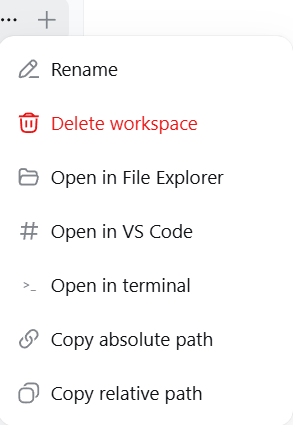
workspace-launcher — open the workspace, or copy its path. Hover a workspace in the sidebar, click "...": Open in File Explorer / Open in VS Code / Open in terminal / Copy absolute path / Copy relative path. Every action shows a result toast.
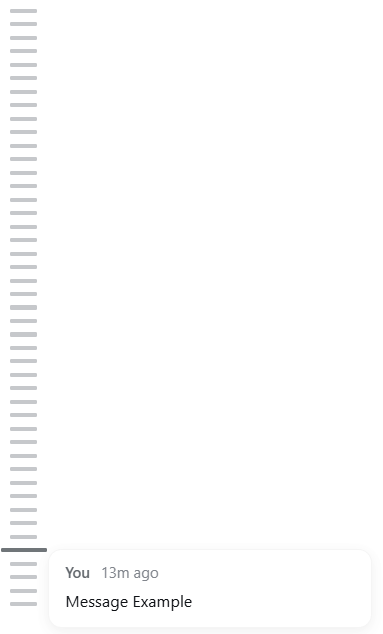
msgrail — a message-history rail. A thin vertical rail on the left of the chat, one bar per message you sent in the current conversation (all of them, loaded or not). Hover a bar for a preview, click to jump to that message.
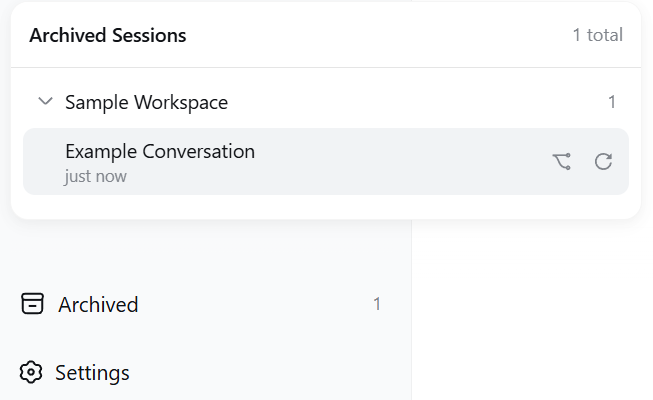
archives — archived sessions, visible again. An "Archived" seat at the sidebar foot lists archived sessions grouped by workspace; click to restore or fork.
Screenshots are taken from the standalone component projects; components without captures show a description only.
vision-bridge — no screenshot available yet. Paste an image into the chat box and send it (even with a text-only model): the agent automatically recognizes it through your configured vision tool and answers.
workspace-launcher — the workspace "..." menu with the five added actions:
msgrail — the message-history rail docked on the left of the chat; hover a bar for a preview, click to jump:
archives — an "Archived" seat at the sidebar foot opens the archived-sessions panel, grouped by workspace; each row shows the title and last-active time, with fork and restore actions:
dsh web --host 127.0.0.1 --port 3080), profile layout 0.1.0-rc.6git (applies the patches; LF-safe invocation)node (msgrail's layout patch).\install.ps1 # Windows: installs all four components, then restarts the harness./install.sh # macOS / Linux: installs all four componentsThen hard-refresh the browser (Ctrl+F5) after the harness is back.
Each component is also usable on its own — see components/<name>/ and the "For AI" part below for the exact per-component steps (patch files, plugin packages, cordis entries).
Copy/paste this whole paragraph into your AI assistant:
Deploy the dsh-toolkit from
https://github.com/chou109/dsh-toolkit(mainland-China mirror:https://gitee.com/chill109/dsh-toolkit) to my local DeepSeek Harness web profile.
- Windows: run
.\install.ps1in the repo root — it installs all four components (vision-bridge patches to dsh-host-apiproxy + dsh-llm-pi-ai; workspace-launcher plugin + dsh-client-ui-workspace patch; msgrail plugin + dsh-client-ui-layout patch; archives plugin), registers the cordis entries, and restarts the harness. macOS/Linux:./install.sh(restartdsh webyourself).- If the script is unavailable, follow the README "For AI" part, or install components one by one from
components/.- Note: vision-bridge itself does NOT include a vision model — configure one separately (e.g. mcp-qwen-mm-plugins-api / vision_chat); if I did not specify one, recommend a compatible option.
- After the harness restarts, verify each component: (a) paste an image and send — the agent must describe it automatically; (b) hover a workspace, open the "..." menu — the five workspace-launcher actions must work (Explorer/VS Code/terminal/copy); (c) the msgrail rail must appear on the left of a conversation with bars for my messages; (d) the "Archived" seat must appear at the sidebar foot.
.\install.ps1 -Uninstall # Windows./install.sh --uninstall # macOS / LinuxThen restart the harness and hard-refresh.
This part is written for AI agents that install, debug, or extend the toolkit. It assumes you can run shell commands and read the dsh packages in node_modules.
The toolkit bundles four independent enhancements, each touching different parts of dsh:
| Component | Type | What it changes |
|---|---|---|
| vision-bridge | 2 patches | @deepseek-ai/dsh-host-apiproxy (prompt RPC: drop the MODEL_DOES_NOT_SUPPORT_IMAGES rejection) + @deepseek-ai/dsh-llm-pi-ai (stream(): project image blocks to a text placeholder carrying the attachment path + a generic instruction to use the agent's available vision tool). No client change. |
| workspace-launcher | plugin + 1 patch | Plugin package (dsh-workspace-launcher, host half exposes POST /workspace-open/open {path, app}; client half registers no UI) + @deepseek-ai/dsh-client-ui-workspace patch (adds 5 items to the workspace row "..." menu: open in explorer/vscode/terminal, copy absolute/relative path; success/failure toasts). |
| msgrail | plugin + 1 layout patch | Plugin package (dsh-msgrail, client-only message rail) + @deepseek-ai/dsh-client-ui-layout patch via components/msgrail/scripts/patch-layout.mjs (adds a shell.history grid column + slot; track width var(--dsh-history-width, 0px)). |
| archives | plugin only | Plugin package (dsh-archives) — "Archived" seat at the sidebar foot with restore/fork; host half exposes POST /archives/unarchive. |
Key design points:
dsh-host-apiproxy, dsh-llm-pi-ai, dsh-client-ui-workspace, dsh-client-ui-layout). A different version breaks git apply — see Debugging.The unified installer does all of this; the manual equivalent:
$profiles = "$env:USERPROFILE\.dsh\profiles"          # or $env:DSH_HOME\profiles
$repo = "<this repo>"

# 1. vision-bridge
$d = "$profiles\node_modules\@deepseek-ai\dsh-host-apiproxy\lib"
git -c core.autocrlf=false apply --unsafe-paths --directory="$d" "$repo\components\vision-bridge\patches\dsh-host-apiproxy.patch"
$d = "$profiles\node_modules\@deepseek-ai\dsh-llm-pi-ai\lib"
git -c core.autocrlf=false apply --unsafe-paths --directory="$d" "$repo\components\vision-bridge\patches\dsh-llm-pi-ai.patch"

# 2. workspace-launcher: plugin + patch
Copy-Item -Recurse "$repo\components\workspace-launcher\plugin\dsh-workspace-launcher" "$profiles\node_modules\"
$d = "$profiles\node_modules\@deepseek-ai\dsh-client-ui-workspace\lib"
git -c core.autocrlf=false apply --unsafe-paths --directory="$d" "$repo\components\workspace-launcher\patches\dsh-client-ui-workspace.patch"

# 3. msgrail: plugin + layout patch
Copy-Item -Recurse "$repo\components\msgrail\plugin\dsh-msgrail" "$profiles\node_modules\"
node "$repo\components\msgrail\scripts\patch-layout.mjs"   # default target resolves via DSH_HOME/~/.dsh

# 4. archives
Copy-Item -Recurse "$repo\components\archives\plugin\dsh-archives" "$profiles\node_modules\"
Cordis registration — append to $profiles\web\cordis.patch.yml (idempotent; the installer does this automatically):
- insert:
    - id: workspace-launcher
      name: 'dsh-workspace-launcher'
- insert:
    - id: msgrail
      name: 'dsh-msgrail'
- insert:
    - id: archives
      name: 'dsh-archives'
Then restart the harness and hard-refresh the browser.
# vision-bridge patches live
Select-String "$profiles\node_modules\@deepseek-ai\dsh-host-apiproxy\lib\index.js" -Pattern 'MODEL_DOES_NOT_SUPPORT_IMAGES'   # -> no match
Select-String "$profiles\node_modules\@deepseek-ai\dsh-llm-pi-ai\lib\index.js" -Pattern 'projectImageBlocksToText'            # -> match

# workspace-launcher endpoint + patch
Invoke-RestMethod -Uri http://127.0.0.1:3080/workspace-open/open -Method Post -ContentType 'application/json' -Body '{"path":"D:\\","app":"explorer"}'   # -> {"ok":true} and Explorer opens
Select-String "$profiles\node_modules\@deepseek-ai\dsh-client-ui-workspace\lib\client.js" -Pattern 'open-explorer'           # -> match

# msgrail layout
Select-String "$profiles\node_modules\@deepseek-ai\dsh-client-ui-layout\lib\client.js" -Pattern 'shell.history'              # -> match
Browser checks: paste an image and send (auto-described); workspace "..." menu shows the 5 actions; msgrail rail appears left of a conversation; "Archived" seat at the sidebar foot.
| Symptom | Cause | Fix |
|---|---|---|
| Installer reports success but a feature is dead | git silently skipped a patch on a non-ASCII path (exit 0, no change) | The installer re-verifies by content and fails loudly; manual: run the Select-String checks above, or move dsh to an ASCII path |
git apply fails |
Installed package version ≠ 0.1.0-rc.6 | Re-diff against npm pack <pkg>@0.1.0-rc.6 of the failing component |
| "当前模型不支持图片…" still shows on send | host-apiproxy patch not loaded | Restart harness; re-apply; verify |
| Agent replies "I can't see the image" | No vision tool registered / key missing | Register a vision MCP (e.g. mcp-qwen-mm-plugins-api) in cordis.patch.yml; set the API key; restart |
| msgrail rail missing | Layout patch not applied, or plugin not registered | Re-run patch-layout.mjs; check cordis entry msgrail; hard-refresh |
| Explorer open fails with "cannot find the file" | Path with trailing separator or legacy quoting | Already fixed in the shipped host code (path normalized; raw arg passed to start); make sure the deployed dsh-workspace-launcher/lib/index.js matches the repo |
| Duplicate menu entries | Old dsh-workspace-open copy still installed alongside | Remove the old package + cordis entry, restart |
Profile node_modules reverted |
It's a junction to the npx cache; a reinstall refreshed packages | Re-run the installer (idempotent) |
taskkill /F /T /PID <node dsh web pid> then npx -y @deepseek-ai/dsh web --host 127.0.0.1 --port 3080 (install.ps1 does this automatically).install.ps1 -Uninstall / install.sh --uninstall (reverses patches, removes plugins + cordis entries; the msgrail layout patch needs git apply -R-style manual restore or a package reinstall).@deepseek-ai/dsh-client-modules): each client plugin's browser half is served from node_modules at /plugins/<id>/client.js?rev=<hash> and evaluated in the browser — patching a shipped bundle or adding a plugin is a hot update, no rebuild/republish.row.cwd), so the server never needs to track "the current workspace".var(--dsh-history-width, 0px)) that costs nothing when the plugin is absent.Made for DeepSeek Harness users who like their workflows one command away.
CLASSIFICATION EVIDENCE
系统优先读取 GitHub Topics,再与站内分类词典和词根规则比对。当前命中: 无有效分类标签。
deepseek-ai
DeepSeek Harness: Everything is a Plugin.

walkinglabs
Harness engineering beginner tutorial, from 0 to 1

anywhere-labs
为 DeepSeek Harness (DSH) 插件生态打造的现代化桌面端解决方案。万物皆「插件」,桌面本身也是「插件」。