
其他
完整应用

deepseek-harness
deepseek-ai
DeepSeek Harness: Everything is a Plugin.
PROJECT TOPICS
INSTALL REFERENCE
dsh plugin --profile web add github:chou109/dsh-strength-meter
该命令指向仓库当前默认分支;尚无绑定当前 commit 的完整验证结果。
PROJECT README
dsh-strength-meter: a model token-usage statistics plugin for the DeepSeek Harness Web UI — a full "Usage stats" page in Settings (metric cards, per-model donut, activity heatmap, daily trend). All data comes from your local session logs; nothing is uploaded.
| Language | Link |
|---|---|
| English | This document |
| 中文 | README.zh.md |
The plugin adds a full "Usage stats" page under Settings → Usage stats, presented in the following blocks:
Block 1 — six metric cards (overview at the top)
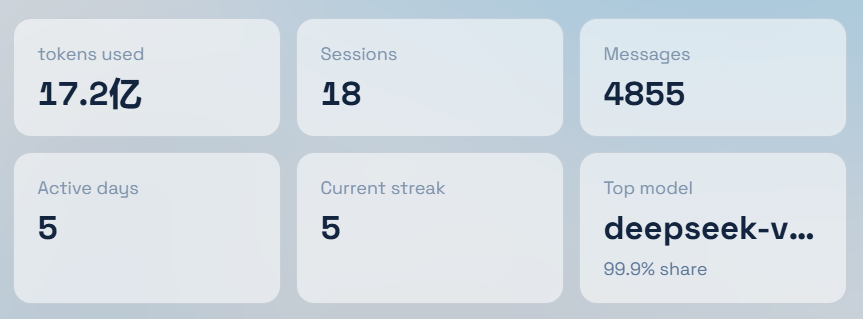
The header offers a time-range switch (Last 7 days / Last 30 days) and a Refresh button (forces a fresh recomputation, bypassing the cache).
Block 2 — Model usage (per-model totals)
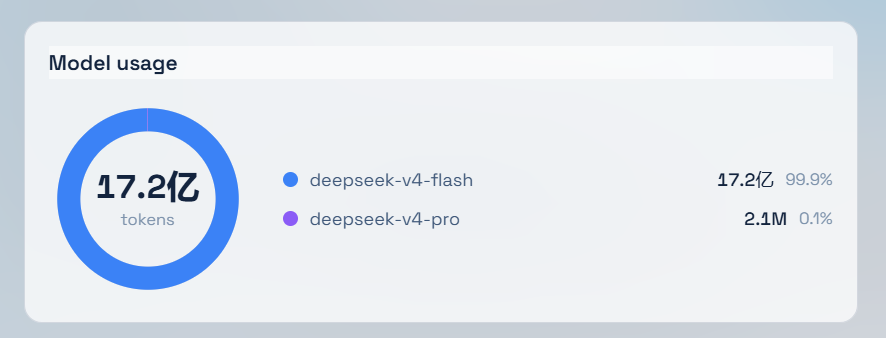
Block 3 — Activity heatmap
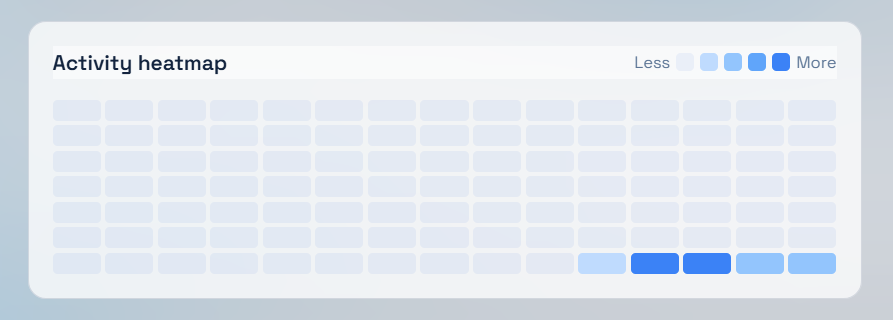
Block 4 — Daily token trend
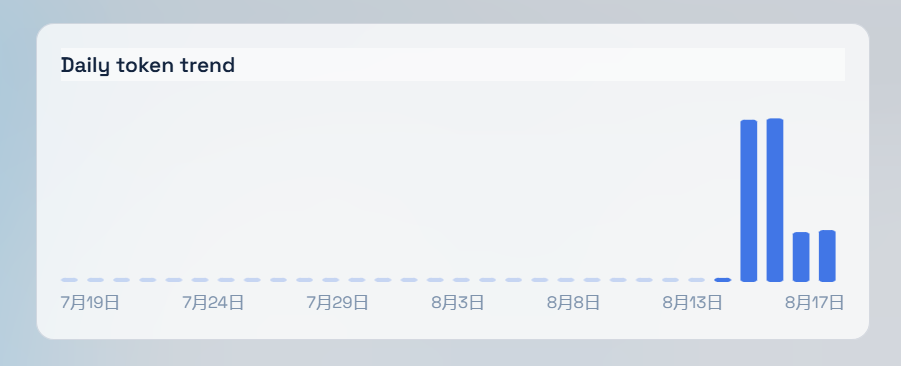
Statistics are computed from your local persisted session logs (~/.dsh/sessions) — nothing is uploaded.
Prerequisites (all must hold):
dsh web) reachable at http://127.0.0.1:3080;%USERPROFILE%\.dsh on Windows, ~/.dsh elsewhere (written as ~/.dsh below);Option A — one-command install (recommended, no npm, no build)
In mainland China, use the Gitee mirror instead:
https://gitee.com/chill109/dsh-strength-meter(swap the repo URL in the commands below).
Windows (PowerShell):
powershell -ExecutionPolicy Bypass -Command "Invoke-WebRequest 'https://github.com/chou109/dsh-strength-meter/raw/main/install.ps1' -OutFile install.ps1; .\install.ps1"macOS / Linux / WSL (bash):
bash <(curl -fsSL https://raw.githubusercontent.com/chou109/dsh-strength-meter/main/install.sh)The installer does three things (idempotent — safe to re-run):
~/.dsh/plugins/dsh-strength-meter (zip download or git clone);~/.dsh/profiles/node_modules;dsh-strength-meter entry in ~/.dsh/profiles/web/cordis.patch.yml.Option B — manual, three steps (offline environments / to understand the wiring)
git clone https://github.com/chou109/dsh-strength-meter.git (or download the zip) anywhere, e.g. ~/.dsh/plugins/dsh-strength-meter;~/.dsh/profiles):# Windows (junction, no admin rights)
New-Item -ItemType Junction -Path "$env:USERPROFILE\.dsh\profiles\node_modules\dsh-strength-meter" -Target "$env:USERPROFILE\.dsh\plugins\dsh-strength-meter"# macOS / Linux (symlink)
ln -s ~/.dsh/plugins/dsh-strength-meter ~/.dsh/profiles/node_modules/dsh-strength-meter~/.dsh/profiles/web/cordis.patch.yml:- insert:
- id: dsh-strength-meter
name: 'dsh-strength-meter'Last step: restart the dsh web process — a page refresh is not enough for a newly added plugin (the plugin set is snapshotted at boot; an already-open tab keeps its old boot manifest):
# Ctrl+C the running dsh web, then run it again
dsh webVerify the install (in order, after the restart):
/plugins/dsh-strength-meter/client.js and /plugins/dsh-strength-meter/usage.json both return 200.If any check fails, see the "If you are an AI, read this" debugging table, or send the screenshot to the AI that deploys it for you.
Paste this prompt to your AI assistant (Gitee mirror is faster in mainland China):
Please deploy the dsh-strength-meter plugin from https://github.com/chou109/dsh-strength-meter.git (or the Gitee mirror, faster in mainland China: https://gitee.com/chill109/dsh-strength-meter.git) to my DeepSeek Harness web profile. Follow the "If you are an AI, read this" section of the README strictly.
1. Get the source
git clone https://github.com/chou109/dsh-strength-meter.git ~/.dsh/plugins/dsh-strength-meter
# or use the installer (zip + symlink + registration in one shot)
bash <(curl -fsSL https://raw.githubusercontent.com/chou109/dsh-strength-meter/main/install.sh)2. Link it into the profile's node_modules (the loader resolves plugins from ~/.dsh/profiles)
# Windows (junction, no admin rights)
New-Item -ItemType Junction -Path "$env:USERPROFILE\.dsh\profiles\node_modules\dsh-strength-meter" -Target "$env:USERPROFILE\.dsh\plugins\dsh-strength-meter"
# macOS / Linux (symlink)
ln -s ~/.dsh/plugins/dsh-strength-meter ~/.dsh/profiles/node_modules/dsh-strength-meter3. Register the plugin (append to ~/.dsh/profiles/web/cordis.patch.yml, idempotent)
- insert:
    - id: dsh-strength-meter
name: 'dsh-strength-meter'4. Restart dsh web. The cordis plugin set is snapshotted at startup (per client-modules: "plugin-set changes take effect on restart"); HMR only refreshes bundle content of already-registered plugins.
5. Verify
GET http://127.0.0.1:3080/plugins/dsh-strength-meter/client.js → 200, body starts with window.__ModuleLoader__.load({;GET http://127.0.0.1:3080/plugins/dsh-strength-meter/usage.json?days=30&force=1 → JSON with total / models[] / sessions / messages / activeDays / streak / topModel / byDay[] / heatmap[] / days;window.__DSH_BOOT__.entries on the page contains { id: "dsh-strength-meter", ... }.One cordis plugin, two faces:
dsh-strength-meter/
├── lib/index.js      # Host face (Node): usage aggregation + web route
├── lib/fold.js       # Pure fold (unit-testable): event log → per-model / per-day stats
├── lib/client.js     # Client face (browser), pre-built, committed to the repo
├── src/client/*.tsx  # Client sources (esbuild build, see scripts/build.mjs)
├── scripts/build.mjs # Self-contained build: esbuild(cjs) + __ModuleLoader__ wrapper
├── install.ps1 / install.sh
└── tests/            # fold unit tests + host/bundle smoke tests
Host face (lib/index.js)
webServer + sessions (declared in the entry inject list, the platform convention); registers an exact route /plugins/dsh-strength-meter/usage.json (exact routes win over client-modules' /plugins prefix route, so no conflict).ctx.sessionPersistence (full history, optional): listSnapshots() returns { header, revision } (the id lives on header.id) → cold sessions are cached by revision, only changed logs are re-folded;ctx.sessions (fallback): live sessions only.lib/fold.js, aligned with token-meter semantics):request/header data.header.config.{provider,model} decides billing for subsequent samples (recorded at sample time, positionally correct);assistant/chunk with chunk.type === "usage", or the usage field of assistant/message; a message sample for the same (turn, step) replaces the chunk sample;days=7|30 scopes totals at the sample level (old data never leaks into the window); force=1 bypasses the 15 s TTL cache.debug block (live/persisted counts and errors) for diagnostics.Client face (src/client/)
inject: ['slots','locale','sessions'], one slot registration:settings.section (root scope) → StatsSection: the full "Usage stats" page (metrics, donut, heatmap, trend), nav label from the nav.stats key.Bundle contract (mandatory, or the page boot fails)
window.__ModuleLoader__.load({ id: "dsh-strength-meter", factory: (require) => { /* CJS */ return module.exports } })lib/client.js; installs never build);react, react/jsx-runtime and @deepseek-ai/* (resolved by the ModuleLoader's seed/static/factory tables); never bundle platform code;package.json needs exports["./client"] and the dsh.client declaration (copy from this repo's package.json);package.json's name by the build script, so renames cannot desync it.| Symptom | Check |
|---|---|
| No "Usage stats" entry in Settings | Inspect window.__DSH_BOOT__ — if dsh-strength-meter is absent: not restarted, or not registered in cordis.patch.yml. If present: look at Network for /plugins/dsh-strength-meter/client.js (should be 200). |
| Page blank / all metrics zero | Read the debug block of usage.json: are live/persisted zero? What's in errors? If sessions:0, the host is probably running pre-fix code (old payloads lack the new fields). |
usage.json 404 |
Host face didn't start: check the dsh log for errors around dsh-strength-meter: usage route; confirm webServer/sessions exist (they always do in the web profile). |
| Heatmap fully blank | Confirm usage.json's heatmap array is non-empty with some nonzero levels; hard-refresh the page (Ctrl+Shift+R) to load the new bundle. |
| White screen after editing the bundle | Rebuilt lib/client.js yourself? Run pnpm install then node scripts/build.mjs, or restore the committed artifact. |
Rebuilding the client (after touching src/client)
cd dsh-strength-meter
pnpm install        # first time only (renames/moves can break pnpm junctions — reinstall once)
node scripts/build.mjs
# writes lib/client.js (+ source map, handy for browser debugging)
Changing a registered plugin's bundle does not need a restart — a page refresh suffices (client-modules re-injects by content hash). If a pnpm run dev:web watcher is running on this machine, updates are hot. Host-side (lib/) changes do require a dsh web restart.
Tests
node tests/fold.test.mjs      # fold / window / heatmap unit tests (zero deps)
node tests/host.smoke.mjs     # route + usage.json smoke
node tests/bundle.smoke.mjs # bundle-contract smoke (mocks __ModuleLoader__)src/client/locales.ts (Chinese is the key-set source of truth; en must match the key set).lib/fold.js (event types come from the dsh-session log vocabulary), then render in StatsSection; keep the verification field list in this README in sync.levelOf in lib/fold.js (currently 4 token-relative buckets against the historical peak day).ctx.slots.inject(...) registration in src/client/index.ts; component props are { t, ...injectedFace }.~/.dsh/sessions).MIT — see LICENSE.
CLASSIFICATION EVIDENCE
系统优先读取 GitHub Topics,再与站内分类词典和词根规则比对。当前命中: 无有效分类标签。
deepseek-ai
DeepSeek Harness: Everything is a Plugin.

walkinglabs
Harness engineering beginner tutorial, from 0 to 1

anywhere-labs
为 DeepSeek Harness (DSH) 插件生态打造的现代化桌面端解决方案。万物皆「插件」,桌面本身也是「插件」。