
模型与 MCP
待识别

rea
morluto
Reverse engineer anything with agents, from app behavior down to native binaries.
PROJECT TOPICS
PROJECT README
A Settings-page panel for DeepSeek Harness that manages MCP servers and the skill library in one place.
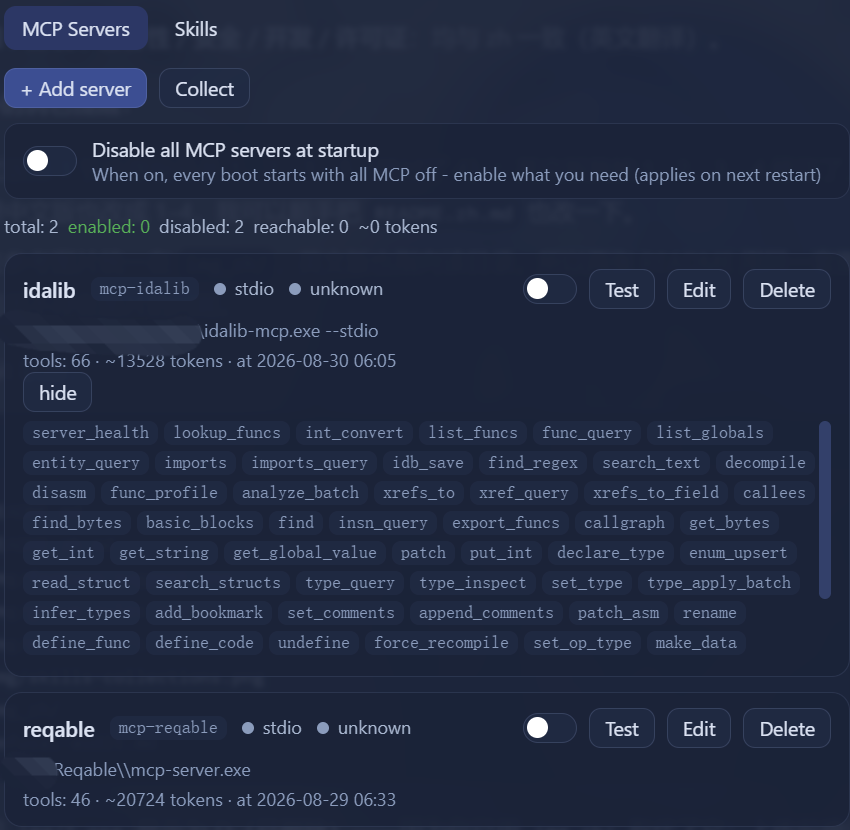
Every server card shows its transport (stdio / streamable-http), a live reachability badge, a tool count + token estimate, and per-server Test / Edit / Delete actions. The skill library groups 130+ skills by collection (e.g. hack-skills, superpowers-zh, ui-ux-pro-max) with batch enable/disable; the grouping rules panel lists the built-in default matchers plus your own rules.
Most skill managers list skills flat and rely on search/tags. This panel takes a different angle: DSH users often install whole skill packs (superpowers, hack-skills, ui-ux-pro-max, …) that each ship a set of skills. So the panel groups skills by collection — auto-detected from frontmatter shape and user rules — so you can see where each skill came from at a glance, act on a whole pack at once, and scale to a hundred skills.
Key principles:
| MCP management panel | Add MCP server panel |
|---|---|
 |
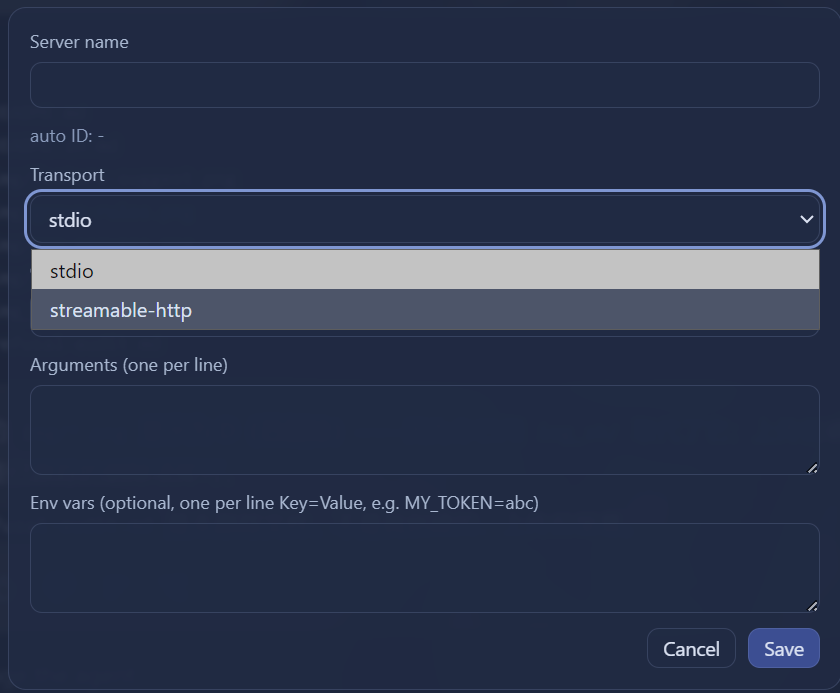 |
mcp-* server from your profile patch (cordis.patch.yml) with live status (active / failed / loading).mcp-<slug>).initialize + tools/list) for both stdio and streamable-http transports.tools/list; cards show tools: N · ~X tokens, and disabled servers still display the last-good snapshot to help you decide whether to enable them.Key: Value per line (e.g. Authorization: Bearer xxx). Headers are used by real connections (official mcp-client) and by the test probe.~/.dsh/dsh-mcp-skill-manager/settings.json.Key=Value lines per server (stdio and http), passed to real connections and the test probe.By collection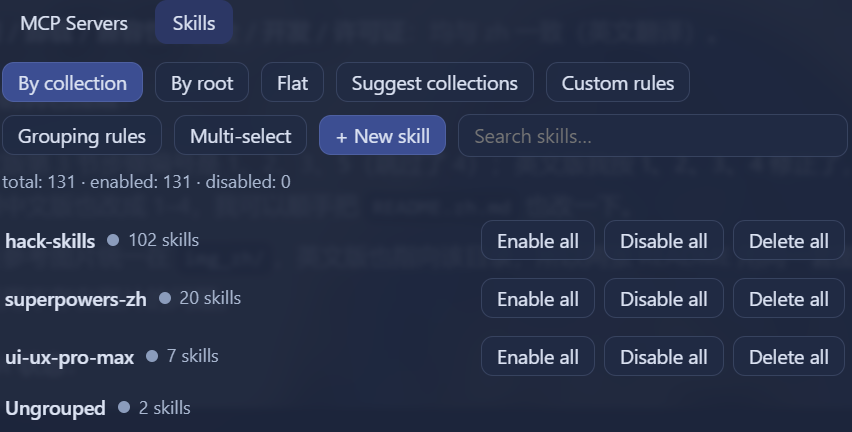 |
By root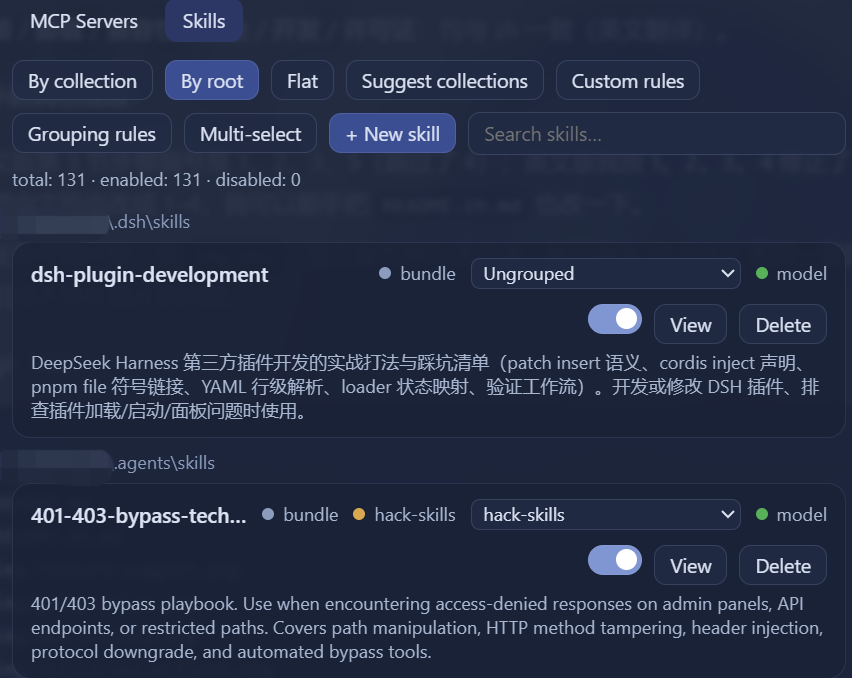 |
Custom grouping rules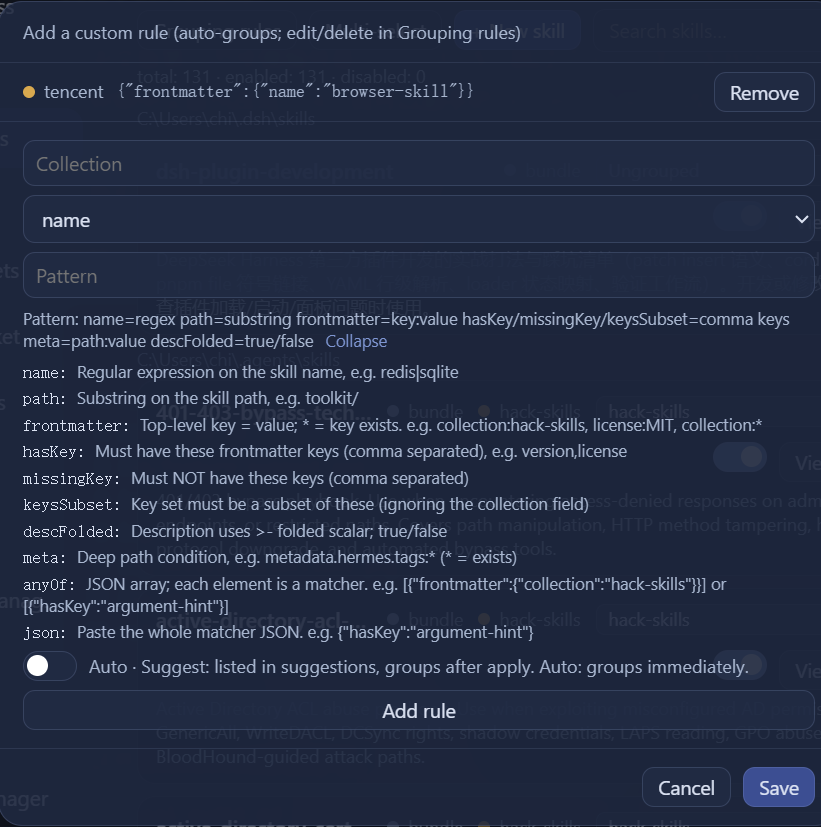 |
View grouping rules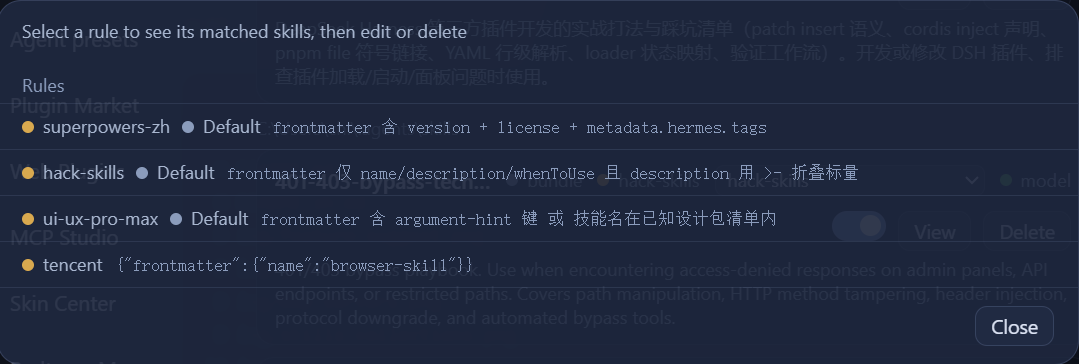 |
.dsh/skills, .agents/skills, ~/.dsh/skills, ~/.agents/skills).whenToUse), toggle model invocation, edit the description, and delete (moved to .trash-dsh-mcp-skill-panel/)..trash-dsh-mcp-skill-panel/; once the trash is non-empty, a Trash section appears at the bottom of the Skills tab with a Restore button.collection: frontmatter field first, then manual assignment, then user rules — with three views (by collection (default) / by root / flat). Per-card quick-assign dropdown, multi-select assign/unassign, and batch enable/disable model or delete a whole collection.metadata.hermes metadata; hack-skills via minimal frontmatter + >- folded description; ui-ux-pro-max via argument-hint or known design names) plus signature auto-clustering (groups skills sharing a distinctive frontmatter shape, ≥2 members, renamable). Suggestions only cover not-yet-grouped skills; review before applying.~/.dsh/dsh-mcp-skill-manager/collections.json.The following uses the browser-skill skill as an example to show the grouping flow.
1. View the skill content
Click View on browser-skill to open its content — the frontmatter has name: browser-skill.
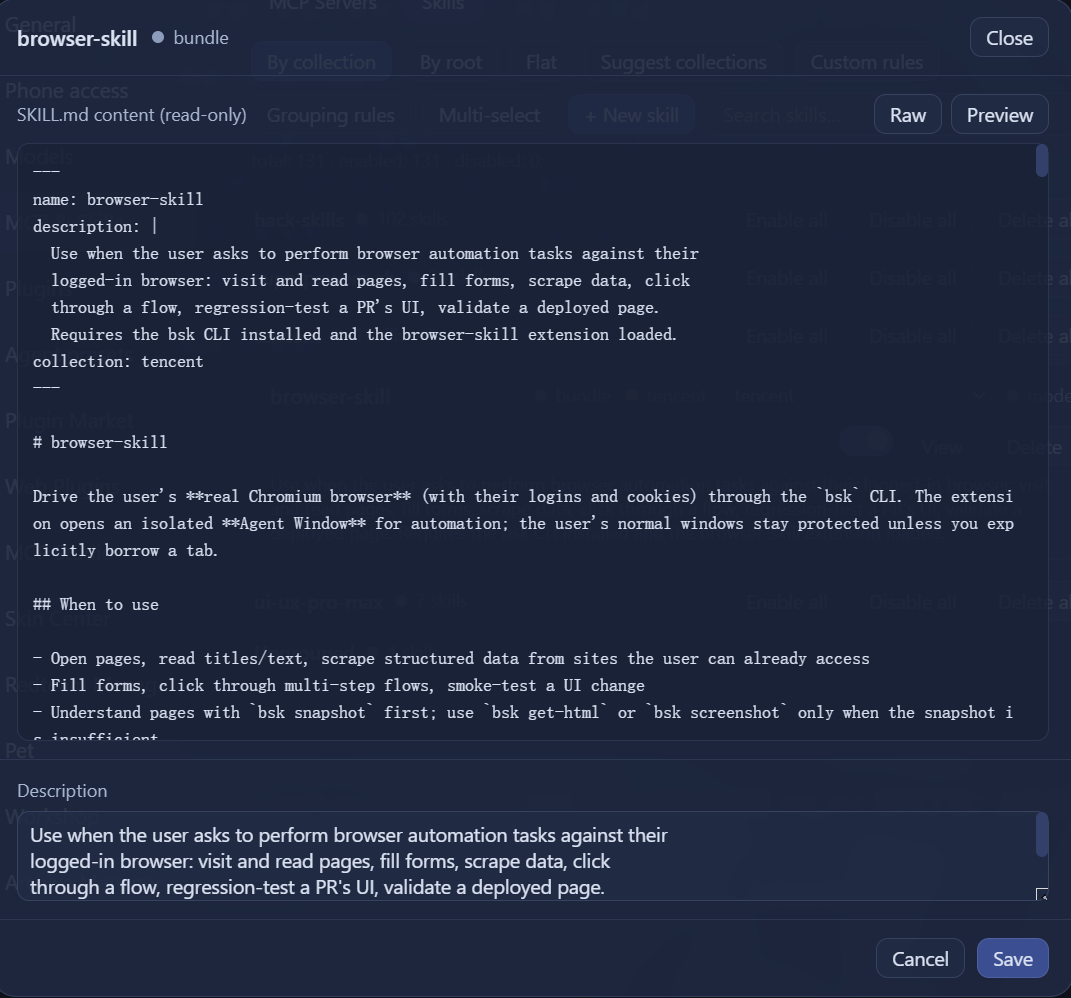
2. Add a custom rule
Fill in the rule as shown below (this example uses Suggest; if you choose Auto, step 3 is unnecessary — the skill is grouped immediately).
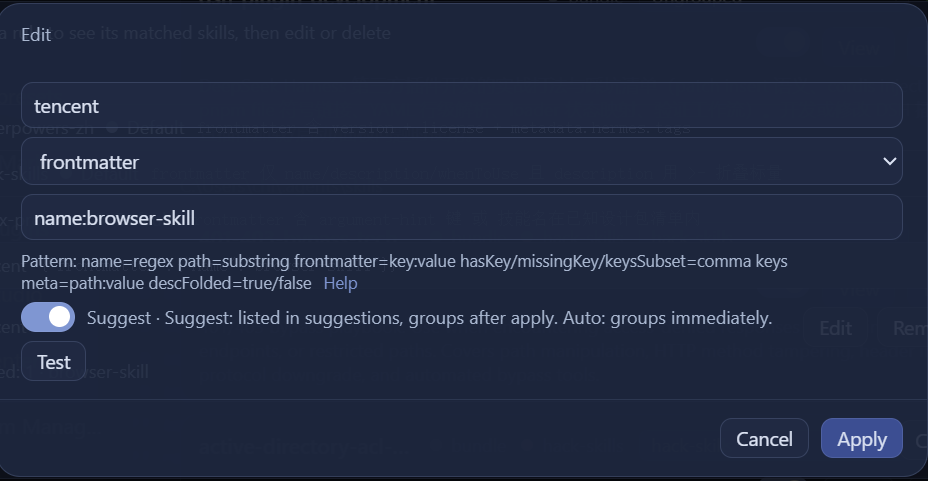
3. Open Feature suggestions
Click Feature suggestions — the custom rule you just added now takes effect.
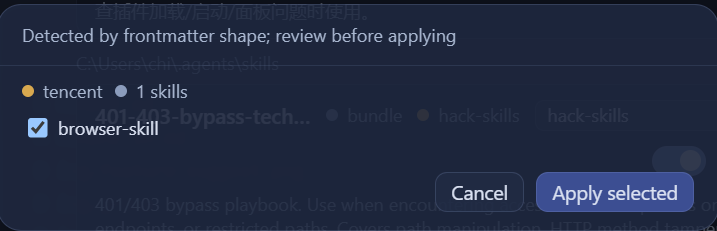
4. Apply the selection
Click Apply selected — browser-skill is now automatically added to the tencent collection.
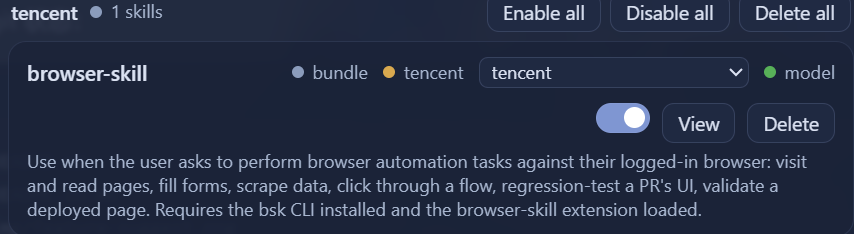
Requires Node >= 20 and pnpm, and a DSH web profile (default).
The package ships a dsh.bundle.patch (cordis.patch.yml), so the official DSH plugin CLI installs and mounts it in one command — no manual cordis.patch.yml edits.
# published on npm
dsh plugin --profile web add dsh-mcp-skill-manager

# straight from a GitHub repo (builds the client bundle on install)
dsh plugin --profile web add github:<user>/dsh-mcp-skill-manager

# from a local checkout (self-link, for development)
dsh plugin --profile web add .
Then restart DSH web and open Settings → MCP & Skills.
[!IMPORTANT]
- npm installs install the published package (
dsh-mcp-skill-manager); thefilesincludecordis.patch.ymland the builtclient/client.js.- GitHub installs build the client bundle on install via the package's
preparescript (node client/build.mjs), which needsesbuild(a devDependency). If pnpm blocks the build, allow it in the profile'spnpm-workspace.yamlunderallowBuilds— the DSH CLI prints the exact key to add when it blocks a git-hosted build.- Do not mix the two channels in one profile. If the plugin is already active through the bundle channel (
dsh.profile.bundles), do not also runnode install.mjsor keep a manual- insert:row incordis.patch.yml— that double-mounts the plugin (two host halves, two client bundles).install.mjsdetects the bundle channel and skips its manual insert automatically.
node install.mjs (local / non-CLI)node install.mjs
# or with a custom profile:
node install.mjs --profile webThe script backs up cordis.patch.yml, installs the package into the profile (pnpm add file:...), and appends the plugin row. Restart DSH web once so the new plugin enters the boot composition (client bundles are assembled at startup):
cd <your-dsh-install-dir>   # e.g. D:/deepseek-harness
pnpm exec dsh web
Then open Settings → MCP & Skills. To verify headlessly after the restart: node scripts/smoke.mjs (checks the loader entry, the client bundle, and the MCP/Skills RPC endpoints end-to-end).
Manual install (equivalent):
cd ~/.dsh/profiles/web
pnpm add file:<path-to-this-package> --config.auto-install-peers=false
cat >> cordis.patch.yml <<'EOF'

- insert:
    - id: dsh-mcp-skill-manager
      name: 'dsh-mcp-skill-manager'
EOF
# restart DSH webcd ~/.dsh/profiles/web
pnpm remove dsh-mcp-skill-manager
# remove the "- id: dsh-mcp-skill-manager" row from cordis.patch.yml
# restore the backup created by install.mjs if desiredweb profile on Windows).@deepseek-ai/cordis only (provided by the host). Regular dependency: js-yaml (frontmatter).connection.rpc service is unavailable (old/headless hosts), the panel degrades to an unavailable message and never blocks startup.connection.rpc, settings.section slots, locale, plus the official file formats (cordis.patch.yml, SKILL.md frontmatter). The patch file is edited line-wise so your comments and hand-written entries are preserved.node --test in this package and re-run node scripts/smoke.mjs (end-to-end loader/bundle/RPC check).authority: "loopback").cordis.patch.yml.bak-mcp-skill-panel, skill deletes go to .trash-dsh-mcp-skill-panel/.~/.dsh/dsh-mcp-skill-manager/ (catalog.json last-good tool snapshots, settings.json preferences, collections.json grouping rules/assignments/excluded). HTTP auth headers are stored in your profile patch — visible only to the loopback panel.shell: false; ids/serverNames are validated against strict patterns; skill paths are confined to the discovered roots.npm install
npm run build # bundle client/index.jsx -> client/client.js
npm test # node --testMIT
CLASSIFICATION EVIDENCE
系统优先读取 GitHub Topics,再与站内分类词典和词根规则比对。当前命中: dsh-mcp-manager、deepseek-harness、deepseek-harness-plugin、deepseek-harness-plugins。
morluto
Reverse engineer anything with agents, from app behavior down to native binaries.

deepseek-ai
DeepSeek Harness: Everything is a Plugin.

nexu-io
The 1st Collaborative AI Design Agent Workspace. Local-first and open source. Create motion, prototypes, websites, apps, dashboards, presentations, images, and videos with your team and AI agents. Share work, exchange feedback, and iterate together in one workspace.