
其他
插件

dsh-bili-scroll
c1overzz
DSH 插件:每天替你刷一轮 B站,读字幕挑出值得的、写一份日报,值得的 @ 你
PROJECT TOPICS
INSTALL REFERENCE
dsh plugin --profile web add github:chenyuntaot/dsh-wsl-terminal
该命令指向仓库当前默认分支;尚无绑定当前 commit 的完整验证结果。
PROJECT README
让 Windows 上的 DeepSeek Harness(DSH)在新建交互终端时,默认启动本机 WSL。
安装后新建终端,即可在 WSL 中操作当前工作区:
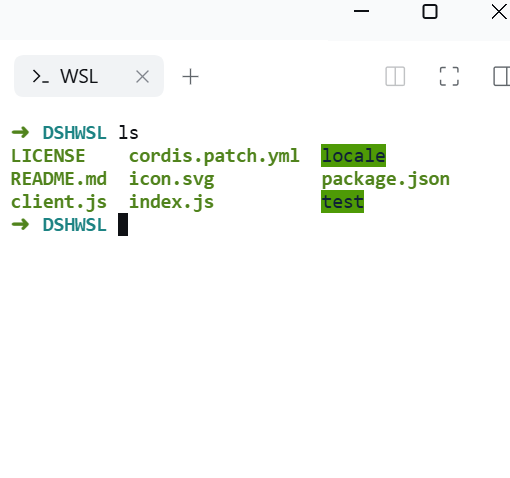
终端菜单会默认选择 WSL,同时保留 PowerShell、cmd 等可用选项:
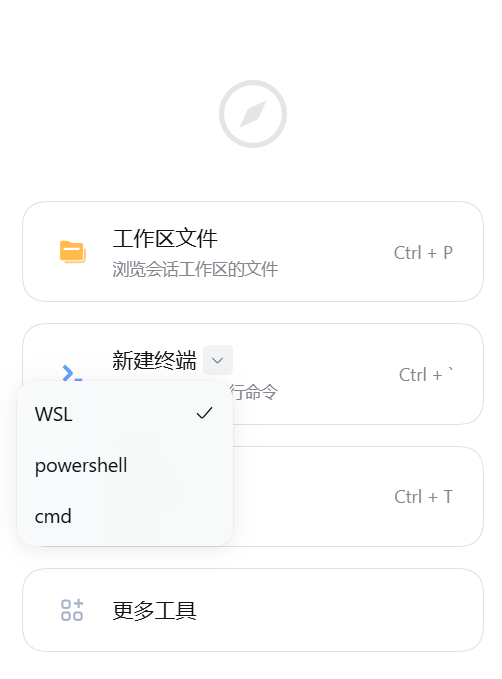
以上为实际运行截图。
wsl --list --verbose 能正常列出发行版;* 标记的发行版将用于新终端。Web 界面可以在浏览器中使用,但运行 DSH Host 的电脑必须是安装了 WSL 的 Windows 主机。
在 DSH 对话中发送:
请安装这个 DSH 插件:git+https://github.com/chenyuntaot/dsh-wsl-terminal.git#v1.0.0安装后刷新 DSH 页面,在右侧栏点击“新建终端”。
在 DSH 中启用“实验性插件 → 自定义插件市场”,进入“插件 → 发现 → 添加索引源”,添加下面的地址,再选择 WSL 默认终端 安装:
https://raw.githubusercontent.com/chenyuntaot/dsh-wsl-terminal/main/market-index.jsonDSH 0.2.1-rc.5 使用用户配置的市场索引,没有官方统一市场。本仓库提供公开自定义索引,以完整 Git 提交 SHA 固定安装版本。
下载并解压仓库,让 DSH 安装解压目录的绝对路径。该方式采用链接安装,请保留源目录。
如果以前安装过开发版 @local/dsh-wsl-terminal,请先停用整个本地 bundle,再安装公开版,避免重复覆盖终端配置。
发布维护步骤见 PUBLISH.md,版本记录见 CHANGELOG.md。
C:\Projects\example 对应 /mnt/c/Projects/example;实际挂载前缀取决于 WSL 设置。pwsh 工具与 Agent 沙箱策略仍由原有预设管理。在插件管理器中停用整个 WSL 默认终端 bundle;仅停用其单独插件行不会移除 bundle 对终端默认值的覆盖。
在已连接页面中停用时,插件会尝试恢复原 shell 选择。如果停用时页面关闭或浏览器存储不可用,可从内置 shell 菜单重新选择。备份存储键为 dsh.wsl-terminal.previous-shell.v1。
可编辑 cordis.patch.yml 中的 args: []:
| 需求 | 参数示例 |
|---|---|
| 固定发行版 | ['--distribution', 'Ubuntu'] |
| 从 Linux 用户目录启动 | ['--cd', '~'] |
| 同时指定发行版和目录 | ['--distribution', 'Ubuntu', '--cd', '~'] |
修改包后按插件管理器提示重新安装或重启 DSH。其他 bundle 或 profile 如果也覆盖 terminal-controller,需自行合并配置;DSH 的补丁会替换该行的整个 config。
本项目使用 DSH 支持的 Cordis bundle 结构:
| 协议入口 | 用途 |
|---|---|
package.json 的 dsh.bundle.patch |
声明 bundle 的 YAML 补丁 |
cordis.patch.yml |
设置原生 terminal-controller.shell 并注册插件 |
exports["."] 与 index.js |
标准 Cordis Host 入口 |
dsh.client、exports["./client"] 与 client.js |
DSH 动态 Client 模块,模块 ID 与包名一致 |
exports["./locale/*.json"] 与 exports["./icon"] |
中英文插件信息与原创图标 |
engines.dsh |
DSH 版本兼容声明 |
market-index.json |
DSH 市场索引 format 1,安装源固定到完整 Git SHA |
Git 安装和市场安装使用同一个标准包,运行代码不依赖开发者电脑上的用户名或工作区路径。
node test/preference.test.mjs覆盖旧偏好迁移、刷新幂等、手动选择保留、停用恢复与存储不可用等场景。
实现采用 DSH 的 terminal-controller.shell 配置及动态 Client 模块格式,浏览器偏好迁移依赖当前版本公开的 dsh.terminal.shell 存储键。升级 DSH 后应重新检查这些接口。
WSL Terminal makes new interactive DSH terminals open the Windows host's default WSL distribution. It inherits the workspace directory and keeps the existing shell selector. Install the complete package through DSH, reload the page, and create a new terminal.
Requires Windows with a working WSL installation. Tested on DSH 0.2.1-rc.5. Disable the entire bundle to restore the Host default. Local directory installations retain a link to the original directory. See the publishing guide before distributing through a custom market index.
MIT. The original SVG icon is included under the same license. The two screenshots were supplied by the project owner for this README.
CLASSIFICATION EVIDENCE
系统优先读取 GitHub Topics,再与站内分类词典和词根规则比对。当前命中: 无有效分类标签。
c1overzz
DSH 插件:每天替你刷一轮 B站,读字幕挑出值得的、写一份日报,值得的 @ 你

hellowind777
一个自主的高级智能伙伴,不仅分析问题,更持续工作直到完成实现和验证。

xing-shuyin
Just open your browser — get all your work done.