
模型与 MCP
待识别

rea
morluto
Reverse engineer anything with agents, from app behavior down to native binaries.
PROJECT TOPICS
INSTALL REFERENCE
dsh plugin --profile web add github:chenmiao8563/dsh-token-ledger
该命令指向仓库当前默认分支;尚无绑定当前 commit 的完整验证结果。
PROJECT README
Transparent, auditable token accounting for DeepSeek Harness.


A ledger, not a dashboard. It folds the durable DSH session log into token totals, keeps them restart-safe, and — the part that matters — lets you recompute the exact same numbers from the raw logs and diff them against what the running host recorded.
$ dsh-token-ledger audit
scanned 139 session log(s), 344203 events, 29 forked session(s), 0 unreadable

  stored      6901 calls  1205685663 tokens
  recomputed  6901 calls  1205685663 tokens

  audit: match — the stored ledger equals a fresh fold of the raw logs
If you only want a pretty chart, there are a dozen plugins for that. This one is for when you need to defend the number.
Since 0.5 the settings page has three tabs: Overview (the ledger, with what each period cost), Rates (a price list for each vendor's newest models, with the live USD/CNY rate) and Bill (the same usage turned into money — four groupings stacked over five periods each, exportable as CSV or JSON in one file). The bill names the price source, the rate and every price it could not apply, so the number can be checked. See Settings page.
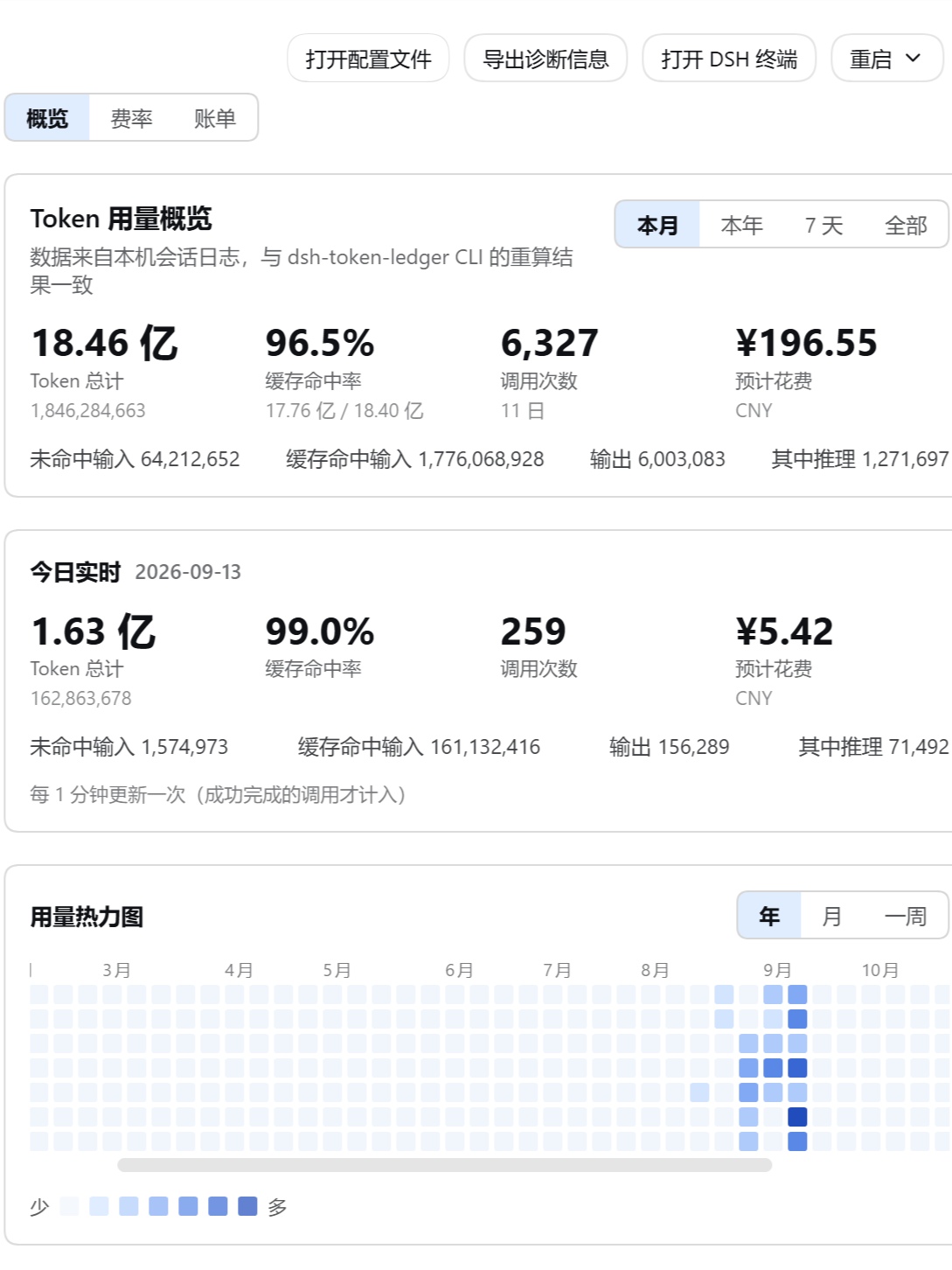
The settings page's tabs, captured on a real ledger — the totals are this machine's:
Overview, with the month's totals, today's usage and a year of activity:
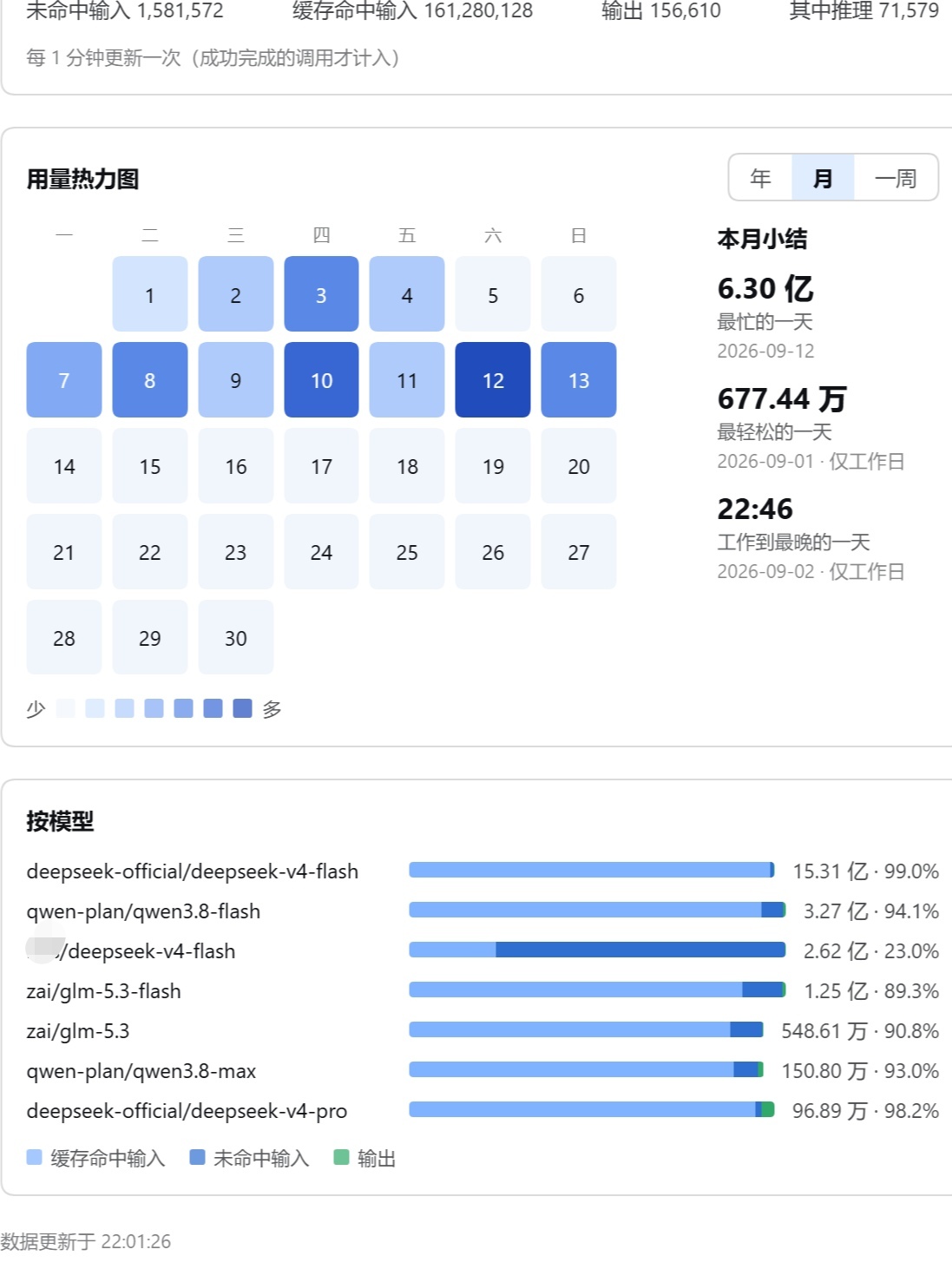
The calendar, which is where a month's shape lives — busiest day, lightest day, the day that ran latest — above the same usage broken down by model:
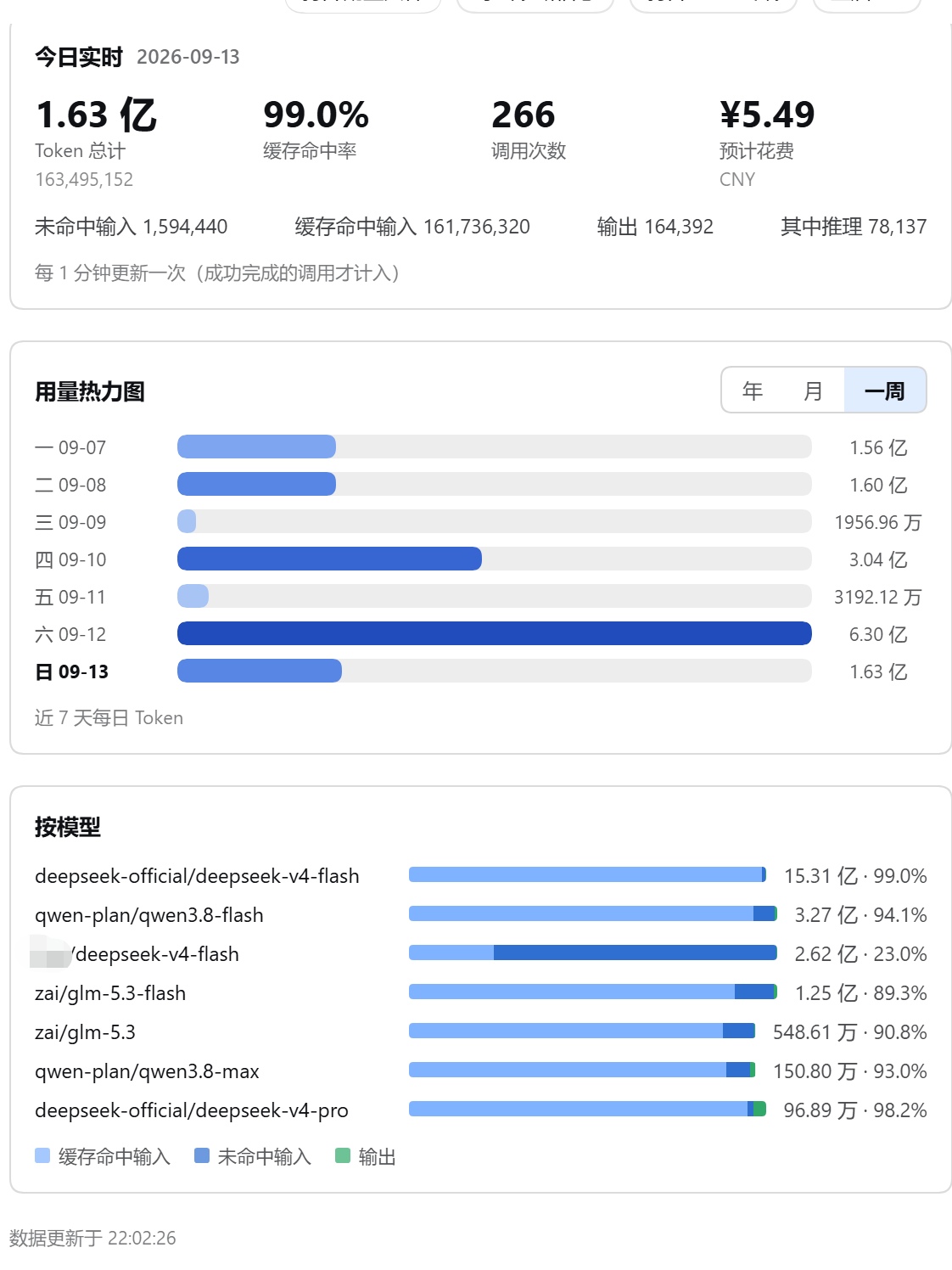
The last seven days as bars, with the same by-model breakdown:
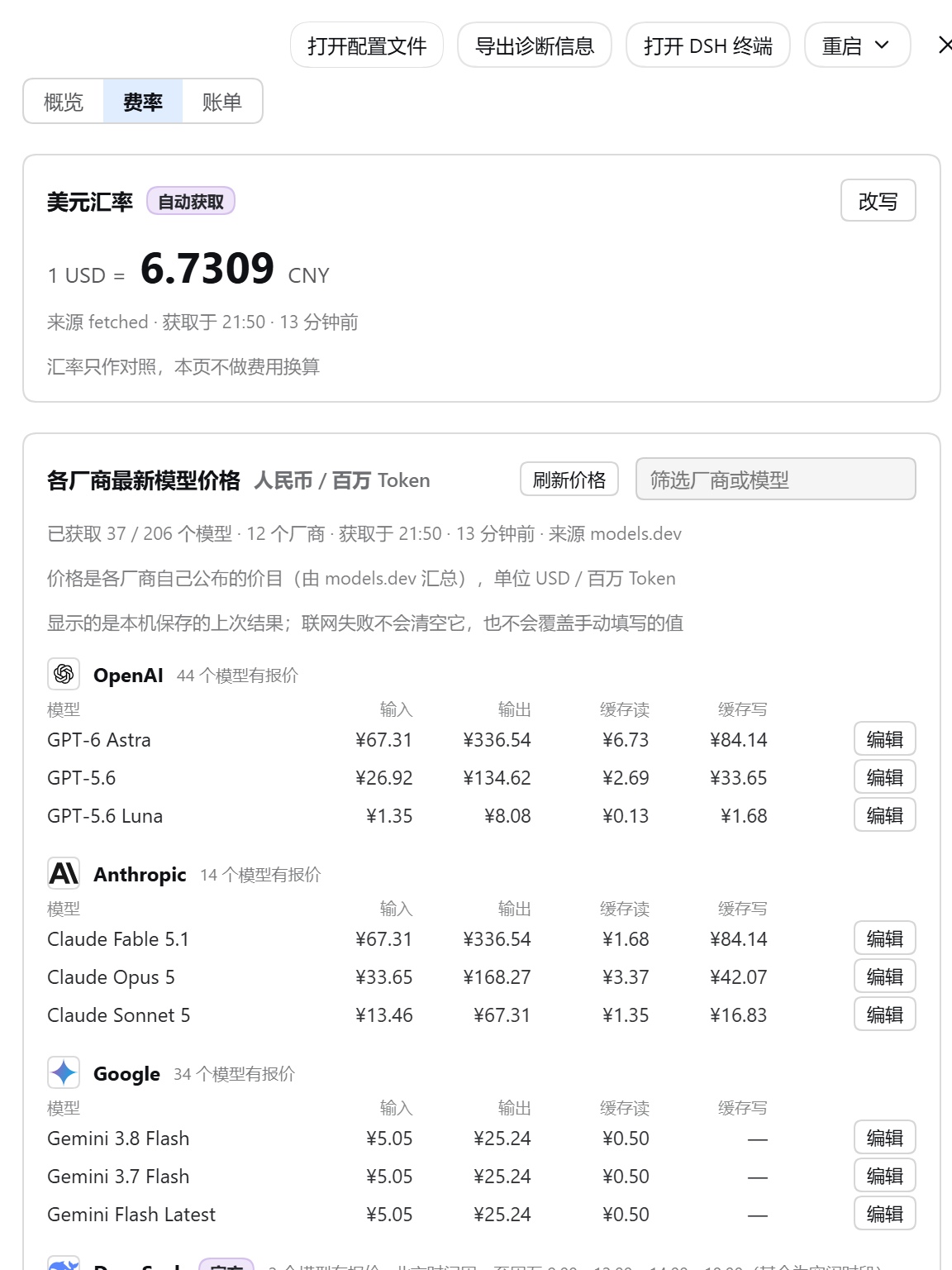
Rates: the live USD/CNY rate and each vendor's published price list, each price editable by hand for the times the network is not there:
| Property | Why it matters |
|---|---|
| Nothing is installed for you | No runtime dependencies, and every declared peer is an optional host package — so a version drift in a DSH package cannot pull a second copy of the harness into your profile. |
| Zero install scripts | dsh plugin add from a git URL works immediately — pnpm has no build to block and no allowBuilds entry to add. |
Only node: imports |
The host half loads from any profile (web, desktop, headless, TUI) without resolving a single package. |
| No model-facing surface | It registers no prompt section, no message and no tool, so it cannot change a request prefix or hurt KV-cache reuse. |
| Fails soft | Every hook is guarded. A ledger fault logs a warning; it never fails a session. |
# from npm
dsh plugin --profile web add @chenmiao8563/dsh-token-ledger

# from a git URL (no build step is involved)
dsh plugin --profile web add github:chenmiao8563/dsh-token-ledger

# from a local checkout
dsh plugin --profile web add /absolute/path/to/dsh-token-ledger
The npm package is scoped because npm rejects the unscoped name
dsh-token-ledger as too similar to an existing package once separators are
normalized away. The CLI command is still dsh-token-ledger.
Restart DSH, then check the row landed:
dsh --profile web --dump-config | grep token-ledgerIn the conversation, /tokens prints the ledger:
/tokens
/tokens export     # write CSV + JSON under <DSH_HOME>/token-ledger/exports/
/tokens json       # the raw snapshot
/tokens path       # where the ledger file is
The ledger is written to <DSH_HOME>/token-ledger/ledger.json.
DSH ^0.2.0-rc.1 — 0.2.0-rc.2 is the version this is currently verified against, and
the floor is written as 0.2.0-rc.1 because that is how this ecosystem spells a
prerelease range. The ^ puts the ceiling at 0.3.0.
This range is load-bearing rather than decorative: DSH compares it against the running
harness at startup and skips a plugin whose range excludes it. ^0.1.2-rc.1 — the
range 1.0.0 shipped with — does not accept 0.2.0-rc.2, so 1.0.0 was silently skipped
by every 0.2 harness and 1.0.1 exists to fix exactly that. A 0.1.x harness is now
outside the declared range.
The same range is also declared as engines.dsh, which is the field a plugin market's
compatibility preflight reads and displays — dshmarket derives its verdict from that field
together with the host peers, and shows the conjunction of everything declared. Both carry
the identical string, so the market shows one requirement rather than a conjunction of two
spellings of it, and the two cannot drift apart without someone editing both.
The requirement is declared the way the ecosystem actually reads it — as
peerDependencies on the five host packages the two halves bind to:
| Peer | Why this plugin names it |
|---|---|
@deepseek-ai/dsh-session-persistence |
It provides sessionPersistence, which is where the ledger's usage comes from. |
@deepseek-ai/dsh-commands |
It provides commands, which registers /tokens. |
@deepseek-ai/dsh-host-webserver |
It provides webServer, which serves the three settings routes. |
@deepseek-ai/dsh-client-locale |
The browser half injects it for the translated labels. |
@deepseek-ai/dsh-client-ui-settings-general |
The browser half injects it to add its section to the settings sidebar. |
Every one is optional, and that is deliberate rather than a hedge. DSH does not
hoist host packages into a profile's node_modules, so a required peer would report
an unmet dependency on every install and mean nothing. Optional is also what keeps the
declaration honest about this plugin's own behaviour: a profile with no web server
skips the settings page and keeps /tokens and the CLI, and a headless or TUI profile
never has the client packages at all.
What makes the declaration useful is that DSH resolves it against the install that is
actually running. Its profile checker reads a peer from the plugin's own node_modules
first, then the profile tree, then the DSH installation itself
(node_modules/dshmarket/lib/check.js), and compares the result to the range above —
so an unsupported harness is reported instead of silently mounting. Earlier versions of
this package declared dsh.compatibility.dsh instead, which nothing in DSH reads; 1.0
removed it rather than leave a field that looks like a promise and is not one.
The declarations cost a consumer nothing: optional peers are not installed, and the package still ships with no runtime dependencies and no install scripts.
The numbers are only useful if you know exactly what they count.
| Rule | Behaviour |
|---|---|
| Successful anchors only | Usage is taken from assistant/message (a completed step) and compaction/summary (one compaction call). A failed or cancelled attempt never appends either, so it is never counted. |
| Streaming samples are replaced, not added | When a step emits a usage chunk and then its final message, the final value replaces the earlier sample — one call either way. |
totalTokens is derived |
It is the sum of the four buckets, never the provider's own total field. Across 15,778 real usage reports the two agreed every single time, and deriving it keeps the buckets and the total consistent by construction. |
| Reasoning tokens are a subset | Reported separately, never added into the total, because they are already inside outputTokens. |
| Local calendar days | Days are your days, not UTC days. |
| Forks are cut, resumes are not | See below. |
A stored log can begin with a prefix of history that was already recorded. Two different situations produce one, and getting them confused is the most common way a usage plugin silently gets the wrong answer:
parentSession set): the prefix is the parent's history, counted
in the parent's own log. Counting it again here would double count. It is cut.This is not a guess. Against real logs, every forked session whose parent log was still present had its pre-marker usage fingerprints contained in the parent's, while the non-forked logs carrying the same marker never repeated their prefix later in the file. On one real 139-session home the distinction was worth 79.9 million tokens of double counting that a naive "count every log" pass reports.
Works without DSH running — it reads the raw logs directly.
dsh-token-ledger [summary] [options]     print the stored ledger (default)
dsh-token-ledger audit   [options]       recompute from raw logs and diff
dsh-token-ledger rebuild [options]       recompute from raw logs
dsh-token-ledger export  [options]       write CSV and JSON exports

--home <path>    DSH home to read (default: the DSH_HOME variable, else ~/.dsh)
--ledger <path>  ledger file to read or write
--out <path>     export destination directory
--days <n>       days in the summary (default 7)
--models <n>     models in the summary (default 5)
--write          with rebuild: replace the stored ledger
--json           machine-readable output
--quiet          suppress the human summary, keep the exit code
Exit codes: 0 success or audit match, 1 audit found a real difference,
2 bad usage or an unreadable input. That makes it usable as a scheduled check.
A running host writes its ledger on a debounce, so a live session is routinely a
little ahead of the stored file. Reporting that as corruption would make the
audit useless. The ledger's own updatedAt settles it:
  audit: match — 1 session(s) advanced after the ledger was written
(1 calls, 5100 tokens not yet flushed)The browser half adds a Token ledger section to the settings sidebar, with three tabs: Overview, Rates and Bill.
cacheRead / (cacheRead + uncachedInput): the
share of input the prompt cache absorbed, so a route with no caching reads 0%
rather than undefined.¥0.00, and tokens the bill could
not price are named underneath the number they are missing from.0 is flagged as not necessarily
free because some platforms bill by the hour and publish no per-token price.vendor badge saying so. The rest come from a per-vendor
public dataset (models.dev); rates.source: openrouter
switches the whole table to that gateway's own quotes, which cover more models but
are not the vendors' list prices. The page says which is which, because those are
different claims.rates.vendors: 0 publishes
every vendor.rates: false makes no request at all and is a price list you maintain.The same usage, grouped the way a bill is read. Four groupings are stacked — workspace, session, model, vendor — rather than put behind a tab, because the question a bill answers is usually comparative, and each section carries its own period, so this month by workspace can sit above today by model.
cwd the ledger recorded for
the sessions that ran there; a session row reads workspace/session-name, using the
title DSH itself gave the session (falling back to the session id for sessions DSH
never titled, with the full id and path in the tooltip); a model row reads
provider/model — the route the ledger recorded, the same name the overview's model
list shows — with the price row it was billed at in the tooltip.bos, qwen-plan,
deepseek-official and zai are endpoints; deepseek, qwen and z-ai are whose
list prices their tokens carry. The row shows the provider — under the display name
the model settings page gives it, so BOS-API rather than bos, read from the
harness settings file and never written to it — and states the price source
underneath (计价来源 deepseek). Two endpoints serving the same model are therefore
two rows, which is the question a vendor bill exists to answer.其余 N 个低频会话, badged 汇总, with their columns summed). The
total does not move: the rows still add up to it. A note under the table says how many
were summarised and what the rule was, and the export always lists every session —
format=csv is the complete record. Two things are never folded: a session whose
tokens could not be priced, and a list where every row qualifies.
bill.smallSessionCost, bill.smallSessionCalls and bill.foldSmallSessions: false
change the rule or turn it off. Only the session dimension folds.TOTAL per section. There
is deliberately no grand total: the periods overlap, and adding today to this week
to this month would count the same tokens four times. The CSV starts with a UTF-8
byte-order mark, without which Excel opens it in the system code page and a session
named 编写统计 arrives as 缂栧啓缁熻; the JSON export has none, because a JSON
parser rejects a leading mark.subscriptions in the config takes monthly
plans, and the fee is spread over the days the bill covers: the 1st-to-10th of a
¥199 month is ¥66.33, not ¥199. A vendor on a plan is billed its plan and the usage
it covers is shown beside it rather than added to it, because adding them would
charge for the same calls twice. Because a plan is one charge, on a grouping where
its vendor appears in several rows — workspaces, sessions, models — the plan is
allocated across those rows in proportion to the usage it covers, which is what
makes a section's rows add up to its total. A row billed partly by plan says so
(其中套餐摊分), and a plan whose vendor has no usage in the period is still billed,
because it was still paid for. A plan's vendor may name either the provider or the
price vendor (bos or deepseek); both resolve to the usage the plan covers.The page reads three loopback-only routes: GET /api/token-ledger/summary for the
overview, GET|POST /api/token-ledger/rates for prices and the rate, and
GET /api/token-ledger/bill for the bill. The overview polls once a minute, prices
and the bill only while their view is open. All three refuse a
non-loopback peer, so they stay private even if the web server is bound to
0.0.0.0. The write half additionally requires a JSON content type — a
cross-origin form cannot send one — and caps the body at 256 KiB.
It needs a profile with a web server (the web or desktop profile). Without one,
/tokens and the CLI still work, and the section says so instead of failing. Note
that hand-entered prices are entered on that page: there is no command-line
equivalent yet, so a headless profile can read the usage ledger but cannot type a
price.
None of the three views is published through a settings namespace. That would need a schema —
a real dependency, and this package has none — and would rewrite settings.yaml on
every debounce with data that is derived and reproducible. The ledger file stays the
only store of record; prices live in rates.json beside it.
Override the composition entry by its id:
- id: token-ledger
  config:
    ledgerPath: 'D:/dsh/ledger.json'   # default: <DSH_HOME>/token-ledger/ledger.json
    backfill: false                     # default: true — fold stored history on startup
    backfillLogs: false                 # default: true — read the session logs on disk too
    rates: false                        # default: true — false makes no network request at all
    # rates also takes an object:
    # rates:
    #   source: modelsdev                # default: the per-vendor dataset; 'openrouter' for gateway quotes
    #   refreshIntervalMs: 1800000       # default: 30 minutes
    #   perVendor: 3                     # default: 3 newest models per vendor
    #   vendors: 15                      # default: cap on how many vendors to publish; 0 for all
    #   modelsUrl: 'https://…'           # default: per source — https://models.dev/api.json
    #   fxUrl: 'https://…/latest/USD'    # default: open.er-api.com
    # Monthly plans, for the bill's plan grouping. Each is amortized over the days
    # a bill covers, so a partial month is billed partially.
    subscriptions:
      - vendor: deepseek                 # which vendor's usage this plan covers
        plan: 'DeepSeek 包月'            # the name shown on the bill
        amount: 199                      # the fee per month
        currency: CNY                    # the currency the fee is quoted in
        startedAt: '2026-09-01'          # optional: not billed before this day
        endedAt: null                    # optional: not billed after this day
        note: null                       # optional: free text, shown with the plan
    # How the page shortens the session list. The export is never shortened, so these
    # only change what is on screen.
    # bill:
    #   foldSmallSessions: true          # default: true — false lists every session on the page too
    #   smallSessionCost: 1              # default: 1, in the bill's currency
    #   smallSessionCalls: 10            # default: 10
rates: false disables the pricing feature's networking entirely and leaves
hand-entered values as the only source. That is the setting a strictly offline host
wants; the rates page still works.
A fresh install shows the ledger you already have rather than one that starts today. Two sources are folded at startup, and each session is owned — permanently — by whichever of them folded it first.
<DSH_HOME>/sessions/<project>/<session>/session.jsonl.zstd. This is the durable record,
it is complete, and it needs nothing from the host: they are the same files rebuild and
audit read. Every session nobody has folded yet comes from here, which is what makes a
first install show its history instead of an empty page.sessionPersistence, the host service. It covers what a log cannot — a session whose
file has not been written yet — and it is the incremental path for the sessions the live
event stream folded.They hand over different arrays: a log is the harness's compact row form, whose indices mean
something else than the logical event list's. A cursor is therefore only ever advanced by the
source that set it, and the other one refuses rather than re-counting a session. backfillLogs: false keeps the startup fold off the disk; backfill: false turns both off and starts empty.
The disk fold reads one session per turn of the event loop, so a first run cannot stall the
host, and it skips every log that has not been written since the previous pass from a single
stat. A host that has run before pays nothing for history it already folded — only the first
run, or the one after a session was resumed outside this host, opens a file.
/tokens and the CLI cover the human cases.What the plugin does with the machine it runs on, stated so it can be checked rather than inferred:
| Capability | What it actually does |
|---|---|
| Files | Reads the session logs under <DSH_HOME>/sessions/, read-only, and reads <DSH_HOME>/settings.yaml for the provider display names a bill shows. Writes two files in its own directory — <DSH_HOME>/token-ledger/ledger.json and rates.json — plus exports where you ask for them. Nothing outside that directory is written or removed; the one unlink in the codebase cleans up its own temporary file after a failed atomic write. |
| Network | Plain HTTPS GETs, and only while the rates feature is on (it is on by default): the price catalogue (models.dev, or openrouter if that source is chosen), the USD/CNY rate, and at most three vendor pricing pages for vendors the catalogue does not price itself. rates: false removes every one of them and leaves hand-entered prices as the only source. A failed fetch keeps the last stored result rather than clearing it. The browser half makes no external request at all: its four fetch calls are same-origin requests to this plugin's own /api/token-ledger/* routes. |
| Commands | No shell, no child process, no spawn: the runtime imports no child_process and calls no exec, spawn or fork — neither at install time nor at run time. What it exposes is the /tokens slash command, registered through the host's own commands service, and the dsh-token-ledger binary you run yourself. |
| Credentials | None are read. process.env is consulted only to resolve DSH_HOME when no explicit home is passed; no provider API key, no .credentials.yaml, no keychain, no OAuth. Nothing about you leaves the machine: the only outbound requests are the price URLs above, and they carry an accept header and a user-agent, nothing else. |
| Install | No preinstall, install, postinstall or prepare script; no runtime dependencies; no native binaries; no symlinks or submodules; and no @deepseek-ai/* component is disabled, replaced or duplicated. |
Every claim above can be checked against the fixed commit — the imports, the URLs and the
state directory are all in lib/, and npm run verify asserts the packaging invariants
that keep the install side true.
^0.2.0-rc.1, declared as optional peers on the five host packages it
binds to — see What DSH it needs. Held against 0.2.0-rc.2:
DSH's own compatibility evaluator accepts this manifest, and every interface the two
halves use — ctx.on, ctx.inject, ctx.get, ctx.effect, commands.register,
sessionPersistence.list()/inspect(), and the settings.section slot with
ctx.slots.inject/ctx.slots.register — is unchanged in the 0.2.0 line.
docs/VERIFICATION.md records the last full in-app run, which
was on 0.1.2-rc.1.rates: false
removes the requests altogether.dsh plugin --profile web remove @chenmiao8563/dsh-token-ledgerThe ledger file is left alone on purpose — delete
<DSH_HOME>/token-ledger/ yourself to reset the history.
npm install         # devDependencies only: react, react-dom, and the slot registry DSH runs
npm test            # 297 tests in 14 files
npm run verify      # packaging invariants (dependency-free, no install scripts, no bare imports)
npm test uses Node's built-in test runner. In a restricted environment where
spawning a child process per test file is blocked, use
npm run test:single-process.
What a change needs to take effect. Both halves are read when the plugin mounts,
so editing lib/index.js or lib/client.js needs a DSH restart (or a plugin
reload) — refreshing the page is not enough, because the bundle's rev is computed
at mount and an unchanged URL keeps the browser's cached copy. Measured, not assumed:
with an isolated host running, a change to lib/client.js left both the served
bundle and its rev (d683dd523466) untouched, while a restart changed the rev
(f55ee321db50) and served the change. Exports are files, so if the one you are
looking at came from before a fix, its timestamp will say so.
The devDependencies are test-only. They are never installed for a consumer:
the package ships with no runtime dependencies and no install scripts, its peers are
optional declarations that nothing fetches, and pnpm does not install a dependency's
devDependencies. They exist
so the browser half can be checked against the real thing — React renders it, so
a hook-order or DOM-prop mistake fails instead of passing silently, and
@deepseek-ai/dsh-client-ui-slots validates the registration against the very
registry that DSH runs. Without them installed the affected tests skip with a
stated reason, so npm test still works from a fresh clone with no network.
See docs/VERIFICATION.md for what was actually verified and how, including the evidence behind the fork rule.
A tag push publishes. No token is stored anywhere.
git tag v1.0.0 && git push origin v1.0.0release.yml then runs the tests and the packaging checks, confirms the tag matches
package.json, publishes over OIDC trusted publishing, attaches the tarball to a
GitHub release, and asserts that the version is on the registry before it reports
success — so a green run means published, not merely attempted.
That last assertion is not decoration. This pipeline failed on every tag from v0.5.0
to v0.8.0 while printing 404 Not Found - PUT, which names a missing package when the
real problem is a missing credential, and the failure left the registry looking empty
for a couple of minutes after a publish that had in fact worked. Two causes, both now
guarded inside the workflow:
actions/setup-node's registry-url input must not be used. It writes
//registry.npmjs.org/:_authToken=${NODE_AUTH_TOKEN} into .npmrc, and npm reads
that line, concludes a credential is already configured, and skips trusted
publishing entirely — failing with ENEEDAUTH, which in a job that holds no
credential reads like "you forgot to log in". A step before the publish now fails
loudly if any _authToken line is present.For the npm side to accept it, the package needs a Trusted Publisher configured at
npmjs.com (package → Settings → Trusted Publisher → GitHub Actions) with repository
chenmiao8563/dsh-token-ledger, workflow release.yml, and no environment —
an environment name that the workflow does not declare does not match, and the
registry answers only OIDC token exchange error - package not found.
Before trusted publishing existed, a version's first release was published by hand
with npm publish --access public --otp=<six digits>, because OIDC cannot be
configured for a package that does not exist yet. That path still works and still
requires a granular token with 2FA bypass, but it produces no provenance attestation,
and it is the path whose expired token started the v0.8.0 investigation. Prefer the tag.
Re-running a release is safe: the publish step is skipped when the version is already on the registry, and the GitHub release is only created when it does not already exist.
MIT
CLASSIFICATION EVIDENCE
系统优先读取 GitHub Topics,再与站内分类词典和词根规则比对。当前命中: deepseek。
morluto
Reverse engineer anything with agents, from app behavior down to native binaries.

deepseek-ai
DeepSeek Harness: Everything is a Plugin.

nexu-io
The 1st Collaborative AI Design Agent Workspace. Local-first and open source. Create motion, prototypes, websites, apps, dashboards, presentations, images, and videos with your team and AI agents. Share work, exchange feedback, and iterate together in one workspace.