
模型与 MCP
待识别

rea
morluto
Reverse engineer anything with agents, from app behavior down to native binaries.
PROJECT TOPICS
INSTALL REFERENCE
dsh plugin --profile web add github:chengxiang-zhang/dsh-cove
该命令指向仓库当前默认分支;尚无绑定当前 commit 的完整验证结果。
PROJECT README
English | 中文




An integrated extension suite for the DeepSeek Harness (DSH) Web GUI
SSH operations · Git workbench · Browser automation · Feishu intake · Run notifications
What it is · Architecture · Features · Quick start · Documentation · Security · Community · Contributing
dsh-cove is an extension suite for the DeepSeek Harness (DSH) Web GUI. SSH operations, the Git workbench, Feishu intake, run-finished notifications and browser automation live in one runtime entity plugin, @dsh-cove/dsh-web-all. Browser code is organized by DSH injection position with exactly one module owning each position, and host capabilities are service domains under the same plugin lifecycle. A DSH profile mounts this single package and never patches DSH source.
The project is a developer preview: interfaces, configuration keys and internal contracts can change between releases. See Versioning and releases.
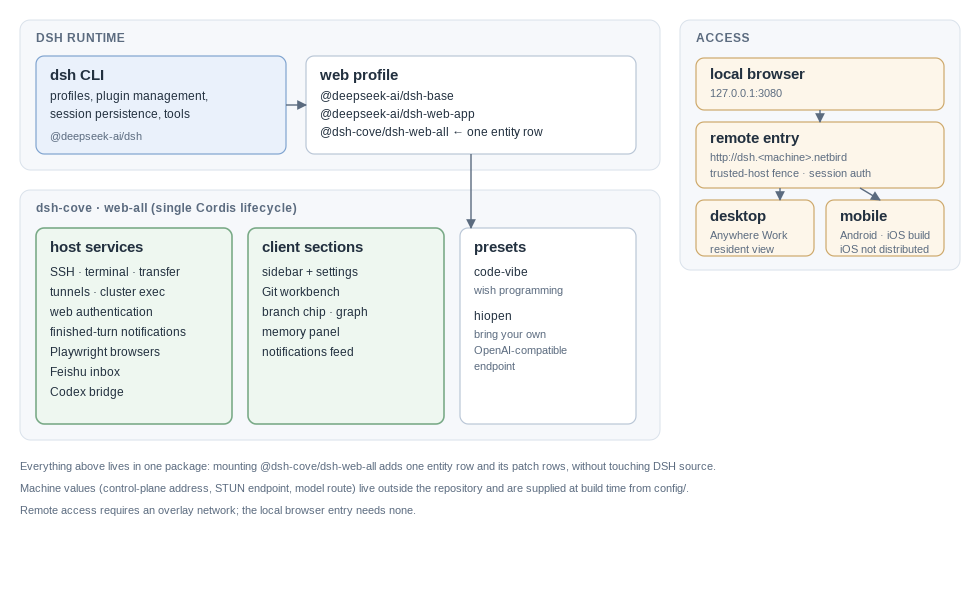
dsh CLI manages profiles, plugins, session persistence and tools; the web profile is @deepseek-ai/dsh-base, @deepseek-ai/dsh-web-app and this repository's @dsh-cove/dsh-web-all.dsh-web-all contributes a single web-all row to the profile, and both host services and browser sections share that one Cordis lifecycle.127.0.0.1:3080 directly; the remote entry needs an overlay network and the --trusted-host fence; the desktop and mobile clients are resident shells over the same Web UI.config/ injects them at build time.The sidebar SSH entry opens a remote operations panel. Hosts support key or password authentication and one-click import from ~/.ssh/config; configuration lives in ~/.dsh/dsh-ssh.json. Configured hosts support real operations:
127.0.0.1 only;The right-pane Source Control workbench and the composer branch picker share one Git service domain: switch branches, read the commit graph and inspect file changes and diffs. A branch directory (worktree) is selected when a conversation is created; its state and cleanup actions live on the lane chip in the conversation header, and there is no page of its own.
The bot WebSocket inbox ships with the lark_inbox_peek, lark_inbox_pop and lark_inbox_ack tools, a credential wizard and a configuration page under Settings.
Every finished turn is recorded in the read-only GET /api/dsh-notify/feed; the desktop and mobile machine lists read that feed, and a finished run can be pushed to Feishu once it has fully stopped.
Each session gets its own Playwright browser, exposed to the agent as the mcp__playwright__* tool namespace. There is no page panel: the capability exists only as tools (launch starts an isolated browser, cdp attaches to a Chrome you started).
Configuration details for every capability live in the dsh-web-all README.
dsh web starting normally;For the DSH Web CLI (browser client):
dsh plugin --profile web add @dsh-cove/dsh-web-all@latestdsh web process; every capability entry appears in the sidebar.web-all runtime entity is mounted.For DSH Desktop:
dsh plugin --profile desktop add @dsh-cove/dsh-web-all@latestdsh --profile desktop --dump-configThe package is published on npm; a source checkout is for development and debugging only:
git clone https://github.com/chengxiang-zhang/dsh-cove.git
cd dsh-cove
pnpm install
pnpm -r build
node scripts/link-profile.mjs
dsh plugin --profile web add link:$(pwd)/packages/dsh-web-all
dsh --profile web --dump-config
The profile directory is not a pnpm workspace, so workspace:* dependencies of web-all fall back to the published npm versions; run node scripts/link-profile.mjs first so the profile uses the repository build output.
A profile runtime mounts @deepseek-ai/dsh-base, @deepseek-ai/dsh-web-app and @dsh-cove/dsh-web-all. The repository publishes one package:
| npm package | Shape |
|---|---|
| @dsh-cove/dsh-web-all | The only runtime entity; owns every host service domain and browser position module |
After installation, restart dsh web and confirm the sidebar entries. dsh --profile web --dump-config shows whether the plugin configuration layer is mounted. A missing sidebar entry almost always means dsh web was not restarted. Uninstall with dsh plugin --profile web remove @dsh-cove/dsh-web-all and restart dsh web again.
If the first install stops on
ERR_PNPM_IGNORED_BUILDS, add the printed keys (cpu-features,protobufjs,ssh2) to the profilepnpm-workspace.yamlallowBuildslist and run the command again. Remove the package before retrying after a failed attempt: that attempt already wrote the dependency, so a plain re-run writes only the dependency and never registers the bundle row. The mountedweb-allrow indsh --profile web --dump-configis the proof of registration.
The profile must stay on a hoisted pnpm layout: keep
packages: - .,nodeLinker: hoistedandautoInstallPeers: falsein itspnpm-workspace.yaml. Without these keys pnpm installs a whole nested@deepseek-ai/*tree, including an outdateddsh-tools, which shadows the SDK resolution of the DSH loader and fails the import withweb-all (@dsh-cove/dsh-web-all): failed to import. Restore the workspace file, delete the profilenode_modulesandpnpm-lock.yaml, and install again.
pnpm 11 enforces a release-age gate, so a version published in the last 24 hours can resolve to mismatched
@dsh-cove/*versions even with an explicit@latest. Exclude the scope in the profile before installing or updating:
minimumReleaseAgeExclude:
  - '@dsh-cove/*'
Every long-lived document describes current behaviour, and generated facts stay with their generator. Start here:
| Document | Contents |
|---|---|
| docs/README.md | Documentation index: audience and language for every document |
| docs/architecture.md | Repository map, runtime model, injection positions, access fence and release model |
| docs/plugins.md | Adding a capability to the single runtime entity |
| docs/development.md | Local development, gates and verification |
| docs/remote-access.md | Remote-access contract for a self-hosted DSH instance |
| docs/publish-prep.md | Release checklist and registry boundaries |
| packages/dsh-web-all/README.md | Feature configuration, security model and known limitations |
Report vulnerabilities privately through GitHub Security Advisories; never open a public issue for an unfixed vulnerability. SECURITY.md defines supported versions, response targets, scope, safe harbour and the hardening checklist.
The plugin exposes privileged local capabilities, so its security model is part of the product: the shared host access fence, the remote-entry invariants and the SSH, credential and account storage rules are documented in the dsh-web-all security model and the remote-access contract.
Read CONTRIBUTING.md before opening a pull request. In short:
pnpm typecheck && pnpm test && pnpm docs:check.A vX.Y.Z tag is the only version source. Tags are cut from main after dev has been integrated and tested. Every tag produces a GitHub Release carrying the gated package tarball and the desktop, Android and iOS installers; the runtime entity is published to npm only when the repository enables the NPM_PUBLISH variable and has a publisher configured. Release history and notes live in GitHub Releases; the repository does not keep a committed changelog. The process is defined by .github/workflows/release.yml and docs/publish-prep.md.
The repository is licensed under Apache-2.0. Retained third-party code keeps its original license and attribution, indexed by NOTICE and the per-directory third-party notices files. Contributions are accepted under the inbound license of the file they touch; see CONTRIBUTING.md.
CLASSIFICATION EVIDENCE
系统优先读取 GitHub Topics,再与站内分类词典和词根规则比对。当前命中: deepseek-harness。
morluto
Reverse engineer anything with agents, from app behavior down to native binaries.

deepseek-ai
DeepSeek Harness: Everything is a Plugin.

nexu-io
The 1st Collaborative AI Design Agent Workspace. Local-first and open source. Create motion, prototypes, websites, apps, dashboards, presentations, images, and videos with your team and AI agents. Share work, exchange feedback, and iterate together in one workspace.