
模型与 MCP
待识别

rea
morluto
Reverse engineer anything with agents, from app behavior down to native binaries.
PROJECT TOPICS
INSTALL REFERENCE
dsh plugin --profile web add github:chen1pengvincent/dsh-archived-manager
该命令指向仓库当前默认分支;尚无绑定当前 commit 的完整验证结果。
PROJECT README

DeepSeek Harness(DSH)会话清理工作台。查找和批量取消归档,移到「最近删除」,或彻底删除已核验的会话日志。
当前版本 0.3.5。归档和即时撤销由 DSH 原生侧栏提供。插件管理归档后的检索、恢复、清理和文件定位。
unarchiveSession,会话回到侧栏,日志文件原地保留。打开 DSH → 设置 → 插件 → 安装。
输入以下 spec:
github:chen1pengvincent/dsh-archived-manager#v0.3.5安装后完全退出并重新打开 DSH,再硬刷新页面(macOS:Cmd+Shift+R)。
打开 设置 → 会话管理。
从旧版本升级时,在插件管理页安装新版本,或先 remove_bundle 再 install_bundle:
{"action":"remove_bundle","target":"dsh-archived-manager"}
{"action":"install_bundle","target":"github:chen1pengvincent/dsh-archived-manager#v0.3.5"}
v0.3.0 起可在会话管理页手动检查稳定版并更新。更新控制页会固定目标版本,在卸载前下载并校验安装包;旧插件卸载后,该页仍可展示安装结果,并在失败时提供重试或恢复入口。安装成功后按提示重新打开页面或重启 DSH。
更新期间请保持 DSH 运行。关闭控制页不会取消安装;若整个 DSH 进程在卸载后、安装完成前退出,请在宿主插件管理页使用目标版本的安装地址恢复。控制页会列出该地址。无需额外构建,也无需在本机单独安装 Node.js;Node.js 24+ 仅用于源码开发和测试。
git clone https://github.com/chen1pengvincent/dsh-archived-manager.git在 DSH 插件安装入口使用:
link:/absolute/path/to/dsh-archived-manager把路径替换为实际 checkout。链接安装后,替换已加载的 Host/Client 代码仍需要重启 DSH,不能只依据磁盘文件变化判断新版本已经生效。
连续处理多个会话时,工具位置固定,读完提示可以直接回到原来的工作位置。切换「已归档」与「最近删除」、刷新列表或出现空列表与无匹配结果时,页签、搜索与排序、日志摘要和操作栏仍在原位。当前不可用的操作会在对应入口显示禁用状态。
「已归档」在搜索旁提供状态筛选,「最近删除」在同一位置提供自动清理期限。版本详情和检查更新共用版本号旁的浮层。点会话标题或「查看结果」可打开覆盖层,查看会话信息、关联文件和本次处理结果时,列表维持原布局。
紧凑摘要显示当前可见条数和日志占用,「范围」说明统计口径。选中条目时,批量操作可处理取消归档、移入或恢复等任务。所选会话的「彻底删除」和整区的「清空全部」各自拥有固定入口,提交前分别核对范围。
从 DSH 侧栏的会话菜单归档,使用宿主提示立即撤销。需要批量处理时,打开 设置 → 会话管理 → 已归档。
| 操作 | 结果 |
|---|---|
| 取消归档 | 通过 DSH 原生接口回到侧栏,日志保留在原目录 |
| 移到最近删除 | 移动已通过校验的日志,移入时磁盘占用不变 |
| 彻底删除 | 确认后永久删除本次列出的会话日志 |
| 清理失效记录 | 日志已经缺失时,仅清除归档记录 |
列表提供搜索、状态筛选和排序。行内标明会话占用、日志缺失或目录受保护。点会话标题可查看具体原因。列表显示的是日志占用,删除预览显示本次可清理的日志。归档首次发现时间由插件记录。
全选作用于当前可见的可选行。选中行和已选数量会突出显示。两个标签分别保存选择,搜索和筛选会清除移出当前结果的选择,排序保留选择。普通批量操作最多处理 200 条。操作执行期间固定范围,结束后可在「查看结果」中查看未处理项。
界面跟随 DSH → 设置 → 通用 → 语言 和宿主主题。窄窗口中控件按行换行,仍按相同顺序排列。键盘可操作版本详情、下拉菜单和确认框。
在会话详情中查看「已记录的关联文件」,包括完整路径、所在文件夹和当前状态。已有文件可在系统文件管理器中显示;文件已失效但原父目录仍有效时,可打开该目录。工作区作为独立入口显示,不等同于产物目录。
列表使用宿主的结构化交付、成功写入和修改记录,覆盖范围取决于会话实际留下的记录。需要继续访问某个文件时,可以先保存它的位置。彻底删除日志会一并移除其中的文件位置记录,独立文件仍留在原处。
| 范围 | 行为 |
|---|---|
| 会话数据 | 聊天文字、表格、代码块随对应 session 清理;仅处理符合宿主实际存储格式的数据 |
| 独立生成文件及已有项目文件 | 文件及已有修改原地保留 |
| 共享附件 | 原地保留。附件采用内容寻址,可能跨会话共享 |
| 归档记录 | 取消归档、移到最近删除、删除或清理失效记录时按操作更新 |
| 活动与提醒 | 会话仍有宿主活动或写入占用时,页面会提示原因。通过 DSH 结束相关活动后再清理 |
| DSH 工作区账本 | 只通过公开 API 操作,不直接手写 workspace.json |
移动、恢复和永久删除前,插件会核对目标路径、会话日志格式,以及 DSH 的活动和写入占用。无法核验或目录内有额外内容的条目会保留,页面会显示原因。批量、清空和自动清理使用同一套日志校验规则。预览与提交之间若目标或日志内容发生变化,需要重新核对。
v0.3.0 起为安全只识别带版本号的会话格式,导致早期无版本号的 session.jsonl.zstd 被判为「无法确认的内容」,永久删除只能逐条失败。v0.3.2 起:
session.v0.*);v1 仍未支持,session.v5.* 等未知代仍拒绝。text-chunks / reasoning-chunks / tool-call-chunks)按其覆盖的 seq 区间校验:分段必须连续、无重叠、无空洞,dt 长度必须等于载荷长度减一,时间不得回退;任何一条不满足仍然拒绝,并保持文件原样。默认 <DSH_HOME> 为 ~/.dsh:
| 数据 | 位置 |
|---|---|
| 最近删除 | <DSH_HOME>/archived-manager/trash/<批次>/ |
| 最近删除清单 | 每个批次目录中的 manifest.json |
| 归档首次观测时间 | <DSH_HOME>/archived-manager/archive-times.json |
| 保留策略 | <DSH_HOME>/archived-manager/settings.json |
| 手动更新状态 | <DSH_HOME>/archived-manager/update-state.json |
| 会话日志 | <DSH_HOME>/sessions/ |
| 共享附件 | <DSH_HOME>/attachments/ |
首次运行前已经存在的归档记录无法反推真实归档时间,因此显示「未记录」,不会伪装成插件安装时间。
| 方法 | 路径 | 用途 |
|---|---|---|
| GET | /archived-manager/list |
归档和最近删除列表、操作资格与日志体积 |
| POST | /archived-manager/preview {action,ids?,items?,trashRetentionDays?} |
预览目标、跳过原因、日志体积,并返回 previewToken |
| POST | /archived-manager/unarchive {ids} |
原生取消归档 |
| POST | /archived-manager/hide {ids,previewToken?} |
移到最近删除 |
| POST | /archived-manager/purge {ids,confirm:"PURGE",previewToken?} |
永久删除归档会话日志 |
| POST | /archived-manager/forget {ids} |
清理文件已缺失的归档记录 |
| GET | /archived-manager/removed |
最近删除条目 |
| POST | /archived-manager/restore {items:[{batch,id}],previewToken?} |
从最近删除恢复 |
| POST | /archived-manager/discard {items,confirm:"DISCARD",previewToken?} |
删除指定的最近删除条目 |
| POST | /archived-manager/repair {items:[{batch,id}]} |
核对部分完成的操作及剩余登记 |
| POST | /archived-manager/empty-trash {confirm:"EMPTY",items:[{batch,id}],previewToken?} |
清空最近删除 |
| GET | /archived-manager/settings |
读取保留策略 |
| POST | /archived-manager/settings/save {trashRetentionDays,items?,previewToken?} |
保存保留策略。开启时提交预览对象和凭据 |
| GET | /archived-manager/health |
健康检查与版本信息 |
| POST | /archived-manager/files {id,batch?} |
已记录关联文件及独立工作区信息 |
| POST | /archived-manager/open-folder {id,batch?,path?,workspace?} |
打开经重新核对的文件位置或工作区 |
| GET | /archived-manager/update/status |
实际安装来源、版本及更新任务 |
| POST | /archived-manager/update/check |
手动检查最新稳定发布 |
| POST | /archived-manager/update/prepare {releaseId,version,switchFromLink} |
准备独立更新控制页,确认后再安装 |
管理接口仅接受回环地址、同源请求和 x-archived-manager: 1。界面在预览后提交相同对象与 previewToken。
以下图片为 v0.3.5 在真实 DSH 中管理测试会话时的界面:
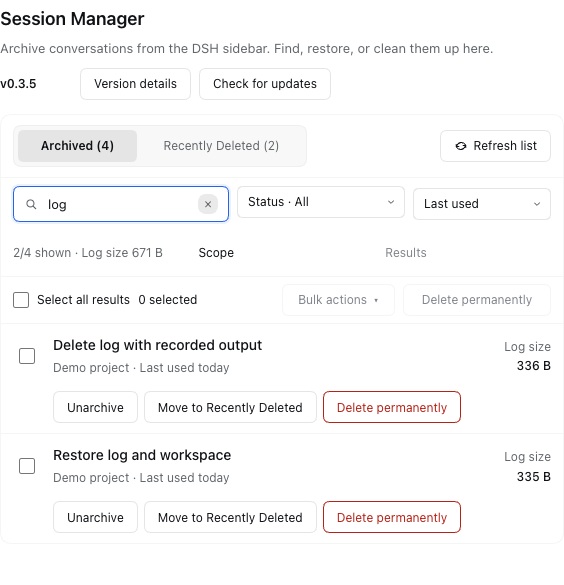
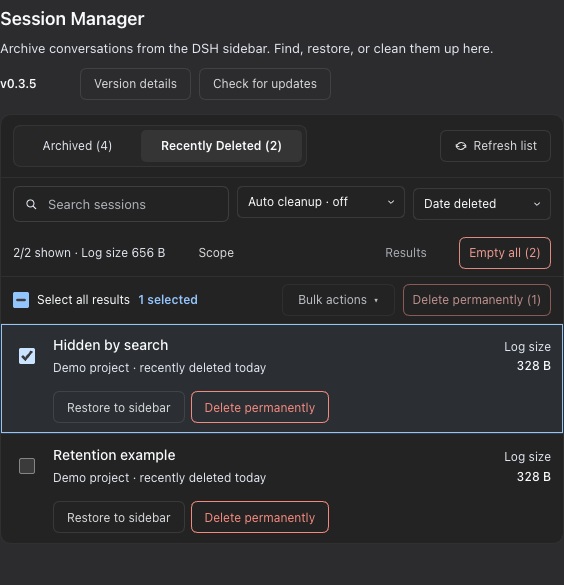
配色使用 DSH 主题令牌并适配深浅主题。可访问性目标、排版和对比度说明见 docs/accessibility.md。
package.json 与页面版本号到 0.3.3。session.jsonl.zstd,无版本号),这类会话现在能正常列出、查看并彻底删除。此前 0.3.0 起的格式校验把它们判为「无法确认的内容」,永久删除只能逐条失败。seq 覆盖区间校验:分段必须无重叠、无空洞,dt 长度必须与载荷一致,时间不得回退;任何一条不满足仍然按「无法确认」拒绝并保持文件原样。session.v5.*)仍然拒绝。npm test 141/141;本机 181 个真实会话目录(21 个 v0)全部可识别,21 个 v0 副本全部删除成功,改动前这 21 个全部失败。要求 Node.js 24+(原生 Zstandard 解码),无第三方运行依赖;DSH 使用其自带运行时:
npm test
node --check client/index.js
npm pack
测试覆盖会话文件操作、状态变化、恢复、批量选择、保留策略、版本更新和主题。GitHub Actions 对 push 和 pull request 自动运行测试。
DSH_HOME 只支持单实例;多个 DSH 实例同时写同一数据目录不受支持。session.v5.*)继续拒绝,避免误删。dsh-archived-manager adds Session Manager to DeepSeek Harness Settings. Archive and undo archive in the native sidebar. Use the manager to find archived sessions, unarchive in bulk, move logs to Recently Deleted, restore them, or permanently delete verified session logs.
Open DSH → Settings → Plugins → Install and enter:
github:chen1pengvincent/dsh-archived-manager#v0.3.5Fully restart DSH after installation, hard-refresh the Web UI, then open Settings → Session Manager. Node.js 24+ is needed only for development and tests.
Search, sort, the log summary, operation results, and bulk selection stay in place when you switch tabs, refresh, or have no results. The dropdown beside search filters archived sessions or sets retention in Recently Deleted. Version details and update status share an anchored panel. Session details and operation results open over the list.
The bulk Delete permanently action uses the current selection. Empty all previews Recently Deleted, including entries hidden by search. Each action has its own confirmation. The layout adapts to narrower windows and follows the DSH theme.
The manager previews the sessions an action will affect and shows why any will be skipped. Restore reports log recovery separately from workspace reattachment. Cleanup respects DSH activity and write ownership, and scheduled cleanup reads the current retention setting before acting. The list uses lightweight file metadata, with full verification before moving or removing logs.
Checked rows and the selected count are highlighted while the toolbar stays neutral. Select-all covers every selectable row in the current filtered result. Selection is pruned by filters and refreshed availability, kept separate per tab, and frozen while an action runs. A selected action supports up to 200 applicable items.
Session operations are local, with no telemetry or background updates. Only manual update checks and installation access this repository's GitHub releases. Loopback-only management routes require same-origin requests and a custom header. All cleanup paths verify the host session format; unknown files or unsafe paths preserve the item. Independent generated files, existing project modifications and shared attachments are never deleted or moved.
The recorded-files view shows paths from structured delivery, write, and edit events. Save any paths you need before permanent deletion removes the recorded locations from the session. The independent files stay on disk. Workspace access has its own entry.
Manual updates use a separate control page that survives removal of the target plugin, verifies the pinned release package before removal, and offers retry or recovery. Keep DSH running during installation. If the whole process exits between removal and successful installation, recover through the native plugin manager using the displayed release address. Source-linked installs change source only after an explicit switch confirmation; the checkout remains untouched.
See the Chinese sections above for the operation matrix, data paths, API table, security controls, development commands, and release notes.
MIT — see LICENSE.
CLASSIFICATION EVIDENCE
系统优先读取 GitHub Topics,再与站内分类词典和词根规则比对。当前命中: deepseek、deepseek-harness、deepseek-harness-plugin。
morluto
Reverse engineer anything with agents, from app behavior down to native binaries.

deepseek-ai
DeepSeek Harness: Everything is a Plugin.

nexu-io
The 1st Collaborative AI Design Agent Workspace. Local-first and open source. Create motion, prototypes, websites, apps, dashboards, presentations, images, and videos with your team and AI agents. Share work, exchange feedback, and iterate together in one workspace.