
模型与 MCP
待识别

rea
morluto
Reverse engineer anything with agents, from app behavior down to native binaries.
PROJECT TOPICS
INSTALL REFERENCE
dsh plugin --profile web add github:chen1880216/dsh-model-guard
该命令指向仓库当前默认分支;尚无绑定当前 commit 的完整验证结果。
PROJECT README
DSH(DeepSeek Harness)插件:禁用模型 / 服务商,并自定义模型选择器的显示顺序。
简体中文 | English
本开源项目已链接并认可 LINUX DO 社区。
被禁用的模型或服务商不会出现在对话的模型选择器里,也无法被选中或提交;排序决定选择器里服务商的先后,以及每个服务商内部模型的先后。
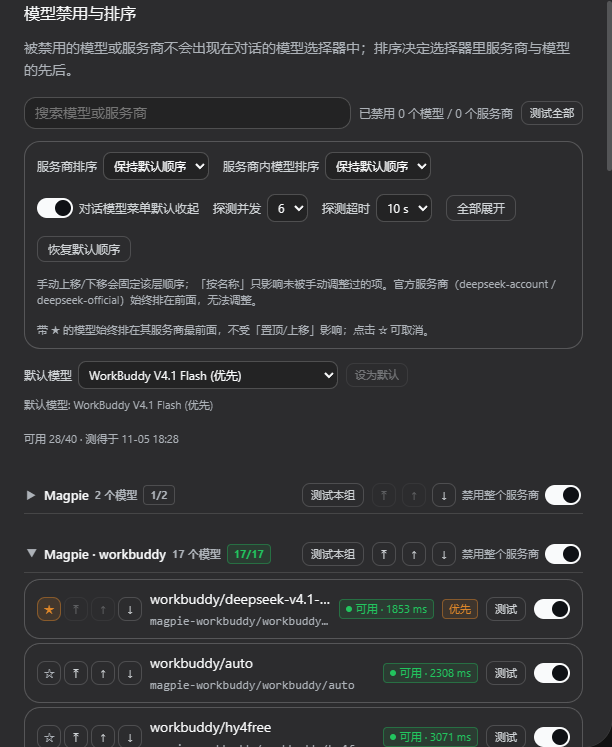
model-guard:probe-results:v1,保留 7 天),刷新页面、开新标签页都还在,不必为了看一眼再测一次;每行悬停可看「测得于 HH:MM」。测试会消耗个位数 token。可用 · 128 ms · 18:26,悬停看完整原因)。agent-default-model 条目——新会话默认用它,重启后仍生效(走 Host 的 agentDefaultModel.saveSelection(),不是另存一份影子配置)。Ctrl/Cmd+K)现在能搜全部会话的正文,命中的用户/助手消息以片段形式列出,不再只是标题与工作区名。见下方「侧边栏全文搜索」。安装后,在 DSH 的 设置 → 模型禁用与排序 中使用。dsh web 与桌面版位置相同;
若某个入口里完全看不到这一页,先按下面「安装 → 先选对 profile」确认插件装进了它实际使用的 profile。
要求 DSH 0.2.x(@deepseek-ai/dsh),Node >=22。
插件只装在哪个 profile,就只对哪个 profile 生效。按你启动 DSH 的方式选目标:
| 启动方式 | 目标 profile | 安装命令 |
|---|---|---|
dsh web(浏览器打开 127.0.0.1:3080) |
web |
dsh plugin --profile web add <路径> |
| 桌面版(Electron) | desktop |
见下「桌面版请装到 desktop」 |
自建 profile(如 tui) |
该 profile 名 | dsh plugin --profile <名字> add <路径> |
⚠️ 装到
web只对dsh web生效。 桌面版里根本不会出现「设置 → 模型禁用与排序」—— 命令执行成功、HMR 也正常,唯独桌面版毫无反应,这时先查 profile 是否装错,而不是查插件。
desktop桌面版用的是保留 profile desktop,目录 $DSH_HOME/profiles/desktop(未设 DSH_HOME 时为 ~/.dsh/profiles/desktop)。
该 profile 由 Electron 应用独占管理,独立 dsh 命令会直接拒绝:
error: profile "desktop" is managed exclusively by the Electron application正确顺序:
profiles/desktop(未初始化时命令会提示 Open DeepSeek Harness Desktop once to initialize its profile, then fully quit it…)。package.json 被占用。dsh 启动器执行——只有它带 manageDesktopProfile 权限,能管理 desktop profile
(其具体路径随安装包而定,本仓库未逐一验证;若它不接受 plugin 子命令,直接用下面的手工做法):dsh plugin --profile desktop add /path/to/dsh-model-guard拿不到桌面版启动器时,等价的手工做法是直接改 profile 清单,改完在该目录跑一次 pnpm install,再重启应用:
// $DSH_HOME/profiles/desktop/package.json
{
  "dependencies": { "@local/dsh-model-guard": "link:/path/to/dsh-model-guard" },
  "dsh": { "profile": { "bundles": [ /* 保留原有项 */, "@local/dsh-model-guard" ] } }
}两处都要写:dependencies 决定能否解析到包,bundles 决定它是否参与组合。
Host 半边注册成功时,探测路由会对空 items 返回 400:
curl -s -X POST http://127.0.0.1:3080/api/model-guard/probe \
  -H 'content-type: application/json' \
  -d '{"items":[]}'
# → {"error":"no-items"}
400 {"error":"no-items"}:Host 半边已注册,路由命中。这是空 items 的预期拒绝,不是故障。404 / 返回 HTML / 连接被拒:该 profile 没装或没组合上——最常见的原因就是装进了别的 profile。405:用了 GET;403 {"error":"cross-origin"}:Origin 与 Host 不一致。3080)。此时以「设置页里出现模型禁用与排序」和日志行
model-guard: probe endpoint listening on /api/model-guard/probe 为准。link: 安装与 peerDependencies WARN用本地路径安装时 pnpm 会写成 link:,并打印:
WARN  Issues with peer dependencies found
└─┬ @local/dsh-model-guard
  ├── ✕ unmet peer @deepseek-ai/cordis
  └── ✕ unmet peer @deepseek-ai/schemastery
这是正常现象,可以忽略。 profile 的 pnpm-workspace.yaml 默认 autoInstallPeers: false,这两个包由 DSH
安装目录在运行时提供;插件声明它们的唯一目的是让 ResolutionRouter.routeLinked() 把裸包名走 interception 路由。
判定安装成功的标准是 package.json 的 dependencies 与 dsh.profile.bundles 两处都出现了本包,不是这条 WARN 是否消失。
若用 link: 方式安装,profile 的 package.json 需要同时出现在两处:
{
  "dependencies": { "@local/dsh-model-guard": "link:/path/to/dsh-model-guard" },
  "dsh": { "profile": { "bundles": [ /* … */, "@local/dsh-model-guard" ] } }
}
dsh plugin add 会把包写进 profile 的 dependencies 与 dsh.profile.bundles,随后 HMR 自动组合。
link:安装必须声明peerDependencies(本包已声明@deepseek-ai/cordis、@deepseek-ai/schemastery)。 DSH 的ResolutionRouter.routeLinked()只对「在祖先node_modules里被声明为 peer」的裸包名走 interception 路由, 否则退回 Node 原生解析、从插件目录向上找不到 DSH 安装目录里的包,直接ERR_MODULE_NOT_FOUND。
dsh-hmr 监视 profile 的 cordis.patch.yml、$DSH_HOME/cordis.patch.yml 与 profile package.json 的 bundles。
前两者按内容比较,所以只 touch 不触发重组合——改内容才会。
全部字段可在设置页编辑,也可直接写进 profile 的 cordis.patch.yml:
- id: model-guard
  config:
    disabledModels: []      # "provider/model",禁用单个模型
    disabledProviders: []   # provider id,禁用整个服务商
    providerOrder: []       # 服务商显示顺序(id 列表)
    modelOrder: []          # 模型显示顺序("provider/model" 列表)
    priorityModels: []      # 优先模型("provider/model" 列表),顺序即优先级
    probeConcurrency: 3     # 探测并发(1–8)
    probeTimeoutMs: 10000   # 单个模型的探测超时(毫秒,1000–60000)
    providerSort: natural   # natural | name
    modelSort: natural      # natural | name
    collapsePickerGroups: true   # 对话模型菜单是否默认收起服务商分组
这些字段都是 volatile(),改动即时生效。
不改动 DSH 已发布的包,而是作为 profile 层 bundle,在 internal/get waterfall 上拦截对 llm 服务的属性读取,
返回一个缓存的 Proxy,覆盖 listModels() 与 listProviders() 做过滤与重排;其余成员原样透传并 bind 回真实实例。
选这两个方法是因为 GUI 目录(buildModelCatalog)与提交校验(modelAvailable → selectModel / requireModel)
都只经它们取目录——过滤一处即可同时挡住「显示」与「选择/提交」,重排一处即可决定选择器顺序。
核心路由不复用该目录,所以本插件是纯减法 + 重排:不新增模型、不改路由,resolveCallConfig() / stream() 仍走原始实例。
对话输入框的模型菜单(conversation.input.model)由官方 dsh-client-ui-model-selection 渲染,组件未导出且安装包只读,因此「默认收起」走纯 DOM 增强:
官方 MenuGroup 的输出带稳定语义钩子(section[data-menu-group]、[data-menu-group-heading]、直接子级 button[role="menuitemradio"]),
增强器只在这些元素上切换属性,收起效果由 CSS 完成,不插入任何节点,也不依赖 hash 过的 class 名。
可用性测试走同源 HTTP 端点 POST /api/model-guard/probe(由 Host 半边在 ctx.webServer 上注册的精确路由,优先于 /api 前缀桥):
curl -X POST http://127.0.0.1:3080/api/model-guard/probe \
  -H 'content-type: application/json' \
  -d '{"items":[{"provider":"magpie","model":"group/wb-v41"}]}'
# → {"results":[{"provider":"magpie","model":"group/wb-v41","ok":true,"latencyMs":1425}],"timeoutMs":20000}{ items: [{provider, model}], concurrency?, timeoutMs? };单次最多 200 个模型;默认超时 10 s、默认并发 3(都可在设置页改,请求体也会被夹到 1000–60000 ms / 1–8)。Origin 的 host 与 Host 一致),跨站返回 403;非 POST 返回 405。llm.prepareCall() → call.stream(),所以凭据、路由、重试策略都是生产路径;
失败时返回 LlmFailure.code(如 UNKNOWN_MODEL、AUTH、RATE_LIMIT)与 message。为什么要单开 HTTP 路由而不是新增 Remote 命名空间:Remote 的命名空间与参数描述由 Typert 代码生成器产出,
第三方插件无法在运行时注册;webServer.register() 是公开的精确路由入口,且精确路由优先命中,不必改动 /api 桥。
curl -s http://127.0.0.1:3080/api/model-guard/default           # → {"provider":"magpie","model":"group/wb-v41"}
curl -s -X POST http://127.0.0.1:3080/api/model-guard/default \
  -H 'content-type: application/json' \
-d '{"provider":"magpie","model":"group/wb-v41"}' # → {"ok":true,...}agentDefaultModel.currentSelection();POST 走 saveSelection() → configEditor → 写回 profile 的
agent-default-model 条目,因此持久化,重启后仍生效。reasoningEffort;换模型则不保留(可能对该模型不合法)。agentDefaultModel 或 configEditor 时返回 501,前端据此显示「当前环境不支持」——不会出现「提示成功但没写」。侧边栏顶部的放大镜(快捷键 Ctrl/Cmd+K)本来就有跨会话搜索,但默认只匹配会话标题与工作区名。
原因是官方把会话索引挂成了 openAt: never(dsh-base / dsh-web-app 的 cordis.patch.yml 里
session-query-sqlite 的 path: ':memory:'),Host 的 sessionQuery 服务因此直接抛
session search is disabled,前端拿不到正文结果。
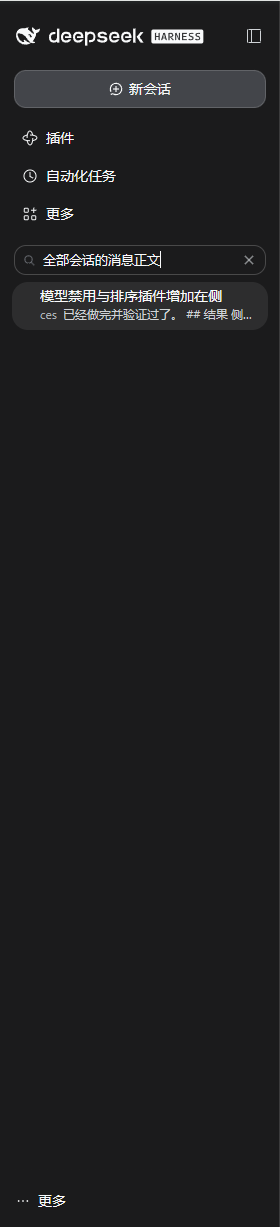
本插件在自己的 bundle patch 层里覆盖同一个条目(bundle 排在官方层之后,后应用的 patch 生效), 把索引开到磁盘上并在首次搜索时建立:
- id: session-query-sqlite
  config:
    path: !!js dshHomePath('cache/session-search.sqlite')
    openAt: first-search
journalMode: wal$DSH_HOME/cache/session-search.sqlite(含 -shm / -wal),权限 0600,可随时删除重建。session-search persistence observation did not stabilize after one retry —— 这是建索引时
活跃会话仍在写入导致快照不稳定,再搜一次即可,不是配置错误。user/message、assistant/message,且 surface: current),不含工具输出与思考内容。snippetChars 截取片段。openAt 改回 never(或删掉这一条 patch),再删掉索引文件。deepseek-account 与 deepseek-official 的顺序无法调整:客户端 orderModelProviders() 无条件把这两个排在最前,
Host 侧怎么排都压不过。页面的排序说明里已写明。session/model-unavailable,需要手动另选一个。internal/get 这个带 internal 前缀的 waterfall,它不是公开契约。DSH 大版本升级后若菜单不再隐藏/顺序不再跟随设置,
说明该事件签名变了。agent-default-model 行决定,设置页的「默认模型」只是调用该服务的 saveSelection(),两者不共用同一份存储。本项目采用 MIT License 开源。
A DSH (DeepSeek Harness) plugin that disables models / providers and customizes the order in which they appear in the model picker.
A disabled model or provider is hidden from the conversation model picker and can neither be selected nor submitted. Ordering decides the sequence of providers in that picker, and of the models inside each provider.
This open-source project is linked to and endorses the LINUX DO community.
model-guard:probe-results:v1, kept for 7 days), so a refresh or a new tab still shows them — no need to re-probe just to look. Hover a row to see "tested at HH:MM". A probe costs a handful of tokens.available · 128 ms · 18:26; hover for the full reason).ok/tested tally next to the title); the sort bar exposes probe concurrency (1–8) and probe timeout (5/10/20/30 s, default 10 s).agent-default-model entry through the Host's agentDefaultModel.saveSelection(), so new sessions use it and it survives restarts — no shadow copy in this plugin.Ctrl/Cmd+K) now searches message bodies across every session, listing matching user/assistant messages with snippets instead of only titles and workspace names. See "Sidebar full-text search" below.After installation, open Settings → Models & ordering in DSH. It lives in the same place in dsh web and in Desktop;
if one of them shows no such page, check "Installation → Pick the right profile first" — the plugin is probably installed
into the other profile.
Requires DSH 0.2.x (@deepseek-ai/dsh) and Node >=22.
The plugin only affects the profile it is installed into. Choose by how you start DSH:
| How you start DSH | Target profile | Command |
|---|---|---|
dsh web (browser at 127.0.0.1:3080) |
web |
dsh plugin --profile web add <path> |
| Desktop (Electron) | desktop |
see "Desktop uses the desktop profile" below |
Your own profile (e.g. tui) |
that profile's name | dsh plugin --profile <name> add <path> |
⚠️ Installing into
webonly affectsdsh web. The Desktop app will show no Settings → Models & ordering at all: the command succeeded and HMR is fine, yet Desktop looks unaffected — check the profile before you debug the plugin.
desktop profileDesktop runs the reserved profile desktop, at $DSH_HOME/profiles/desktop (~/.dsh/profiles/desktop when DSH_HOME
is unset). That profile is owned exclusively by the Electron application, and a standalone dsh binary refuses it:
error: profile "desktop" is managed exclusively by the Electron applicationThe correct order:
profiles/desktop (otherwise the command reports
Open DeepSeek Harness Desktop once to initialize its profile, then fully quit it…).package.json is free.dsh launcher that ships inside the Desktop installation — only it carries the manageDesktopProfile
permission needed to manage the desktop profile (its exact path depends on the installer and is not verified here;
if it does not accept the plugin subcommand, use the manual route below):dsh plugin --profile desktop add /path/to/dsh-model-guardIf that launcher is not reachable, the equivalent manual route is to edit the profile manifest, run pnpm install in
that directory, and restart the app:
// $DSH_HOME/profiles/desktop/package.json
{
  "dependencies": { "@local/dsh-model-guard": "link:/path/to/dsh-model-guard" },
  "dsh": { "profile": { "bundles": [ /* keep existing entries */, "@local/dsh-model-guard" ] } }
}
Both entries matter: dependencies makes the package resolvable, bundles makes it part of composition.
Once the Host half is registered, the probe route answers empty items with 400:
curl -s -X POST http://127.0.0.1:3080/api/model-guard/probe \
  -H 'content-type: application/json' \
  -d '{"items":[]}'
# → {"error":"no-items"}
400 {"error":"no-items"}: the Host half is registered and the route matched. That is the expected rejection of an
empty request, not a failure.404 / HTML / connection refused: this profile has not installed or composed the plugin — installing into a different
profile is the usual cause.405: you used GET; 403 {"error":"cross-origin"}: Origin and Host disagree.3080). In that case go by "the settings page shows Models &
ordering" and the log line model-guard: probe endpoint listening on /api/model-guard/probe.link: installs and the peerDependencies WARNA local-path install becomes a link: dependency and pnpm prints:
WARN  Issues with peer dependencies found
└─┬ @local/dsh-model-guard
  ├── ✕ unmet peer @deepseek-ai/cordis
  └── ✕ unmet peer @deepseek-ai/schemastery
This is normal and safe to ignore. The profile's pnpm-workspace.yaml sets autoInstallPeers: false, and both packages
are supplied at runtime by the DSH installation; declaring them only makes ResolutionRouter.routeLinked() route the bare
names through interception. Judge success by seeing the package in both dependencies and dsh.profile.bundles of the
profile's package.json, not by whether this WARN disappears.
For a link: install, the profile's package.json must list the package in both places:
{
  "dependencies": { "@local/dsh-model-guard": "link:/path/to/dsh-model-guard" },
  "dsh": { "profile": { "bundles": [ /* … */, "@local/dsh-model-guard" ] } }
}
dsh plugin add writes the package into the profile's dependencies and dsh.profile.bundles, after which HMR composes it automatically.
A
link:install must declarepeerDependencies(this package declares@deepseek-ai/cordisand@deepseek-ai/schemastery). DSH'sResolutionRouter.routeLinked()only routes bare package names through interception when the ancestornode_modulesdeclares them as a peer; otherwise resolution falls back to native Node lookup, which cannot find the packages inside the DSH installation directory when walking up from the plugin directory, resulting inERR_MODULE_NOT_FOUND.
dsh-hmr watches the profile's cordis.patch.yml, $DSH_HOME/cordis.patch.yml, and the bundles field of the profile's package.json.
The first two are compared by content, so a bare touch does not trigger recomposition — the content must change.
Every field is editable in the settings page, or directly in the profile's cordis.patch.yml:
- id: model-guard
  config:
    disabledModels: []      # "provider/model" — disable a single model
    disabledProviders: []   # provider id — disable a whole provider
    providerOrder: []       # provider display order (list of ids)
    modelOrder: []          # model display order (list of "provider/model")
    providerSort: natural   # natural | name
    modelSort: natural      # natural | name
    collapsePickerGroups: true   # collapse provider groups in the chat model menu
All of these fields are volatile(), so changes apply immediately.
Rather than modifying the published DSH packages, this plugin ships as a profile-layer bundle that intercepts property reads of
the llm service on the internal/get waterfall. It returns a cached Proxy overriding listModels() and listProviders()
to filter and reorder; every other member is passed through and bound back to the real instance.
These two methods are the interception points because both the GUI catalog (buildModelCatalog) and the submission check
(modelAvailable → selectModel / requireModel) read the catalog only through them — filtering in one place covers both
"display" and "select/submit", and reordering in one place decides the picker's order. Core routing does not reuse that catalog,
so this plugin is a pure subtraction + reordering: it adds no models, changes no routes, and resolveCallConfig() / stream()
still go through the original instance.
The composer's model menu (conversation.input.model) is rendered by the official dsh-client-ui-model-selection, whose component is not
exported and whose package is read-only, so "collapsed by default" is implemented as a pure DOM enhancement: the official MenuGroup
output carries stable semantic hooks (section[data-menu-group], [data-menu-group-heading], direct-child button[role="menuitemradio"]),
and the enhancer only toggles attributes on those elements — collapsing is done in CSS, no nodes are inserted and no hashed class names are used.
The magnifier at the top of the sidebar (Ctrl/Cmd+K) already searched across sessions, but by default it only matched
session titles and workspace names. The reason is that upstream wires the session index with openAt: never
(session-query-sqlite with path: ':memory:' in the cordis.patch.yml of dsh-base / dsh-web-app), so the Host's
sessionQuery service throws session search is disabled and the client never gets message content back.
This plugin overrides that same entry in its own bundle patch layer (the bundle sorts after the official layers, so the later patch wins), putting the index on disk and building it on the first search:
- id: session-query-sqlite
  config:
    path: !!js dshHomePath('cache/session-search.sqlite')
    openAt: first-search
journalMode: wal$DSH_HOME/cache/session-search.sqlite (plus -shm / -wal), mode 0600, safe to delete and rebuild.session-search persistence observation did not stabilize after one retry — the active session keeps writing, so two
persistence snapshots disagree; search again and it succeeds. It is not a configuration error.user/message, assistant/message, surface: current); tool output and reasoning are not.snippetChars.openAt back to never (or drop the patch entry) and delete the index file.deepseek-account and deepseek-official cannot be changed: the client's orderModelProviders() unconditionally
puts those two first, and no Host-side ordering can override it. The settings page states this as well.session/model-unavailable is only raised when you send a message, so you need to pick another model manually.internal/get waterfall (note the internal prefix), which is not a public contract. If a major DSH upgrade
leaves the menu unfiltered or the order no longer following the settings, that event's signature has changed.agent-default-model row).Released under the MIT License.
CLASSIFICATION EVIDENCE
系统优先读取 GitHub Topics,再与站内分类词典和词根规则比对。当前命中: deepseek-harness。
morluto
Reverse engineer anything with agents, from app behavior down to native binaries.

deepseek-ai
DeepSeek Harness: Everything is a Plugin.

nexu-io
The 1st Collaborative AI Design Agent Workspace. Local-first and open source. Create motion, prototypes, websites, apps, dashboards, presentations, images, and videos with your team and AI agents. Share work, exchange feedback, and iterate together in one workspace.