


Agent 与会话
插件

nuwa-skill
alchaincyf
你想蒸馏的下一个员工,何必是同事。蒸馏任何人的思维方式——心智模型、决策启发式、表达DNA。Distill how anyone thinks.
PROJECT TOPICS
INSTALL REFERENCE
dsh plugin --profile web add github:cgartlab/dsh-tac
该命令指向仓库当前默认分支;尚无绑定当前 commit 的完整验证结果。
PROJECT README


English | 中文
A DeepSeek Harness client plugin that turns the harness into a project-aware workspace: a global project/session board in the native right sidebar, a floating session HUD, keyboard-first session navigation, hold-to-scroll conversation reading, and desktop-class task notifications.
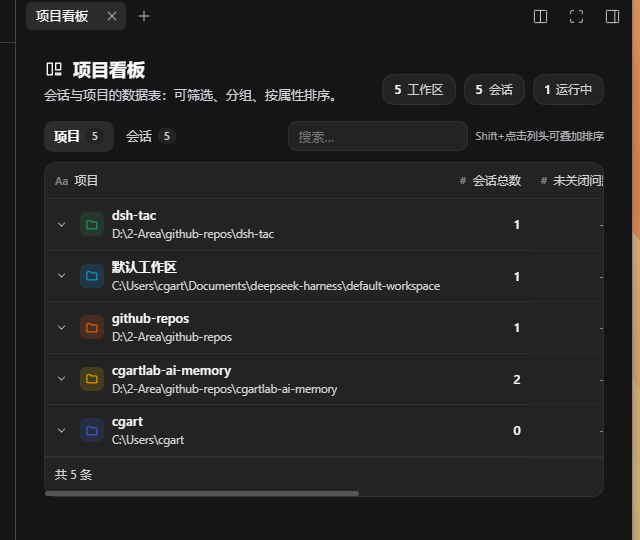
| Floating session list | Command palette (sessions / projects / settings) |
|---|---|
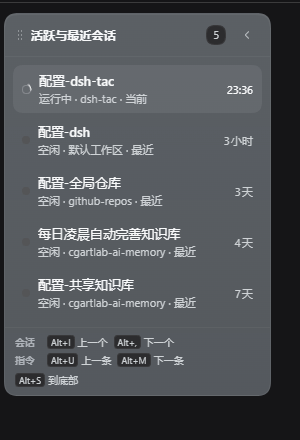 |
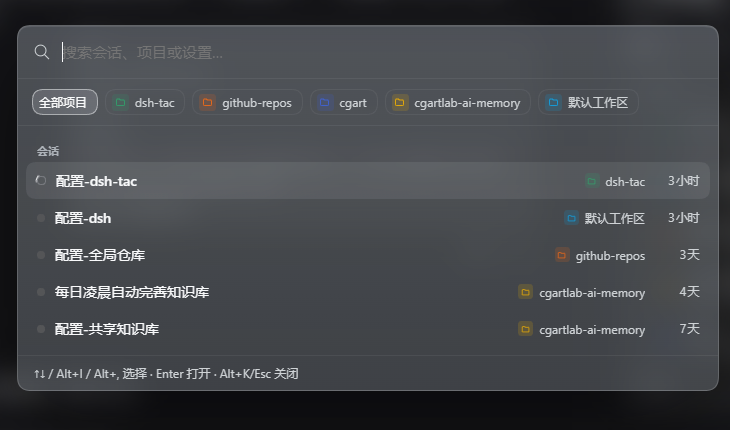 |
⌥+I / ⌥+, cycle in
exactly that order.⌥+K) — fuzzy search over sessions and projects, and now over
settings too (the input prompts for "sessions, projects or settings"). With a keyword,
results are split into three labelled groups: Settings (the host's own settings
sections, discovered live), Project Board settings (the six sections of this plugin's
settings page — Shortcuts, Top function buttons, Interface and behavior, GitHub data
source, Logs & diagnostics, Data) and Sessions (the original results). Setting rows
carry their own icon and group headers, and ⌥+I / ⌥+, / ↑ / ↓ move continuously
across all groups; Enter opens the session or jumps to the setting. An empty query still
shows only the familiar session list, and the project filter chips narrow sessions only —
settings are global. Selecting a setting opens the host Settings page at that section;
plugin settings also scroll to their section and briefly highlight it. If Settings opens
but the section cannot be preselected, an info toast says so; if it cannot be opened at
all, a warn toast points you to the sidebar — a partial success is never silent. Sections
the host or other plugins add later appear in search without a plugin update.Shift+Enter restores the highlighted archived row (the footer
hint appears only when the selection is archived). The filter is an explicit request, so it
still shows archived rows even when "include archived in search" is switched off. Esc
clears the filters (project and archived together) before a second press closes the panel.⌥+M down to the end activates the composer so a reply can be typed immediately.{en, zh} object is rendered as text instead of [object Object].⌥+D dialog can archive, delete (where the host exposes it),
and stop a running turn (remote.session.cancel); queued messages survive a stop.Every shortcut is configurable in Settings → 项目看板设置. Defaults:
On macOS these use ⌥ (Option), ⌃ (Control), ⇧ (Shift) and ⌘ (Command); ⌥ is the
physical Option key. On Windows and Linux the same combinations are shown as Alt+… /
Meta+…. Stored bindings stay platform-neutral, so saved shortcuts need no migration.
| Shortcut | Action |
|---|---|
⌥+K |
Open / close the command palette (sessions, projects and settings) — inside, ⌥+I / ⌥+, / ↑ / ↓ move the selection across all groups, Enter opens the session or jumps to the setting, Shift+Enter restores a highlighted archived row |
⌥+I / ⌥+, |
Previous / next session |
⌥+U / ⌥+M |
Previous / next user instruction (tap to jump, hold to scroll) |
⌥+S |
Scroll to bottom and focus the composer |
⌥+D |
Session actions dialog (archive / stop a running turn / delete where the host exposes it) |
⌥+N / ⌥+B / ⌥+V |
Board at narrow / medium / fullscreen. Any of them closes an open board; a closed board opens at the size you pressed |
⌥+W |
Show / hide the native left sidebar; leaves a fullscreen board first |
⌥+R |
Rename the current session |
⌥+E |
Collapse / expand the floating session list |
⌥+Enter |
Steer the earliest queued message into the running turn |
While the command palette is open, window-level keys (board / left sidebar / floating list / rename / session menu) dismiss it and then act; conversation-level keys (steer, hold-scroll, scroll-to-bottom, session cycle) stand down so typing is never interrupted.
dsh-client-ui-sidebar, dsh-client-ui-workspace, and dsh-client-ui-session.Verified against: DSH 0.2.2-rc.3 (desktop app on macOS / Windows, and the web UI).
0.6.1 adapts to rc.3's frame-level right sidebar (layout.openRightbar / closeRightbar) and
its schedule records (target.sessionId); both older and newer shapes are read, so rc.1 hosts
keep working through the fallback paths. DSH is in developer preview; the plugin only uses
public client services, but an upstream breaking change may still need a follow-up release —
please include your DSH version in issues.
You need two things: DeepSeek Harness (DSH) already installed, and access to GitHub.
No Node setup, no npm install — the plugin has zero runtime dependencies and React comes from
DSH itself.
No terminal needed:
dsh-tac (a GitHub URL or a local directory also works);It then shows up under "installed plugins" with its own on/off switch. The installer registers the plugin in the profile you are running — there is no config file to edit by hand. Now check After installing: what you should see and If nothing appears below; both sections apply to either install option.
First, find the dsh command. The desktop app ships its own CLI and does not put it on
PATH. It lives here:
| Platform | Path |
|---|---|
| Windows | %LOCALAPPDATA%\Programs\DeepSeek Harness\resources\runtime\cli\bin\dsh.cmd |
| macOS | /Applications/DeepSeek Harness.app/Contents/Resources/runtime/cli/bin/dsh |
Add it to PATH if you want plain dsh, otherwise use the full path. On macOS, without changing
PATH, the whole command looks like this:
"/Applications/DeepSeek Harness.app/Contents/Resources/runtime/cli/bin/dsh" plugin --profile desktop add dsh-tacOn Windows PowerShell, replace dsh with the full .cmd path:
& "$env:LOCALAPPDATA\Programs\DeepSeek Harness\resources\runtime\cli\bin\dsh.cmd" plugin --profile desktop add dsh-tacThen confirm your profile name. That is the configuration you actually run; look at what exists:
ls ~/.dsh/profiles/The desktop app is usually desktop; npx @deepseek-ai/dsh web creates web, and you may have
other profiles of your own. Use the one DSH is actually running. Do not guess this —
installing into the wrong profile leaves the plugin installed but completely inactive.
Install it (replace desktop with the name you just saw):
dsh plugin --profile desktop add dsh-tacThat installs from npm (dsh plugin forwards add <pkg> to pnpm inside that profile). To track
the latest commit on main instead, use the source form:
dsh plugin --profile desktop add github:cgartlab/dsh-tacBoth commands register the plugin in that profile's dsh.profile.bundles automatically — no
hand-editing the JSON. Then restart DSH.
Both install options lead to the same result. After a full restart you should immediately see:
Alt+N / Alt+B / Alt+V
(⌥+N / ⌥+B / ⌥+V on macOS) to open it at narrow / medium / fullscreen size
(board screenshot); Alt+K (⌥+K) opens the
command palette.This applies to both install options. Check in this order:
ls ~/.dsh/profiles/ again and confirm the name you
passed to --profile is the profile DSH actually runs. dsh-tac should be listed in
dsh.profile.bundles of ~/.dsh/profiles/<name>/package.json (dsh plugin add and the GUI
installer write it automatically — only add it by hand if it is genuinely missing). The
cordis.yml in the same folder is generated by DSH; do not edit it by hand.dsh-tac is enabled.⌘+Q, on Windows
quit from the tray icon, then start DSH again. Client bundles are only loaded at startup.@local/dsh-project-board / @local/dsh-tac. If you installed one of those long ago, check
that the profile has no leftover old entry — an old alias does not load the current
dsh-tac package.plugin ready entry.At the bottom of the DSH sidebar, ⋯ More → Settings (or Ctrl+,), then pick
"项目看板设置" in the left-hand list. Everything is there: all shortcuts, floating-list
behaviour, the board's default view, the GitHub data source and the log level.
Use this when you want your local checkout, not the published one:
plugin_manager install_bundle target="<this repository>"The package is dsh-tac and inserts itself as the dsh-tac loader entry.
package.json exposes dsh.bundle.patch and dsh.client; the plugin injects into
conversation.header.leading, conversation.session.header.utilities,
conversation.composer.dock, shell.overlay, and settings.section.
The plugin ships as a client bundle, so after editing src/ rebuild and hot-reload:
npm install        # first time only
npm run build      # src/ → client.js + index.js
Then disable and re-enable the plugin under Settings → Plugins, or press Ctrl+R.
The built artifacts are committed; npm run check verifies they match the sources.
dsh plugin --profile desktop remove dsh-tacOr disable dsh-tac under Settings → Plugins. The plugin writes no DSH data; what survives
an uninstall is only its own settings and logs (kept in browser localStorage).
The plugin is written in TypeScript under src/ and compiled into a single client bundle
(client.js) by esbuild. The bundle is loaded through the harness client module loader, uses
only public client services (ctx.slots, ctx.sidebarRight, ctx.layout,
ctx.get('workspaces'), session status stores) and takes React from the host. It ships with no
runtime dependencies of its own; host-half index.js is intentionally a no-op.
This is a client-half plugin: the required apply(ctx) entry is exported the way a DSH
client plugin specifies it — window.__ModuleLoader__.load({ id, factory }), whose factory
returns { inject, apply } (src/index.ts). The top-level index.js is deliberately empty
because everything runs in the browser, so a reviewer looking for apply should read
src/index.ts / client.js rather than index.js.
src/index.ts — entry the harness injects; binds the host React and calls applysrc/apply.ts — dictionaries, styles, stores, native board/sidebar actions, slot wiringsrc/features/ — board, floating list, palette + shortcut dispatcher, notifications, dialogs, settings page, chat scrollingsrc/core/ — settings/migration, logging, combos, stores, DOM probes, schedule + preset sources, palette settings catalogsrc/i18n/ — zh/en dictionaries (key parity is a compile-time error)client.js, index.js — generated artifacts (never edit by hand)cordis.patch.yml — bundle insertionlocale/ — zh/en trailer stringsscripts/ — build plus manifest, syntax and i18n checks used locally and in CIdocs/architecture.md — slot map, state, keyboard and notification internalsnpm ci # toolchain: typescript + esbuild
npm run typecheck # tsc --noEmit (strict)
npm run build # src/ -> client.js + index.js
npm run check # typecheck, manifest/exports/syntax, i18n parity
npm test # bundle + shortcut regression suiteclient.js and index.js are generated; CI rebuilds them and fails if the committed
artifacts differ from src/. All checks run on every push and pull request
(.github/workflows/check.yml).
Everything a marketplace submission asks for, and where each field lives in this repo:
| Field | Value / where to find it |
|---|---|
| One-line value | A keyboard-first project board, floating session HUD and command palette for DeepSeek Harness — see every session and project at a glance. |
| Category | DSH client plugin · productivity / project management (GitHub topic dsh-plugin; package.json keywords). |
| Install command | dsh plugin --profile <profile> add dsh-tac, or the in-app "+ Add plugin" flow. Full steps in Install above. |
| Compatibility | Verified against DSH 0.2.2-rc.1 (desktop on macOS / Windows, and the web UI); Node 18+ is only needed for repository checks. See Requirements. |
| License | CC-BY-NC-SA-4.0 — package.json license, the badge at the top, and License below. |
| Screenshots | docs/screenshots/board.png, hud.png, palette.png — all embedded near the top of this README; capture and freshness rules live in docs/screenshots.md and are enforced by npm run check. |
| Permissions & data | See Permissions & data above: session list/status only, optional GitHub API and system notifications, no conversation content and no upload. |
Licensed under Creative Commons Attribution-NonCommercial-ShareAlike 4.0 International, the same license as cgartlab.com.
Copyright (c) 2025-2026 CGArtLab.
CLASSIFICATION EVIDENCE
系统优先读取 GitHub Topics,再与站内分类词典和词根规则比对。当前命中: session-management。
alchaincyf
你想蒸馏的下一个员工,何必是同事。蒸馏任何人的思维方式——心智模型、决策启发式、表达DNA。Distill how anyone thinks.

freestylefly
Prompt as Code | GPT Image 2 / 2.5 提示词与案例库,530+ 个案例、20+ 套工业级模板与可复用 Skills,新增 2.5 同提示词对比专区,附完整提示词与生成记录,持续更新。

titanwings
Distilly — Distill how they think into reusable Skills for any Agent or Bot. Formerly Colleague Skill(原同事 Skill).