

模型与 MCP
待识别

rea
morluto
Reverse engineer anything with agents, from app behavior down to native binaries.
PROJECT TOPICS
INSTALL REFERENCE
dsh plugin --profile web add github:callmenightmare/dsh-work-log
该命令指向仓库当前默认分支;尚无绑定当前 commit 的完整验证结果。
PROJECT README


A daily work log for DeepSeek Harness — one npm-style bundle with two surfaces and one data source.
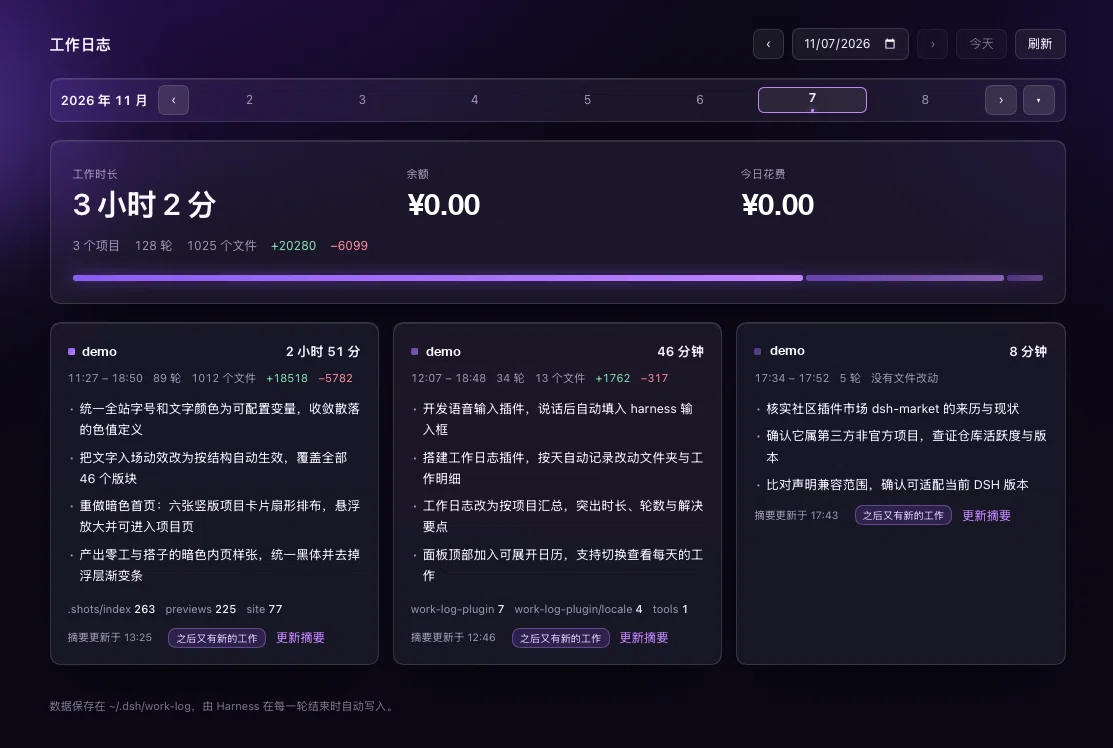
shell.overlay): always visible in the top-right corner, draggable, shows today's work time and current balance, with a jump button to the panel. It keeps showing while you switch Sessions and panels.Report panel — a day of work grouped by project: total time, balance, today's spend, and what each project solved.
Floating pill — always-on HUD, draggable, shows today's work time and balance; › opens the panel.

There are a few work-log plugins for DSH. This one is built around three things the others don't do:
› jumps to the full report.非官方插件。Not affiliated with DeepSeek.
一个工作日志插件。整页面板看统计和历史,右上角胶囊随时看今天的时长和余额。两个形态读同一个接口,数据永远一致。
和其他 DSH 工作日志插件的区别:能看到余额与今日花费、摘要由模型按项目写(不是对话原文)、有一个切会话也不消失的浮窗。
work_log 工具(read / record / summarize)git clone https://github.com/callmenightmare/dsh-work-log.git然后在 Harness 里把这个目录装成 bundle(把路径换成你 clone 下来的绝对路径):
install_bundle /absolute/path/to/dsh-work-log或者打开侧边栏「插件」→ 添加 → 选择本地目录。安装后刷新页面。
要求:DeepSeek Harness >= 0.2.1-rc.1(Web / Desktop profile)。
~/.dsh/work-log/YYYY-MM-DD.json一天一个文件,可读、可备份、可手改。插件被卸载后这些文件仍然保留。
127.0.0.1 上的路由给页面读,不发往任何第三方deepseekAccount.getBalance())读取,不保存凭证127.0.0.1)A work log plugin with two surfaces over one data layer:
It records one entry per conversation turn (request, closing reply, changed folders, file/line counts, start and end), groups entries by working directory into projects, and computes duration as the union of active intervals.
git clone https://github.com/callmenightmare/dsh-work-log.gitThen install that directory as a bundle in your profile:
install_bundle /absolute/path/to/dsh-work-logRequires DeepSeek Harness >= 0.2.1-rc.1.
Everything stays local: ~/.dsh/work-log/YYYY-MM-DD.json, served to the page over 127.0.0.1. The balance is read through the host's own account service; no credentials are stored. Summary generation spends your own model quota (one call per project per day).
node test/host.test.mjsThe test runs the host half against a fake Cordis context: event folding, durations, persistence, the three HTTP routes, model summarization (with a stub stream), and the agent tool.
See CHANGELOG.md.
MIT
CLASSIFICATION EVIDENCE
系统优先读取 GitHub Topics,再与站内分类词典和词根规则比对。当前命中: deepseek-harness。
morluto
Reverse engineer anything with agents, from app behavior down to native binaries.

deepseek-ai
DeepSeek Harness: Everything is a Plugin.

nexu-io
The 1st Collaborative AI Design Agent Workspace. Local-first and open source. Create motion, prototypes, websites, apps, dashboards, presentations, images, and videos with your team and AI agents. Share work, exchange feedback, and iterate together in one workspace.