
其他
完整应用

deepseek-harness
deepseek-ai
DeepSeek Harness: Everything is a Plugin.
PROJECT TOPICS
PROJECT README

Figure preparation assisted by ChatGPT.




https://github.com/user-attachments/assets/8a098d95-8d24-44bd-8435-67e52450c524
dsh-medomni is a preview implementation of the MedOmni strategy for medical image analysis. It gives a language-model agent a modality-specific set of tools so it can select an appropriate workflow from a natural-language request:
Data and network disclosure: Model inference runs locally on the configured machine. The plugin connects to Hugging Face to download model checkpoints and uses HF_TOKEN only for gated model access; the token is read from the process environment and is not stored by the plugin. Input files and generated previews are read from or written to the local filesystem and are retained according to the surrounding DSH session. The behavior of the selected DSH language-model provider is controlled by DSH and its provider configuration, not by this plugin.
Prepare these items before installing the plugin:
dsh installation.uv, git, and Python 3 available on PATH. uv creates the isolated environment; git is used by BiomedParse on its first use.microsoft/maira-2), BiomedParse (microsoft/BiomedParse), and MedGemma. BiomedCLIP is public.hf auth login or export it with export HF_TOKEN=hf_....No checkpoint needs to be downloaded manually. The required model downloads automatically when its tool is first used. Optional prefetch commands are documented below.
Follow these steps in order.
Confirm that the required commands are available:
python3 --version
uv --version
git --version
If uv is missing, install it using the official uv instructions. Install Python 3 and Git using your operating system's package manager if needed.
After accepting the gated-model terms listed in Requirements, authenticate in the same shell or user account that will run DSH:
hf auth loginAlternatively:
export HF_TOKEN=hf_...dsh plugin --profile web add github:bowang-lab/dsh-medomniThis adds dsh-medomni to your profile's package.json and installs cordis.patch.yml (mounting the plugin under id dsh-medomni) automatically. Restart dsh (or your DSH Desktop/web session) afterward so the new bundle loads.
Run the setup command from the profile where the plugin was installed:
cd ~/.dsh/profiles/web
./node_modules/.bin/dsh-medomni setup
This creates the shared Python environment and installs common dependencies. It does not install every model or the BiomedParse extras. Those remain lazy-loaded so users only download what they use.
[!NOTE] Optional: prefetch checkpoints. Normal use downloads each required checkpoint automatically on first use. Run one of the following only if you want to download a checkpoint in advance, after authenticating with Hugging Face:
hf download microsoft/maira-2
hf download microsoft/BiomedParse biomedparse_v1.pt
hf download microsoft/BiomedCLIP-PubMedBERT_256-vit_base_patch16_224
hf download google/medgemma-1.5-4b-itNothing needs to be pre-built or downloaded first. Ask your agent something like:
"Generate a radiology report for this chest X-ray:
/path/to/chest_xray.png"
and it picks the matching tool itself. The first call for a model/dependency group may still download its checkpoint; BiomedParse also clones its repo and builds detectron2 on first use. Later calls reuse the downloaded files. Run dsh-medomni doctor any time to see setup progress (see Troubleshooting).
Tools that take a 2D image (X-ray, ultrasound, retinal, and the classification/report tools) also accept a pasted image instead of a filesystem path — but only when the selected provider route declares image input.
[!IMPORTANT] Before pasting an image, open the model selector in the lower-right corner of the chat composer and choose the entry marked "+ dsh-medomni Vision".
DSH rejects a pasted image on a text-only provider route before any plugin sees it. dsh-medomni therefore adds an image-enabled route for 2D medical images, which appears as "DeepSeek + dsh-medomni Vision" in the picker. Select this route (as shown in the below image), then paste normally.
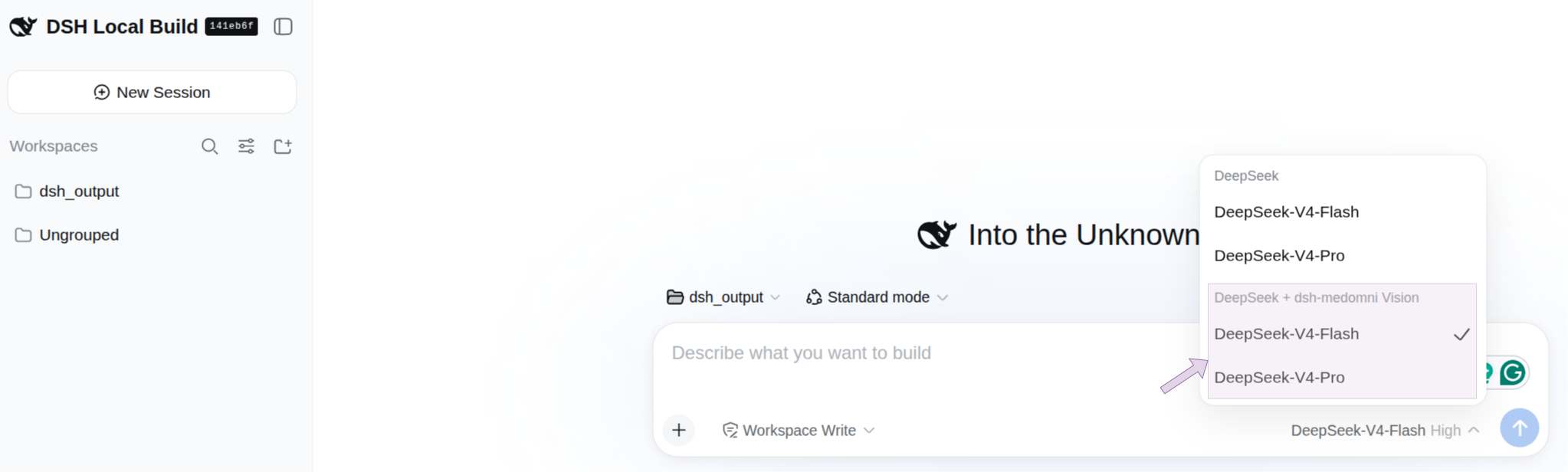
Select the provider entry marked + dsh-medomni Vision before pasting a 2D medical image.
The image-enabled route uses the same provider, model, and language model as the original route; it is not a second model. Its adapter changes the pasted image into an attachment identifier that the language model can pass to a dsh-medomni tool. The tool resolves that identifier to the image bytes and runs the selected medical-imaging model.
[!IMPORTANT] 3D CT and MRI inputs must be provided as filesystem paths to a NIfTI volume or DICOM directory. Pasted-image input is supported only for the plugin's 2D image tools; it does not apply to CT/MRI volume tools.
Set wrapProviders: false in the plugin config to disable these image-enabled routes (see Configure).
3D CT/MRI — filesystem path required:
Analyze this 3D scan: /path/to/scan.nii.gzYou can also provide a DICOM directory path for tools that support DICOM input.
2D image — filesystem path or pasted image:
Analyze this chest X-ray: /path/to/chest_xray.pngFor a pasted X-ray, ultrasound, or retinal image, select the + dsh-medomni Vision route, paste the image directly into the composer, and ask your question in the same message.

New tools should follow the existing pattern: a Python script under skills/<modality>/, a SCRIPTS entry plus defineTool registration in index.js, explicit agent-facing instructions in the tool description, optional preview attachment support, and package/test updates.
See Adding a New Tool for the full step-by-step checklist and examples.
dsh-medomni registers these modality workflows as model-invocable DSH skills. The agent can load the relevant skill when a request requires modality-specific tool sequencing; the existing tool descriptions remain the direct tool-selection contract.
- id: dsh-medomni
  disabled: true
Set it back to false (or remove the line) to re-enable. Unloading removes the tools, the image-enabled routes, and the settings surface; anything already written to the session workspace remains.
Nothing is required — the plugin defaults to the skills/ directory shipped inside this package. Override only if you want to point at a different copy of these scripts, in your profile's cordis.patch.yml:
- upsert:
    - id: dsh-medomni
      config:
        skillsDir: /path/to/other/skills   # optional, default: this package's own skills/
        # pythonBin: python3               # optional, default "python3"
        # timeoutMs: 1800000                # optional, default 30 minutes
        # wrapProviders: true              # optional, default true — adds image-enabled
        #                                  #   "<provider>-dsh-medomni" routes
# excludedProviders: [] # optional — provider ids never wrappeddsh-medomni doctor checks this machine's setup without calling any model — whether uv/git/python3 are on PATH, whether the shared venv exists, and how far BiomedParse's one-time setup has progressed:
cd ~/.dsh/profiles/web
./node_modules/.bin/dsh-medomni doctor
or, against a local checkout of this repo directly:
node /path/to/dsh-medomni/lib/doctor-cli.jsskills/: /path/to/dsh-medomni/skills
✓ uv — uv 0.10.7
✓ git — git version 2.34.1
✓ python3 — Python 3.12.12
✓ shared venv
torch pin: torch==2.10.0
torch 2.10.0+cu128, CUDA available: true
✓ BiomedParse repo cloned
✓ BiomedParse extra dependencies installed
✓ detectron2 built
✓ BiomedParse weights downloaded — 1.7GBA ✗ line names exactly what's missing and why it matters. An unchecked BiomedParse line is not itself an error — that stage only runs on a _biomedparse tool's first call — but is the first place to look if such a call fails. Pass --skills-dir <path> if your profile overrides the plugin's default skillsDir.
index.js, uses the standard execution path, returns structured JSON, and bootstraps an isolated Python environment before importing model dependencies.torch/transformers from whatever ambient Python environment happens to be active, which can silently conflict with a pinned range such as MAIRA-2's transformers>=4.48,<4.52.If you want to add tools back in this style, follow Adding a New Tool: a SCRIPTS entry pointing at a script under skills/<modality>/, a matching defineTool registration whose execute shells out to it and parses its JSON stdout, explicit agent-facing tool instructions, and skills/_bootstrap.py's bootstrap at the top of the script.
CLASSIFICATION EVIDENCE
系统优先读取 GitHub Topics,再与站内分类词典和词根规则比对。当前命中: 无有效分类标签。
deepseek-ai
DeepSeek Harness: Everything is a Plugin.

anywhere-labs
为 DeepSeek Harness (DSH) 插件生态打造的现代化桌面端解决方案。万物皆「插件」,桌面本身也是「插件」。

awesome-dsh-plugin
A curated list of plugins for DeepSeek Harness (dsh) · DeepSeek Harness 插件精选列表