
模型与 MCP
待识别

rea
morluto
Reverse engineer anything with agents, from app behavior down to native binaries.
PROJECT TOPICS
INSTALL REFERENCE
dsh plugin --profile web add github:bosinHU/dsh-skill-editor
该命令指向仓库当前默认分支;尚无绑定当前 commit 的完整验证结果。
PROJECT README




在 dsh Web 设置页直接编辑 skill 的 SKILL.md(简介 + 正文),保存即写回磁盘、无需重启。一个独立、轻量、纯 node:fs 实现的 dsh 插件。
本项目所有代码由dsh完成,本人完全不会编程
设置 → 技能编辑器,列出所有技能,点开即可编辑。~/.dsh/skills、~/.agents/skills、工作区 .dsh/skills):可编辑保存。SKILL.md,技能热加载,刷新即生效。node:fs 直接操作明文文件,不依赖任何 skill 插件内部实现,升级不失效。# 从 npm 安装(推荐,与 1024 Store 同源)
dsh plugin --profile web add dsh-skill-editor
# 或直接从 GitHub 仓库安装
dsh plugin --profile web add https://github.com/bosinHU/dsh-skill-editornpm 包:dsh-skill-editor@0.1.0(MIT)
本插件在
dsh.client.platform: web下自动注入,无需手动改cordis.patch.yml。
安装后重启 web 服务(dsh --profile web),刷新页面,设置页即出现「技能编辑器」。
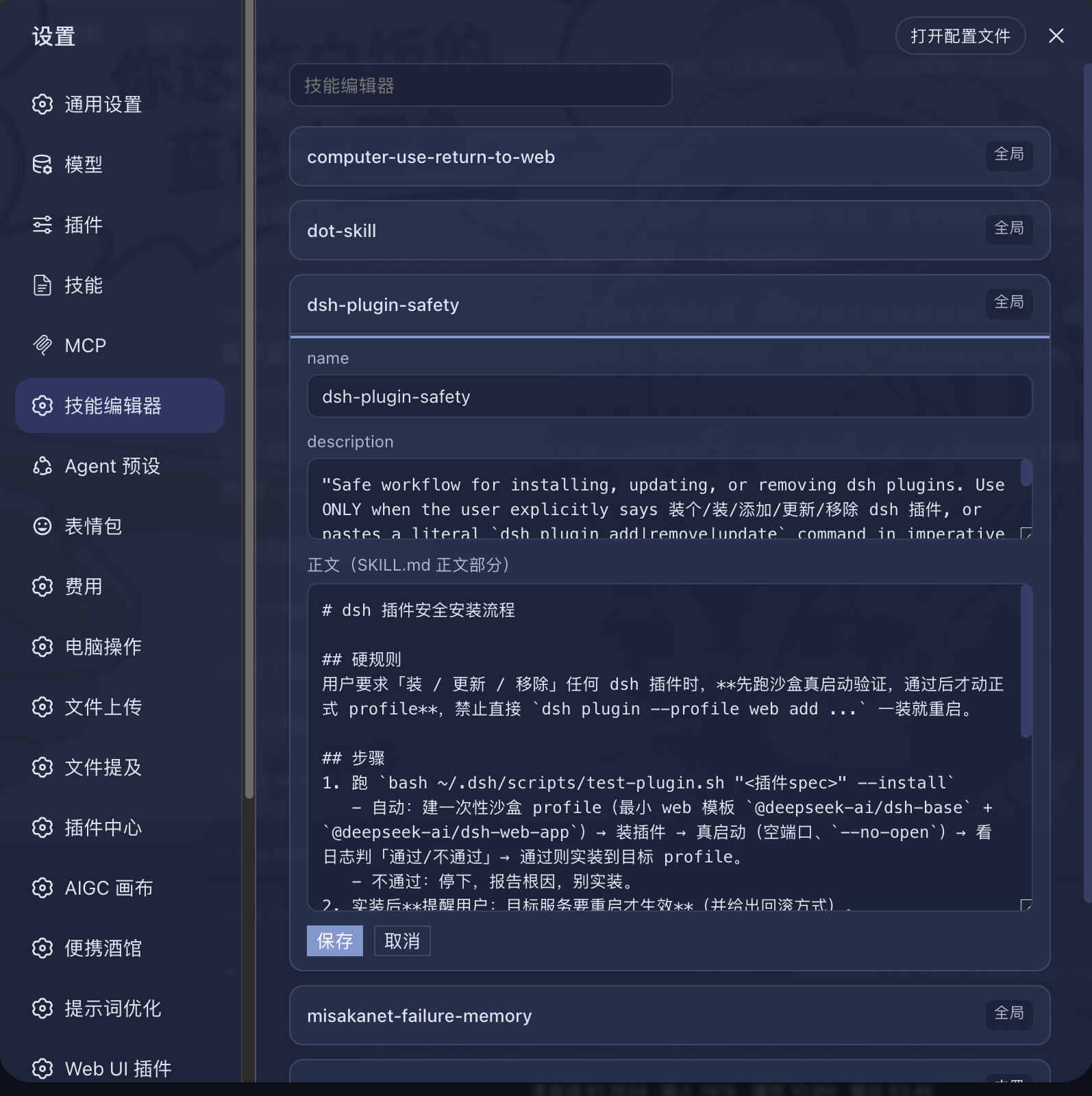
description 或正文(SKILL.md 中 --- 分隔线之后的部分)。图为 dsh Web 设置页「技能编辑器」的真实界面:左侧为设置导航,右侧列出全部技能(
全局/内置),展开后可编辑name、description与正文(SKILL.md)。
dsh-skill-editor/
├── package.json        # 包声明(dsh.client / dsh.bundle.patch)
├── cordis.patch.yml    # bundle patch(注册 host 插件)
├── lib/
│   ├── index.js        # host:skillEditor 远程服务(list/content/saveContent)
│   └── client.js       # client:设置页「技能编辑器」UI
├── README.md
└── LICENSElib/index.js 的 MANIFEST 中,每个参数都带 codec 字段(新版 typert 强制要求):name / sessionId)用 codec: { mode: "src-json" };payload)用 codec: { mode: "strict", typeSymbol: "...", schema }。apply(ctx) 里显式调用 ctx.typert.register(MANIFEST),否则前端 remote.skillEditor 连不上后端。Q: 保存后要重启 dsh 吗? 不需要,技能是热加载的,刷新页面即可生效。
Q: 系统/内置技能为什么不能改?
防止误改内置技能导致 dsh 异常。如需修改,请在本地 ~/.dsh/skills 下新建同名技能,或改用本地副本。
所有代码内容由 dsh 自主完成。
CLASSIFICATION EVIDENCE
系统优先读取 GitHub Topics,再与站内分类词典和词根规则比对。当前命中: deepseek-harness。
morluto
Reverse engineer anything with agents, from app behavior down to native binaries.

deepseek-ai
DeepSeek Harness: Everything is a Plugin.

nexu-io
The 1st Collaborative AI Design Agent Workspace. Local-first and open source. Create motion, prototypes, websites, apps, dashboards, presentations, images, and videos with your team and AI agents. Share work, exchange feedback, and iterate together in one workspace.