
学习研究
插件

Study-Mate
Miaotofu01
你的AI学习搭档:定路线、讲知识、做项目,边学边做,学透一门科目
PROJECT TOPICS
INSTALL REFERENCE
dsh plugin --profile web add github:bocchii-the-code/dsh-nerd-mode
该命令指向仓库当前默认分支;尚无绑定当前 commit 的完整验证结果。
PROJECT README

What education should really be like, not just plain lecture notes.


A study switch for DeepSeek Harness that teaches in steps and keeps a dated Course record.
A chat lesson ends when the answer arrives. Nothing checks that you understood it, and nothing survives the tab closing. Nerd Mode makes dsh teach in steps, stop where the choice changes the result, and keep a dated record when a subject deserves one. A Course can last weeks instead of one sitting.
| Command | What it does | What it keeps |
|---|---|---|
/nerd-mode on |
turns teaching on for this conversation | nothing; it is a switch |
/study |
answers one concept or one task | a file, and only at the path you name |
/study-plus |
runs one Course, one concept per session | graph, states, log, lectures, HTML Book |
Requires DeepSeek Harness with a profile and Node.js 22.19 or newer, on Windows, macOS, or Linux. Tested with @deepseek-ai/dsh 0.2.1-rc.3 on Node 22.
From npm:
dsh plugin --profile <profile> add dsh-nerd-modeFrom GitHub:
dsh plugin --profile <profile> add github:bocchii-the-code/dsh-nerd-modeFrom a local folder or tarball:
dsh plugin --profile <profile> add C:\path\to\dsh-nerd-modeRestart dsh. Every mode gets the /nerd-mode command and a Nerd Mode pill in the composer bar. The mode picker shows no new entry, because the plugin mounts at profile level, not as a preset.
/nerd-mode on./study why does Adam divide by 1 - beta^t./study-plus Shampoo and Adam optimizers.Both paths teach in steps and stop at the fork, the point where the choice changes the result. They differ in what they keep.
An explicit /study goes straight to one-off teaching. An explicit /study-plus goes straight to tracked study, even when the request names several concepts. With the switch on and no command, a learning request gets one question round first. It asks for goal and background as single choices, and whether you want one complete answer in this conversation or a tracked /study-plus session.
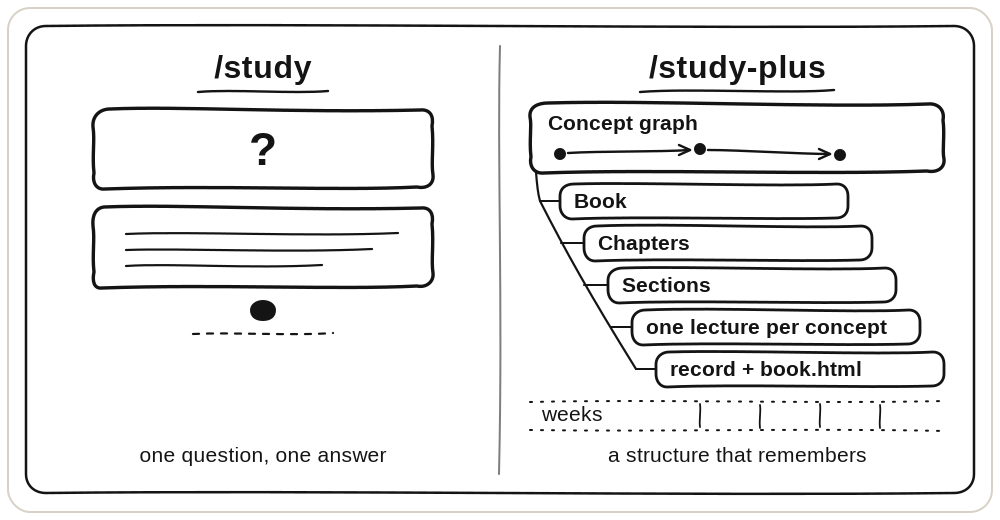
/study/study walks one concept or one task from the first step to the last and stops once at the fork. A concept comes in layers: intuition, then terms, then formal detail. A task comes as the finished artifact, with one line of reason beside each step. The guide grades nothing and keeps no learner record.
Use it for a question you want to understand now and will probably not return to.
/study why does Adam divide by 1 - beta^t
/study walk me through the preconditioner in this file        # with code
/study help me finish problem 3, and explain each step        # with homework
You get a title, the central idea, numbered steps, one line of symbols above each formula, and a short table when four or more symbols keep coming back. Then one worked example, the common mistake, and the single stop at the fork.
The only files it writes are the ones you ask for: a lecture or artifact at the path you name, and a figure when a picture helps. A figure goes to diagrams/<name>.svg, or to study/<course>/diagrams/ inside a Course. /study never reads or writes graph.md, state.md, log.md, or plan.md.
/study-plusA Course is organized as a Book of Chapters and Sections, with one concept per Section. A concept graph in prerequisite order groups the concepts into Chapters. The graph carries Chapter and Section columns, so one file records the reading order beside the prerequisite order.
The Course has three tracker files at its root and one Markdown lecture per concept under study/<course>/lectures/. After you approve the graph, the guide prepares a complete draft for every concept, so a lesson starts without waiting. It builds an HTML book from the saved material.
Use it for a subject you will still be learning next month.
/study-plus Shampoo and Adam optimizers              # first session builds the graph
/study-plus                                          # later sessions continue the Course
/study-plus chapter 2                                # read that chapter in Book order
/study-plus the matrix square root                   # jump straight to one concept
A Course is one folder under study/: one concept graph, one state file, one log, its lectures, its figures, and its Book. A conversation settles its Course on the first tracked study, then asks no more. When the workspace holds one Course, /study-plus uses it and names it in one line. Several Courses get one question that lists them and offers a new Course. A request about a second subject gets one question: add these concepts to the current Course, or start a new Course.
/study-plus <course>
  propose 15 to 30 concepts in prerequisite order, grouped into Chapters
  show the chapter list and the concept table together, then wait
  you approve, edit, or rebuild the graph
  you answer one calibration round: goal, background, and concepts to skip
  write one complete draft per concept, skipped concepts included
  teach each concept: recall (optional) → lecture → configured unseen questions → teach-back → dated record
Approval also asks the remaining calibration items: what you want to do with the Course, what you have already read or used, and the concepts you can skip. When the opening question already answered your goal and background, it asks only the concepts you can skip. The answers set Teaching level in graph.md, beside Goal and Background, and every lecture follows that level.
| Level | Chosen when | Lecture shape |
|---|---|---|
beginner |
most prerequisites are unknown | 3 to 7 numbered steps, every term explained, one example per step |
standard |
some prerequisites are known | intuition first, then formal detail, examples where they help |
advanced |
most prerequisites are known | one pass, no numbered steps, starts from the formal statement, at most one example per idea |
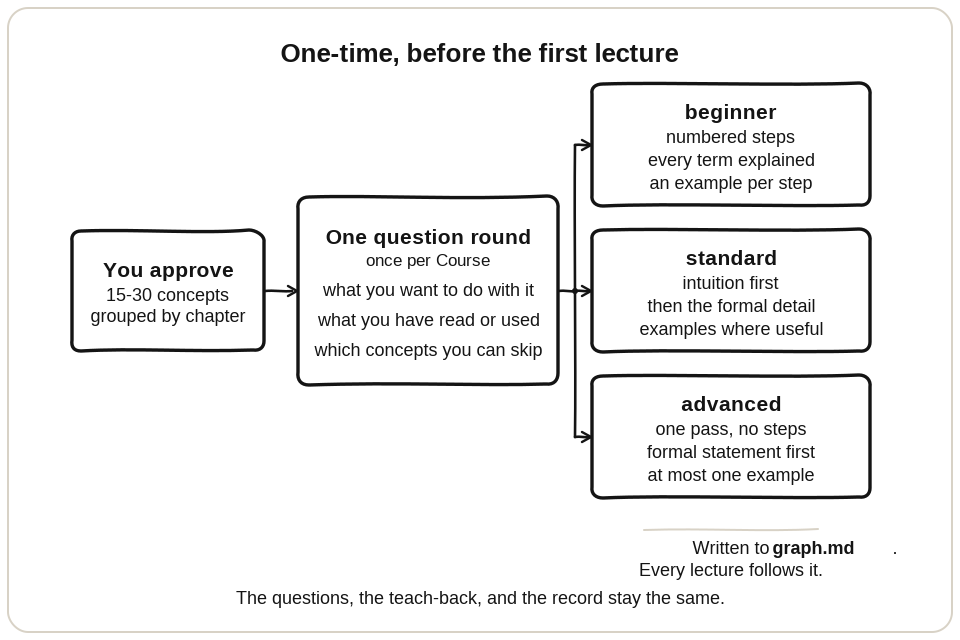
The level shapes the lecture only, never the questions, the teach-back, or the record. A mid-Course change lasts for that session unless you say to keep it.
Drafts count as preparation, not learning. Every lecture follows the study skill's writing standard, and the guide saves the file before showing it. When the graph drops a concept, its lecture file moves to lectures/archive/ instead of being deleted.
Later sessions read the tracker files first. You pick a Chapter or a Concept, and it names that Concept, its state, and the state of its prerequisites in one line. Nothing forces a prerequisite order. An open prerequisite never blocks a concept: the guide explains or recommends it, and the choice stays yours.
The HTML book refreshes after each draft batch and each lesson, with one page per Section and a draft label where no lecture exists yet. Section numbers come from the graph, so a missing lecture leaves no gap. The previous copy stays as book.html.bak. The book page is not a command.
/study, quick lesson |
/study-plus, long lesson |
|
|---|---|---|
| Writes files | saves a lecture or artifact at the path you name, and an SVG when a picture helps | study/<course>/: graph.md, state.md, log.md, one file per concept, book.html refreshed automatically |
| Reads files | no reads by default, but reads or writes a requested artifact path | the three tracker files, before the first line |
| Remembered next session | no | yes, with dates |
| Graded | no | each concept, rubric written first |
| Organized as | one concept, one task, or a one-off book | Book, Chapter, Section |
| Typical span | one sitting, one idea | 15 to 30 concepts over weeks |
/study does not create a study/ folder by itself. /study-plus schedules no reviews and never guesses that you know something.
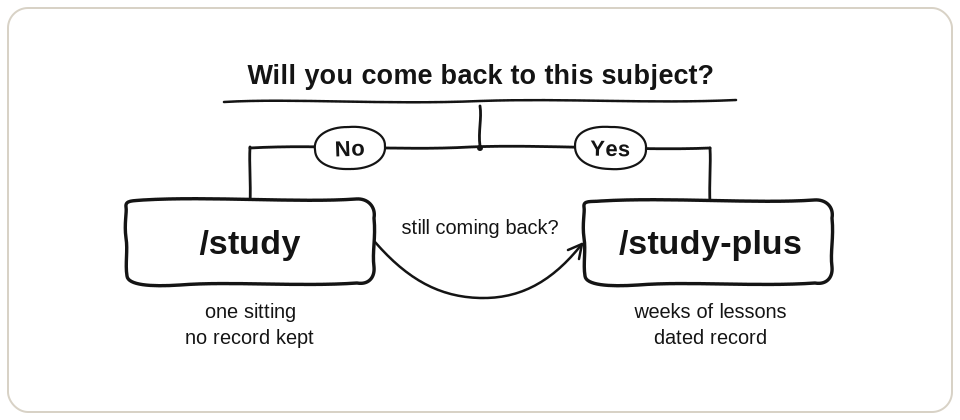
/study./study-plus./study-plus, which mirrors them as Chapters./study and keep coming back? Build the graph once with /study-plus, and the earlier conversation still informs it./nerd-mode on teaching posture for this conversation
/nerd-mode off
/study <concept or task>
/study-plus <course> recorded session with the three tracker filesThe pill in the composer bar sends /nerd-mode. It sits left of Full Throttle, stays visible in both states, and goes dim when off.
Change the defaults under Settings → Nerd Mode.
| Setting | Choices | Default |
|---|---|---|
| Recall Session | on, off | off |
| Questions after a lecture | 0 to 10 | 3 |
| Question type | short answer, multiple choice, mixed | short answer |
A four-option question appears as a card with one correct choice. The guide asks a short-answer question in the conversation. Save applies to the next session, Cancel discards a draft, and Restore defaults returns to recall off, 3 questions, short answer. A preference stated inside one /study-plus request wins for that session only and does not update the profile.
The About group at the bottom shows the installed version and the newer of the npm and official GitHub versions. Its button installs that version from its channel by running pnpm in the profile, then asks you to restart DSH. A pinned GitHub ref and a fork are not checked. A link: install is updated with git. The whole page follows the DSH interface language.
Nerd Mode is a profile-level plugin, mounted from cordis.patch.yml. The patch covers the whole profile, so every mode gains the command and the pill.
package.json
├── dsh.bundle.patch → cordis.patch.yml
│     ├── dsh-nerd-mode → lib/index.js
│     │     ├── session projection — on/off state, folded from the session log
│     │     ├── prompt section — assets/section.md at order 550, while on
│     │     ├── /nerd-mode — the switch
│     │     └── GET /api/study-sessions — the read-only session index
│     ├── study-plus-skills — skills/ as a filesystem skill provider
│     └── goal packages — disabled
└── dsh.client → client.js: pill, Study tab, Lectures tab, Study Sessions panel, Settings section
State lives in a session projection. It folds from the session log, so compaction, resume, and fork keep it. The prompt section has text only while that state is on.
Prompt text is assets/section.md, the only prompt text the plugin adds, so a profile patch never carries a stale copy. A section config value replaces it.
Settings reach the model as a short defaults block appended to that section, only during a tracked session. They never change the tool set.
Session history is a second, read-only store. lib/study-sessions.js scans the conversation logs in chunks, keys each file by its size and modification time, and writes ~/.dsh/study-sessions-index.json, which sits outside every workspace. The panel reads it through one route that answers only GET, refuses a request with no session cookie (401) and a foreign host or origin (403).
Patch scope covers the whole profile. It loads skills/ with a !!js expression, so review patch changes as host-process code. It also disables the three goal packages, because the built-in goal tool turns one study answer into an auto-continuing run.
study: the no-grading guide and the lecture-writing standard. Saves a requested file and draws figures when useful.study-plus: the recorded session. Book, Chapters, Sections, one lecture per concept, assessment per concept.diagram: one SVG figure per idea. Written for this package.These four ship with the package but sit outside the teaching flow. None of them reads or writes a Tracker.
answer-me-with-html: one-page HTML explainers, by QingYunA.writing-beats: beat-by-beat article structure, by Matt Pocock.humanizer: rewrite AI-sounding prose, by Siqi Chen.convert-documents-to-markdown: Word, PDF, and ebook conversion, by firecrawl.git clone https://github.com/bocchii-the-code/dsh-nerd-mode
cd dsh-nerd-mode
npm install
npm run checknpm run check runs ESLint and the Node test suite. npm test runs the tests alone, and npm run lint runs ESLint alone.
| Path | Holds |
|---|---|
lib/index.js |
plugin entry: projection, prompt section, command, session defaults, session index route |
lib/fold.js |
the state fold and its constants |
lib/study-sessions.js |
the session history scan and its index |
client.js |
composer pill, Study and Lectures tabs, Study Sessions panel, Settings section |
assets/section.md |
the teaching policy prompt |
skills/ |
bundled skills |
test/ |
one file per surface, run by node --test |
To try a local build, add this folder as a plugin: dsh plugin --profile <profile> add .
If you rename the package, update the resolve('dsh-nerd-mode/package.json') string in cordis.patch.yml.
Design notes: SPEC v3, v2, historical, session defaults spec, GLOSSARY.md, docs/adr/. Doc layout: docs/README.md. Version history: CHANGELOG.md.
Issues and pull requests are welcome on GitHub. Run npm run check before you open a pull request. For a change to the teaching prompt, read docs/adr/ first, because the prompt behavior is recorded there.
dsh plugin --profile <profile> remove dsh-nerd-modeMIT. Bundled skills keep their own licenses. See NOTICE.md.
CLASSIFICATION EVIDENCE
系统优先读取 GitHub Topics,再与站内分类词典和词根规则比对。当前命中: learning。
Miaotofu01
你的AI学习搭档:定路线、讲知识、做项目,边学边做,学透一门科目

1692775560
Mimir — 一站式科研工作台插件:LaTeX 论文边写边编译、arXiv 文献管理、实验追踪、指标图表、GPU 服务器 SSH 任务编排,管理科研全周期。An open-source research workbench plugin for the whole research cycle.

Li-Evan
Open-source AI tutor for personalized learning: Socratic, adaptive lessons to learn anything. Claude Code skill + self-hosted web app. Bloom 2 Sigma · 开源 AI 家教