
模型与 MCP
待识别

rea
morluto
Reverse engineer anything with agents, from app behavior down to native binaries.
PROJECT TOPICS
INSTALL REFERENCE
dsh plugin --profile web add github:bloodyxu/dsh-workspace-icons
该命令指向仓库当前默认分支;尚无绑定当前 commit 的完整验证结果。
PROJECT README
中文说明 · English
Give every project folder in the DSH Web sidebar its own icon — 160 bundled Hugeicons, each in its own colour, or an emoji, or an image. Projects you have not set up yourself get an icon chosen by reading the project and asking the AI, with a local rule engine as the fallback when no model is available.
dsh plugin --profile <profile> add dsh-workspace-icons<profile> is the profile you run the Harness with (desktop for the desktop app). The command adds the package to that profile's dependencies, appends it to dsh.profile.bundles (which is what inserts the Host line from cordis.patch.yml), and lets pnpm wire it up.
Restart the Harness so the Host half loads. After that you should see a Project icons page in Settings, and right-clicking a project row in the sidebar should open the icon picker.
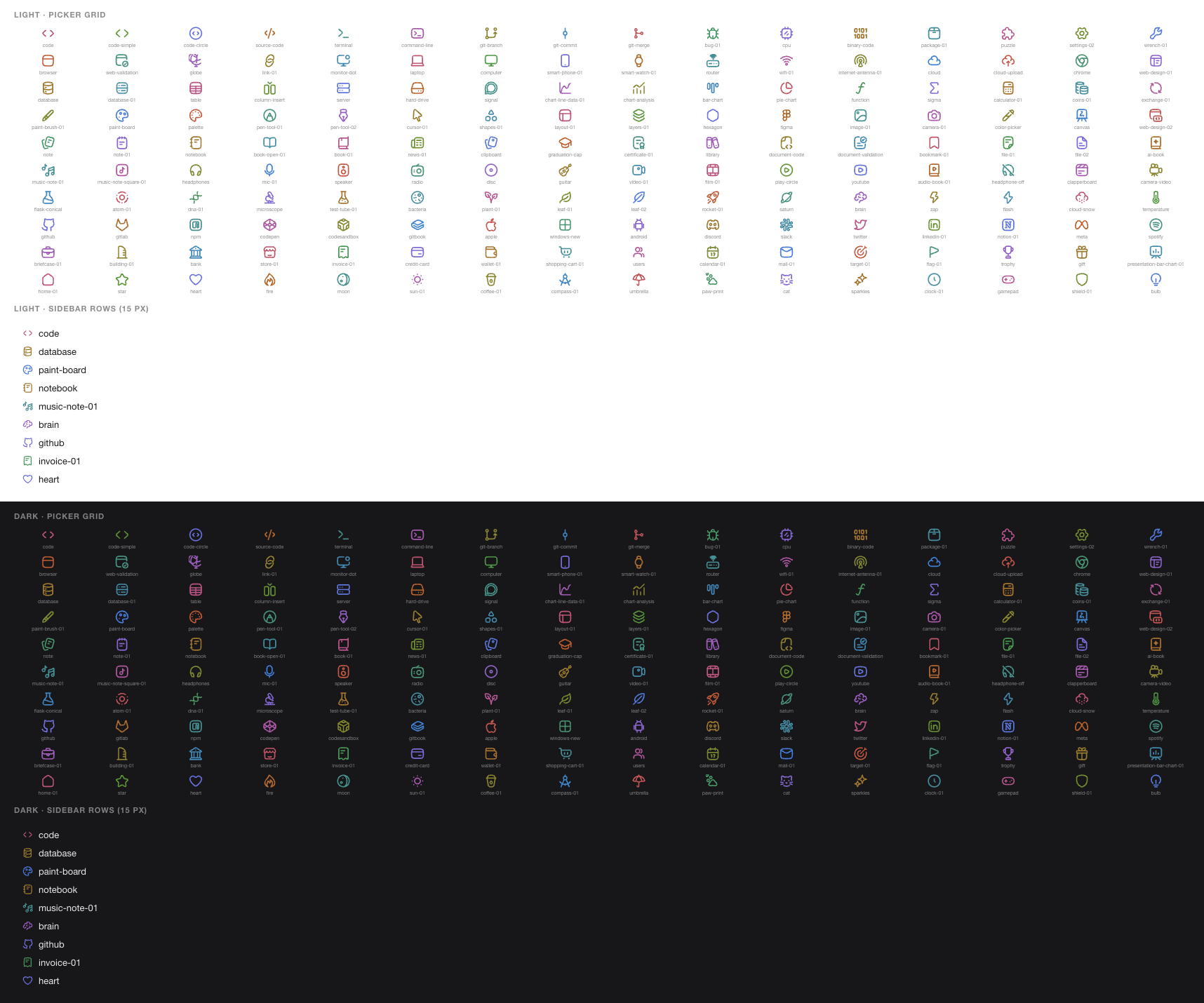

Both images are renders of what the plugin generates — the colour table from glyphColor(), the rows from buildCss() applied to mock project rows — not screenshots of the Harness window itself.
Two entry points, one shared store:
The picker has three tabs:
https://… and data:image/… only (javascript:, file: and friends are refused).There is also Remove icon, which restores the default folder icon for that project.
Each of the 160 bundled icons gets a dedicated colour derived from its position in the catalog (hues spread with the golden angle) rather than assigned at random: the same icon is always the same colour, so you learn to recognise them. Colours are generated in OKLCH and written into the stylesheet as sRGB hex, so perceived lightness is even — yellow reads as clearly as blue, with no "washed out on white / too dark on black". Measured contrast is 3.7–4.3:1 on the light theme and 4.1–4.9:1 on the dark theme. Emoji and image icons are unaffected (an emoji keeps its own colours, an image keeps its own pixels).
On by default. The rules are simple:
What the Host half reads — always inside the project root, never a recursive scan:
| Source | What is taken |
|---|---|
package.json |
name / description / keywords / dependencies / scripts |
| other manifests | pyproject.toml, requirements.txt, Cargo.toml, go.mod, Gemfile, pom.xml, build.gradle(.kts), composer.json, Package.swift, pubspec.yaml, CMakeLists.txt, *.uproject (first 1.4 KB each) |
README* |
first 900 characters |
| top-level entries | up to 40, skipping node_modules, .git, dist, target, .venv…, and dotfiles |
| language mix | top-level files plus one level of at most 6 subdirectories, bucketed by extension |
The model is asked what the project is, not what stack it uses, and must answer with a single JSON object: {"glyph":"<name>","why":"<one line>"}, where glyph exactly matches an icon name and why follows the UI language. Any failure (no model, timeout, invalid output) falls back to local rules — dependencies → README/name keywords → dominant language → manifest type → generic folder icon — so it works offline and the answer is always one of the 160 icons.
Costs and boundaries: the project path, its name and those evidence snippets are sent to the default model configured in DSH (agentDefaultModel); file contents beyond the snippets, code bodies and any write to project files are not involved. Turn the switch off in the settings page to stop requests entirely (suggestions already stored keep showing; you can override or clear them one by one).
Both stores live in browser localStorage, keyed by project folder path (falling back to the workspace id when there is no path), so renaming a project keeps its icon:
dsh-workspace-icons.v1 — manual icons;dsh-workspace-icons.auto.v1 — AI/rule suggestions (with reason, source, timestamp) and the auto switch.At most 500 entries are kept per store; when the cap is hit the oldest folders are dropped. Nothing is written to disk and nothing is synced between machines — clearing browser data clears the icons too.
The plugin has two halves.
Browser half (client.js) occupies two official slots:
settings.section — the "Project icons" settings page (order: 25);shell.overlay — the right-click picker (order: 40, positioned by a document-level contextmenu listener).Both slots' standard props include useWorkspaces, so the project list needs no extra IPC. Drawing the icon has no official slot, so it goes through a structural selector:
[data-row-key="workspace:<id>"] > span:first-child > svg { display: none }   /* hide the native folder icon */
[data-row-key="workspace:<id>"] > span:first-child::before { … }              /* draw our own */
data-row-key is a stable semantic attribute on sidebar rows; the CSS-module class names are hashed, so they are deliberately not used.
Preset colours are computed once in the browser by glyphColor() and cached: OKLCH(0.60, ≤0.17, golden angle × index) → sRGB hex, painted through background-color under a mask; the same colour is used for sidebar rows, the picker and the settings previews.
Host half (index.js + lib/) does the one thing the browser cannot: read files and call the model. It registers one owner-authenticated route:
POST /api/workspace-icons/suggest
{ "language": "zh" | "en", "projects": [{ "key": "...", "path": "/abs/path", "title": "..." }] }
→ { "results": [{ "key", "path", "glyph", "why": { "zh"?, "en"? }, "source": "ai" | "rule" }], "route": "<model>" }workspaceRegistry service is present, only folders registered as workspaces are read (422 unknown-workspace otherwise);ctx.get('llm').stream(...) (createUserMessage + BlockAssembler from @deepseek-ai/dsh-llm), maxTokens: 160, with an AbortSignal; that dependency is imported lazily, so an unresolved import leaves the local rules working instead of breaking the bundle;source: "rule" and still gets an icon.1.x used Phosphor icon names (browser, sparkle, …); 2.0 moved to Hugeicons names (browser, sparkles, rocket-01, …), and the two sets are not interchangeable. Stored kind: "glyph" entries that fail the name check are silently dropped, so those projects fall back to the default folder icon (or an AI suggestion) — just pick again. The localStorage keys are unchanged, and emoji / image icons are unaffected.
connection service (Host route), the llm service for AI suggestions (optional) and the settings.section / shell.overlay slots. Node 20+.@deepseek-ai/dsh-client-ui-workspace (the current implementation); workspace-tree grouping uses the same workspace:<workspaceId> row keys, so icons keep showing there. The flat grouping mode has no project rows at all, so there is nothing to draw on.data-row-key or the first child's structure), icon drawing fails silently: the only effect is that icons stop showing, while the settings page keeps working and nothing else breaks. After a DSH upgrade, buildCss() and ROW_PREFIX in client.js are the two places to look.npm run check # syntax + glyph-table freshness + all three test suites
npm test # tests only
npm run test:analyze # evidence reading and fallback rules (pure, temp dirs as fixtures)
npm run test:host # the Host route (fake Cordis context, fake model)The icon table is generated code (the #region hugeicons-glyphs block in client.js) — do not edit it by hand. To add, remove or swap icons, edit the GROUPS list in scripts/build-glyphs.mjs (Hugeicons export names such as CodeSimpleIcon), fetch the source set once, then generate:
npm pack @hugeicons/core-free-icons --pack-destination /tmp/hugeicons
mkdir -p /tmp/hugeicons && tar -xzf /tmp/hugeicons/hugeicons-core-free-icons-*.tgz -C /tmp/hugeicons
npm run build:glyphs      # reads /tmp/hugeicons/package/dist/esm by default; use --source to point elsewhere
npm run build:glyphs -- --names   # only rewrite lib/glyphs.mjs (the Host-side name list); needs no source set
Generated ids drop the Icon suffix and go kebab-case: CodeSimpleIcon → code-simple, Bug01Icon → bug-01.
npm run check:glyphs validates without writing (for CI) and needs no source set.
Test coverage: both slot registrations and their arguments; the generated CSS (native icon hidden / glyph / emoji / image); localStorage round-trips and corrupt-data tolerance; the three icon validators; storage caps; right-click behaviour (session rows untouched); suggestion merging (manual wins); request dedupe and failure backoff; icon-table integrity; zh/en dictionary key parity; evidence reading (manifests / README / directory / language mix / missing folder tolerance); fallback rules (Next.js→browser, torch→brain, Rust→settings-02, empty→package-01, "language model" not treated as 3D); prompt shape and JSON parsing; the Host route (registration args, invalid body 400, relative paths refused, oversized body 413, unknown workspace 422, rule fallback, model success/invalid/throw/timeout, no default model, route disposal).
Layout:
client.js                    browser half (UI + generated icon table + suggestion state machine)
index.js                     host half (/api route, evidence, model call, fallback)
lib/analyze.js               evidence reading and local rules (pure, testable)
lib/glyphs.mjs               the 160 icon names (generated; used by the host half)
cordis.patch.yml             bundle patch: insert workspace-icons
locale/{zh,en}.json          UI copy
icon.svg                     plugin icon
scripts/build-glyphs.mjs     icon-table generator (client.js block + lib/glyphs.mjs)
THIRD-PARTY-NOTICES.md       Hugeicons' MIT licence
test/contract.test.mjs       browser-half contract tests
test/analyze.test.mjs        evidence and fallback-rule tests
test/host.test.mjs Host route testsdsh plugin --profile <profile> remove dsh-workspace-iconsThen check that ~/.dsh/profiles/<profile>/package.json has no leftover entry in dsh.profile.bundles (delete it if so) and restart the Harness. Uninstalling does not clear localStorage; to wipe it completely, run this in the browser console:
localStorage.removeItem('dsh-workspace-icons.v1')
localStorage.removeItem('dsh-workspace-icons.auto.v1')MIT — see LICENSE. The bundled icon set is Hugeicons' free set (MIT); its notice is in THIRD-PARTY-NOTICES.md.
CLASSIFICATION EVIDENCE
系统优先读取 GitHub Topics,再与站内分类词典和词根规则比对。当前命中: deepseek-harness。
morluto
Reverse engineer anything with agents, from app behavior down to native binaries.

deepseek-ai
DeepSeek Harness: Everything is a Plugin.

nexu-io
The 1st Collaborative AI Design Agent Workspace. Local-first and open source. Create motion, prototypes, websites, apps, dashboards, presentations, images, and videos with your team and AI agents. Share work, exchange feedback, and iterate together in one workspace.