模型与 MCP
待识别

rea
morluto
Reverse engineer anything with agents, from app behavior down to native binaries.

bloodtmai-cmyk/dsh-activity-view
DSH 活动视图:把侧栏会话列表换成按活跃度排序的扁平列表,每行带所属项目名,运行中的会话置顶 · Activity view for the DSH sidebar: recently active sessions first, workspace name per row, running sessions pinned on top. Install: plugin_manager install_bundle github:bloodtmai-cmyk/dsh-activity-view
PROJECT TOPICS
INSTALL REFERENCE
dsh plugin --profile web add github:bloodtmai-cmyk/dsh-activity-view
该命令指向仓库当前默认分支;尚无绑定当前 commit 的完整验证结果。
PROJECT README
DSH 活动视图 — 把 DeepSeek Harness 左侧「工作区 / 会话」列表的列表主体换成活动视图:顶部是被手动置顶的会话(不带分组标题),其余按「今天 / 昨天 / 更早」分组,组内运行中的会话排在前面并带圆形运行标记。原生列表的其余结构(工具栏、搜索、视图选项等)保持原生。
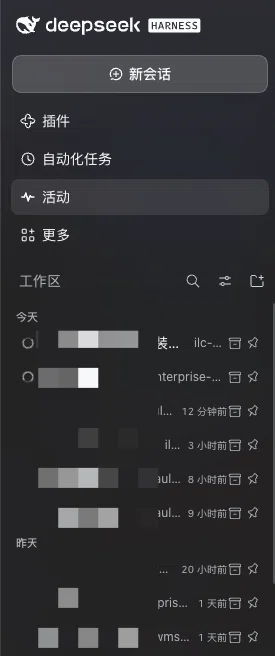
截图中会话信息已打码。
A community UI plugin for DeepSeek Harness, packaged as dsh-activity-view. It registers as the occupant of the host slot sidebar.workspaces.sessions, so only the session-list body is replaced — the surrounding native chrome (toolbar, search, view options, workspace controls, per-row buttons and menus) stays native.
pinnedSessionIds set, archived ones excluded) are lifted into a header-less block at the top, each shown once, and they do not consume the 25-row budget that applies to ordinary rows.updatedAt), newest first. Inside a group, running sessions come first and carry a circular running marker; a running row shows no relative time. Ordinary running sessions therefore always sit at the top of Today, however old their updatedAt is — the stored timestamps themselves are never rewritten.session-<uuid> and <uuid> are not normalised into each other, and rows that merely share a title or a workspace are never merged. Sub-agent rows are not listed.ctx.sessions.list snapshot when no props are supplied) and re-renders as the host republishes it. A one-minute local clock only refreshes relative times and the Today/Yesterday boundary — it is not a data poll.Install straight from this repository through the DSH plugin manager:
plugin_manager install_bundle github:bloodtmai-cmyk/dsh-activity-viewThe repo carries the dsh-plugin topic, so the marketplace index picks it up too. It requires engines.dsh = 0.2.2-rc.1 to match your host runtime exactly: on any other runtime the plugin manager skips the whole bundle (skippedBundles), so nothing is patched and the native UI stays untouched.
patches/0001-sidebar-workspaces-sessions-slot.patch — adds the sidebar.workspaces.sessions child slot to ui-workspace, moving the whole native list into the slot's fallback so an unoccupied slot still renders the original list.patches/0002-sidebar-navigation-action-slot.patch — adds the sidebar.navigation.action slot to ui-sidebar: one navigation action row (after the native panel rows, before "More") that toggles activity mode.compat/ui-workspace, compat/ui-sidebar — MIT-licensed vendored copies of the host's own UI packages (LICENSE kept inside each package) carrying exactly those two patches; compat/vendor-lock.json records the host build they were cut from.cordis.patch.yml — disables the native ui-sidebar / ui-workspace rows by id and inserts the two compat packages plus dsh-activity-view. Removing the bundle puts the native rows back.display: contents element inside the native column, so rows inherit the native height, inset, font and colour, and the native scroll container stays in charge when the slot is unoccupied.sidebar.workspaces.sessions,替换会话列表的列表体;工具栏、搜索、视图选项、workspace 控件、行内按钮与右键菜单都还是原生的。pinnedSessionIds,归档的不进这块)被提到顶部,不带分组标题、只出现一次,也不占普通行的 25 行上限。updatedAt 分成今天 / 昨天 / 更早,越新越前;组内运行中的会话排在前面并带圆形运行标记,运行中的行不显示相对时间。因此普通运行会话始终排在「今天」组内靠前,即使它的 updatedAt 较早;历史时间戳本身不会被改写。session-<uuid> 与 <uuid> 不互相归一,标题或工作区相同但 id 不同的会话不会被合并;子代理行不列出。ctx.sessions.list 快照),随宿主重新发布而重渲染;分钟级本地时钟只推进相对时间与「今天 / 昨天」的边界,不是数据轮询。plugin_manager install_bundle github:bloodtmai-cmyk/dsh-activity-view要求宿主运行时与 package.json 的 engines.dsh = 0.2.2-rc.1 精确匹配。不匹配时整个 bundle 会被 loadProfileDirectory() 跳过(skippedBundles):补丁一行都不生效、原生 UI 原样保留。
compat/ 两个包按宿主内部模块结构打补丁,宿主升级后可能失配;升级后请重新校验,不要假定仍可用。CLASSIFICATION EVIDENCE
系统优先读取 GitHub Topics,再与站内分类词典和词根规则比对。当前命中: deepseek-harness。
morluto
Reverse engineer anything with agents, from app behavior down to native binaries.

deepseek-ai
DeepSeek Harness: Everything is a Plugin.

nexu-io
The 1st Collaborative AI Design Agent Workspace. Local-first and open source. Create motion, prototypes, websites, apps, dashboards, presentations, images, and videos with your team and AI agents. Share work, exchange feedback, and iterate together in one workspace.