
模型与 MCP
待识别

rea
morluto
Reverse engineer anything with agents, from app behavior down to native binaries.
PROJECT TOPICS
INSTALL REFERENCE
dsh plugin --profile web add github:bloodarea/dsh-agent-team-presets
该命令指向仓库当前默认分支;尚无绑定当前 commit 的完整验证结果。
PROJECT README
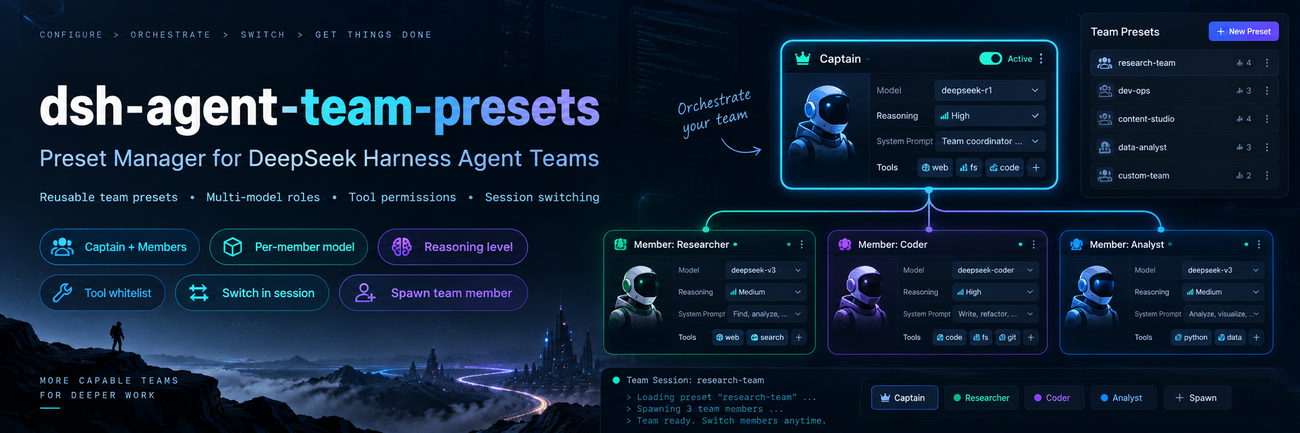
Concept illustration. The plugin interface is documented screen by screen in Getting started; the captain uses the conversation's selected model.
English | 中文
New to this plugin? Start with the illustrated walkthrough — every screen, every button: Getting started.
Community plugin v0.3.2 · Tag
This release keeps more than one version of each supported target patchable at once, so updating dsh-context or dsh-better-sidebar no longer takes the Preset badge away, and it ships rebuilt replacements for dsh-context 0.84.1 and dsh-better-sidebar 0.32.1. It requires DeepSeek Harness 0.2.2-rc.3: that is the release this build was verified on, and 0.2.2-rc.2 is now refused rather than claimed.
dsh-context 0.84.1 and dsh-better-sidebar 0.32.1, rebuilt from their upstream sources with the same small registration patch, then verified (the service must register, the bundle must stay within its size band, both hashes are recorded). The 0.84.0 and 0.32.0 entries stay, so a profile that has not upgraded is still patchable.assets/card-patches/catalog.json is merged over the versions compiled into the plugin, so supporting another version becomes data rather than a code change.tools/card-patches.mjs clones the upstream tag, applies the source patch (git apply, --3way, then fuzz), builds it with the target's own toolchain, verifies the result, and only then publishes; apply / revert install or remove one replacement in a profile with a backup. Repository only — not part of the npm package.lib/ built before the "a shipped preset set went missing" work, so its warning and restore path never reached users. Both are in 0.3.2.0.2.2-rc.3 in engines.dsh and the DSH peer ranges. The previous release claimed rc.2 while shipping a bundle built against a later contract; rc.2 and older are now refused with a named reason instead of being over-promised.Earlier releases and the full changelog are on the Releases page.
dsh-agent-team-presets is a visual Team preset and private skill manager for DeepSeek Harness. Configure a Team once, assign per-agent isolated skills, then select it from the conversation composer whenever you need it.
A Team contains a captain and any number of member roles:
spawn_team_member; the Harness subagent runtime provides messaging, execution, and lifecycle.This is a community plugin, not the Harness's bundled @deepseek-ai/dsh-experimental-agent-team-presets development package.
DeepSeek Harness already ships Agent Teams with multi-agent collaboration. In the Harness versions this plugin supports, per-Team configuration, skill isolation, and reuse are still left to the user, which is what this plugin addresses:
Design principle: the Harness subagent runtime owns collaboration at runtime; this plugin owns configuring, managing, isolating, and reusing teams and their skills.
~/.dsh/agent-team-presets/team-skills), completely isolated from global host skills.github-repository-presentation, git-release-hygiene) and two method skills (grilling, research), materialized into the private library and pre-bound to engineering, discovery, and research roles. Create local editable overrides and one-click restore them to the built-in copy (恢复为插件内置版本).agent-team-presets-troubleshooting (not a Team Skill, not per-Agent isolated). It covers Team application, member creation, tool-policy refusals, model-route evidence, Team Skill visibility, and install/upgrade failures.PATH (flags found/missing and refuses assignment when absent) and reports declared MCP servers (declarative display; never auto-connected or hard-blocking).list_team_skills, assign_team_skill, unassign_team_skill, and remove_team_skill alongside get_team_preset and update_team_preset.Interface screenshots live with the walkthrough, taken live from an isolated instance that had only this plugin installed: docs/guide/getting-started.md.
>=0.2.2-rc.3 <0.3.0. Verified against 0.2.2-rc.3; 0.2.2-rc.2 and older are refused. Each member's route is recorded through agent.model.select() for fresh, forked, and cold-resumed execution; the captain keeps the conversation's model selection. The plugin manager enforces engines.dsh from package.json.run_code for the rest of its life, while other Sessions and the all-tools mode keep PTC. If mounting fails, or the surface still exposes the PTC transport afterwards, the application is refused and nothing is left behind, because no executor was ever released.web for the Web GUI or desktop for Desktop.spawn and fork.The plugin version (0.3.2) and the Harness version (0.2.2-rc.3, for example) are separate version lines.
Open Global panels → Plugins → Add plugin, paste the line below into Package name or address, and click Install:
dsh-agent-team-presetsOr install it from the CLI:
dsh plugin --profile <profile> add dsh-agent-team-presetsReplace <profile> with your active profile (e.g. web or desktop):
dsh plugin --profile web add dsh-agent-team-presetsThe plugin manager compares the installed version against npm's latest dist-tag, so every later release is offered as an update.
Tracks the repository's default branch; an update is offered when package.json on that branch moves to a higher version:
dsh plugin --profile <profile> add github:bloodarea/dsh-agent-team-presetsdsh-agent-team-presets@0.3.1
dsh plugin --profile <profile> add github:bloodarea/dsh-agent-team-presets#v0.3.1A fixed version or tag reproduces exactly one release. A #tag GitHub spec is only ever compared against that same tag, so the market never reports an update for it — upgrading means editing the spec by hand. Use this form only when you need a frozen install.
name@version, github:owner/repo, tarball URLs, or absolute filesystem paths.dsh.bundle, so the plugin manager automatically registers it as a profile bundle layer; do not add a loader entry by hand.npm view dsh-agent-team-presets versionAfter installation, follow the plugin manager's reload/restart prompts and navigate to Settings → Agent team presets. Verify that details display dsh-agent-team-presets, version 0.3.1, and a running component.
@deepseek-ai/dsh-experimental-agent-team-presets first before enabling the community package.Install the bundle; do not add a second loader declaration. The package already supplies its own bundle patch. Duplicate hand-written declarations in profile patches can prevent settings from saving. See Configuration writes are overridden.
Example prompt for a Team with execution and review roles:
Use the selected Team. Have the executor implement the agreed changes and regression tests, then ask the reviewer to inspect them independently. Summarize changes, test results, and remaining risks.
A preset role is a template. Summoning creates an instance with a unique target such as executor or executor-2. Use send_message with the returned target to continue working with an existing instance rather than spawning a new one.
Selecting No team disarms the Team application once the captain and teammates become idle, restoring standard session contributions without changing the active model.
Hover a Team row in the composer picker to open its member panel. The captain is listed first with the Session model route; every member follows with its configured provider · model and role description.
spawn_team_member are not installed. The Session model switches to that member's configured provider/model and reasoning effort. A member with no configured route keeps the Session's current model.| Field | Purpose |
|---|---|
| Team name and purpose | Identify the preset and explain what work it handles. |
| Category | Assign the Team to a local category for organization in lists and picker. |
| Display metadata | Summary, tags, use cases, quick prompts, and notes. Purely presentation-only; never injected into LLM context tokens. |
| Captain | The lead agent. A nonempty captain prompt replaces its persona prefix; the captain keeps the conversation's model. |
| Members | Reusable role templates the captain can summon. |
| Name | Role display name and target base. ASCII letters/digits and hyphens (max 64 chars, not lead). |
| Description | Role responsibilities for the captain to select appropriate members (max 200 chars). |
| Color | Accent color distinguishing the role in settings and the roster. |
| Provider / Model | Members only. Route from the deployment's model catalog. |
| Reasoning effort | Members only. Options depend on model support; empty uses route default. |
| Allowed tools | Independent all-tools or custom allow-list policy. |
| Team Skills | Assigned private skills, registered exclusively in this Agent's scope upon creation. |
| System prompt | Standing role instructions. {{variable}} denotes prompt template variables. |
A fresh installation seeds nine editable Teams across two series:
| Preset | Roles | Intended use |
|---|---|---|
轻量研发团队builtin-lightweight |
Captain, fullstack-advisor, executor | Small features and module iterations. Captain plans and verifies, architecture advisor handles cross-layer technical contracts on demand, executor writes code, tests, and debugs. Pre-bound with official delivery skills. |
标准研发团队builtin-standard |
Captain, system-architect, executor, code-reviewer | Standard software projects. Captain coordinates, system architect establishes interface contracts and module boundaries, executor develops and tests, independent code reviewer inspects quality. Pre-bound with official delivery skills. |
全栈软件研发团队builtin-fullstack |
Captain, backend-architect, ui-designer, executor, reviewer | Complex full-stack engineering across Web, Desktop, and Android. Captain leads, backend architect and UI designer provide technical/UX contracts, reviewer enforces quality gates, executor implements. Pre-bound with official delivery skills. |
| Preset | Roles | Intended use |
|---|---|---|
需求探索builtin-discovery |
Captain, demand-analyst, solution-explorer, independent-challenger | Open-ended ideas where goal, technical path, or product direction is still exploratory; read-only research with independent challenge. |
架构规划builtin-planning |
Captain, system-architect, technology-evaluator, compliance-auditor | Settled goals where systems, module boundaries, and cross-module contracts must be designed. |
既定工作流执行builtin-workflow |
Captain, workflow-coordinator, task-executor, delivery-verifier | Established workflows where user specifies next task, and team implements, verifies, and delivers it. |
工程研发协作builtin-engineering |
Captain, architect-advisor, executor, code-reviewer, repository-specialist | Feature development, cross-layer implementation, UI/UX, and debugging, with a dedicated repository delivery specialist (repository-specialist). Pre-bound with official delivery skills. |
独立代码与安全审计builtin-audit |
Captain, vulnerability-expert, security-auditor, compliance-inspector | Independent read-only review of specified code, vulnerabilities, security configurations, and dependency compliance. |
科研协作builtin-research |
Captain, domain-researcher, experiment-analyst, rigor-reviewer | Literature review, experiment design, scientific computing, data analysis, and academic rigor inspection. |
Default presets are seeded once per profile. Deleting or editing a built-in preset is respected across restarts, which also means a Team list that lost its shipped presets some other way (a hand-edited or restored settings file) does not get them back by itself: the Host logs a warning and the page shows a notice pointing at Restore defaults. That button stages a draft, so save afterwards. Restoring brings back shipped fields and official rosters while preserving local member model routes and tool policies.
Each Team preset supports rich metadata:
Token economy: Display metadata is stored in the preset document and used by the UI for search, grouping, and cards, but is never injected into the runtime LLM prompt context.
不使用团队 pinned to the top.Traditional skills in Harness are typically registered into the global environment, exposing every skill to every agent. This plugin introduces a Private Team Skill subsystem:
~/.dsh/agent-team-presets/team-skills or storage domain), isolated from host and profile skills.github-repository-presentation, git-release-hygiene) and method (grilling — clarify before acting; research — primary sources only). Default bindings: engineering executor/repository-specialist receive the delivery skills; the Discovery captain receives grilling, its technical-scout/product-scout and the Research evidence-scout receive research.updateAvailable status is displayed, and users can restore to the built-in copy (恢复为插件内置版本) with one click..zip packages directly in the Web GUI.SKILL.md are resolved against host PATH, using PATHEXT on Windows. Directories and non-executable files do not satisfy the dependency. Missing required executables are flagged and assignment is refused (dependency-missing).skillsDeclared). The plugin never connects, launches, or manages external MCP servers automatically (their lifecycle belongs to the Harness environment and profile). Because MCP connectivity is an environment-level fact, declared MCP servers are reported as unverified rather than hard-blocking role assignment. When an MCP server is configured and running in the Harness profile, its exposed tools (mcp__<server>__<name>) appear under the MCP tool group in the role's tool configuration and can be authorized via tool policies.标准研发团队 → executor), keeping the confirm button disabled until bindings are cleared.Export saves one Team as a JSON document (format version 2). Import preset reads the document and stages it in the editor.
Cards in dsh-context (Fleet view, top bar) and dsh-better-sidebar (Tasks page, right sidebar) can mark the subagents this plugin created with a small Preset tag. The integration is an adapter:
contextAgentCardBadges / betterSidebarAgentCardBadges, protocol version 1). This plugin registers into a service only when it appears, does not require either package, and keeps working unchanged when neither is installed.Neither target published such a service at the time of writing, so this plugin ships prebuilt replacement bundles for the exact versions listed below and offers them in Settings → Agent Team presets → Integrations:
| Target | Versions this build patches | What the row offers |
|---|---|---|
dsh-context |
0.84.0, 0.84.1 | Install patch / Remove patch |
dsh-better-sidebar |
0.32.0, 0.32.1 | Install patch / Remove patch |
Each row reports its own state, and the page never guesses: not installed, version not supported, not patched, patched, modified by something else. "Install patch" asks for confirmation, backs up the target's lib/client.js, then writes this plugin's build of the same source. "Remove patch" restores that backup and deletes it.
No restart and no page reload. The running server's client-hmr transport stat-polls every client bundle, republishes the changed one (clientModules.rebuilt), and the page reloads that plugin in place — the row turns active within about a second, and the badge appears on the cards. If a row stays patched without going active, reload the page once.
Safety rules worth knowing:
version not supported; supporting one is a verified rebuild, not a code rewrite (see below).not patched again.New upstream releases are adopted with node tools/card-patches.mjs rebuild --target <id> --version <version> --write: it clones the release, applies the source patch, builds it, and refuses to publish anything unless the rebuilt bundle still registers the card service. Adding a version keeps the older ones patchable, and a shipped assets/card-patches/catalog.json reaches new versions without a code change.
If you would rather not use the bundled builds, the same change is available as source patches in contrib/agent-card-badges for applying to the matching target and rebuilding it yourself, and as upstream-ready changes for the target maintainers.
Root sessions register tools allowing agents to inspect and update presets and skills programmatically, subject to tool policies:
get_team_preset: Reads the active or specified Team preset, returning its purpose, role descriptions, prompts, roster, and settings revision.update_team_preset: Updates team/captain descriptions and member prompts/descriptions using compare-and-set revision checks. Requires direct human turn and Host approval. Returns team-busy if affected members are currently active.list_team_skills: Lists installed private Team Skills, origins, dependencies, and role assignment status.assign_team_skill: Assigns one Team Skill to a role in a Team (isolated to that agent scope).unassign_team_skill: Removes a Team Skill assignment from a role.remove_team_skill: Deletes a Team Skill from the library, enforcing blocker checks.send_message, list_agents, team_task_*) must be explicitly allowed if needed.skill tool is always admitted, and is not offered as a choice. It publishes the catalog and loads instruction text rather than granting a capability, and the Host withholds that whole catalog from an Agent that cannot see it. A custom allow-list therefore cannot remove it, and the settings page does not list it: a checkbox for it would be a control that can never do anything. Documents written by an earlier version that still name it keep loading unchanged — the entry is admitted implicitly, never reported as unavailable, and never needs removing.An assigned Team Skill is only useful if the member can load it on the turn that asks for it, so the plugin makes the registration part of member creation rather than a background step:
The path-separator and executable-resolution fixes are exercised by unit tests that normalize separators and by ENOTDIR cases, but no Windows machine was available here. Junction handling across volumes, PATHEXT resolution against a real PATH, and the full native build chain still need a Windows run before the release is described as Windows-verified.
run_code and ordinary subagent / workflow delegation to preserve strict policy contracts. Use preset Team members for delegation.If saving or selecting a Team reports:
Configuration for "agent-team-presets" is overridden by a home patch or command-line overlayCheck profile patches, $DSH_HOME/cordis.patch.yml, and --patch overlays for duplicate hand-written agent-team-presets declarations. Remove duplicate declarations while preserving Host-managed settings rows.
The plugin registers agent-team-presets-troubleshooting on the global skill layer as soon as the profile composes the skill service. It is a host-level skill, not part of the private Team Skill library and not isolated per Agent: every Session can load it with the skill tool. Use it when a Team does not apply, a member cannot be summoned, a tool is refused, a member's model route is questioned, a Team Skill is invisible, or an install/upgrade behaves unexpectedly. The guide also states the evidence order: configuredRoute, model/selection, request/header.config, and the member snapshot route outrank subagent/descriptor or roster display values.
| Symptom | What to check |
|---|---|
| Settings page is absent or plugin pending | Confirm profile type, peer dependencies, subagent backends (default spawn/fork), and client services. |
| Skill deletion button is disabled | The skill is protected: inspect the blocker list in the modal (bound roles or dependencies must be unassigned first). |
Skill assignment refused (dependency-missing) |
A required executable declared by the skill is absent from host PATH. Note that declared MCP servers are reported for visibility and do not block assignment; ensure MCP servers are configured in your profile. |
| Member creation refused | Check storage domain availability, subagent execution backend (spawn/fork), model quota, and concurrency limits. |
| Model route display mismatch | list_agents.model can return an inherited or fallback model even when the member actually runs on its configured route. Verify actual routing via spawn_team_member's configuredRoute, model/selection, the first request/header.config, and the member snapshot route. |
| A selected member's route is unusable | The Host refuses the application and keeps the Session's previous composition and model instead of falling back to the captain. Correct that member's provider/model (and reasoning effort) in Settings → Agent team presets, then reselect it. The composer reports missing members but does not display a Host refusal; check the member route and the deployment's provider catalogue. |
The plugin integrates via Cordis and Harness lifecycle extension points without patching host source code:
spawn_team_member at Agent scope. Selecting one member instead installs that member's role card and tool policy, omits the captain briefing and member tool, and selects the member's configured model route on the Session.agent/created hook injects model selection, persona, tool filters, and assigned Team Skills strictly into that member's Agent scope.~/.dsh/agent-team-presets/team-skills), crash-recovery journaling, dependency resolution, and guarded deletion.| Area | Source |
|---|---|
| Plugin lifecycle and settings reconciliation | src/index.ts, src/settings-reconcile.ts |
| Built-in team catalog and series | src/builtin-teams.ts, src/team-catalog.ts |
| Team application and member tool | src/application.ts |
| Member snapshots and runtime injection | src/member-store.ts, src/member-identity.ts, src/member-runtime.ts |
| Private Team Skills subsystem | src/team-skills/store.ts, src/team-skills/manager.ts, src/team-skills/service.ts, src/team-skills/tools.ts |
| Tool policies and presentation | src/tool-policy.ts, src/presentation.ts |
| Preset tools and transfer | src/preset-tools.ts, src/preset-transfer.ts |
| Browser client UI | src/client/ |
Source development requires a compatible, dependency-installed Harness checkout with its Host types and generated Typert Remote artifacts built first (the Harness build:lib:host pipeline provides them):
export DSH_CHECKOUT=/absolute/path/to/deepseek-harness
npm test
npm run typecheck
npm run bundle
Bug reports and pull requests are welcome at GitHub Issues and Pull requests.
Thanks to 张灏焱 for contributing the grilling and research method Team Skills (PR #2), and to Matt Pocock for the upstream skills they adapt (MIT, see NOTICE).
SKILL.md bundles) materialized into the private library.grilling and research (MIT; pinned commit recorded in NOTICE).MIT. Bundled dependency notices are in THIRD-PARTY-NOTICES.txt; source and MIT attribution for the bundled method skills are in NOTICE.
CLASSIFICATION EVIDENCE
系统优先读取 GitHub Topics,再与站内分类词典和词根规则比对。当前命中: deepseek-harness。
morluto
Reverse engineer anything with agents, from app behavior down to native binaries.

deepseek-ai
DeepSeek Harness: Everything is a Plugin.

nexu-io
The 1st Collaborative AI Design Agent Workspace. Local-first and open source. Create motion, prototypes, websites, apps, dashboards, presentations, images, and videos with your team and AI agents. Share work, exchange feedback, and iterate together in one workspace.