
模型与 MCP
待识别

rea
morluto
Reverse engineer anything with agents, from app behavior down to native binaries.
PROJECT TOPICS
INSTALL REFERENCE
dsh plugin --profile web add github:bitxeno/dsh-git-plus
该命令指向仓库当前默认分支;尚无绑定当前 commit 的完整验证结果。
PROJECT README
English | 中文
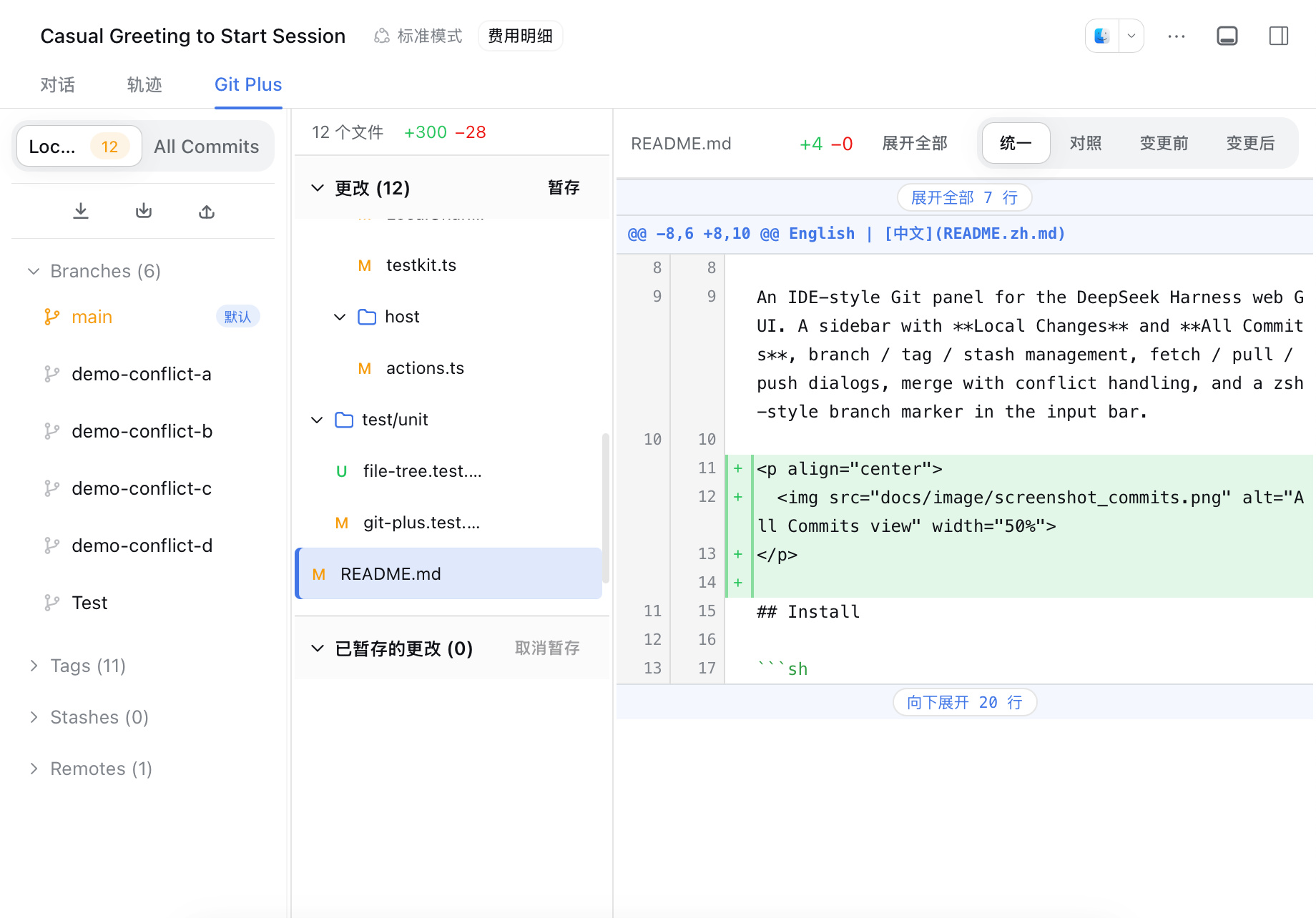
An IDE-style Git panel for the DeepSeek Harness web GUI. A sidebar with Local Changes and All Commits, branch / tag / stash management, fetch / pull / push dialogs, merge with conflict handling, and a zsh-style branch marker in the input bar.
dsh plugin --profile web add git+ssh://git@github.com/bitxeno/dsh-git-plus.gitOnce the package is on npm, the registry form works too:
dsh plugin --profile web add dsh-git-plusThe same command updates an existing installation; append @<version> to pin one. Restart dsh web after installing (a client-only change just needs a browser refresh).
The panel lives in the conversation view as the Git Plus tab.
Sidebar — top nav switches between Local Changes and All Commits; beneath it a sync toolbar (fetch / pull / push), then the collapsible Branches / Tags / Stashes / Remotes groups:
--prune always on).--rebase and --autostash.remote/branch (creating a branch on the remote is one select away); tracking reference (--set-upstream) shows only for new remote branches, with optional --tags and --force./-separated names into folders, with the default branch first (the local default branch; origin/main under Remotes). In Remotes the default branch stays inside its own remote folder and leads it — it is never lifted out of origin.When the panel is narrow — a phone, or a desktop window dragged thin (measured on the panel itself, not the viewport) — the sidebar collapses into a permanent icon rail: the top cell opens the drawer, the next two switch views directly without opening anything, and the four group icons open the drawer already expanded and scrolled to that group. The drawer overlays the content rather than squeezing it; tapping a branch/tag, opening a dialog, tapping the backdrop, or pressing Esc closes it.
Local Changes — stage / unstage / discard per file or in bulk, commit with amend, per-file diffs.
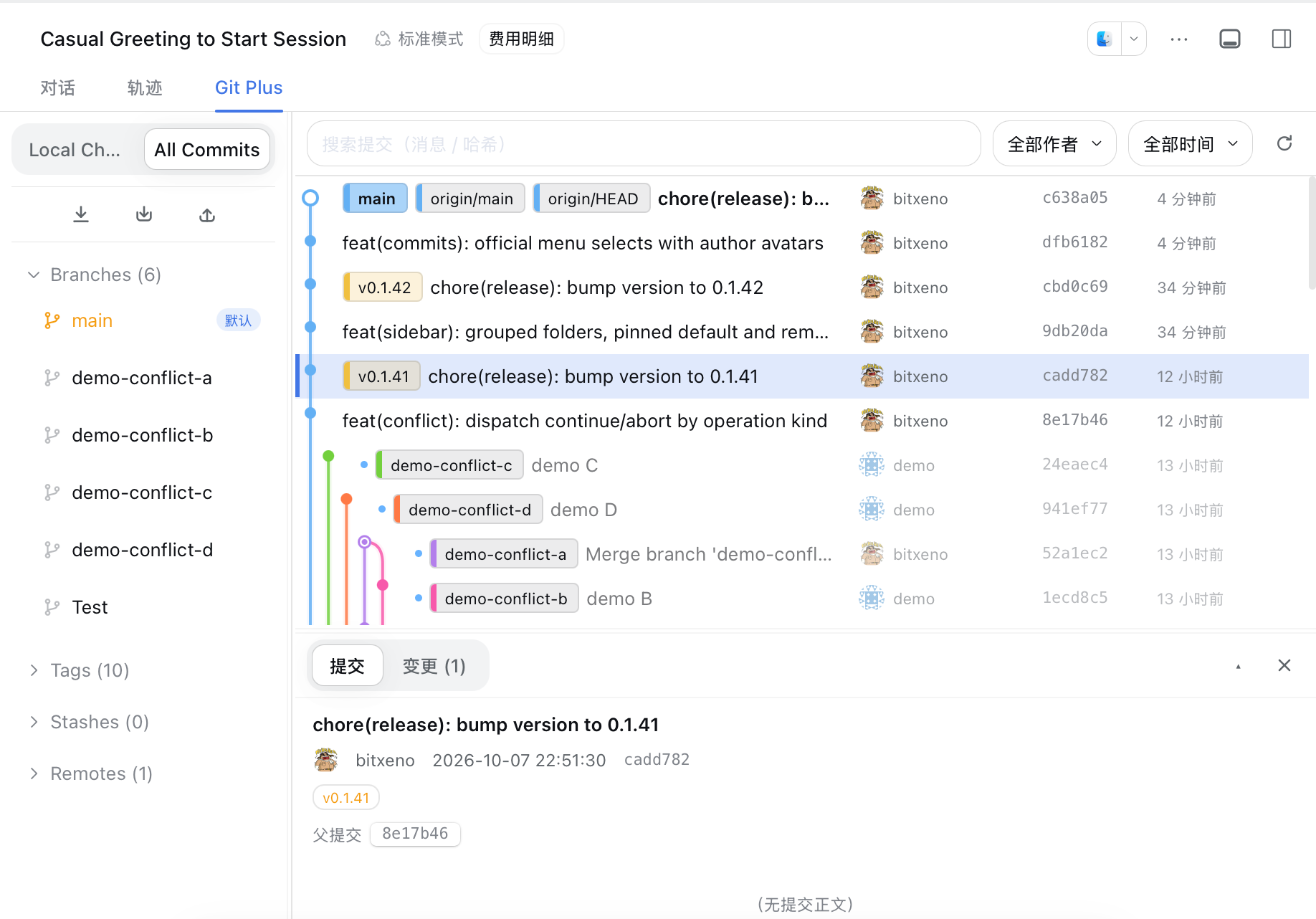
All Commits — commit history with a graph rail, search by message or hash prefix, author and time filters, and a commit detail pane: commit body, change stats, per-file diffs (unified or split, image compare, deferred rendering for large diffs), file tree and raw content. Branch / tag / checkout can be launched from any commit row.
Conflicts — a merge or pull that conflicts returns a banner listing the conflicted files with their resolved state; continue (git add -A + commit) or abort from there.
The input bar shows a zsh-style <repo> (branch) marker (toggle in Settings; off state moves a status dot beside the Git tab).
The plugin detail page has two live options: the input-bar branch marker toggle and the default diff view (unified / split). Saved changes apply immediately.
Host options go into the selected profile's cordis.patch.yml:
- id: git-plus
  config:
    timeoutMs: 8000
    networkTimeoutMs: 300000
    maxBytes: 4194304
    maxChanges: 1000
    refreshIntervalMs: 30000
    defaultDiffView: unified
timeoutMs bounds each local git command (default 8000 ms).networkTimeoutMs bounds network commands — fetch / pull / push (default 300000 ms).maxBytes caps per-command stdout (default 4 MiB).maxChanges caps the change list (default 1000).refreshIntervalMs is the snapshot poll interval (default 30000 ms).A Host config change needs a dsh web restart.
npm install
npm run check   # typecheck + unit tests
npm run build   # rebuild lib/ (host + client bundles)
npm run deploy:local  # rsync lib/ into the local dsh profile
lib/ is committed and is what ships; deploy:local deploys it to ~/.dsh/profiles/web/node_modules/dsh-git-plus/lib for local testing.
Releases: push a chore(release): bump version to X.Y.Z commit — the workflow tags vX.Y.Z, creates the GitHub release (notes via changelogithub), and publishes to npm when the NPM_TOKEN secret is configured.
npm publishing is gated on the NPM_TOKEN repository secret — without it the workflow ships GitHub releases only:
dsh-git-plus package with read and write access. Copy it immediately — it is shown only once.gh secret set NPM_TOKEN --repo bitxeno/dsh-git-plus
# paste the token when prompted, then verify:
gh secret list --repo bitxeno/dsh-git-pluslatest dist-tag for stable versions, next for prereleases containing -).Notes: the npm package name must be unclaimed (the first publish creates it; validate beforehand with npm publish --dry-run). To rotate, regenerate the token on npmjs.com and update the secret value.
CLASSIFICATION EVIDENCE
系统优先读取 GitHub Topics,再与站内分类词典和词根规则比对。当前命中: deepseek-harness。
morluto
Reverse engineer anything with agents, from app behavior down to native binaries.

deepseek-ai
DeepSeek Harness: Everything is a Plugin.

nexu-io
The 1st Collaborative AI Design Agent Workspace. Local-first and open source. Create motion, prototypes, websites, apps, dashboards, presentations, images, and videos with your team and AI agents. Share work, exchange feedback, and iterate together in one workspace.