

Agent 与会话
插件

nuwa-skill
alchaincyf
你想蒸馏的下一个员工,何必是同事。蒸馏任何人的思维方式——心智模型、决策启发式、表达DNA。Distill how anyone thinks.
PROJECT TOPICS
INSTALL REFERENCE
dsh plugin --profile web add github:benz-ai-x/dsh-24-PA
该命令指向仓库当前默认分支;尚无绑定当前 commit 的完整验证结果。
PROJECT README



From “remind me” to “prepare my week” — turn conversations into organized, reviewable action without giving up control.
@benz-ai-x/dsh-24pa is a self-hosted AI personal-assistant plugin for dsh. Local DSH sessions and a Feishu bot coordinate seven business workers in one owner-bound workspace; the desktop workspace adds sixteen capability cards for agent skills, scheduled tasks, calendars, todos, structured memory, handwriting review, and delivery evidence.
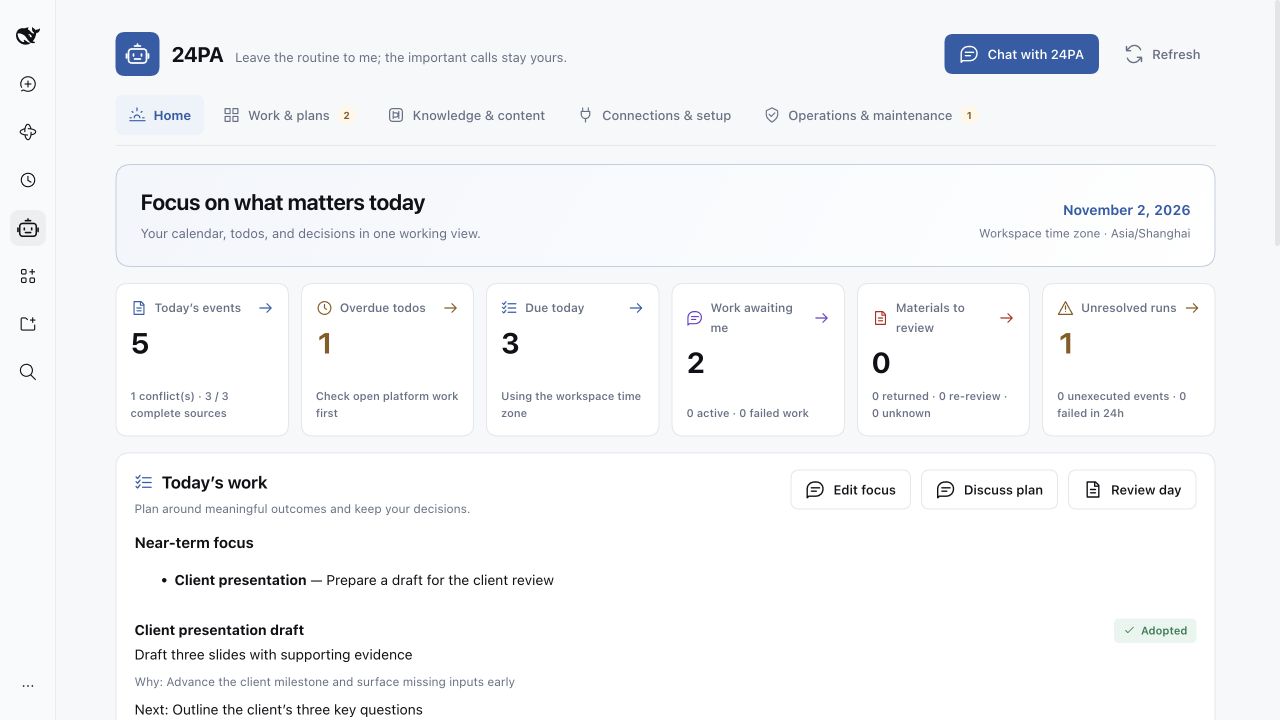
English desktop interface with sample data.
0.2.2-rc.3.1 upgrades the host baseline to dsh 0.2.2-rc.3: managed subagent activation is flattened, ownership is rechecked against the live tree and durable parent catalog before execution, and stop/recovery uses the new host lifecycle. The standard preset is regenerated; wait_agent replaces the host-disabled interrupt_agent. Existing work, session identity, ledgers, and WeChat behavior remain in place; Office tools are not added to 24PA allowlists. The WeChat acceptance status in #279 is unchanged.
This release requires Node.js >=24.9.0 and dsh 0.2.2-rc.3. Older hosts must use their matching plugin version in the table below.
The bundle combines one assistant preset with a host plugin. Conversational coordination and the desktop card surface share the same owner identity, role boundaries, Skill and schedule runtime, work records, storage, and delivery evidence.
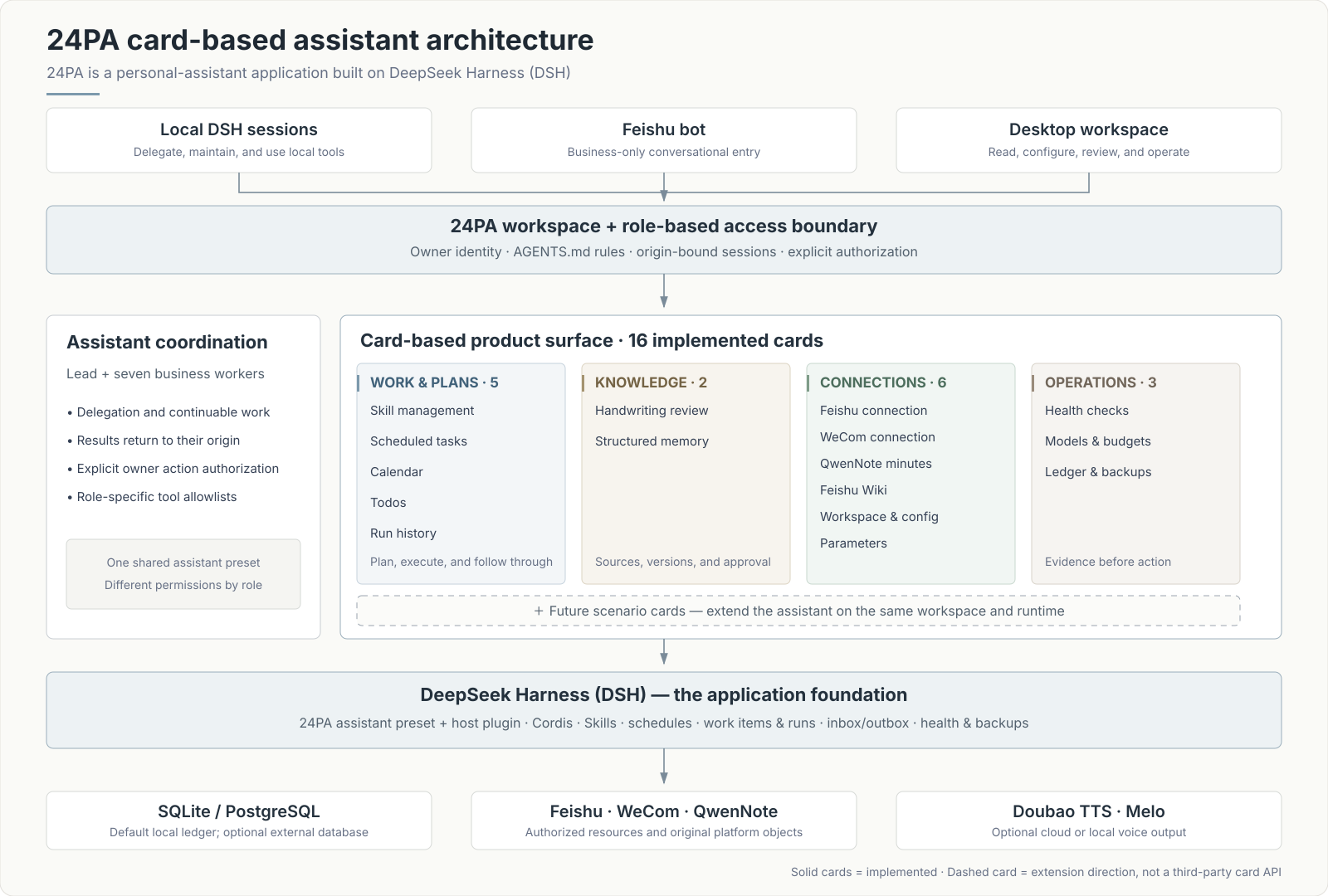
Cards are the product's extension unit. A new personal-assistant scenario can add a focused card while reusing the same workspace, permissions, plans, run history, and operational foundation. The sixteen solid cards below are implemented today; the dashed card is an extension direction, not a claim that this release already exposes a third-party card SDK.
Every card below is part of the current product. Ordinary browsing is read-only and does not silently start a model, create a platform object, or run a task.
| Card | What it helps you do | Included capabilities |
|---|---|---|
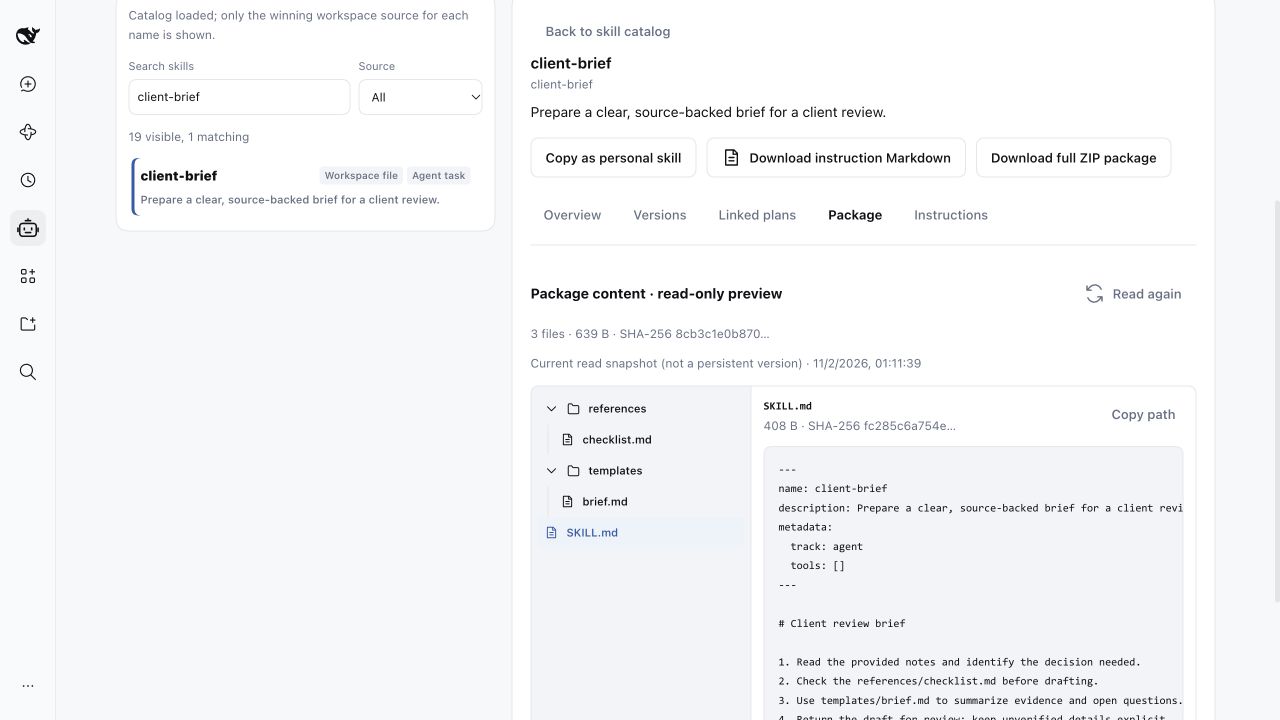
| Skill management | Turn reusable know-how into controlled assistant capabilities. | Create/import Markdown or ZIP; edit and copy; complete package tree and read-only file preview; immutable versions; linked plans; test, run, disable, roll back, delete, and download. |
| Scheduled tasks | Put one-off and recurring work on a persistent timeline. | Blank, preset, or copied plans; Skill parameters, fixed time zone, approved targets and delivery; occurrence preview; enable, pause, resume, run now, delete, restore, and history. |
| Calendar | Understand and manage schedules across registered calendars. | Today and next-event views; source filters, conflicts and query completeness; platform verification; conversation-based create/change; native reminders; original-event links. |
| Todos | Manage real platform work without confusing it with assistant execution. | Overdue, today and open views; multi-source aggregation; five role scopes; conversation-based create, complete, postpone, edit and cancel; original-object links and related work items. |
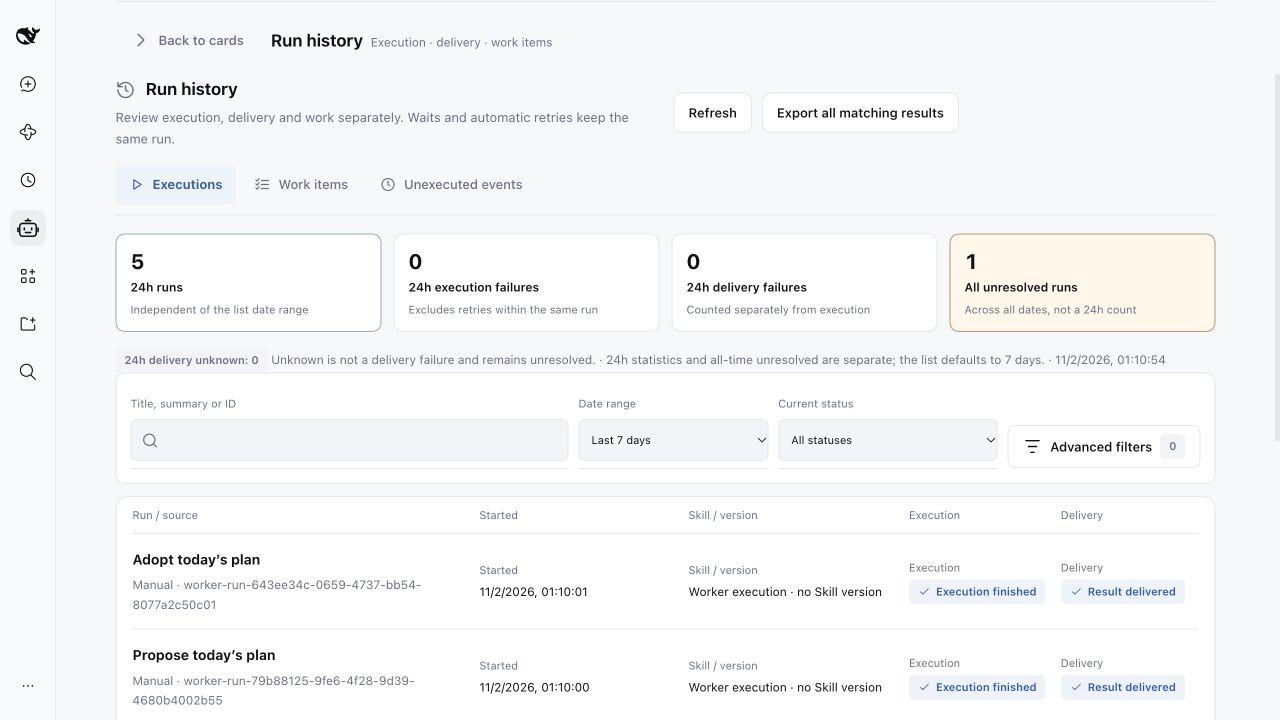
| Run history | See what ran, what resulted, and what was actually delivered. | Separate executions, work items and unexecuted events; filters and export; diagnostics and reconciliation; retry delivery or rerun; supplement, stop, continue and accept work items. |
| Card | What it helps you do | Included capabilities |
|---|---|---|
| Handwriting review | Turn handwritten material into reviewable content and explicitly authorized next actions. | Source comparison, draft editing, version publishing and diffs; Feishu review entry; verification and resend; candidate actions remain separate from content approval. |
| Structured memory | Keep long-term facts, preferences and decisions traceable. | Full text, sources, confirmation evidence, scope, validity, conflicts and revisions; query/filter; local create, edit, deactivate, delete, restore and undo; JSON remains the editable authority. |
| Card | What it helps you do | Included capabilities |
|---|---|---|
| Feishu connection | Know whether the owner, app and required capabilities are really connected. | Owner, CLI, app and profile identity evidence; send/receive, review callback and resource checks; read-only diagnostics, explicitly triggered tests, cleanup and configuration links. |
| WeCom connection | Operate selected WeCom resources without adding another inbound bot. | Separate calendar, todo and one-way push evidence; identity and authorization checks; renewal, independent tests and configuration links; no inbound chat. |
| QwenNote minutes | Use recordings and meeting notes as traceable source material. | Local-only, on-demand list/transcript/minutes reading; connection evidence; source-backed summaries and candidate actions that still require review and authorization. |
| Feishu Wiki | Choose where memos and handwriting-review documents belong. | Destination, node, permission and related-document checks; configure, verify and open; save through material workflows without moving old documents or silently changing destinations. |
| Workspace & config | Keep each owner's rules, data and sessions attached to the right workspace. | Directory and binding status, configuration source, effective version and differences; bind, switch, reload, inspect effective config and enter parameter editing; failed reloads keep the current environment. |
| Parameters | Change everyday behavior through one controlled configuration surface. | Business parameters, source mappings, model routes, voice and budget settings; edit, validate, save, reset and locate errors; write-only secrets and separate saved/effective feedback. |
| Card | What it helps you do | Included capabilities |
|---|---|---|
| Full-app health checks | Find what needs attention before it blocks work. | Module status, evidence time and scope, impact and next steps; full or per-module read-only checks; distinguish disabled, unchecked, unverified and failed states; diagnostics and repair links. |
| Models & budgets | Understand model consumption and stop new managed requests at explicit limits. | Actual model routes, token/request usage and pricing evidence; daily/monthly limits and warning thresholds; one-run permit after review; unknown cost is never reported as zero. |
| Ledger & backups | Protect the state needed for recovery and prove what was checked. | SQLite/PostgreSQL status; create backups, inspect manifests and verify real copies; isolated restore checks; secrets excluded; restore drills remain separate from authorized production cutover. |
See the Manticore delivery and acceptance record for module ownership and verification evidence.
| Skill package management | Auditable run history |
|---|---|
 |
 |
>=24.9.0 (the default SQLite ledger uses built-in node:sqlite).0.2.2-rc.3 for the current release line.npm install -g @deepseek-ai/dsh@0.2.2-rc.3
dsh plugin --profile <name> add @benz-ai-x/dsh-24pa@0.2.2-rc.3.1 --registry=https://registry.npmjs.orgRestart the same Profile, open the 24PA workspace, and choose the「24私助」preset. Installation and startup must use the same DSH_HOME; the official npm registry is recommended because some mirrors lag behind.
Setting up a new instance? Follow the step-by-step initialization guide for the isolated instance directory, workspace, launch script, expected pnpm build approval, token URL, and demo verification. After the demo works, tell the local assistant「帮我接通飞书」or use the bundled Feishu setup guide.
24PA versions follow <dsh baseline>.<serial>. Use the release line matching your host instead of installing the newest package everywhere.
| dsh host | 24PA package |
|---|---|
0.2.2-rc.3 |
0.2.2-rc.3.1 (current release) |
0.2.2-rc.1 |
0.2.2-rc.1.8 (line frozen here) |
0.2.1-rc.5 |
0.2.1-rc.5.8 (line frozen here) |
0.2.1-rc.4 |
0.2.1-rc.4.2 |
0.2.1-rc.3 |
0.2.1-rc.3.2 |
0.2.1-rc.2 |
0.2.1-rc.2.9 |
0.2.1-rc.1 |
0.2.1-rc.1.2 |
0.2.1-alpha.2 – 0.2.1-alpha.5 |
0.2.1-alpha.5.1 |
0.2.1-alpha.1 |
0.2.1-alpha.1.6 |
0.2.0-rc.2 |
0.2.0-rc.2.3, plus the two schedule companions described in the initialization guide |
data/pa24.db in the workspace; explicitly configured PostgreSQL is also supported. Durable inbox/outbox records preserve origin and delivery targets..24pa/secrets.json, mode 0600); environment values take precedence. AGENTS.md stores rules and non-secret configuration.Read the package reference for configuration fields, storage ownership, failure recovery, permission details, and the source map.
No. SQLite is the default and needs no separate database service. PostgreSQL remains an explicit option for existing or preferred deployments.
Yes. Use built-in or workspace Skills and scheduled tasks. Markdown files under .dsh/skills/ are hot-reloaded; managed packages add versioning, review, execution, and rollback controls.
They are written to the native calendar with an alert, so the model is not the reminder engine. Platform acceptance, device delivery, and read status are different facts; 24PA does not claim one proves another.
Package: @benz-ai-x/dsh-24pa · Current release: v0.2.2-rc.3.1
Confirm 1–3 near-term outcomes in chat, then ask 24PA to plan your day. Proposals explain priorities, next actions, and tradeoffs. An adopted plan remains available for the evening review; Home shows the same records and provides reviewable chat drafts. Clear small requests proceed directly; consequential tradeoffs prompt a discussion.
The daily-planning and daily-review agent Skills use the model. Run them on demand or explicitly enable a schedule. In workspace settings, enable the Skill worker and calendar or digest role, and add the selected names to the business Skill allowlist. Existing digest templates are retained. Adopting a daily plan does not create calendar events; time blocks require separate explicit adoption.
The intelligent morning brief starts with how to organize today, connecting prior progress, calendar commitments, deadlines and up to three proposed outcomes. Scheduled tasks → Morning preset selects daily-planning and states that it uses the model. Leave the work date blank to use the scheduled occurrence date. Yesterday's review is paired with its original adopted plan revision; missing records or older reviews keep their actual dates.
Chat and the panel manage the same plan: view it, change timing, pause/resume, or change per-plan voice. Chat previews creation, resumption and settings changes; reply with the displayed “Confirm plan …” text to apply them. Select the intended plan when several match, or explicitly request another plan. In the panel, use Adjust timing and voice, preview, and confirm. Legacy plans support these operations without migration, retaining their time zone, weekdays, skill, voice and history. Execution and delivery have separate statuses.
Existing template plans remain unchanged. Pause a managed plan, choose Use intelligent morning brief, preview and save, then Verify new skill and enable. Confirm the updated capabilities and delivery target while retaining the same plan, timing, time zone, channel and history. Legacy digest plans first use their original skill for migration, then follow the same switch. Saving a proposal does not adopt it or change external calendar events or tasks.
CLASSIFICATION EVIDENCE
系统优先读取 GitHub Topics,再与站内分类词典和词根规则比对。当前命中: ai-agent、personal-assistant。
alchaincyf
你想蒸馏的下一个员工,何必是同事。蒸馏任何人的思维方式——心智模型、决策启发式、表达DNA。Distill how anyone thinks.

freestylefly
Prompt as Code | GPT Image 2 / 2.5 提示词与案例库,530+ 个案例、20+ 套工业级模板与可复用 Skills,新增 2.5 同提示词对比专区,附完整提示词与生成记录,持续更新。

titanwings
Distilly — Distill how they think into reusable Skills for any Agent or Bot. Formerly Colleague Skill(原同事 Skill).