
模型与 MCP
待识别

rea
morluto
Reverse engineer anything with agents, from app behavior down to native binaries.
PROJECT TOPICS
INSTALL REFERENCE
dsh plugin --profile web add github:bayhnf/dsh-remote-client
该命令指向仓库当前默认分支;尚无绑定当前 commit 的完整验证结果。
PROJECT README
English | 中文
Run DeepSeek Harness on a server and use it from a Mac desktop app over SSH. It works the way Codex Desktop, Orca or VS Code Remote do: profiles, sessions, credentials, agents and files stay on the server, and the Mac only connects.
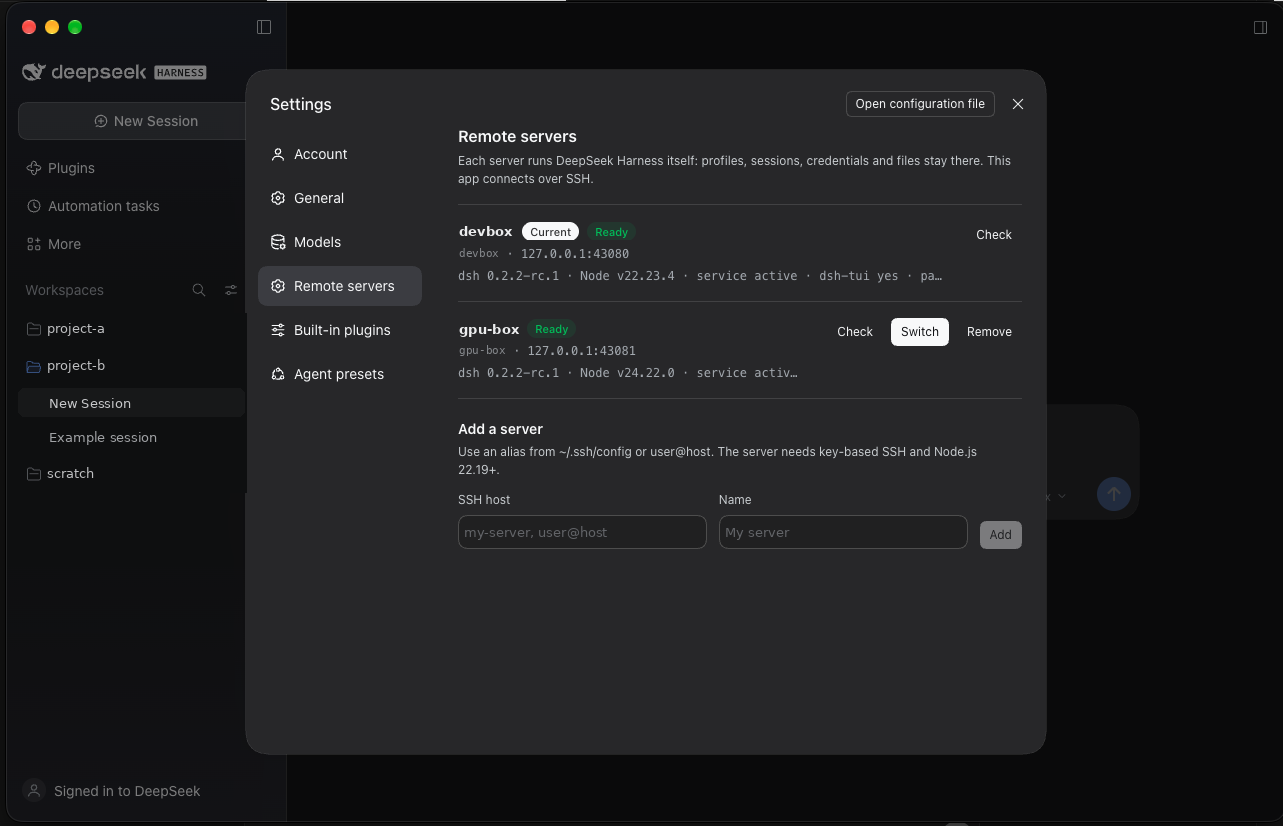
dsh, the dsh-tui terminal UI, pnpm, a server profile and a systemd user service.127.0.0.1, and the app reaches it through ssh -L. Nothing is exposed to the network, and no relay is involved.This addresses the requests in #12670, #9529 and #12110. It is a community project, not affiliated with DeepSeek.
Mac: DeepSeek Harness Remote.app ──127.0.0.1:43080 ─ ssh -L <private socket> ─▶ server: dsh --profile server (127.0.0.1:3080)
──127.0.0.1:43081 ─ ssh -L <private socket> ─▶ second server …remote.json, picks the active server, and over SSH starts its dsh-server.service if needed. It then reads the newest dsh web: http://…/?token=… line from the server log. A log another user could read or replace is refused.127.0.0.1:<localPort> itself for as long as it runs, and passes connections on to ssh -N -L <socket>:<listener>, whose socket sits in a private (0700) directory. No other program can take the port while the app runs.http://127.0.0.1:<localPort>/?token=…. The server exchanges the token for a session cookie and serves its own Web UI.The Remote servers page can list the configured servers and run the read-only check on them over your SSH keys. Adding, switching, removing and setting up a server each need a confirmation in a native dialog, which the page cannot answer.
The repository has two parts:
| Part | What it is |
|---|---|
app/ |
The Electron client: tunnel, window, preload bridges, server switching. build-mac.sh turns it into DeepSeek Harness Remote.app. |
plugin/ |
dsh-remote-servers, a DSH bundle that adds the Remote servers settings page. It installs on each server with dsh plugin --profile server add, and Set up server installs it for you. |
npx during the build), and the official DeepSeek Harness.app installed once as the build source. You can uninstall it afterwards; see Build.git clone https://github.com/bayhnf/dsh-remote-client && cd dsh-remote-client
(cd plugin && npm i --no-save esbuild && node build.mjs) # builds the settings page bundle
./build-mac.sh # -> ~/Applications/DeepSeek Harness Remote.appbuild-mac.sh copies the official app and changes only the copy:
runtime/, app.asar.unpacked/, auto-update).app/ as app.asar and uses its own bundle id (override it with DSH_REMOTE_BUNDLE_ID), so it runs beside the official app with separate storage.To uninstall the official app but keep building, save a copy first:
mkdir -p ~/dsh-remote-work
ditto -c -k --keepParent "/Applications/DeepSeek Harness.app" ~/dsh-remote-work/DeepSeek-Harness-<version>.app.zip
build-mac.sh uses the newest such zip when /Applications/DeepSeek Harness.app is absent, and keeps the previous app until the new build is complete. Rebuild after a new official release to pick up its Electron runtime; the Web UI itself comes from each server, so update DSH on the server to update the UI.
Add your server to ~/.ssh/config. The app starts with one placeholder entry named dsh-server:
Host dsh-server
  HostName your.server.example
  User you
Open DeepSeek Harness Remote. If the server is not set up yet, the window shows a connection error: choose Connection → Set up this server… in the menu bar. It works before any server UI is available.
Once connected, add more servers in Account menu → Settings → Remote servers. Use From ~/.ssh/config to pick an alias, or type user@host. To add a server before any server is set up, edit the settings file (Connection → Open settings file).
Adding, removing, switching and setting up servers each ask for confirmation in a native macOS dialog, so a page served by one server cannot act on your other servers.
| Action | Effect |
|---|---|
| Check | Reports Node, dsh, dsh-tui, the service state, and whether the running server has the Web UI and this page enabled (read from dsh --profile server --dump-config) |
| Set up server | Installs only what is missing (pinned: @deepseek-ai/dsh@0.2.2-rc.1, @deepseek-harness-tui/dsh-tui@0.19.0, pnpm@10.33.0); never upgrades an installed dsh or replaces an existing service, and restarts the service only when its profile changed since it started. The service log holds the launch token: its path must have no symlinks or ACLs, and every directory on it must be one only you (or root) can change; the default, ~/.dsh/logs, is made 0700, and the log is kept 0600 |
| Switch | Closes the current tunnel and opens the chosen server in a new window, in that server's own session |
| Remove | Removes the entry and clears every browser session it used, on this Mac only; nothing on the server is deleted |
Settings live in ~/Library/Application Support/DeepSeek Harness Remote/remote.json (and sessions.json remembers which session each server last used). Every value is validated before it reaches the ssh command line or the remote shell, and the page can only refer to servers by id.
The server is a normal DSH install, so other clients use the same data. dsh-tui (installed by Set up server) works over SSH, and editors such as Orca detect it as DeepSeek Harness.
npm install && npm test        # scripts on fake servers, transport with real sshd, the main-process lifecycle, the settings page in React, and an end-to-end run in the real Web UI (needs dsh and a headless Chromium; skipped otherwise)
node vendor/build-desktop-keyboard.mjs <deepseek-harness checkout> # refresh the bundled keyboard bridgeMIT. Parts are ported from or bundle DeepSeek Harness (MIT); see THIRD_PARTY_NOTICES.md.
CLASSIFICATION EVIDENCE
系统优先读取 GitHub Topics,再与站内分类词典和词根规则比对。当前命中: deepseek-harness。
morluto
Reverse engineer anything with agents, from app behavior down to native binaries.

deepseek-ai
DeepSeek Harness: Everything is a Plugin.

nexu-io
The 1st Collaborative AI Design Agent Workspace. Local-first and open source. Create motion, prototypes, websites, apps, dashboards, presentations, images, and videos with your team and AI agents. Share work, exchange feedback, and iterate together in one workspace.