dsh-tui-vscode
VS Code companion extension for dsh-TUI — an experience almost identical to the official Claude Code VS Code extension
Real integrated terminal · Beside placement · multiple concurrent sessions · sidebar session history · specific-session resume






简体中文
dsh-tui-vscode
dsh-tui-vscode runs dsh-tui inside a REAL VS Code integrated terminal (a new editor column beside the active one; default shell — PowerShell on Windows) — the same shape as the terminal mode of the official Claude Code VS Code extension (createTerminal + run the CLI inside it), with no webview and no xterm emulation.
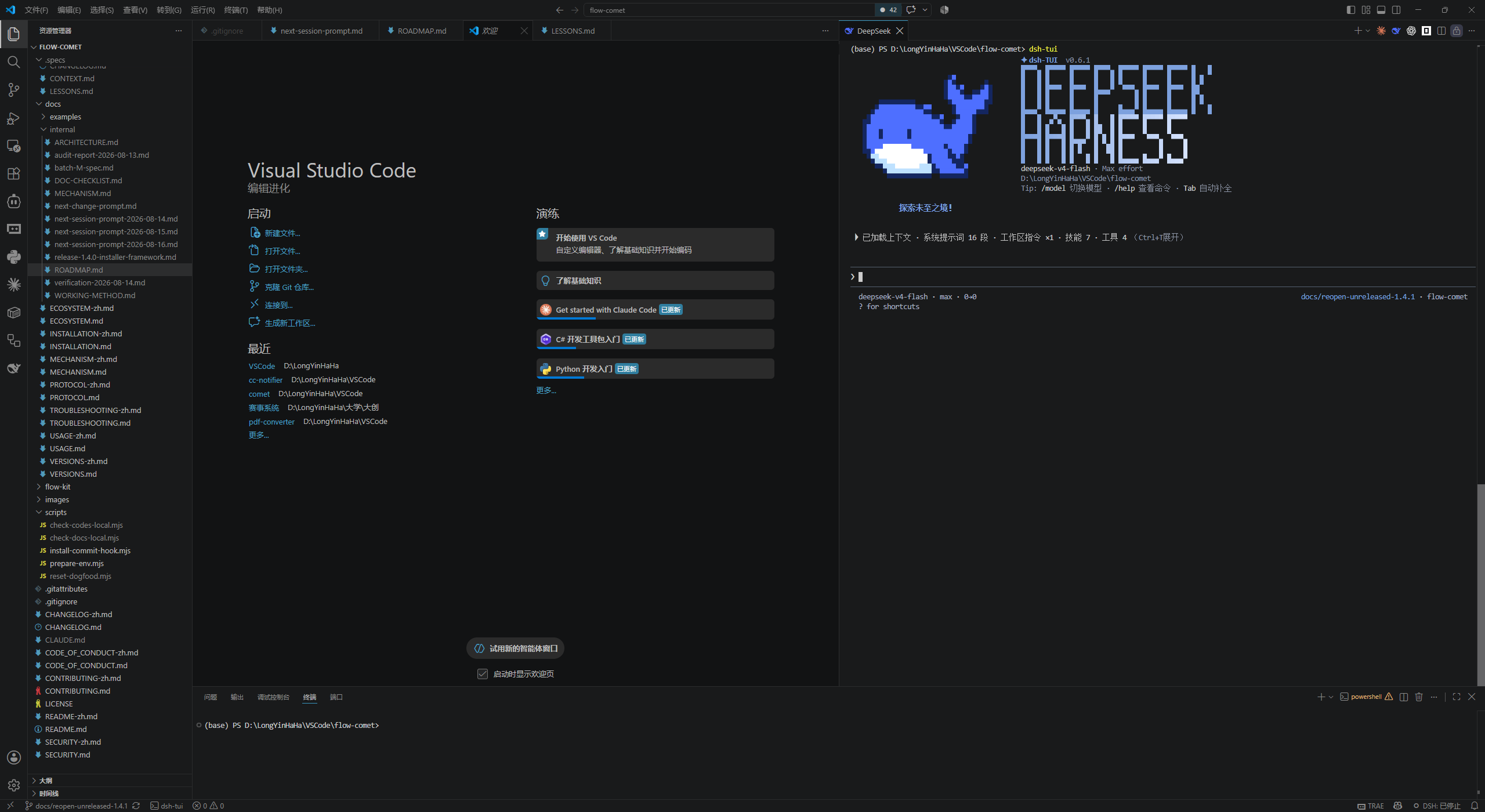
Screenshot
Click the whale button and a DeepSeek terminal opens on the Beside column, running dsh-tui automatically — a real terminal, a real shell, the full TUI:
Features
- Real terminal, not an emulation: sessions run in the VS Code integrated terminal (your default shell) with everything native — shell integration, real Ctrl+C, copy/paste, fonts and theme.
- Beside placement (default):
ViewColumn.Beside — a NEW column beside the active one, never taking over the column you are looking at (same as Claude Code); dsh-tui-vscode.terminalLocation can switch to the current column (active) or the bottom panel (panel).
- Multiple concurrent sessions: every "Start new session" click opens a new terminal + session; older sessions keep running (same as Claude Code).
- Sidebar session history: shows only sessions of the current VS Code workspace (including sessions launched from its subdirectories; union over multi-root workspaces; empty list when no workspace is open), hiding boot-only sessions with no conversation, delegated sub-agent runs and archived sessions (same source as the dsh web list: the archive set in
storages/workspace.json) — matching the dsh browser's default view; title + compact relative time (shared with the web session list); clicking an entry resumes THAT session; hover an entry to archive (dsh-native archiving: log retained, restorable anytime) or rename, right-click to permanently delete (destructive, kept behind the context menu); the "Manage archived sessions" command restores or permanently deletes; auto-refreshes on directory changes.
- One-click start / resume:
Start new session, Resume last session, and specific-session resume from the sidebar — the latter goes through the DSH_TUI_RESUME_SESSION environment channel (read at boot by the profile's cordis.patch.yml), which does not interfere with --resume.
- Auto start/stop + env injection: open = start, closing the terminal ends the process;
$VISUAL / DSH_TUI_LANG / $DSH_HOME are injected into the terminal environment.
Quick Start
Prerequisites: install the DSH CLI and dsh-tui globally (the first run bootstraps the profile; pnpm required). Running models needs DEEPSEEK_API_KEY:
npm install -g @deepseek-ai/dsh @deepseek-harness-tui/dsh-tui
Install from the VS Code extension marketplace (recommended): press Ctrl+Shift+X, search for dsh-tui and install with one click; or build from source:
git clone https://github.com/baobaolaodie/dsh-tui-vscode.git
cd dsh-tui-vscode
npm install
npm run install:local
Usage
- Start / open more: click the editor-title whale button, or run
dsh-tui: Start new session / 启动新会话 — every click opens a NEW DeepSeek terminal on the Beside column and runs dsh-tui automatically; click again for another concurrent session. The activity-bar whale icon opens the sidebar session history (its welcome view offers start/resume buttons).
- Resume the last session:
dsh-tui: Resume last session / 恢复上次会话 (--resume, reads ~/.dsh-tui/resume.txt).
- Resume a specific session: in the sidebar session history, expand a project and click a session — a new terminal boots it with
DSH_TUI_RESUME_SESSION=<id> in its environment.
- Stop: close the terminal tab (ends only that session), or double
Ctrl+C inside the TUI; dsh-tui: Terminate session / 终止会话 sends Ctrl+C to the most recent terminal.
- Reference selected code: with editor focus, press
Ctrl+Alt+K (macOS Cmd+Alt+K), or use the Command Palette / editor context menu "Insert @-mention" — it inserts the current file or selection as @relative/path#Lstart-end into the running dsh-tui input box (relativized against the workspace root; single line #L12, multi-line #L12-14, bare relative path when nothing is selected; dsh-TUI natively slices the attachment to the line range at submit time instead of loading the whole file). With no running session it falls back to copying to the clipboard.
⚠️ Version gate: the #L line-range syntax requires dsh-TUI ≥ 0.9.1 (upstream PR #537, released in v0.9.1 on 2026-08-25); against an older dsh-TUI, @ mentions report the file as missing — upgrade dsh-TUI first.
- Keybinding conflicts: the default
Ctrl+Alt+K (macOS Cmd+Alt+K) may collide with extensions like opencode (the official terminal mode uses the same default). If it does not work or conflicts, open "Keyboard Shortcuts" (Ctrl+K Ctrl+S), search dsh_tui, and rebind it to your preferred keys; the context-menu / command-palette entries are unaffected.
- Automatic selection context (on by default): editor selections are pushed in real time to the running dsh-tui over the IDE selection channel (300 ms debounce, coordinates plus the editor's selection text, never touching the input box); asking a question automatically attaches the selected content and shows a "⧉ Selected N lines from …" indicator line; when the channel is unavailable it falls back to typing
@relative/path#L…. Requires dsh-TUI ≥ 0.11.0 — the IDE selection channel (upstream PR #562, released in v0.11.0 on 2026-09-24).
Architecture
flowchart LR
  classDef ext fill:#4D6BFE22,stroke:#4D6BFE
  classDef data fill:#2ea04322,stroke:#2ea043

  subgraph host["VS Code extension host"]
    CMD["Entry: activity-bar whale · editor-title button · command palette"]:::ext
    TERM["createTerminal{ name: DeepSeek, location: Beside, env, iconPath, isTransient }"]:::ext
    SESS["Session history TreeView"]:::ext
    WATCH["fs.watch on session dirs"]:::ext
  end

  CMD -->|launch command| TERM
  TERM -->|run dsh-tui when shell is ready| SHELL["Default shell (Windows: PowerShell)"]
  SHELL -->|node dsh-tui| TUI["dsh-tui process"]
  TUI -->|read/write| STORE["~/.dsh/sessions (zstd JSONL)"]:::data
  TUI -->|last-used| MRU["~/.dsh-tui/last-used.json"]:::data
  WEB["dsh web session list"] --- STORE
  SESS -->|zstd decode + title fallbacks| STORE
  SESS -->|storage-ledger titles| CACHE["~/.dsh/storages/session_projcache.json"]:::data
  SESS -->|last-used sort| MRU
  WATCH -->|auto refresh| SESS
Key points:
- Session = real terminal: the extension only calls
createTerminal and sends the launch command — process, signals, scrollback, copy/paste are all handled by the VS Code terminal (the same architecture as the official extension).
- Specific-session resume: the profile's
cordis.patch.yml reads DSH_TUI_RESUME_SESSION at boot; --resume is deliberately NOT passed (the launcher would overwrite the env from ~/.dsh-tui/resume.txt — verified in bin/dsh-tui.js).
- Session-history data sources: session logs (concatenated multi-frame zstd, bounded window reads: 64 KB head + 128 KB tail, decoded frame by frame, tolerantly) → title from log
session/title event → dsh-storage ledger (the web list's own source) → first human prompt (incl. agent/inbox/spliced) → working-directory basename; the view is filtered to the current workspace with empty sessions, sub-agent runs and archived sessions hidden; within a group, sorted by last-used.
- IDE selection channel: on activation the extension starts a loopback WebSocket server on a random
127.0.0.1 port and writes a lock file (~/.dsh-tui/ide/<port>.lock: {port, token, workspaceFolders, pid}); terminals it spawns connect directly via the DSH_TUI_IDE_PORT / DSH_TUI_IDE_TOKEN environment variables (env-direct first), while manually launched dsh-tui instances discover it by scanning the lock directory matched against the workspace (lock-scan fallback). Selection changes are debounced 300 ms and pushed as selection_changed notifications carrying coordinates and the editor's selection text (0-based {path, startLine, endLine, isEmpty, text, documentVersion}; text includes unsaved edits), which dsh-TUI attaches verbatim. The handshake is protocol v2 (ide/hello → ide/hello_ack; a token or version mismatch is refused), loopback only, silent degradation on startup failure, lock cleared on deactivation. Requires dsh-TUI ≥ 0.11.0 — the IDE selection channel (upstream PR #562, released in v0.11.0 on 2026-09-24).
Configuration
| Key |
Default |
Description |
dsh-tui-vscode.command |
dsh-tui |
Launch command (resolved to an absolute path against the HOST PATH before being sent) |
dsh-tui-vscode.extraArgs |
[] |
Extra CLI args, e.g. ["--lang","en"] |
dsh-tui-vscode.terminalLocation |
editor |
Terminal placement: editor (new editor-area column) / active (current column) / panel (bottom panel) |
dsh-tui-vscode.lang |
"" |
""/zh/en, exported as DSH_TUI_LANG |
dsh-tui-vscode.imageProtocol |
sixel |
What to export as DSH_TUI_IMAGE_PROTOCOL: sixel (real raster images — needs terminal.integrated.enableImages to be true with the window reloaded and terminal.integrated.gpuAcceleration left at auto/on; degrades to half-block character art otherwise), none (always half-block character art), auto (removes the variable from the session environment and lets dsh-TUI decide). Requires dsh-TUI ≥ 0.10.0. See Terminal images. |
dsh-tui-vscode.injectEditor |
true |
Export $VISUAL when unset |
dsh-tui-vscode.editorCommand |
code -w |
Value exported as $VISUAL |
dsh-tui-vscode.dshHome |
"" |
$DSH_HOME override (empty = inherit) |
dsh-tui-vscode.autoInsertMention |
true |
On selection change, push the selected code to the running dsh-TUI over the IDE selection channel (300 ms debounce; coordinates plus the editor's selection text, no input-box takeover; dsh-TUI attaches the content verbatim at submit and shows an indicator line). Requires dsh-TUI ≥ 0.11.0 (IDE selection channel, upstream PR #562); falls back to typing @relative/path#Lstart-end when the channel is unavailable. |
Terminal images
The mascot artwork, chat photo thumbnails and image previews render as real raster images only when every condition below is met:
- VS Code side:
terminal.integrated.enableImages must be true (VS Code defaults to false), and you must reload the window after changing it — VS Code loads the @xterm/addon-image renderer only while it builds the WebGL renderer, so the setting does nothing until the window is reloaded. When a session starts with that setting off, the extension shows a one-time prompt with an "enable and reload" action and never writes your VS Code settings without asking. A failed settings write is the one deliberate exception to that "once": nothing was written, so the next session start offers the one-click path again. A write that is accepted but has no effect counts as that same failure — terminal.integrated.enableImages has window scope, so a workspace or folder override outranks the Global value the extension writes. The extension therefore inspects what each scope explicitly sets (Configuration.inspect()) before writing, and lets the highest-precedence scope that sets anything decide — VS Code resolves a folder value over a workspace value over the Global one, and a scope that sets nothing is skipped rather than read as an override (or as a success): an explicit false at that deciding scope defeats the Global write, so nothing is written and the manual instructions appear instead of a reload offer, while a true there means the setting is already effectively on — the write goes through and the reload offer still goes out. The verdict deliberately never re-reads the setting after writing — update() resolves before the new value reaches the extension host, so a read taken there can still see the old value and turn a successful click into a false failure. The prompt is not marked as answered on the manual path. That retry is guaranteed by the window's own state rather than by the persisted marker: clearing the marker is fire-and-forget, so a delayed or rejected clear cannot silence the promise the failure just made.
- Renderer side:
terminal.integrated.gpuAcceleration must leave the WebGL renderer possible. VS Code's own definition of enableImages says it "will only work when terminal.integrated.gpuAcceleration is enabled", and the image addon is attached to the WebGL renderer alone — so leave gpuAcceleration at auto (the default) or set it to on. With off (or the legacy canvas renderer value) the addon is never loaded, and the extension therefore exports none for every session in that window and stays silent: neither enabling enableImages nor reloading the window can bring the addon back.
- dsh-TUI side: the extension exports
DSH_TUI_IMAGE_PROTOCOL, which dsh-TUI has understood since 0.10.0 (checked release by release against lib/types/ink/ink.js for 0.10.0–0.13.0; absent in 0.9.0/0.9.1). An older dsh-TUI simply ignores the variable — harmless, but nothing changes either.
Because VS Code only builds that renderer while it loads a window, the extension judges this capability from two observations rather than the bare setting: the terminal.integrated.enableImages value it saw when the window started (snapshotted once at activation and deliberately not refreshed inside that window) and the live value — a session is given sixel only while both are true. A value written but not yet reloaded into this window — whether it came from the "Enable and Reload Window" action or from your own settings.json edit — therefore still exports none for every session started in that window, keeping the half-block character art visible instead of leaving a permanently blank image slot. That state is no longer silent: a one-time prompt ("Image rendering is enabled, but the setting takes effect only after a window reload", with a Reload Window button) says which step is still missing; only sessions started after the reload get sixel.
Residual risk, not claimed as solved: VS Code exposes no API that reports which renderer is actually in use. auto can still resolve to the canvas renderer on a machine without a usable GPU (the gate allows sixel there), and a gpuAcceleration change made mid-window is only re-read after the reload that restarts the extension host. In those cases the visible half-block character art — not this gate — is what keeps the image area from going blank.
dsh-tui-vscode.imageProtocol (default sixel) decides what gets exported:
| Value |
Exported |
Behavior |
sixel |
sixel |
Real raster images while terminal image rendering is on; with enableImages set to false, the default degrades to half-block character art, so the image area stays visible instead of going blank. |
none |
none |
Always half-block character art, even when rendering is on. The extension also skips the setup prompt for this choice: a user who asked for character art is never nagged to enable images, and the one-time prompt is not consumed by an offer they did not want. |
auto |
(removed) |
Remove DSH_TUI_IMAGE_PROTOCOL from the session environment and let dsh-TUI decide on its own — the opt-out path for when upstream protocol detection is fixed. Merely not writing the key would not be enough: VS Code overlays this env onto the environment the terminal would inherit, so a value exported by your own shell profile (or inherited from the VS Code process) would still reach dsh-tui and silently pin that protocol. |
Verified combination: Windows 11 (10.0.26200) + VS Code 1.140.0 + dsh-TUI 0.13.0. Other platforms, remote setups and other VS Code versions are unverified; the character-art fallback keeps the worst case visible rather than blank.
UI language
The extension UI follows the VS Code display language (vscode.env.language): command-palette titles, view names, setting descriptions and runtime messages are localized through the standard package.nls*.json + vscode.l10n pipeline, with English as the default and an automatic fallback.
For a Chinese UI, install the Chinese (Simplified) Language Pack and restart VS Code — the pack is registered on first launch and takes effect after the restart (standard VS Code behavior; verified in our e2e).
This is separate from dsh-tui-vscode.lang, which only sets the TUI's own language through DSH_TUI_LANG; it does not translate the extension UI.
Directory Structure
dsh-tui-vscode/
├── src/
│   ├── extension.ts        # Activation: command registration, createTerminal, views
│   ├── session.ts          # Env injection + launch-command resolution (host PATH)
│   ├── sessions.ts         # Session data layer (multi-frame zstd decode + bounded window reads + storage ledger + workspace filter + rename/delete + MRU sort)
│   ├── sessions-view.ts    # Sidebar session history (current workspace, empty/subagent hidden + fs.watch refresh)
│   ├── status.ts           # Status-bar item
│   ├── test/               # Data-layer unit tests (node:test)
│   └── test-suite/         # Real extension-host e2e (@vscode/test-electron)
├── media/icon.svg          # DeepSeek whale icon (activity bar / terminal tab)
├── media/icon.png          # Marketplace icon
├── scripts/
│   ├── install-commit-hook.mjs  # local hook installer
│   └── install-local.mjs        # installs the locally packaged vsix (version read from package.json)
├── .githooks/              # pre-commit / commit-msg (shipped in the repo)
├── .github/
│   ├── workflows/ci.yml    # full CI (test matrix/e2e/quality/pr-policy/release-consistency/security-scan/docs-links)
│   ├── PULL_REQUEST_TEMPLATE.md
│   └── ISSUE_TEMPLATE/     # four issue forms
├── CONTRIBUTING.md / CONTRIBUTING_ZH.md
├── SECURITY.md / SECURITY_ZH.md
├── CODE_OF_CONDUCT.md / CODE_OF_CONDUCT_ZH.md
├── CHANGELOG.md / CHANGELOG_ZH.md
├── README_ZH.md
├── package.json
└── LICENSE
Tech Stack
| Layer |
Technology |
| Language |
TypeScript 5.6 (ESM syntax in source, compiled to CommonJS; Node 24 dev runtime) |
| Platform |
VS Code Extension API (engines ^1.90.0) |
| Runtime dependency |
@bokuweb/zstd-wasm (session-log zstd decompression — the only dependency) |
| Testing |
node:test unit tests + @vscode/test-electron real extension-host e2e |
| Packaging |
@vscode/vsce |
| CI |
GitHub Actions (Linux/Windows matrix + xvfb) |
CI / Verification
.github/workflows/ci.yml runs on every push/PR: the test job (Linux/Windows × Node 22/24 matrix: npm ci → typecheck → npm test) and the e2e job (Linux + xvfb: npm ci → npm run test:e2e → npm run package).
Additional jobs: quality (bilingual mirror symmetry / BOM guard / actionlint), pr-policy (Conventional Commits title, branch prefix, PR template completeness, CHANGELOG self-check honesty), release-consistency (five-point version sync + per-version PR links), security-scan (credential scan) and docs-links (dead-link check).
The e2e suite covers: command registration, real terminal creation with env injection, input round-trip, multiple sessions, Ctrl+C termination, --resume resume, specific-session resume (env channel, no --resume), and a guarded REAL dsh-tui resume test (a successful resume creates no new session — observable).
Contributing
See CONTRIBUTING.md — branch prefixes, Conventional Commits, the PR template and verification requirements are enforced by CI.
License
MIT © 2026 baobaolaodie. dsh-tui itself is ccch1mneyyy/dsh-TUI (MIT).


